XP Type II 工程师培训手册 (2.0).pdf.pdf - 第109页
FK-9F98-34 XP T ype II Series T raining T ext for Service Engineers Edition 2.0 XP242E – Chapter 1 Initial Adjustment Page 5 of 8 1.5 Computer connection Note: at the time of publication the XP type II machine type is no…
FK-9F98-34 XP Type II Series Training Text for Service Engineers
Edition 2.0 XP242E – Chapter 1 Initial Adjustment Page 4 of 8
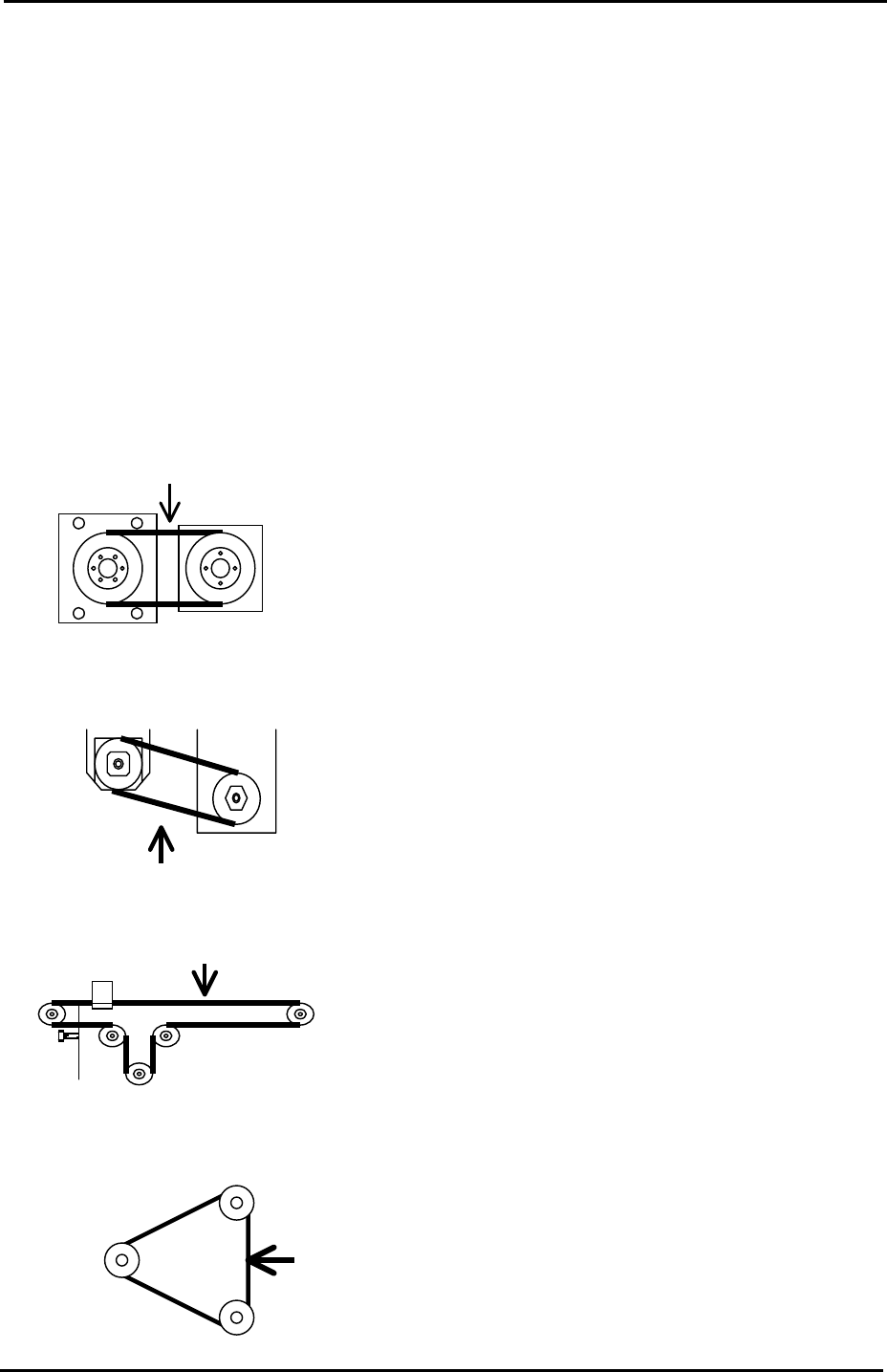
1.4 Belt Tension Measurement
1. Measuring equipment: Tension meter
2. Use the tension meter to check the belt tension of the Y, Z, T and U axes.
3. Press the Emergency Stop button and move each of the axes to the Minus (-) mechanical
stopper.
4. Refer to the following illustrations and check that the belt tension for each axis is within
the target range:
Y-axis measuring point
Tension meter setting
Belt unit amount: 4gf/m Target Frequency
Belt width:15mm 148~166 Hz
Span length:127mm
Z-axis measuring point
Tension meter setting
Belt unit amount: 2.5gf/m Target Frequency
Belt width: 9mm 389~431Hz
Span length: 54mm
U-axis measuring point
Tension meter setting
Belt unit amount: 2.5gf/m Target Frequency
Belt width:9mm 39~43Hz
Span length: 543mm
T-axis measuring point
Tension meter setting
Belt unit amount: 2.5gf/m Target Frequency
Belt width: 15mm 140~154Hz
Span length: 151mm
Motor
Ball screw
Mid pulley
Fuji Machine Mfg. Co., Ltd. Okazaki.
SMT Equipment Quality Assurance Dept.
1 – 4 CS Section
FK-9F98-34 XP Type II Series Training Text for Service Engineers
Edition 2.0 XP242E – Chapter 1 Initial Adjustment Page 5 of 8
1.5 Computer connection
Note: at the time of publication the XP type II machine type is not officially supported in the
MCS/X, F4G or FujiCam host systems. Communication between the XP type II and these
hosts is possible but “machine type” should be set to XP141 or XP241.
Machine Side
1. Connect the LAN cable to the PC.
2. Remove the bottom left cover at the front of the machine, and connect the LAN cable to
the LAN port.
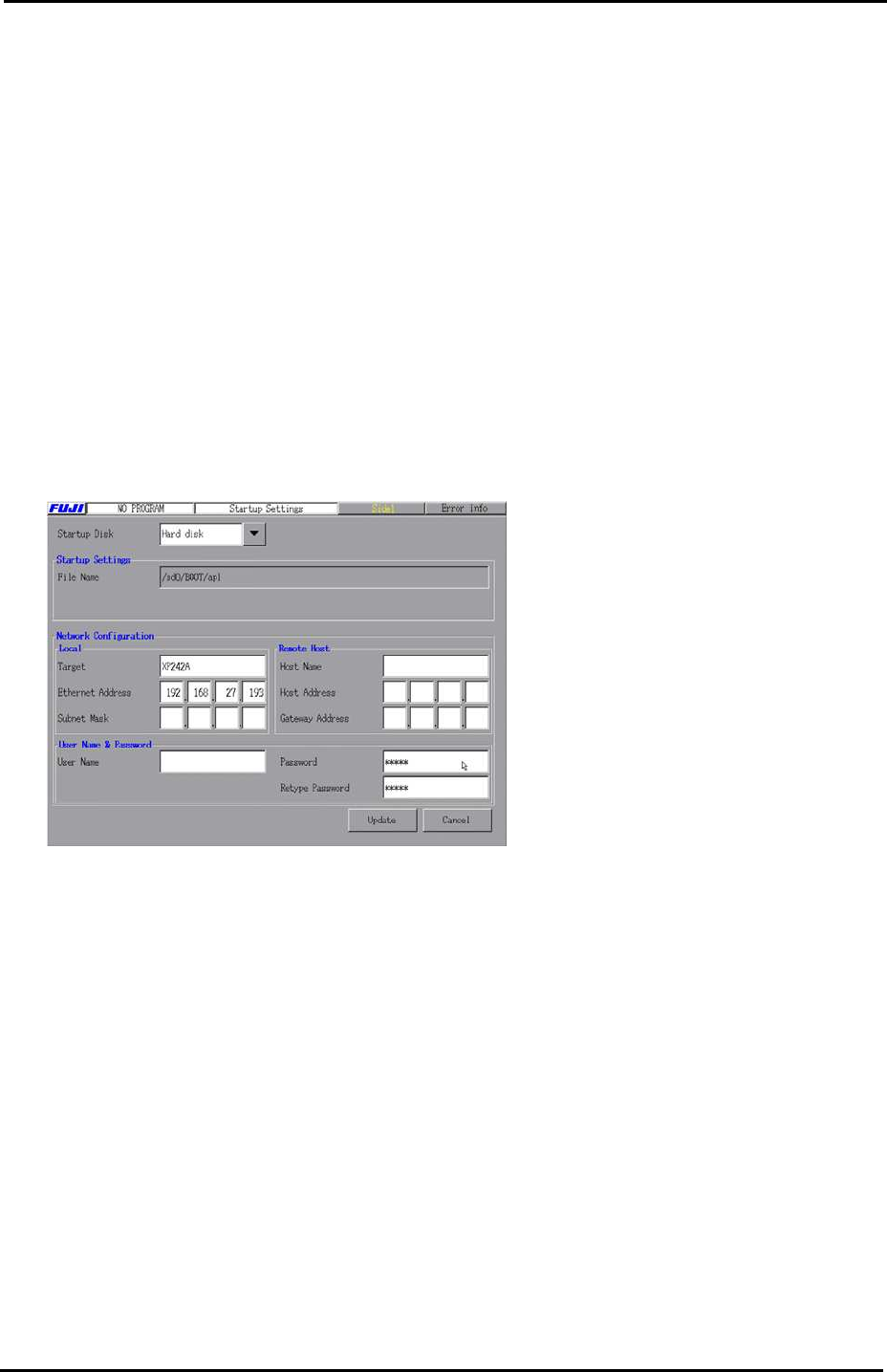
3. Select [Maintenance B] – [Start Up Settings]:
4. In the [Target] field input the machine nickname. In the [Ethernet Address] field input
the machine IP address.
5. After inputting the “Target” and “Ethernet Address” click on [Update] to save the new
settings and reboot the machine in order for them to take effect.
MCS/X
1. At the PC select [Start] – [Programs] – [MCSX] – [MCSX].
2. Click on the [File Manager] tab to bring up the "File Exchange" window.
3. To add a line, click on [Add Line], then enter a new line name, and click on [OK].
Fuji Machine Mfg. Co., Ltd. Okazaki.
SMT Equipment Quality Assurance Dept.
1 – 5 CS Section

FK-9F98-34 XP Type II Series Training Text for Service Engineers
Edition 2.0 XP242E – Chapter 1 Initial Adjustment Page 6 of 8
4. To add a machine, click on [Add M/C]:
Line Name: Choose an available line.
Machine nick n
ame: For example XP241A
Machine t
ype: Input the machine type.
I
P Address: Input the machine IP address.
When finished click on [OK].
F4G
1. At the PC select [Start] – [Programs] – [Windows NT Explorer] – [Winnt] – [System 32] –
[drivers] – [etc] – [hosts] and open the hosts file with notepad, a text file similar to the one
below will then open:
127.0.0.1 localhost
192.168.33.190 italy
192.168.39.2 pascal
192.168.39.10 uk
192.168.33.154 XP241A
2. Make a new entry, and in the first column input the machine's IP address, then a "host
name" in the next column. Close and save the file.
3. Select [Start] – [Programs] – [F4G] – [F4G] – [Line Config] and a text file will open. In the
MC Name column input the same hosts name as that registered in the hosts file, then in
the HOSTNAME column also input the same host name as that registered in the hosts
file, in this case XP241A. Under the MCTYPE column input the machine type, for
example XP241. Close and save the file.
4. At the PC select [Start] – [Programs] – [Windows NT Explorer] – [F4G] – [CC] – [Passwd]
and open the passwd file with notepad, a text file similar to the one below will then open:
# C/C OS User-ID PassWord
#cc1, OS9, super, user
italy, WINDOWSNT, Administrator,
XP241A, WINDOWSNT, anonymous,
5. Make a new entry, and in the first column of the new entry input the same host name as
that registered in the hosts file. In the OS column input WINDOWSNT, and in the User-ID
column input, anonymous. Close and save the file.
6. The settings are now complete, restart the computer in order for them to take effect.
Fuji Machine Mfg. Co., Ltd. Okazaki.
SMT Equipment Quality Assurance Dept.
1 – 6 CS Section