XP Type II 工程师培训手册 (2.0).pdf.pdf - 第37页
FK-9F98-34 XP T ype II Series T raining T ext for Service Engineers Edition 2.0 XP142E – Chapter 4 Loader Adjustment Page 6 of 12 4. Set the dial gage on the fixed rail to “0”, and measure the difference between the fixe…
FK-9F98-34 XP Type II Series Training Text for Service Engineers
Edition 2.0 XP142E – Chapter 4 Loader Adjustment Page 5 of 12
Fuji Machine Mfg. Co., Ltd. Okazaki.
SMT Equipment Quality Assurance Dept.
4 – 5 CS Section
4.3 Conveyor Rails
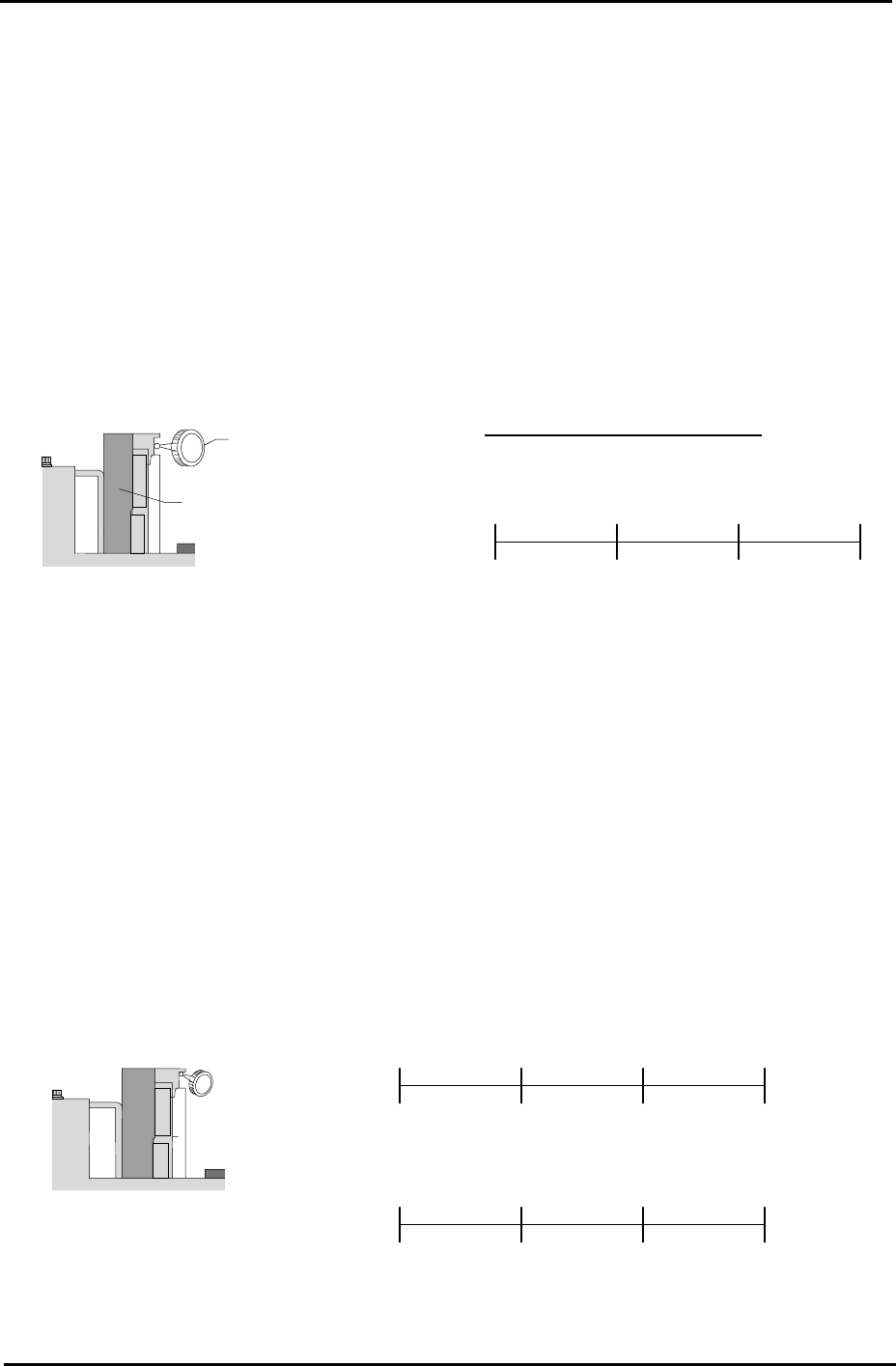
Rail Parallelism
1. Attach a dial guage to the placing head (an extension bar is necesarry).
2. Set the dial gauge on the fixed conveyor rail.
3. Set the dial gage to “0”. Measure the parallelism of the fixed rail.
4. Record your measurements on the adjustments check sheet:
Dial Gauge
Reference side of the
Conveyor
Tolerance: ±0.05 / 450 mm
(mm) 150 450 300 0
( ) ( ) ( ) (mm) 0
Viewed from the right side
of the machine
Rail Flatness
1. Adjust the conveyor width to 200mm.
2. Set the dial gauge on the underside of the board clamper at the fixed rail side. Measure the
flatness and record the measurements on the adjustment check sheet.
450 300 150 0
(mm)
Reference side of th
conveyor
e
( )
Viewed from the right
side of the machine
0
450 300 150
( ) ( ) ( )
0
( ) ( ) ( ) (mm)
(mm)
(mm)
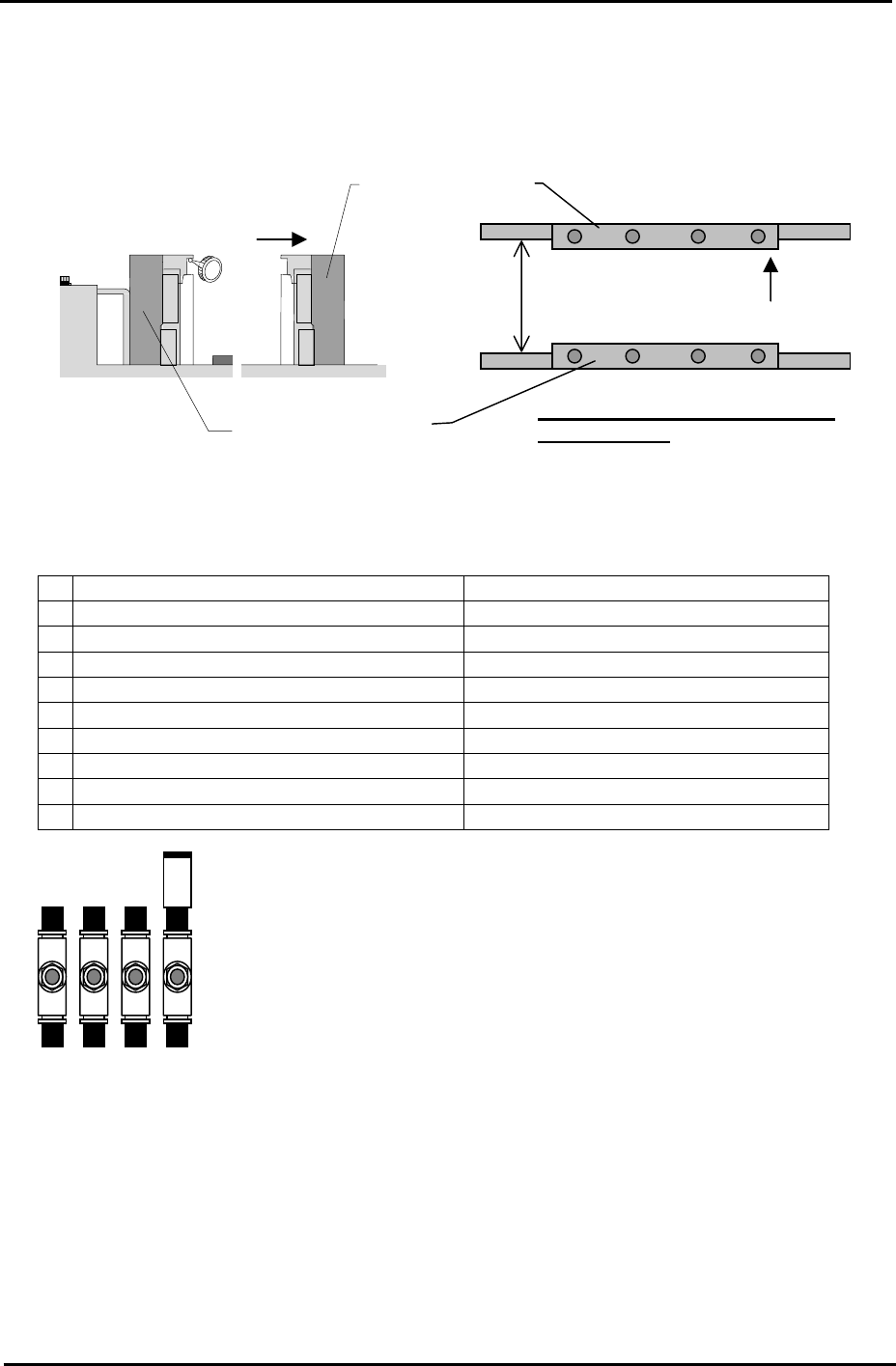
3. Measure the flatness of the underside of the board clamper at the adjustable rail side.
FK-9F98-34 XP Type II Series Training Text for Service Engineers
Edition 2.0 XP142E – Chapter 4 Loader Adjustment Page 6 of 12
4. Set the dial gage on the fixed rail to “0”, and measure the difference between the fixed rail
and the adjustable rail. Add the difference to the flatness value of the adjustable rail side
measured in step 3. If the values are out of tolerance please contact FUJI.
Reference Conveyor
Viewed from the right
side of the machine
Movable conveyor
200mm
Tolerance: whole deviation to be
within 0.20mm
4.4 Conveyor Speed Controllers
Speed Controller Number of times from fully closed
1 In-conveyor board lifter (UP) Approximately ¼ turn.
2 In-conveyor board lifter (DOWN) Approximately 1 turn.
3
Main conveyor board clamp (SLOW) ½ turn.
4
Main conveyor board unclamp (SLOW) 1.5 turns.
5
Main conveyor board unclamp (FAST) 4 turns.
6
Main conveyor board clamp (FAST) 4 turns.
7 Board stopper (UP) 4 turns.
8 Board stopper (DOWN) 4 turns.
9 Board vacuum (Option) 1 turn.
Note: check the main conveyor board clamp/unclamp speed controller
s
after the main lifter upper limit/downward limit sensor adjustment is
complete.
3 4 5 6
Fuji Machine Mfg. Co., Ltd. Okazaki.
SMT Equipment Quality Assurance Dept.
4 – 6 CS Section
FK-9F98-34 XP Type II Series Training Text for Service Engineers
Edition 2.0 XP142E – Chapter 4 Loader Adjustment Page 7 of 12
4.5 Main Table Pneumatic Switch
Note: Before proceeding with these adjustments, confirm that the lifter plate flatness
check (4.1) is complete.
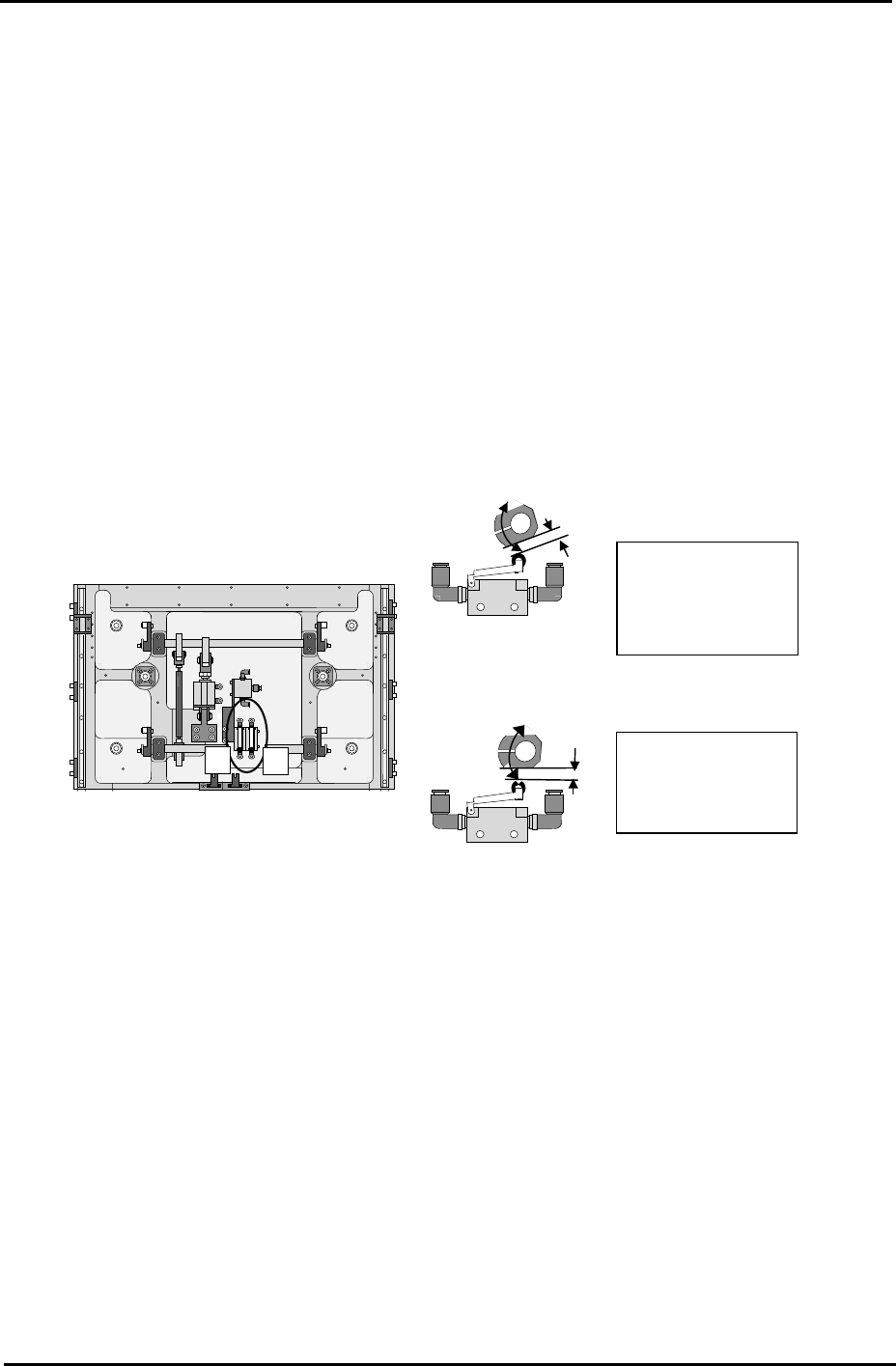
Fast Down Adjustment
1. With the lifter plate raised, adjust the position of the cam so that there is a gap of 1mm
between the cam and the pneumatic switch roller.
Fast Up Adjustment
2. With the lifter plate raised, adjust the position of the cam so that it is horizontal.
2
1
1. Fast Down cam.
1mm gap with lifte
r
raised
Machine front.
2
1
2. Fast UP cam.
Horizontal with lifte
r
raised
Machine rear under the main table.
4.6 Lifter Upper/Lower Limit Sensor
1. Raise the main lifter and adjust the flag so that the upper limit sensor turns ON when a
4mm thick board is clamped, and turns OFF when a 4.8mm thick board is clamped.
2. With the main lifter lowered, adjust the flag at the lower limit sensor side so that it is
positioned 1mm past the point where the sensor comes ON.
3. Ensure that the I/O [X024 MainStLftUpChk] is ON when the lifter is at its upper limit, and
[X025 MainStLftDwnChk] is ON when the lifter is at its lower limit.
Fuji Machine Mfg. Co., Ltd. Okazaki.
SMT Equipment Quality Assurance Dept.
4 – 7 CS Section