XP Type II 工程师培训手册 (2.0).pdf.pdf - 第172页
FK-9F98-34 XP T ype II Series T raining T ext for Service Engineers Edition 2.0 XP242E – Chapter 6 Proper Data Mea surement s Page 17 of 30 6.9 Part s Camera Resolution 1. Equipment: glass gage for resolution measurement…
FK-9F98-34 XP Type II Series Training Text for Service Engineers
Edition 2.0 XP242E – Chapter 6 Proper Data Measurements Page 16 of 30
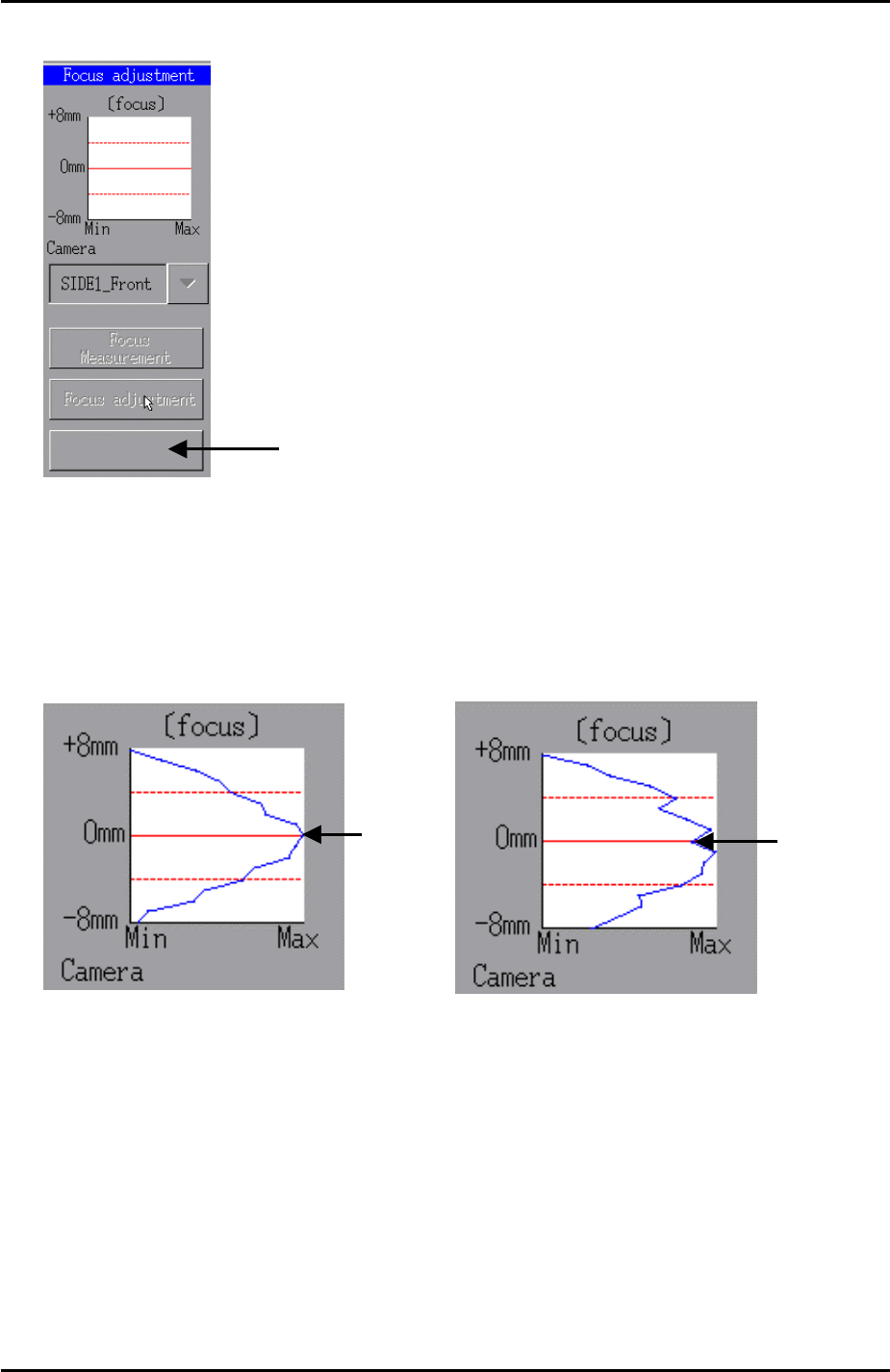
8. To stop the focus adjustment press the following tab:
Complete
Press here to stop the
focus adjustment
9. Now press [Focus Measurement] and hold down the [START] button until the
buzzer sounds.
10. A graph showing the results of the focus measurement appears. The peak of the
graph must be within the dotted red lines indicating +4mm and -4mm. Ideally the
peak of the graph will hit 0mm as shown in the examples below:
Peak at 0
Peak at 0
11. If necessary fine adjust the camera focus until the results of the focus measurement
are within range.
12. Finally apply Loctite 425 adhesive to the focus ring hollow bolt and lock the focus
ring.
13. After locking the focus ring carry out the focus measurement again to confirm that
the focus is still within range.
Fuji Machine Mfg. Co., Ltd. Okazaki.
SMT Equipment Quality Assurance Dept.
6 – 16 CS Section
FK-9F98-34 XP Type II Series Training Text for Service Engineers
Edition 2.0 XP242E – Chapter 6 Proper Data Measurements Page 17 of 30
6.9 Parts Camera Resolution
1. Equipment: glass gage for resolution measurement (Z3502DFAJ0020)
2. Select [Maintenance A] – [I/O Check] – [Y021 Nozzle Unhold] – [OFF] and attach a
20mm nozzle to the placing head.
3. Select [Maintenance A] – [I/O Check] – [Y020 Parts Pickup] – [ON] and attach the
glass gage to the placing head with the printed surface facing downwards.
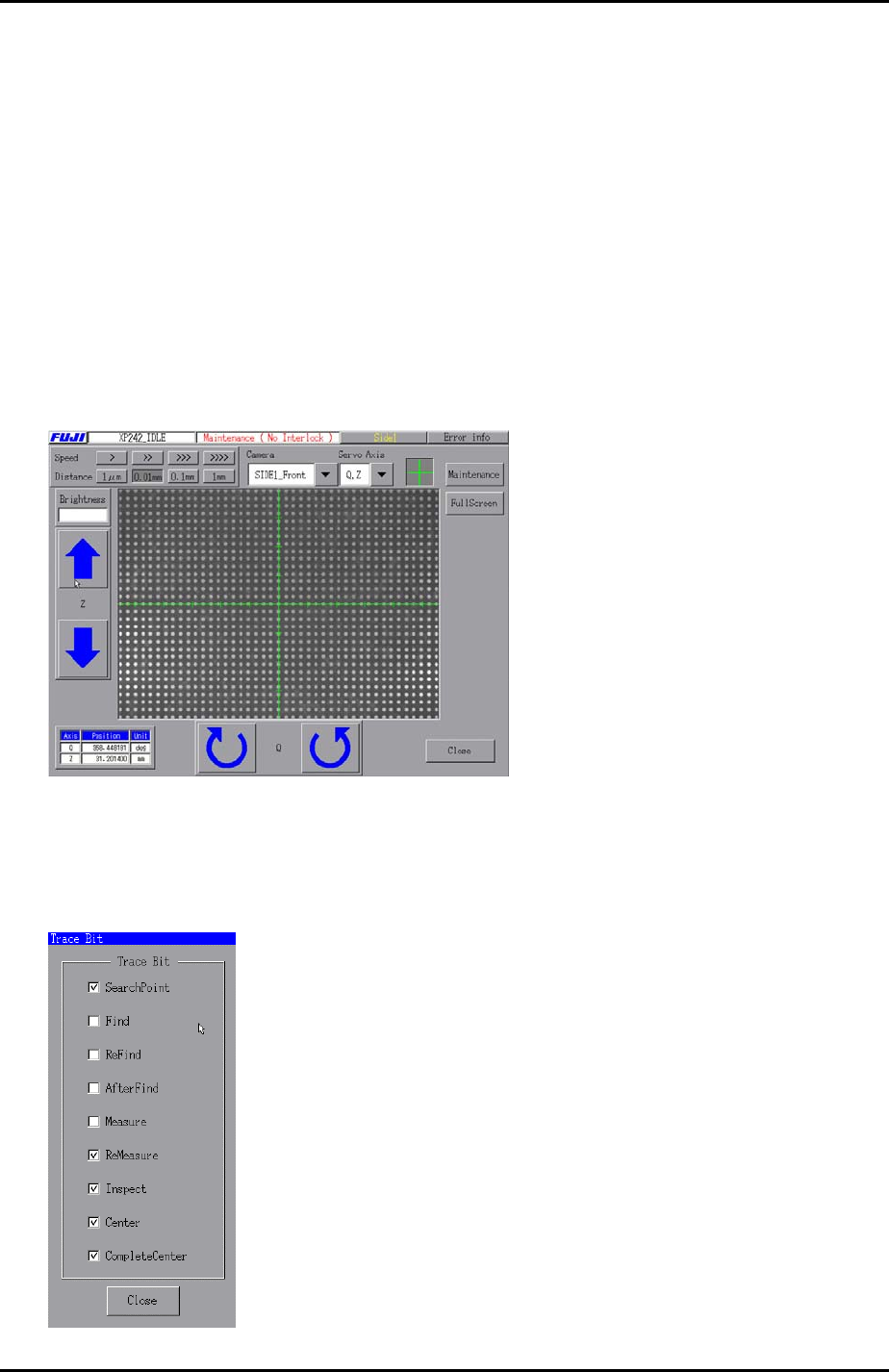
4. Select [Maintenance C] – [Custom Maintenance] and move the Y-axis to the prism
position, and the Z-axis to the part inspection height: Z0 + 27.5mm + 2.5mm
(2.5mm is equivalent to the thickness of the glass gage).
5. Set the center of the cross hairs in the center of one of the central dots on the glass
gage as illustrated below:
6. Select [Maintenance A] – [Trace Bit] and select “SearchPoint”, “ReMeasure”,
“Inspect”, “Center”, and “Complete Center”as shown below:
Fuji Machine Mfg. Co., Ltd. Okazaki.
SMT Equipment Quality Assurance Dept.
6 – 17 CS Section
FK-9F98-34 XP Type II Series Training Text for Service Engineers
Edition 2.0 XP242E – Chapter 6 Proper Data Measurements Page 18 of 30
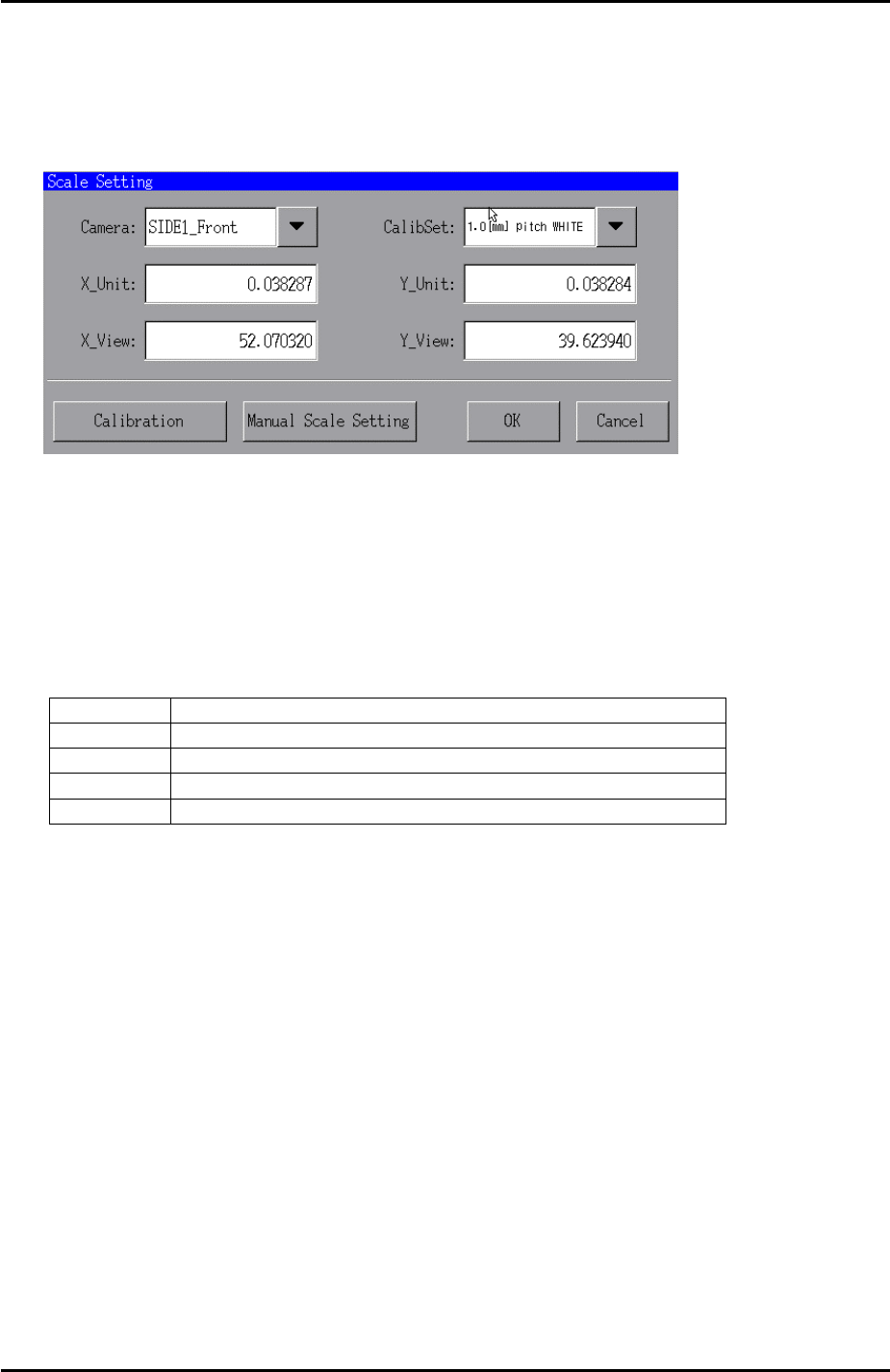
7. Select [Maintenance A] – [Scale Setting] and make sure the 200V power supply to
the servos ON.
8. Select “SIDE1_Front” from the [Camera] drop down list and “1.0 [mm] pitch WHITE”
from the [CalibSet] drop down list as shown below:
9. Press [Calibration] and answer YES to the question “Set Center?” and the
resolution measurement will proceed.
10. Answer NO to the question “Do you save calibration data to FD?”.
11. To the next question, “Save calibration data?” answer YES?
12. Confirm that the resolution results are within the tolerances shown below:
Front and Rear Parts Camera Resolution Tolerance
X_Unit 0.0375 ~ 0.039
X_View 50.98 ~ 53.04
Y_Unit 0.0375 ~ 0.039
Y_View 38.81 ~ 40.37
13. Finally press [OK] to finish.
Fuji Machine Mfg. Co., Ltd. Okazaki.
SMT Equipment Quality Assurance Dept.
6 – 18 CS Section