00197498-03_UM_SiplaceCA-Serie_EN.pdf - 第172页
3 Technical Data User Manual SIPLACE CA-Series 3.10 Controls on the SWS From software version SC.708.0 Edition 12/2014 EN -DR AFT 172 3.10 Controls on the SWS Each SWS features a monitor screen and ke yboard. The EMERGEN…

User Manual SIPLACE CA-Series 3 Technical Data
From software version SC.708.0 Edition 12/2014 EN -DRAFT 3.9 Controls on the Placement Machine
171
3.9.3.1 Controls on the Machine's Operator Panels
The two operator panel have identical control functions.
Monitor, keyboard, start and stop buttons 3
Both sides of the placement machine feature a monitor screen and keyboard.
The start and stop buttons are located beneath the keyboard. The on-screen dialog will occasion-
ally prompt you to activate certain actions using buttons, and this arrangement will make it easier
for you both to activate and to interactively control these actions.
Main switch 3
The main power switch is part of the power module. It is located on the left-hand operator panel
viewed in the direction of PCB transport. It is located here because it is only needed for servicing
and preventive maintenance work and is therefore not subject to frequent use.
3.9.3.2 Controls on the Input and Output Sides of the Placement Machine
The controls on the input and output sides of the placement machine are identical.
EMERGENCY STOP button, start and stop buttons 3
There is an EMERGENCY STOP button and a start and stop button on both the input and the out-
put sides of the PCB conveyor. The arrangement of the buttons has been designed for quick and
easy access from any position.
3 Technical Data User Manual SIPLACE CA-Series
3.10 Controls on the SWS From software version SC.708.0 Edition 12/2014 EN -DRAFT
172
3.10 Controls on the SWS
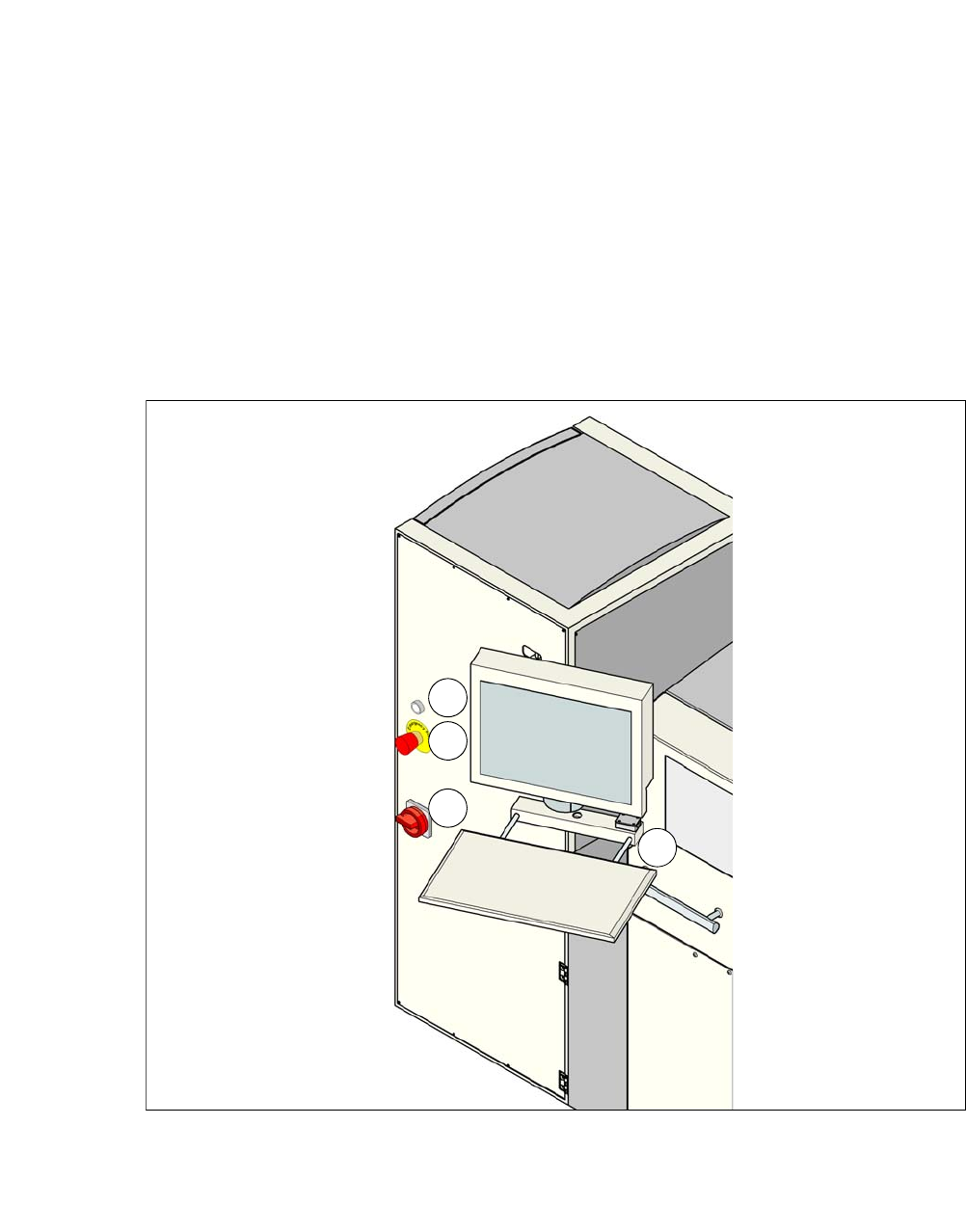
Each SWS features a monitor screen and keyboard.
The EMERGENCY STOP button is located on one side of the SWS together with the other con-
trols.
3.10.1 Controls and Displays
3
Fig. 3.10 - 1 Controls and displays
(1) Operating status (3) Power supply switch
(2) EMERGENCY STOP switch (4) Monitor screen with keyboard
1
2
3
4
User Manual SIPLACE CA-Series 3 Technical Data
From software version SC.708.0 Edition 12/2014 EN -DRAFT 3.10 Controls on the SWS
173
3.10.2 Description
All the controls can be reached by a 1.40 m tall person.
EMERGENCY STOP button 3
When you press the EMERGENCY STOP button, it engages. SWS and SIPLACE perform an
EMERGENCY STOP. The power supply to all SWS axes is interrupted. Turn the button to release
it.
3
Operating status indicator on the SWS 3
The operating status shines if the SWS is switched on.
Main switch 3
The main switch is used for switching the power supply to the SWS on and off.
3
LCD monitor 3
Each SWS features a flat screen monitor with LCD technology and touchscreen function.
Keyboard 3
The keyboard is located beneath the monitor. The keyboard is fitted with a USB port which can be
used for backup of data to an external storage medium.
DANGER
Lethal voltages!
Even when the EMERGENCY STOP button is switched off, some parts inside the ma-
chine carry potentially lethal voltages.
Always follow the applicable accident prevention and DIN regulations (particularly EN
60204, part 1 or IEC 60204, part 1) and the applicable regulations in your own coun-
try.
Only qualified or appropriately trained personnel may switch the power supply to the
placement machine on and off.
DANGER
Lethal voltages!
Some parts inside the machine carry potentially lethal voltages - even when switched off
at the main power switch.
Always follow the applicable accident prevention and DIN regulations (particularly EN
60204, part 1 or IEC 60204, part 1) and the applicable regulations in your own coun-
try.
Only qualified or appropriately trained personnel may switch the power supply to the
placement machine on and off.