00197498-03_UM_SiplaceCA-Serie_EN.pdf - 第422页
7 Component and Die Handling User Manual SIPLACE CA-Series 7.1 X Feeder Modules for SIPLACE X-Series From software version SC.708.0 Edition 12/2014 EN -DRAFT 422 7.1.6 Energy and Dat a Inte rface for X Feeder Modules Ite…
User Manual SIPLACE CA-Series 7 Component and Die Handling
From software version SC.708.0 Edition 12/2014 EN -DRAFT 7.1 X Feeder Modules for SIPLACE X-Series
421
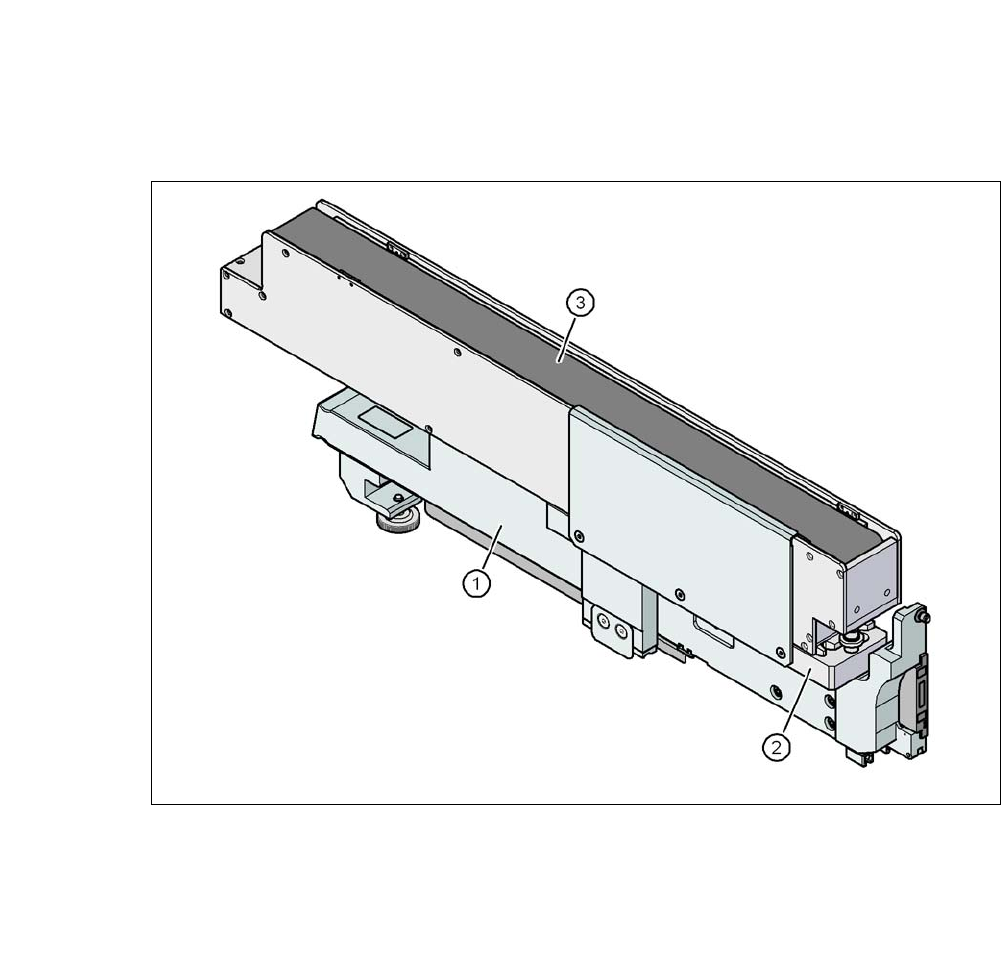
7.1.5.3 Feeder module adapter for the X-Series with reject conveyor
7
Fig. 7.1 - 18 Feeder module adapter for the X-Series with reject conveyor
(1) Adapter for X-Series feeder modules (item no. 00141305-xx)
(2) Adapter plate for reject conveyor (item no. 00141308-xx)
(3) Reject conveyor (reject module)
7 Component and Die Handling User Manual SIPLACE CA-Series
7.1 X Feeder Modules for SIPLACE X-Series From software version SC.708.0 Edition 12/2014 EN -DRAFT
422
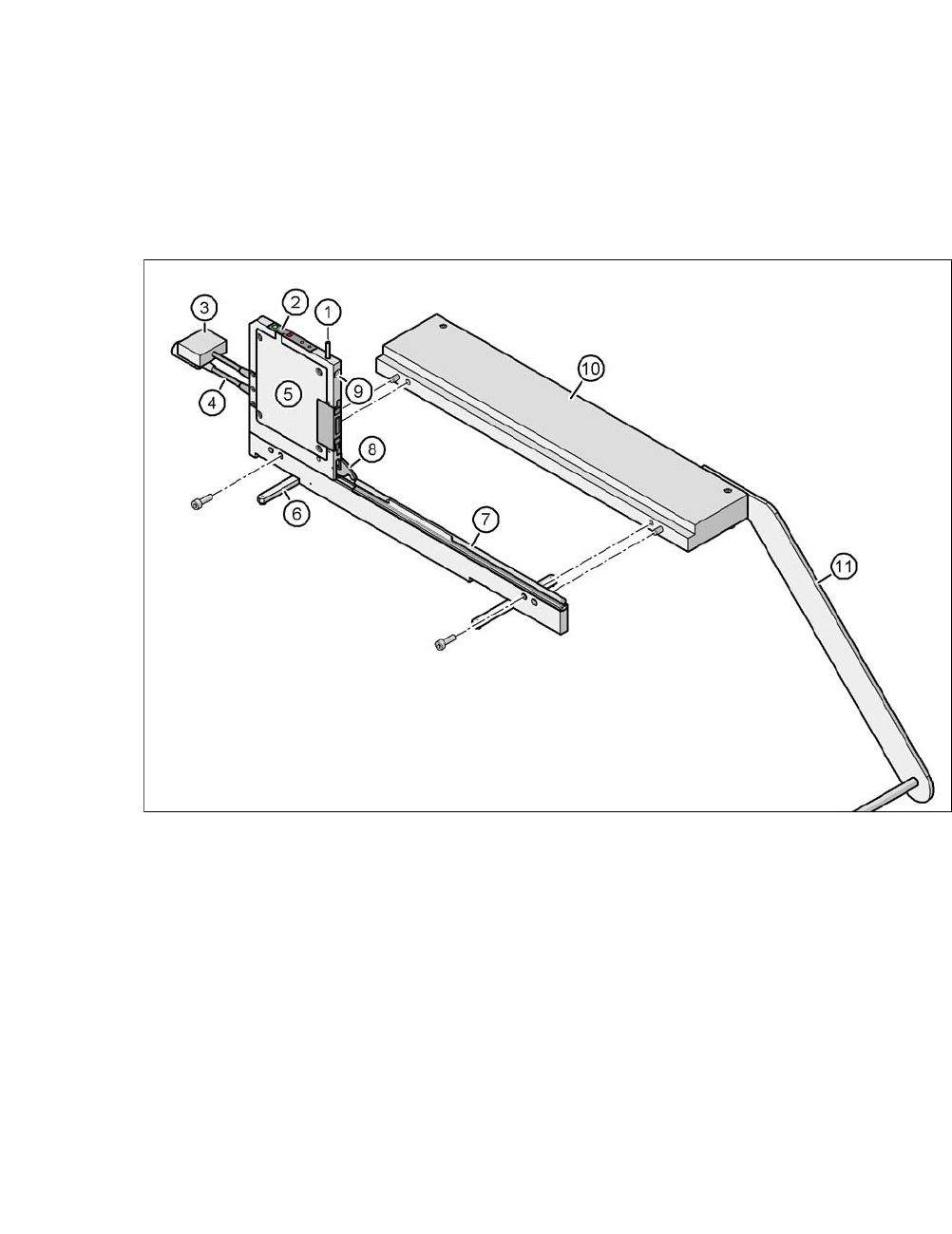
7.1.6 Energy and Data Interface for X Feeder Modules
Item no. 00141247-xx Energy and data interface for X feeder modules
7
Fig. 7.1 - 19 Energy and data interface for X feeder modules
(1) Unlocking button for locking latch
(2) Operator panel
(3) Data cable
(4) Power supply cable
(5) Electronics housing
(6) Fold-out feet
(7) Omega profile for guiding feeder modules
(8) Locking latch
(9) Locating hole for front centering pin of feeder module
(10) Base plate
(11) Tape reel holder

User Manual SIPLACE CA-Series 7 Component and Die Handling
From software version SC.708.0 Edition 12/2014 EN -DRAFT 7.1 X Feeder Modules for SIPLACE X-Series
423
7.1.6.1 Description
The energy and data interface allows X feeder modules to be used outside the machine and setup
area. The interface consists of an aluminum frame with omega profile (item 7 in fig. 7.1 - 17
, page
420
) for holding and guiding the feeder modules. As with the X component trolley, the feeder mod-
ule is placed on the omega profile, with the slider guides, and is pushed forwards until the front
centering pin of the feeder module is fully inserted into the locating hole (item 9 in fig. 7.1 - 17
,
page 420
). The locking latch (item 8 in fig. 7.1 - 17, page 420) locks the feeder module in this po-
sition. To remove the feeder module, simply press the release button (item 1 in fig.
7.1 - 17
, page 420). The locking latch (item 8 in fig. 7.1 - 17, page 420) is pressed down and re-
leases the feeder module. Fold-out feet (item 6 in fig. 7.1 - 17
, page 420) stabilize the position of
the energy and data interface, particularly for wide feeder modules.
The electronics housing (item 5 in fig. 7.1 - 17
, page 420) holds the electronics control unit for the
energy and data interface. The operator panel (item 2 in fig. 7.1 - 17
, page 420) consists of start
and stop buttons and two status LEDs. Communication with a PC takes place via the data cable
(item 3 in fig. 7.1 - 17
, page 420). The power supply cable (item 4 in fig. 7.1 - 17, page 420) is
connected to the power supply unit provided.
7.1.6.2 Usage
The energy and data interface is used to check, maintain and repair X feeder modules. It can also
be used for setting up in advance for PCB production. In this case, the energy and data interface
is fixed to the base plate (item 10 in fig. 7.1 - 19
, page 422). The tape reel holder (item 11 in fig.
7.1 - 19
, page 422) is also mounted on the base plate. When a component tape is inserted, you
can check or reset the increment, pick-up position and conveyor speed. The detailed user manual
describes how to use the interface and the necessary servicing work.
7.1.6.3 Scope of Delivery
– Single Slot EDIF
– Power supply, 100 - 120 / 200 - 240 VAC, +30VDC, 4.3 A
– Base plate with tape reel arm
– User manual