00197498-03_UM_SiplaceCA-Serie_EN.pdf - 第82页
2 Operational Safety User Manual SIPLACE CA- Series 2.8 Safety Features From software version SC.708.0 Edition 12/2014 EN -DR AFT 82 2.8 Safety Features 2.8.1 Protective Covers 2 Fig. 2.8 - 1 Protective covers and other …
User Manual SIPLACE CA-Series 2 Operational Safety
From software version SC.708.0 Edition 12/2014 EN -DRAFT 2.7 Safety Instructions for Operating the SWS
81
2.7.3 Safety Instructions for Closing the Protective Cover
2
– The sliding door of the SWS can be opened during operation to replace the wafer magazine
- the SWS will continue production. Opening the door only disables the magazine lift.
– Opening the cover hood sets the SWS into EMERGENCY OFF state.
2.7.4 Safety Instructions for the Linear Dipping Unit (LDU)
2
WARNING
Danger of crushing!
Risk of trapping and crushing hands when closing the protective cover.
Always hold the grab recess provided when opening or closing the sliding door.
When closing, do not reach into the gap between the cover or sliding door and the
machine housing. This area is marked with black-and-yellow warning strips.
DANGER
Hazardous substances (flux)!
The flux used for the Linear Dipping Unit poses a hazard to health!
Make sure that you observe the safety data sheet provided with the flux (Material
Safety Datasheet - MSDS)
Make sure that you fulfill all measures specified therein.
When filling and cleaning the LDU, plus when disposing of the flux, wear the pre-
scribed protective clothing (e.g. breathing protection, gloves, goggles).
2 Operational Safety User Manual SIPLACE CA-Series
2.8 Safety Features From software version SC.708.0 Edition 12/2014 EN -DRAFT
82
2.8 Safety Features
2.8.1 Protective Covers
2
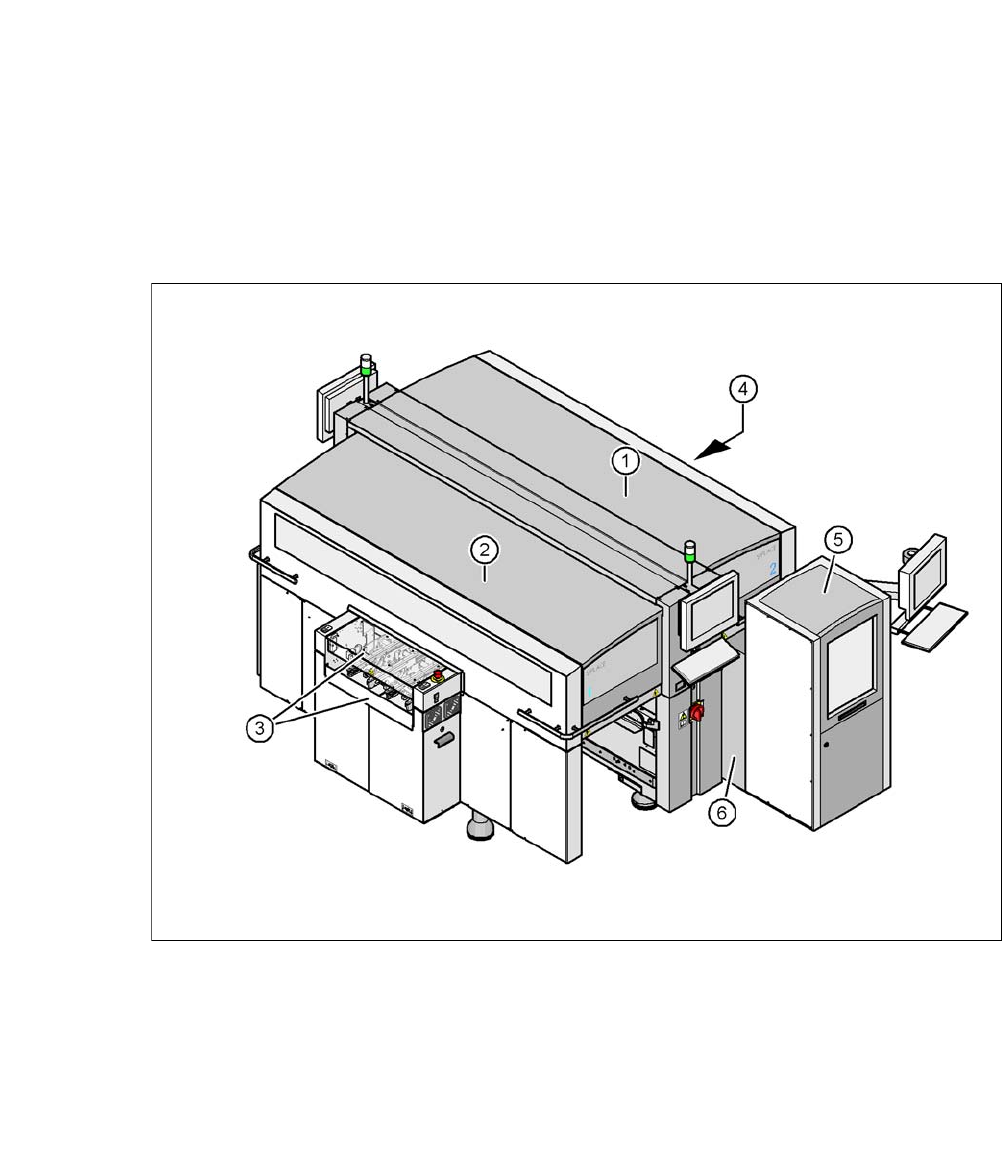
Fig. 2.8 - 1 Protective covers and other covers
(1) Protective cover
(2) Protective cover
(3) Cover flap and hand guard on the input conveyor
(4) Cover flap and hand guard on the output conveyor
(5) Magazine lift with sliding door
(6) Fixed cover on SWS
2
The traveling range of the gantries has two protective covers that can be swung upwards (items
1 and 2). There are side screens to prevent access to the inside of the machine from the side. The
two cover flaps (item 3 and 4) over the input or output belt of the PCB conveyor prevent access
to the PCB conveyor.
User Manual SIPLACE CA-Series 2 Operational Safety
From software version SC.708.0 Edition 12/2014 EN -DRAFT 2.8 Safety Features
83
Function 2
If one of the protective covers is swung upwards or if one of the cover flaps on the PCB conveyor
is lifted, the power supply to the gantry axes and SWS will be immediately interrupted. The gantry
axes and all SWS axes will come to a standstill. The message "Close cover" is displayed on the
screen.
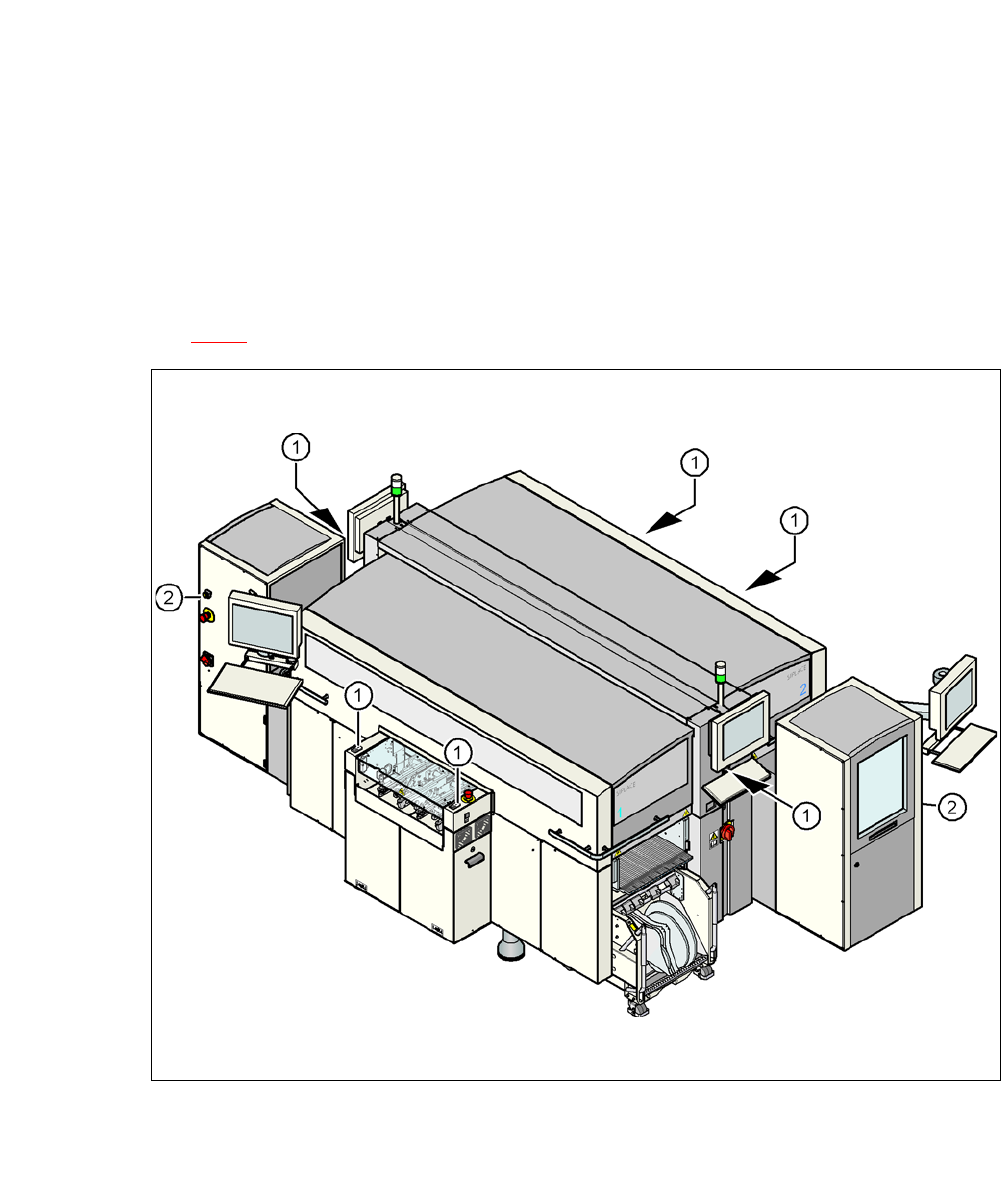
Close the protective covers and press one of the Start buttons on the machine (item 1 in fig.
2.8 - 2
).
2
Fig. 2.8 - 2 Position of the start and EMERGENCY STOP reset button (white) on the machine and on the SWS
(1) Start button (white) on the machine
(2) Operating status indicator (white) on the SWS