00197498-03_UM_SiplaceCA-Serie_EN.pdf - 第70页
2 Operational Safety User Manual SIPLACE CA- Series 2.6 Safety Instructions for Operating the Placement Mach ine From software version SC.708.0 Edition 12/2014 EN -DRAFT 70 2.6 Safety Instructions fo r Operating the Plac…
User Manual SIPLACE CA-Series 2 Operational Safety
From software version SC.708.0 Edition 12/2014 EN -DRAFT 2.5 Safety Instructions for Transportation
69
2.5.2 Transporting the SWS
2
The SWS can be transported using a suitable hand lift with the following specifications:
Carrying power 1000 kg at least
Fork length 1000 mm at least
Distance between the forks 300 at least, 520 mm at most (outer dimension) 2
2
WARNING
Risk of tilting!
There is a risk of the SWS tilting if the required specifications for the fork-lift truck are not
observed.
Only use the specified fork-lift for transportation.
Transportation of the SWS is described in section 5.3
, page 266.
PLEASE NOTE
Hand lift specifications
The necessary width of the fork lift presents a critical measure.
Make sure that the hand lift used fulfills the specified requirements.
2 Operational Safety User Manual SIPLACE CA-Series
2.6 Safety Instructions for Operating the Placement Machine From software version SC.708.0 Edition 12/2014 EN -DRAFT
70
2.6 Safety Instructions for Operating the Placement
Machine
2.6.1 Safety Instructions for Closing the Protective Covers
To avoid risk of injury when closing the protective covers on the machine, the operator must in-
struct the personnel concerned to always follow the instructions below when handling the protec-
tive covers.
2
2
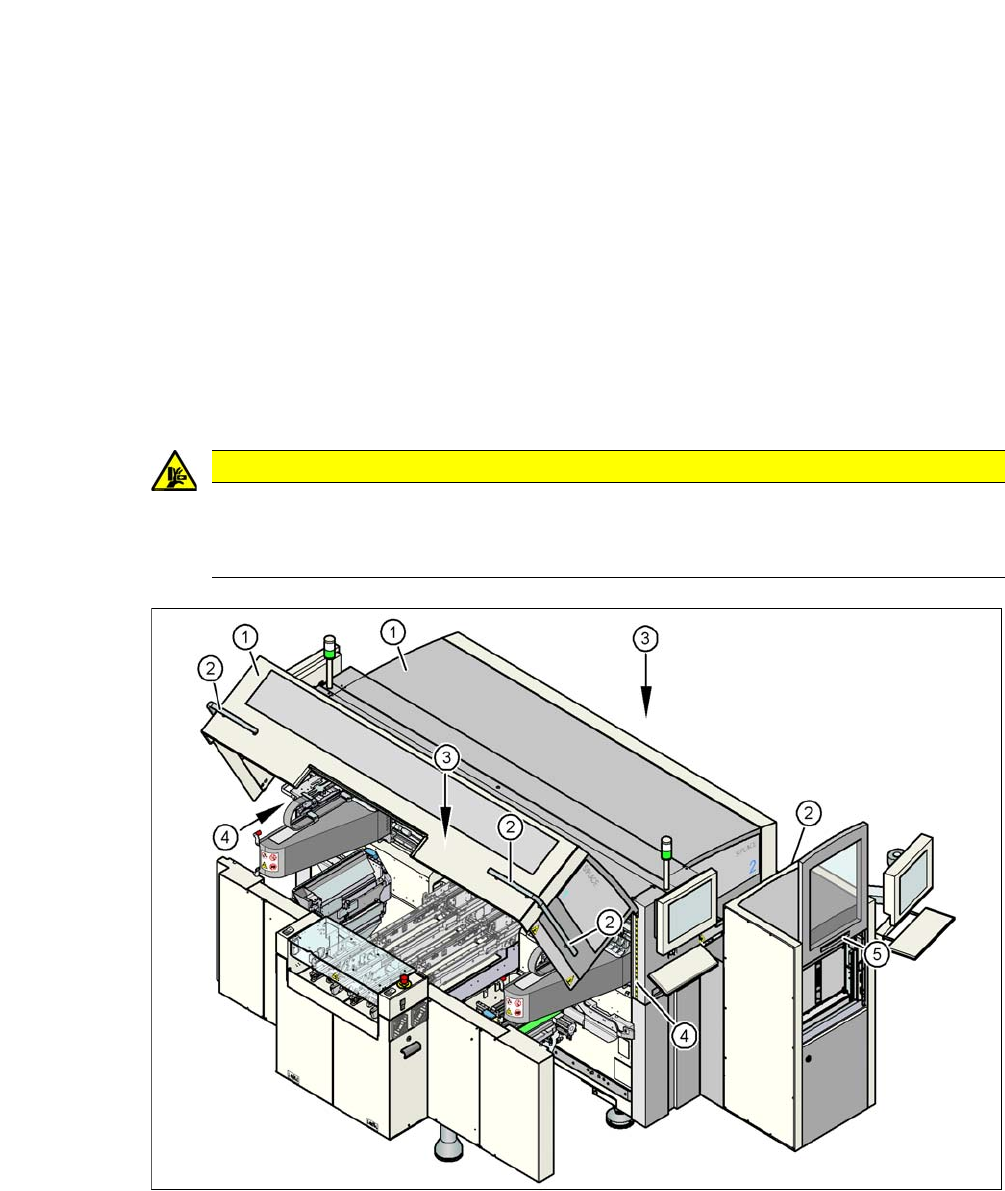
Fig. 2.6 - 1 Safety instructions for closing the protective covers
(1) Protective Covers
(2) Handles
(3) Cover flaps above the PCB conveyor
(4) Warning strips
(5) SWS sliding door
CAUTION
Danger of crushing!
Risk of crushing hands if the protective covers are not closed correctly.
Close the protective covers correctly.

User Manual SIPLACE CA-Series 2 Operational Safety
From software version SC.708.0 Edition 12/2014 EN -DRAFT 2.6 Safety Instructions for Operating the Placement Machine
71
Always hold the grab handles when opening or closing the protective covers.
When closing, do not reach into the gap between the cover or sliding door and the machine
housing.
This area is marked with a yellow and black warning strip (item 4 in fig. 2.6 - 1
, page 70).
When you close the cover, make sure that there is no second person in the swiveling range
of the cover.
When you close the covers, make sure that there is no-one else in the vicinity of the opposite
component trolley location.
2.6.2 Safety Instructions for Processing Capacitors Based on Powdered Metal
There is a risk associated with processing capacitors based on powdered metal (e.g. tantalum).
The risk is that
– Should these components be destroyed, a sudden exothermic reaction i.e. heat formation,
will occur. If the ambient conditions are unfavorable, and depending on the capacitance, this
buildup of heat can cause damage.
– This effect can occur when these components are cut.
Please contact your suppliers to clarify whether the components that you handle are affected.
In extremely rare cases, this risk can occur in the tape cutter of SIPLACE machines, with the re-
mote possibility of causing a smoldering fire in the waste tape.
The ambient conditions are unfavorable if:
(1) The components remain on the tape while the set tape cycle is checked (since the operator
can cycle the feeder module onward without removing components during this check).
(2) The components remain on the tape, e.g. due to a tear in the cover foil.
(3) The components remain on the tape, and the components or tape do not conform to the spec-
ification, thus increasing the pickup error rate.
Please follow the instructions given below to minimize the risk when placing capacitors based on
powdered metal.
(1) If the component tape is cycled onward manually, the operator must remove any components
remaining in the tape pocket.
(2) If the cover foil tears, the operator must remove any components remaining on the tape.
To ensure that tantalum capacitors do not cause the tape material to burn when it is cut as a result
of pickup errors, the user interface has been extended to include the "Remove component from
tape in the event of a pickup error" option. This option must be enabled in SIPLACE Pro. On the
placement machine, the component that was not picked up is paced forward again until it is ready
for removal from the component tape. The track is deactivated and the operator is sent an error
message to remind him to pick up the tantalum component from the tape.