00197498-03_UM_SiplaceCA-Serie_EN.pdf - 第242页
4 SIPLACE Wafer System (SWS) User Manual SIPLACE CA- Series 4.5 SIPLACE SWS Wafer Stretcher From software version SC.708.0 Edition 12/2014 242 4.5.6.2 Settings Fig. 4.5 - 5 Wafer support - setting the frame width Remov…

User Manual SIPLACE CA-Series 4 SIPLACE Wafer System (SWS)
From software version SC.708.0 Edition 12/2014 4.5 SIPLACE SWS Wafer Stretcher
241
4.5.6 Setting the frame width for 8" wafer supports
The width of the wafer needs to be set for 8" wafer support. This is not needed for 12" wafer sup-
ports.
Wafers with a width of 10.5" (FF 105) or 10.8" (FF 108) can be processed. The mechanical ad-
justments must be made at seven positions, depending on the width.
4.5.6.1 Preparations
Close all current processes on the SWS module.
Move the wafer table into the changeover position.
In the view, select Manual operations -> Wafer handling systems -> Go to change
position.
Open the clamp.
In the view, select Manual operations -> Wafer handling systems ->Open wafer
clamp.
– The clamp will open and the expansion ring will move downwards.
Open the expander
In the view, select Manual operations -> Wafer handling systems ->Release
stretcher.
– The downholder plate will move upwards.
In the view, select Production -> Other and click on the red "off" button there.
SWS GUI and Linux are shut down properly. 4
Switch off the SWS at the main switch.
CAUTION
Avoid damage to the gripper
The gripper could be damaged while you are working on the wafer support.
Push the gripper in the direction of the wafer lift and out of the wafer support working
area.
4 SIPLACE Wafer System (SWS) User Manual SIPLACE CA-Series
4.5 SIPLACE SWS Wafer Stretcher From software version SC.708.0 Edition 12/2014
242
4.5.6.2 Settings
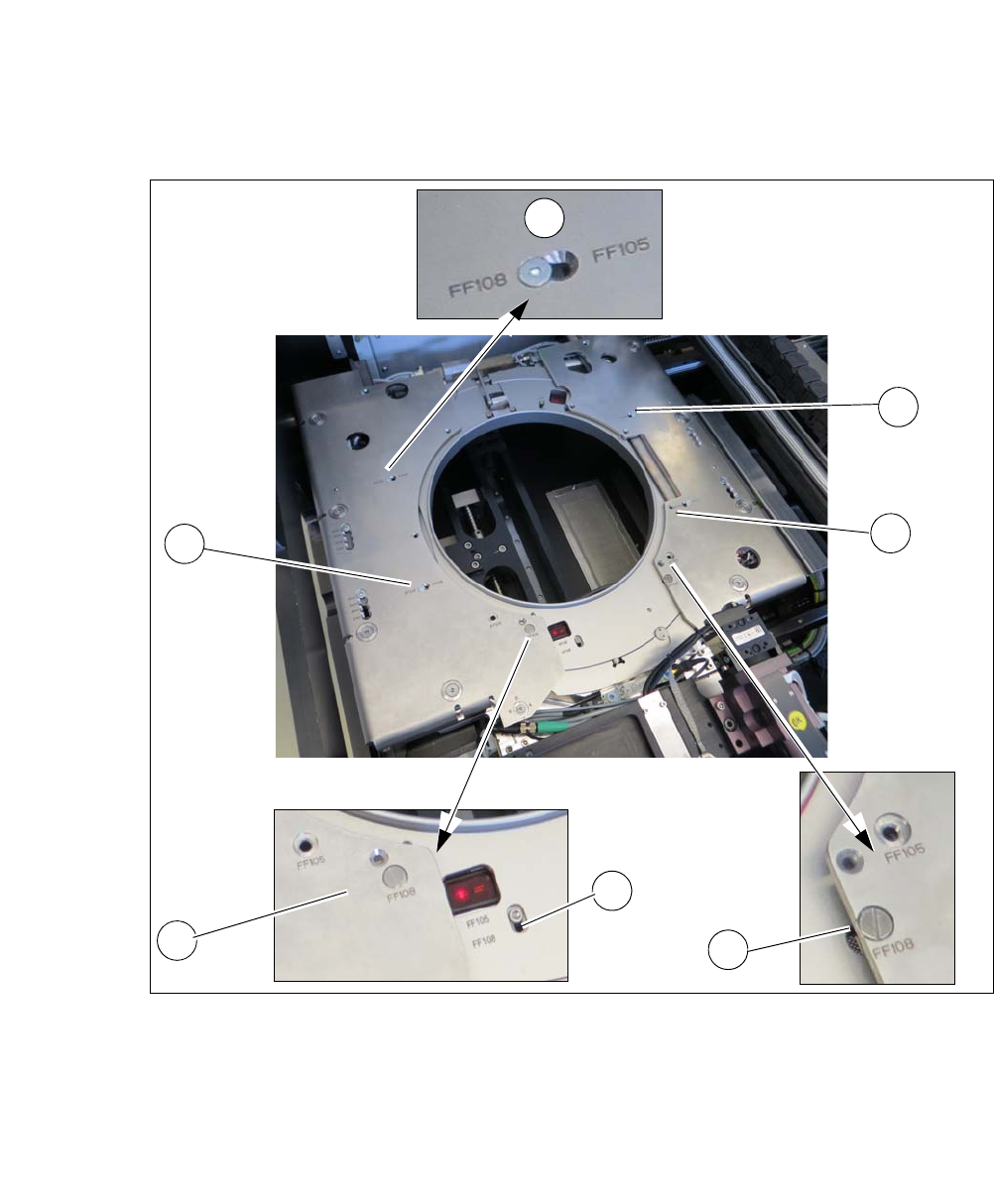
Fig. 4.5 - 5 Wafer support - setting the frame width
Remove the screws at the four points (1) and fit these in the required position (FF105 or FF
108).
Remove the screw at the relevant point (2) and fit it in the required position (FF105 or FF 108).
Loosen the screw at the relevant point (3) and fit it in the required position (FF105 or FF 108).
Remove the screw at the relevant point (4) and fit it in the required position (FF105 or FF 108).
1
1
1
4
2
3
1

User Manual SIPLACE CA-Series 4 SIPLACE Wafer System (SWS)
From software version SC.708.0 Edition 12/2014 4.5 SIPLACE SWS Wafer Stretcher
243
4.5.7 Converting the wafer support
In order to use various wafer sizes (8" and 12") with the SIPLACE SWS Wafer Stretcher, you need
to convert the SIPLACE SWS Wafer Stretcher.
You can order the SIPLACE SWS Wafer Stretcher as follows:
– 00519717-xx 12 inch Wafer Expander
and as an option 4
– 03079734-xx 8 inch Retrofit Kit
or
– 00519719-xx 8 inch Wafer Expander
and as an option 4
– 00519720-xx 12 inch Retrofit Kit
The following instructions describe the changeover from an 8" to a 12" wafer support (see also
“Differences in conversion from 12" to 8” on page 256).