YRM20_Ope_E.pdf - 第119页
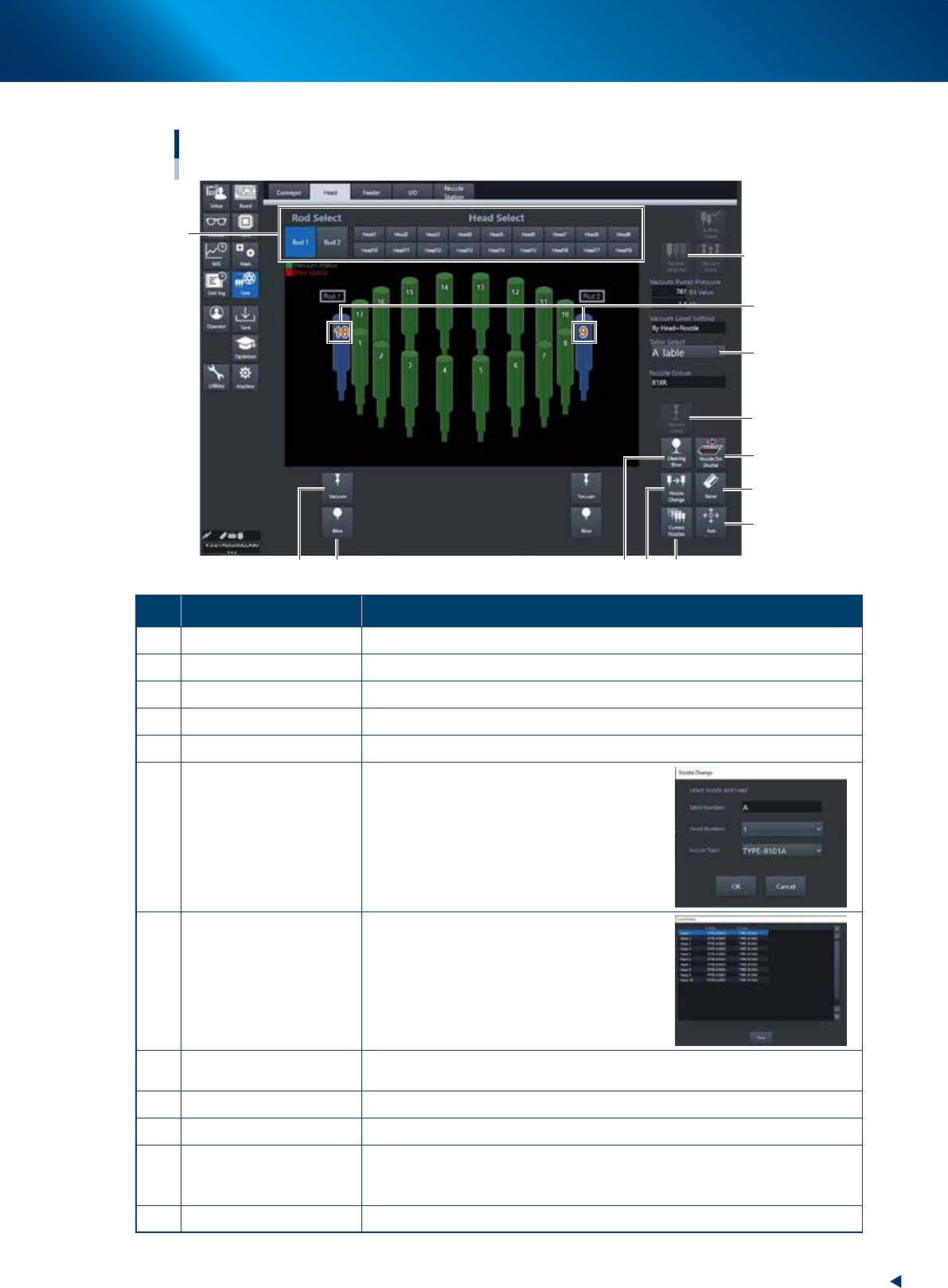
2. Operation screen and buttons 2-22 Chapter 2 Basic operation [Unit] – [Head] screen HM head 1 2 7 6 4 3 5 9 8 24209-KMX-00 Button name Function 1 V acuum T urns the vacuum of each head on or off. 2 Blow Turns the air b…
2. Operation screen and buttons
2-21
Chapter 2 Basic operation
►
Manual head operation
[Unit] – [Head] screen
RM head
3
10
6 7
8
12
2
11
5
9
4
1
Currently placed heads
under the rods
(Z-axis and V-axis).
24234-KMX-00
Button name Function
1 Rod Select, Head Select Selected head moves under selected rod.
2 Recover Valve Pos
Moves the V-axis on the rod side selected by "Rod select" to the initial position.
3 Vacuum Turns the vacuum of heads placed under the rods 1 and 2 ON/OFF.
4 Blow Turns the blow of heads placed under the rods 1 and 2 ON/OFF.
5 Cleaning Blow Displays the "Execution Nozzle Cleaning Blow" screen.
6 Nozzle Change
Opens the "Nozzle Change" screen. Specify
the head and nozzle type to perform nozzle
change.
7 Current Nozzles
Shows a list of nozzle types currently
attached to each head.
8 Axis
Opens the "Move Axis" screen. This is the same as the [Axis] button on the
[Unit] - [Conveyor] screen.
9 Reset
Resets maximum and minimum values measured by the [Negative Pressure] button.
10 Nozzle STN Shutter Opens or closes the nozzle station shutter.
11 Vacuum Check
Measures head negative pressure placed under the rod selected at "Rod
Select". The maximum, minimum and current values appear beneath each
rods after completing measurement.
12 Table Select Switches the head unit to be displayed.
2. Operation screen and buttons
2-22
Chapter 2 Basic operation
[Unit] – [Head] screen
HM head
1
2
7
6
43
5
9
8
24209-KMX-00
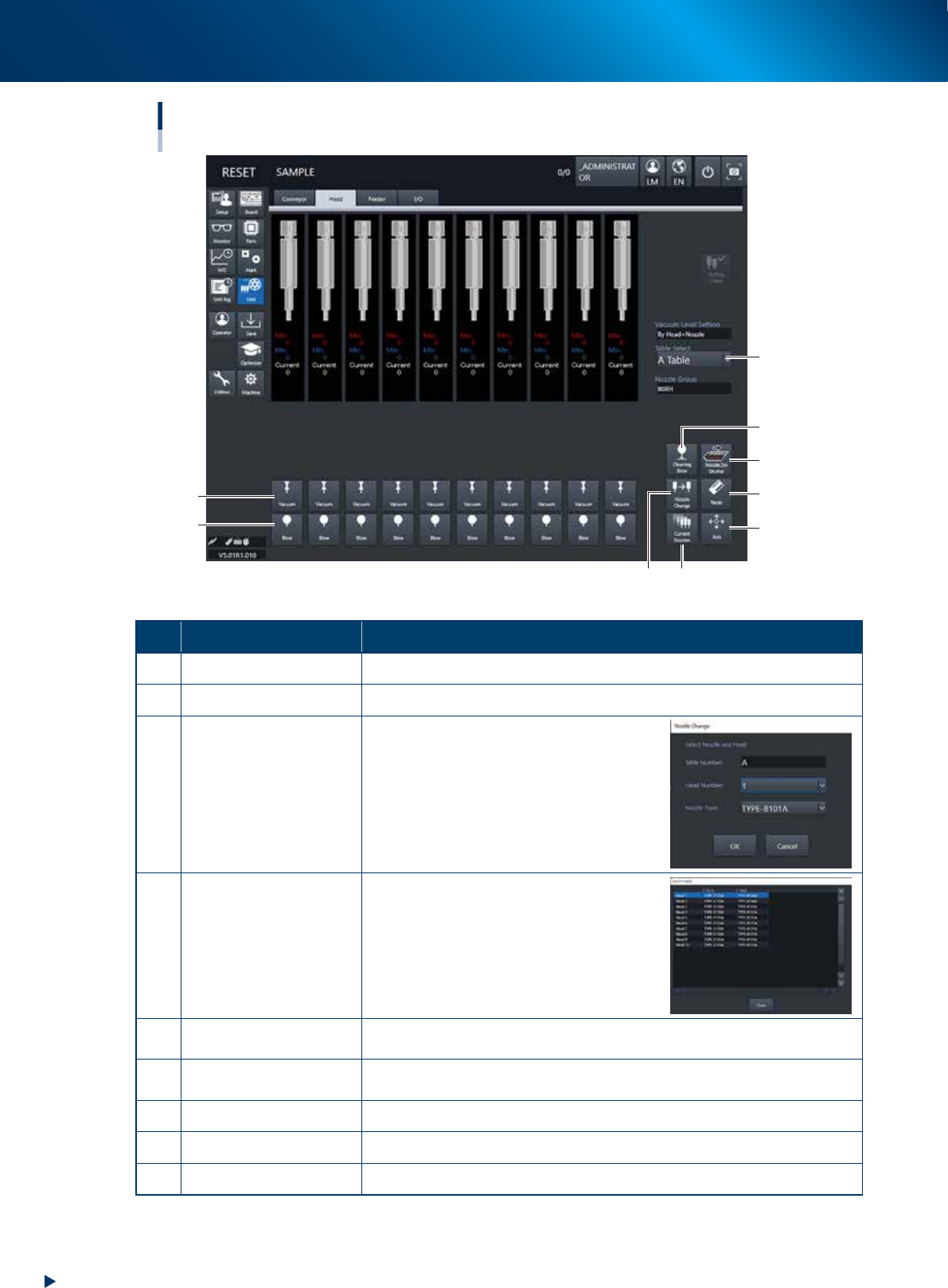
Button name Function
1 Vacuum Turns the vacuum of each head on or off.
2 Blow Turns the air blow in each head on or off.
3 Nozzle Change
Opens the "Nozzle Change" screen. Specify
the head and nozzle type to perform nozzle
change.
4 Current Nozzles
Shows a list of nozzle types currently
attached to each head.
5 Axis
Opens the "Move Axis" screen. This is the same as the [Axis] button on the
[Unit] - [Conveyor] screen.
6 Reset
The maximum, minimum and current values appear under each heads. Resets
the maximum and minimum values.
7 Nozzle STN Shutter Opens or closes the nozzle station shutter.
8 Cleaning Blow Displays the "Execution Nozzle Cleaning Blow" screen.
9 Table Select Switches the table display.
2. Operation screen and buttons
2-23
Chapter 2 Basic operation
►
Manual feeder operation
[Unit] – [Feeder] screen
2
4
7
8
3
5
1
6
24210-KMX-00
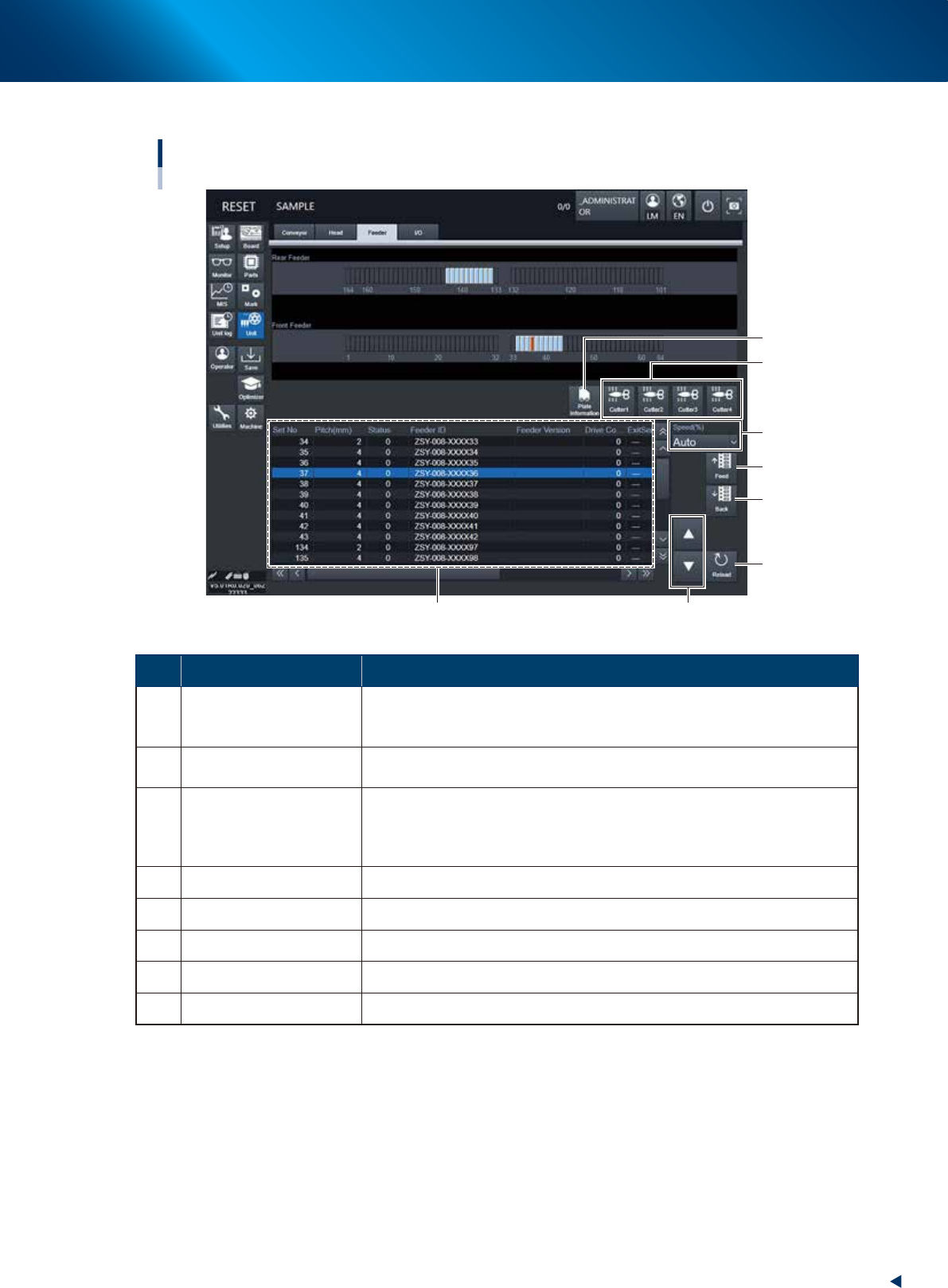
Button name Function
1 Feeder Information
Displays the information of the feeders set on the feeder plate.
The No. displayed in the "Status" column indicates the error code No. For
error details, refer to "ZS/ZSR FEEDER User's Manual".
2 Feed
Feeds the tape on the feeder selected by the feeder information to one pitch.
Each time pressing this button advances the tape at the specified pitch.
3 Back
Moves the tape backwards by one pitch on the feeder selected by the feeder
information.
Each time pressing this button moves the tape backward at the specified
pitch.
4 Speed Select the feed speed from the drop-down list with "Normal", 90,80, to 10%.
5 Reload Clears the feeder condition (memory) and reloads the setting.
6 Up/down arrows Moves the selected row up or down.
7 Cutter Opens or closes the tape cutter.
8 Plate Information Allows you to check the version of the plate board in the feeder plate.