YRM20_Ope_E.pdf - 第77页
4. Component supply section 1-46 Chapter 1 Unit names and functions 4.4 Non-stop feeder change YRM20 supports non-stop feeder change of ZS feeder/ZSR feeder . Activating "ZS Nonstop P arts Supply setting" enabl…
4. Component supply section
1-45
Chapter 1 Unit names and functions
4.3 One-stop cover (option)
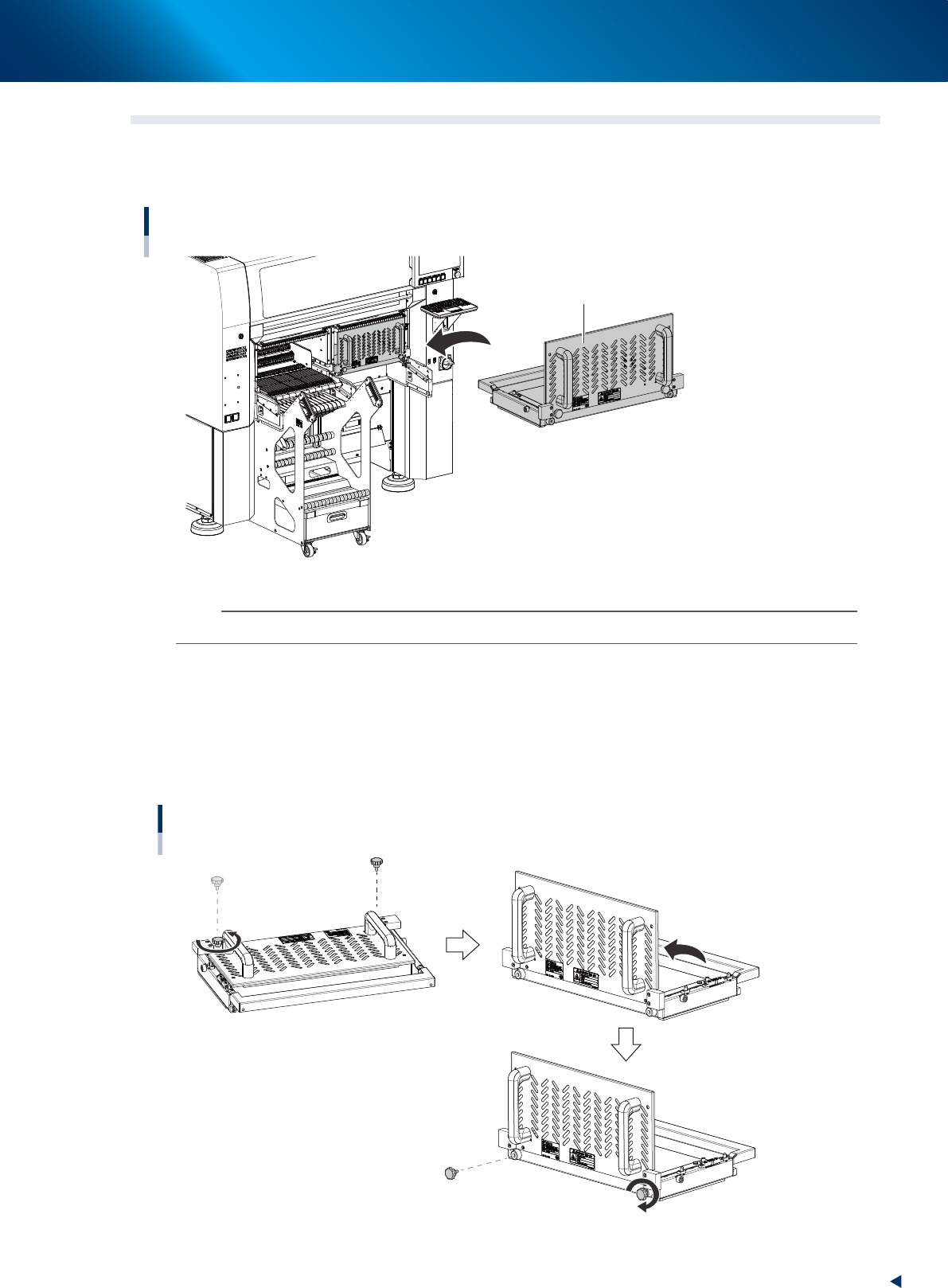
When the automatic operation is required to start without feeder exchange carriage, attach one-stop cover
instead of carriage. The one-stop cover prevents putting hands and fingers in moving section.
One-stop cover
One-stop cover
23130-KMX-00
n
NOTE
The one-stop cover cannot be detached during automatic operation.
█
Assembling one-stop cover
The one-stop cover is normally delivered in folded.
1. Remove two knobs from one-stop cover by hand.
2. Unfold one-stop cover.
3. Attach knobs removed in 1. on front surface of one-stop cover.
Assembling one-stop cover
Knob
23131-KMX-00
4. Component supply section
1-46
Chapter 1 Unit names and functions
4.4 Non-stop feeder change
YRM20 supports non-stop feeder change of ZS feeder/ZSR feeder. Activating "ZS Nonstop Parts Supply
setting" enables the feeder satisfying the removing conditions (see "Feeder removing conditions" below) to
be changed without stopping machine.
Additionally when the setting is activated, feeder which is not used for mounting can be removed and
inserted even during operation.
█
Summary of the non-stop feeder change conditions
*<Non-stop feeder change setting> is enabled. * <Setting> is disabled.
Feeder in use
Feeder satisfying
removing conditions
Feeder not in use Feeder in use Feeder not in use
Mounter is operating. Not available Available Available Not available Not available
c
CAUTION
When pulling the feeder, make sure to pull it completely and insert it after cutting the carrier tape. If pulling the feeder
incompletely and insert it, the carrier tape is raised and it may interfere with the head.
█
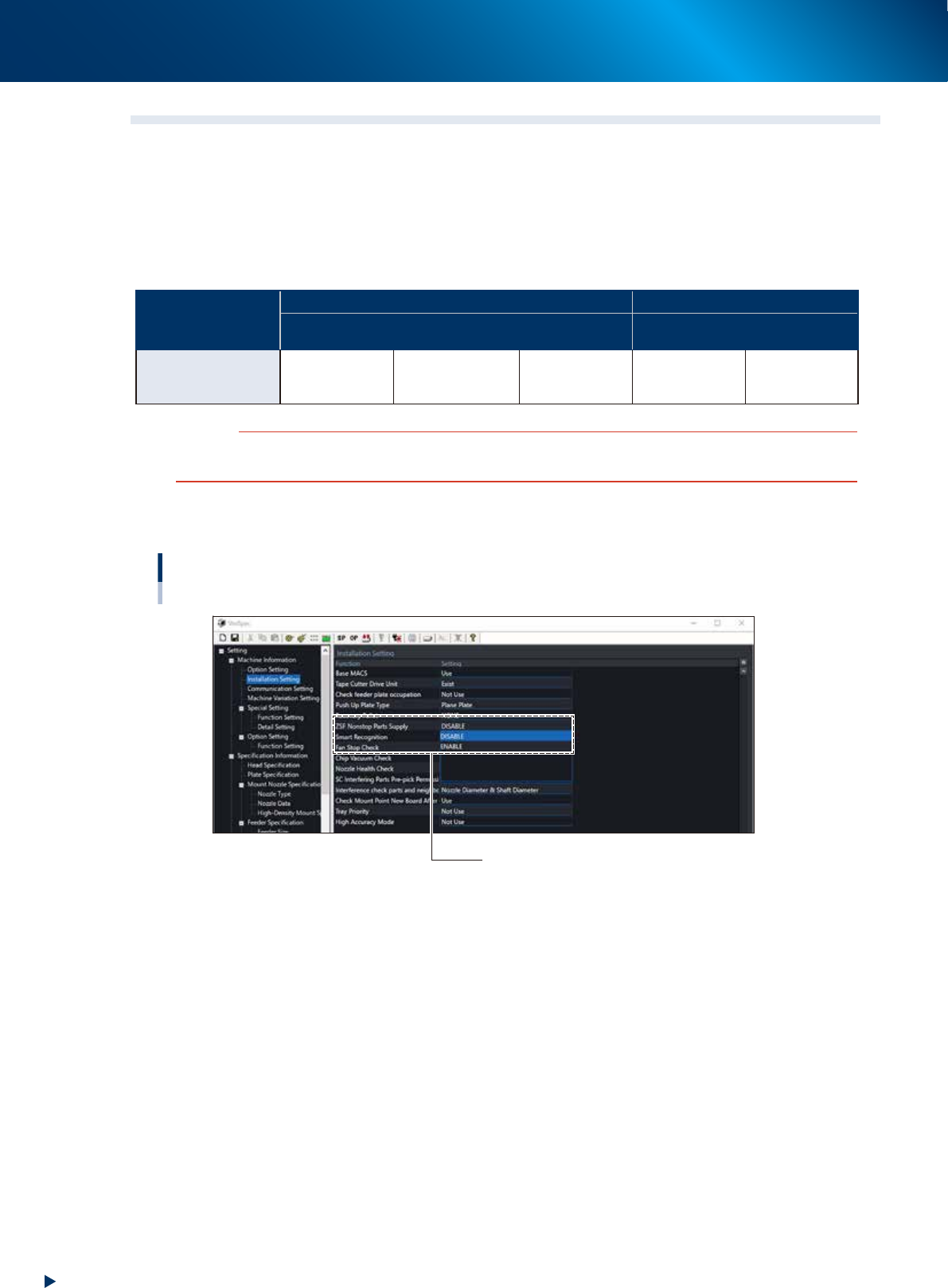
Non-stop feeder change setting
Setting non-stop feeder change
“Machine Information” - ”Installation Setting” screen
ZSF Nonstop Parts Supply : ENABLE / DISABLE
24109-KMX-00
█
Operation with SS feeder
YRM20 can use SS feeder.
But since it is necessary to open the safety cover and upper cover for changing SS feeders, non-stop
feeder change function is not available.

4. Component supply section
1-47
Chapter 1 Unit names and functions
█
Feeder removing conditions
1. When Setting the "Skip Retry"
If setting the skip retry, the parts of the feeder occurring the parts run-out will be mounted at the end
and other normal parts will be mounted prior to them. At this time the message "Ea30151 Parts
empty (Continue to Run)" will be displayed on the screen and the corresponding feeder can be
removed. The LED of the removable feeder glows yellow.
2. When pressing the [Feeder Remove] button
If activating the non-stop feeder change setting, the [Feeder Remove] button will be displayed on the
"Monitor" - "Production" screen. The message "Ea30152 Ready to remove the feeder." will be
displayed by selecting any feeder and pressing the [Feeder Remove] button. Then the feeder will be
removable. Same as the skip retry setting, the selected feeder parts will be mounted at the end and
other normal parts will be mounted prior to them.
n
NOTE
Regarding both cases above, if the parts of the removed feeder are mounted before completing the parts refill, an error
occurs and the machine stops.
3. When setting the alternative component function
If setting the alternative component function, the feeder occurred the parts run-out will be replaced to
the other feeder that the alternative component function is set and it continues to mount. At this time
the message "Ea30151 Parts empty (Continue to Run)" will be displayed on the screen and the
corresponding feeder can be removed. The LED of the removable feeder glows yellow. Additionally,
if refilling components to the removed feeder and setting it to the machine again, the component
supply is changed to the feeder that has been set again.