YRM20_Ope_E.pdf - 第57页
3. Head unit 1-26 Chapter 1 Unit names and functions 3 Specify the n ozzles y ou wan t to clea n b y nozzle s haft blo w . The "Nozzle Se tting" screen w ill appear . Selec t the t arget noz zle and table for t…
3. Head unit
1-25
Chapter 1 Unit names and functions
█
When the machine has a nozzle station (option)
When the settings are made so that all nozzles can be changed using a nozzle station (option), follow
these steps.
1
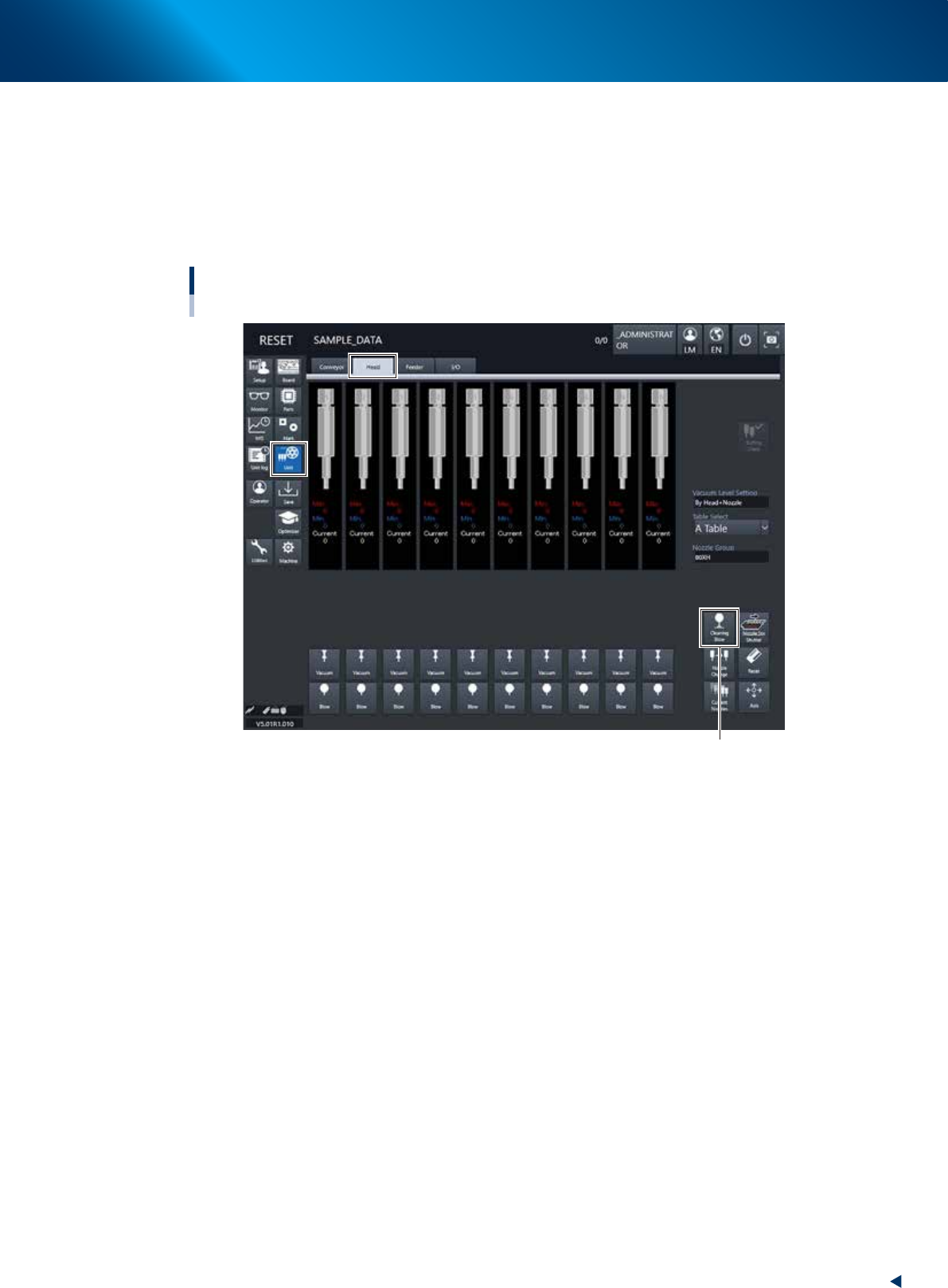
Open the [Unit] – [Head] screen.
2
Press the [Cleaning Blow] button.
[Cleaning Blow] button
Nozzle shaft blow
When using nozzle station (option)
24103-KMX-00
3. Head unit
1-26
Chapter 1 Unit names and functions
3
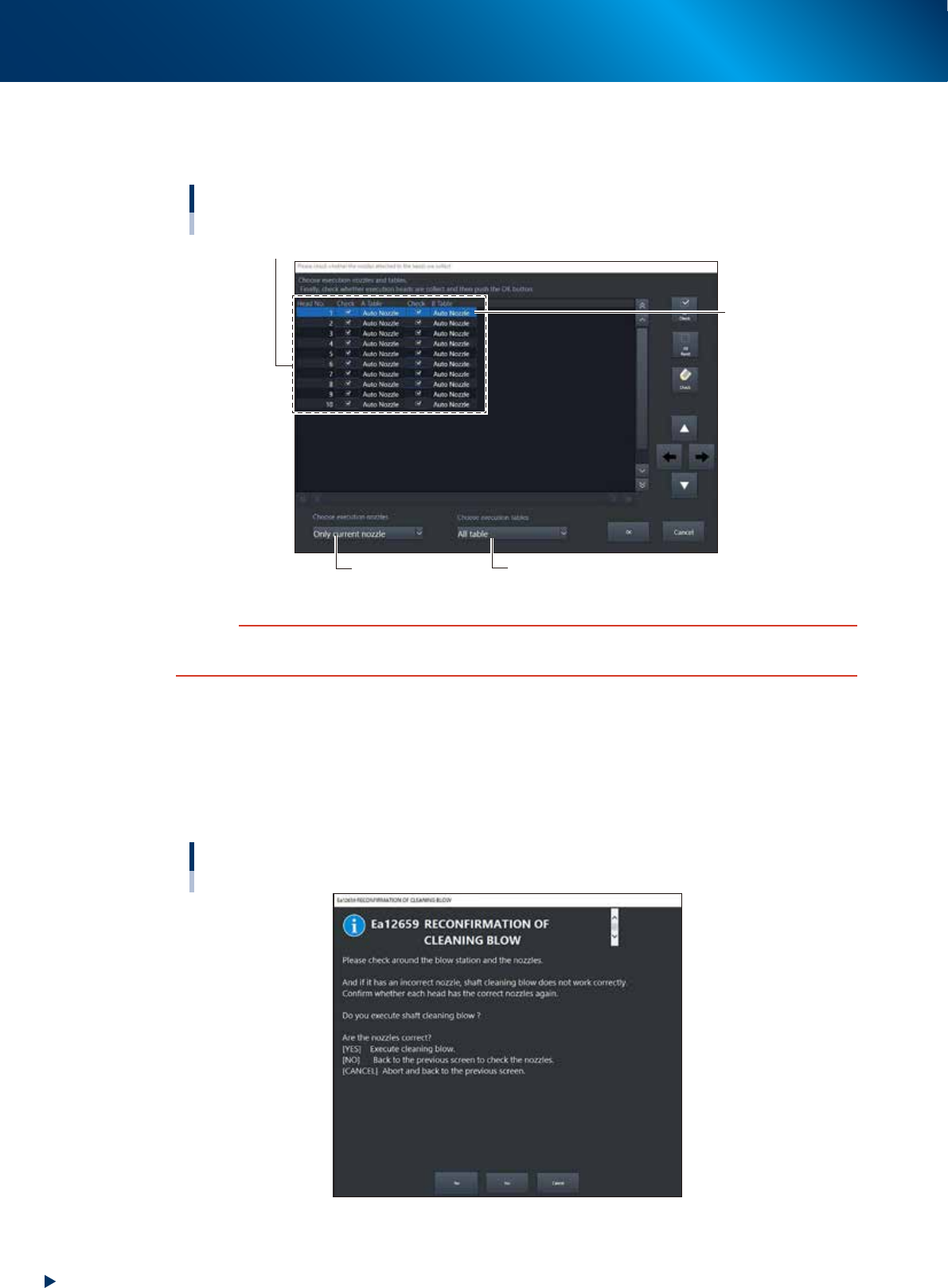
Specify the nozzles you want to clean by nozzle shaft blow.
The "Nozzle Setting" screen will appear. Select the target nozzle and table for the nozzle shaft
cleaning blow. Put a check mark on the nozzles, and then press the [OK] button.
Nozzle Setting screen
With nozzle station
Select the check boxes for the nozzles you want to clean by nozzle shaft blow.
Select the table.Select the target nozzle.
"Auto Nozzle"
should be selected
24104-KMX-00
c
CAUTION
When the nozzle is not subject to the nozzle shaft blow, the nozzle may collide with the air-blow station, causing
breakage. Before starting the nozzle shaft blow, be sure to check that the set nozzles meet the installed nozzles.
4
A confirmation screen appears asking you to make a final check.
Check the contents of the screen and press the corresponding button.
[YES] : Performs nozzle shaft blow of the selected nozzles.
[NO] : Returns to the "Nozzle Setting" screen.
[CANCEL] :
Closes the dialog box and returns to the [Unit]-[Head] screen without performing
nozzle shaft blow.
“RECONFIRMATION OF CLEANING BLOW” screen
24105-KMX-00

3. Head unit
1-27
Chapter 1 Unit names and functions
►
Safety checks
The nozzle shaft blow function also contains the following safety checks.
• Nozzle shaft blow interruption alarm
The head immediately rises if operation stops during nozzle shaft blow due to emergency stop or an
interlock triggering. If the head rises but the air blow still continues, then the nozzle might come
loose from the head. To prevent this, a confirmation dialog box appears if the machine operation
stopped during nozzle shaft blow.
• Nozzle sensors to check whether a nozzle is left on the blow station
The nozzle shaft blow function forces high-pressure air through the nozzles during cleaning, so the
nozzles might come loose from the head if machine operation stops during nozzle blow. If a nozzle
comes loose from the head and remains on the blow station while the automatic operation still
continues, then the nozzle left on the blow station might interfere with other heads or so.
YRM 20 performs the missing nozzle detection by taking image of nozzles with side view cameras.
This check occurs at Z-axis UP completion following a shaft air-blow operation.
If a missing nozzle is detected, an error displays and all axes are stopped.