YRM20_Ope_E.pdf - 第79页
4. Component supply section 1-48 Chapter 1 Unit names and functions Feeder removing conditions : 1. Setting "Skip Retry" 1 Open the "Board" t ab screen. Press the [Board] button a nd select the "…

4. Component supply section
1-47
Chapter 1 Unit names and functions
█
Feeder removing conditions
1. When Setting the "Skip Retry"
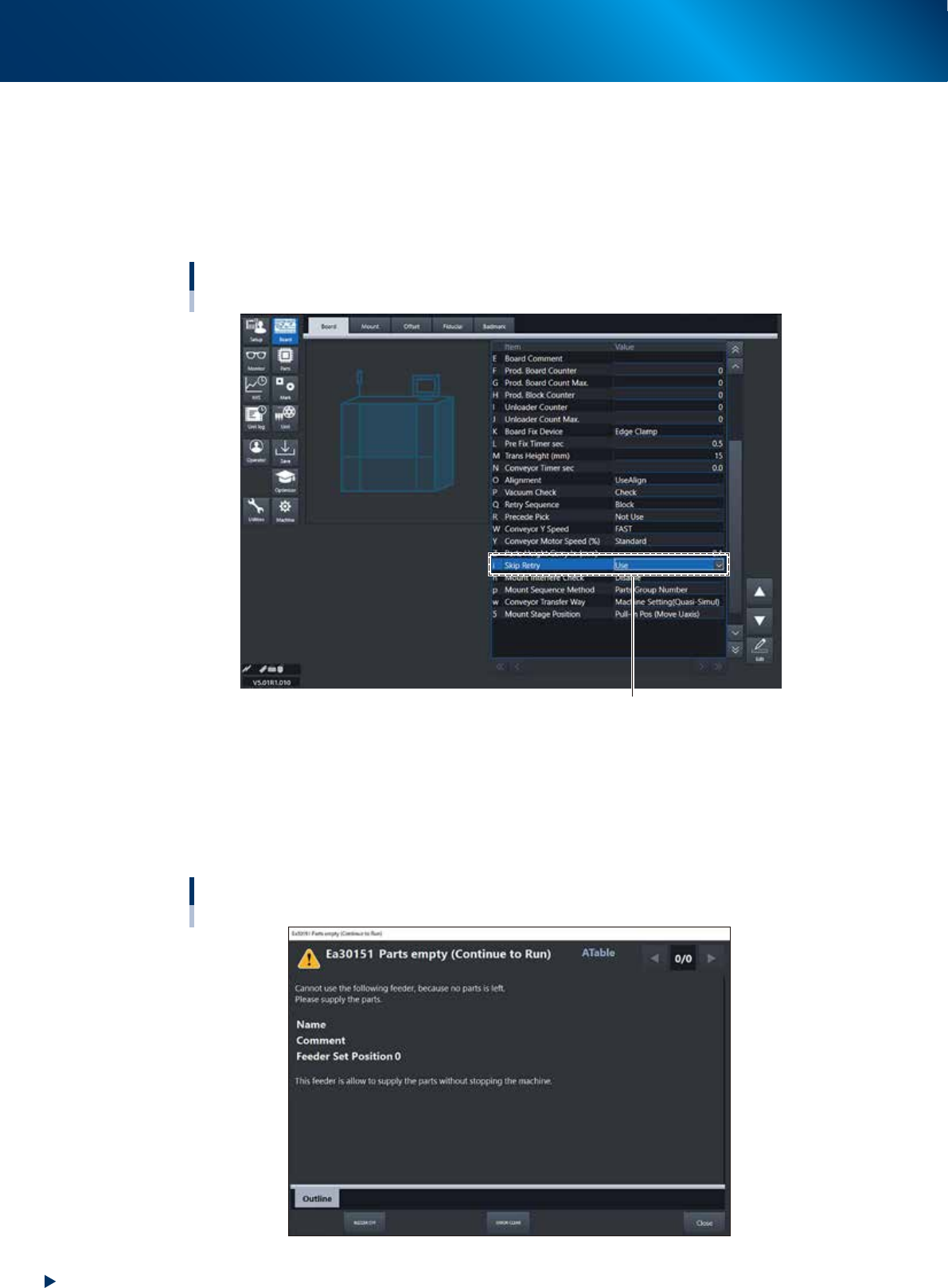
If setting the skip retry, the parts of the feeder occurring the parts run-out will be mounted at the end
and other normal parts will be mounted prior to them. At this time the message "Ea30151 Parts
empty (Continue to Run)" will be displayed on the screen and the corresponding feeder can be
removed. The LED of the removable feeder glows yellow.
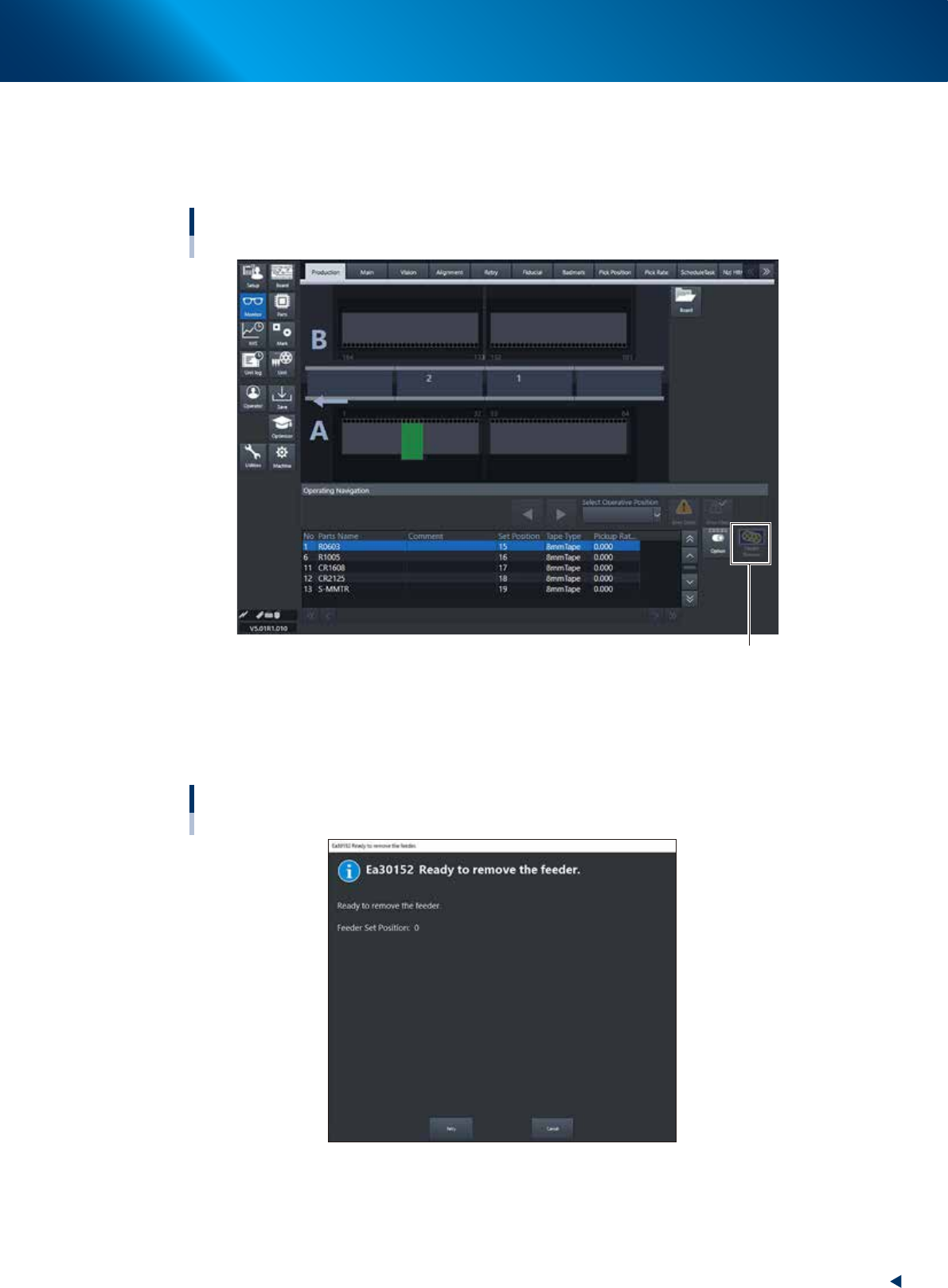
2. When pressing the [Feeder Remove] button
If activating the non-stop feeder change setting, the [Feeder Remove] button will be displayed on the
"Monitor" - "Production" screen. The message "Ea30152 Ready to remove the feeder." will be
displayed by selecting any feeder and pressing the [Feeder Remove] button. Then the feeder will be
removable. Same as the skip retry setting, the selected feeder parts will be mounted at the end and
other normal parts will be mounted prior to them.
n
NOTE
Regarding both cases above, if the parts of the removed feeder are mounted before completing the parts refill, an error
occurs and the machine stops.
3. When setting the alternative component function
If setting the alternative component function, the feeder occurred the parts run-out will be replaced to
the other feeder that the alternative component function is set and it continues to mount. At this time
the message "Ea30151 Parts empty (Continue to Run)" will be displayed on the screen and the
corresponding feeder can be removed. The LED of the removable feeder glows yellow. Additionally,
if refilling components to the removed feeder and setting it to the machine again, the component
supply is changed to the feeder that has been set again.
4. Component supply section
1-48
Chapter 1 Unit names and functions
Feeder removing conditions : 1. Setting "Skip Retry"
1
Open the "Board" tab screen.
Press the [Board] button and select the "Board" tab.
2
Set the "Skip Retry".
Select "Use" from the "i. Skip Retry" drop-down list.
Using skip retry
[Board] - [Board] screen
i : Skip Retry Select” Use”
24110-KMX-00
3
Activate the setting.
The changed setting is activated by saving the board data and reloading it.
■
Operation when skip retry is activated
When running out components, the following message appears. The operation continues.
The LED of ZS feeder that can be detached glows yellow.
Parts empty (Continue to Run) screen
24111-KMX-00
4. Component supply section
1-49
Chapter 1 Unit names and functions
Feeder removing conditions : 2. Pressing [Feeder Remove] button
1
Open [Monitor] - [Production] screen.
Select the feeder to be removed from the bottom of the "Production" screen.
Using [Feeder Remove] button
[Monitor] - [Production] screen
[Feeder Remove] button
24112-KMX-00
2
Press the [Feeder Remove] button.
The message "Ready to remove the feeder" appears.The LED of the feeder that can be detached
glows yellow.
Using [Feeder Remove] button
“Ready to remove the feeder” message
24113-KMX-00