YRM20_Ope_E.pdf - 第152页
4. Preparing component tape 2-55 Chapter 2 Basic o pera tion q Check and a djust the tape supp ort plate posi tion. If the feeder type is 12 m m or wider , it is required to adjust the tape su pport plate according to th…

4. Preparing component tape
2-54
Chapter 2 Basic operation
►
Button operations and corresponding feed pitches
Feeder type Setting Pitch
[FEED], [BACK]
Pressed 1 Time
[FUNC+FEED]
[FUNC+BACK]
Pressed 1 Time
ZS Feeder 4mm All pitches 1mm 1mm
ZS Feeder 8mm
0 2mm
1mm1 1mm
2 and higher 2mm
ZS Feeder 12/16mm, 24mm,
32mm, 44mm, 56mm、72mm,
88mm, 104mm
0
2mm
2mm
2 and higher Setting pitch
TIP
• For handling the feeder of 12 mm or wider, set the components pitch on the power station. Then, press the [FUNC] and
[FEED] buttons or the [FUNC] and [BACK] buttons simultaneously. The feeder feeds the tape by the set pitch. See
Chapter 2, "5. Setting tape feed pitch" in "ZS/ZSR FEEDER User's Manual" for the setting.
• Continuous feed is possible by pressing and holding the "FEED / BACK" button.
• Continuous feed is not possible by pressing and holding the "FUNC + FEED" and "FUNC + BACK" buttons.
• See the “SS Feeder User’s Manual” for setting the feed pitch of SS feeder.
4. Preparing component tape
2-55
Chapter 2 Basic operation
q
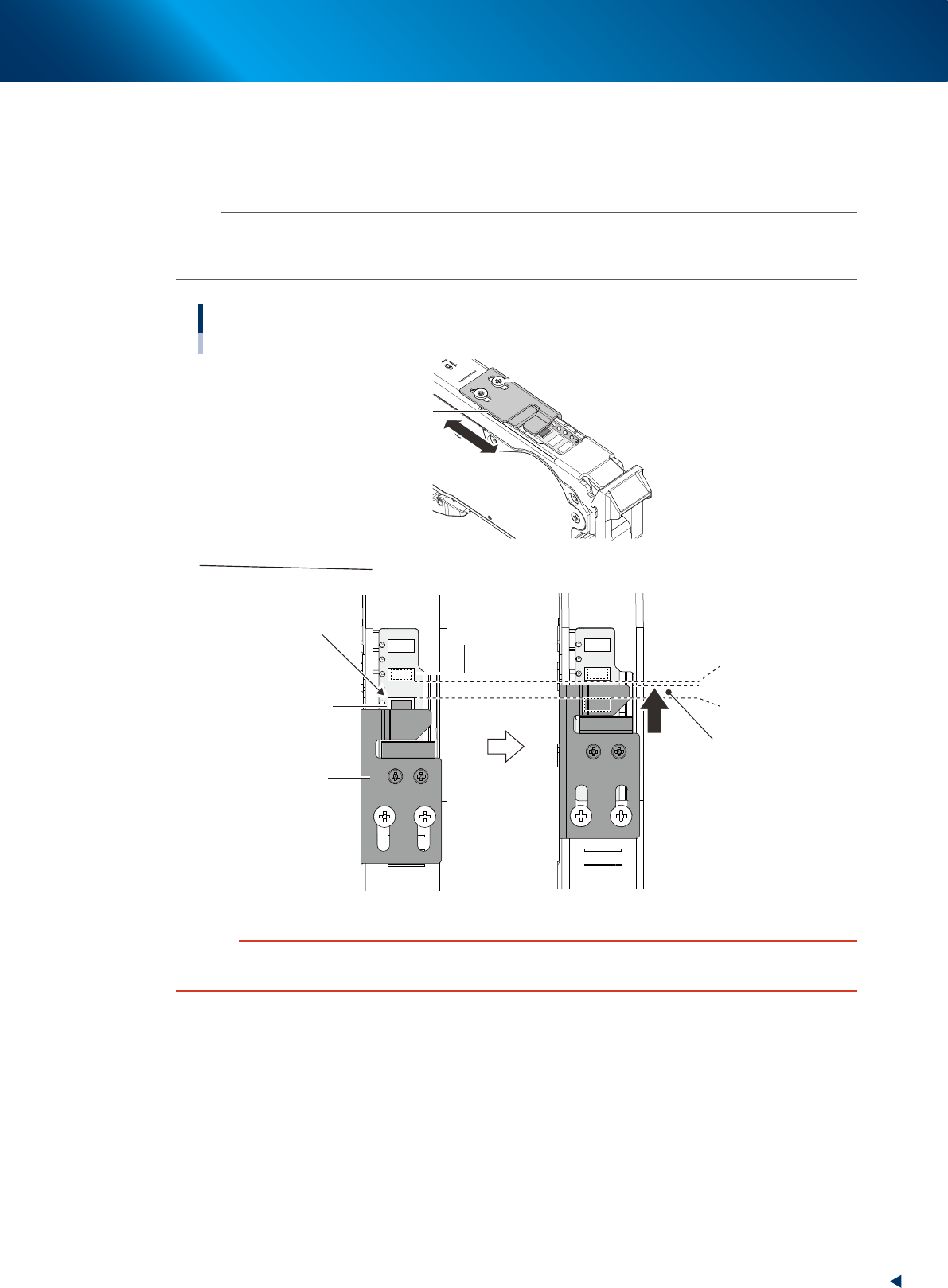
Check and adjust the tape support plate position.
If the feeder type is 12 mm or wider, it is required to adjust the tape support plate according to the
components shape. Adjust the tape support plate position by loosening the 2 adjustment screws with
Phillips screwdriver. Locate the tape support plate between A and B illustrated below (closer to A).
n
NOTE
The cover tape is required to be adjusted upon changing the tape support plate position. When the cover tape shortens,
push the take-up roller lever, as the same procedure of Step 8, and pull out cover tape from take-up roller. When some
slack is on cover tape, remove it.
Adjusting tape support plate position
Not supported appropriately
Pickup pocket
(Component pickup
position)
Standby position pocket
(Component standby position)
A. Front side of
pickup pocket
B. Rear side of
stanby position pocket
Place the leading edge of
tape support plate at rear side
of the center of A and B
Adjusting tape support plate
Slide the tape support plate
Tape support plate
Tape support plate
Adjustment screw
23211-KMX-00
c
CAUTION
If the tape support plate is not adjusted, the components may pop out after removing the cover tape, or its pickup position
may get unstable.
4. Preparing component tape
2-56
Chapter 2 Basic operation
w
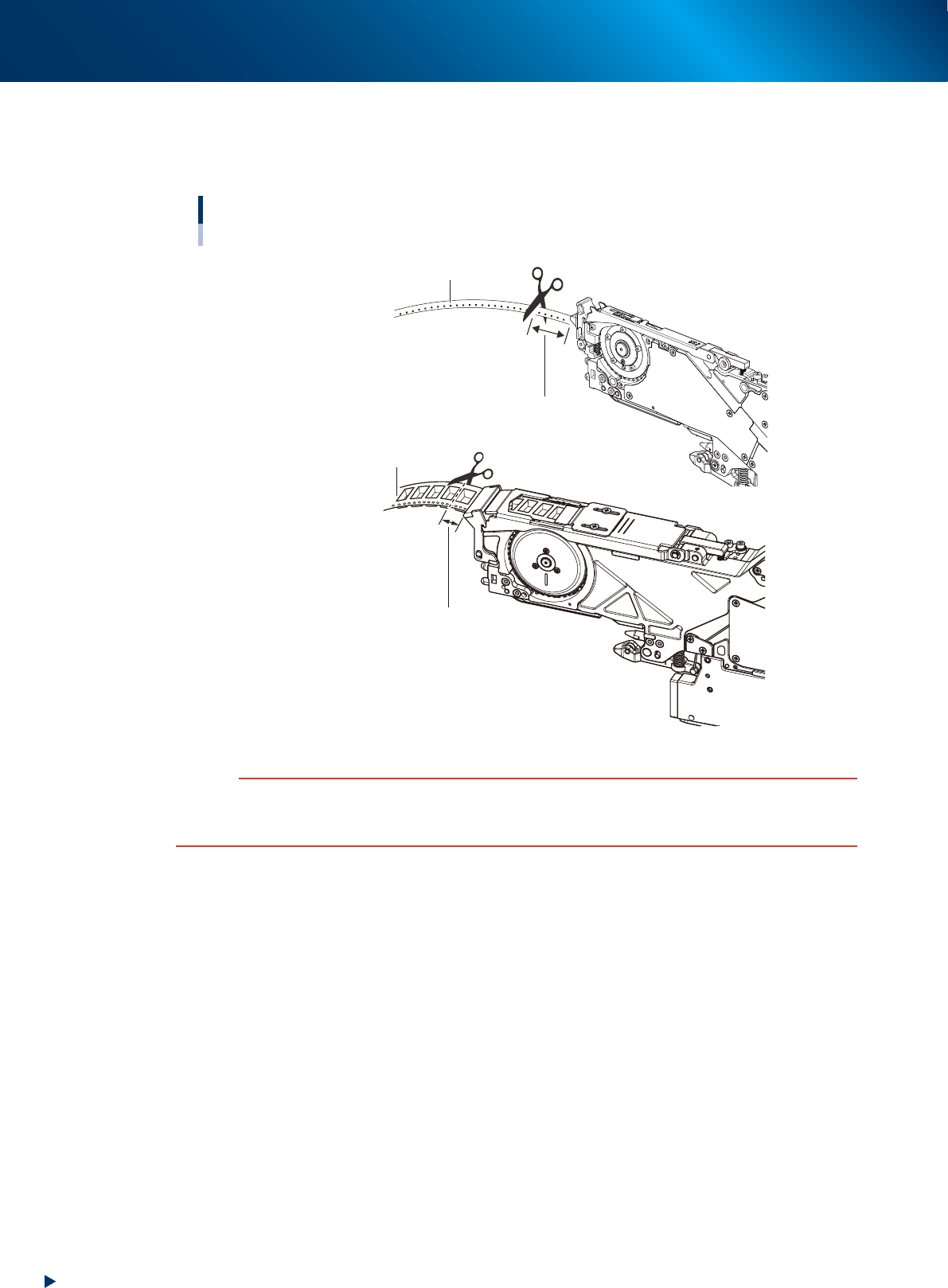
Cut the carrier tape.
Before setting the tape feeder on the machine, feed the tape out until a component is at the pickup
position, then cut the carrier tape about 15 mm from the feeder tip.
Cutting the carrier tape
■ 12 mm or wider feeder
Carrier tape
Cut straight the carrier tape
at about 15 mm from the feeder tip.
Cut straight the carrier tape
at about 15 mm from the feeder tip.
Carrier tape
■ 8 mm feeder
23212-KMX-00
c
CAUTION
If using the carrier tape without cutting the excess component, it could block the path way for discharging the tape.
Cutting a hard emboss tape too short causes the carrier tape to touch at the machine slope entrance, then the feeding
trouble may occur.