YRM20_Ope_E.pdf - 第150页
4. Preparing component tape 2-53 Chapter 2 Basic o pera tion 0 Align the firs t componen t with th e standb y positio n. If pressing the [F EED] button an d the [BACK] button on the feeder , the t ape can be transferred …
4. Preparing component tape
2-52
Chapter 2 Basic operation
9
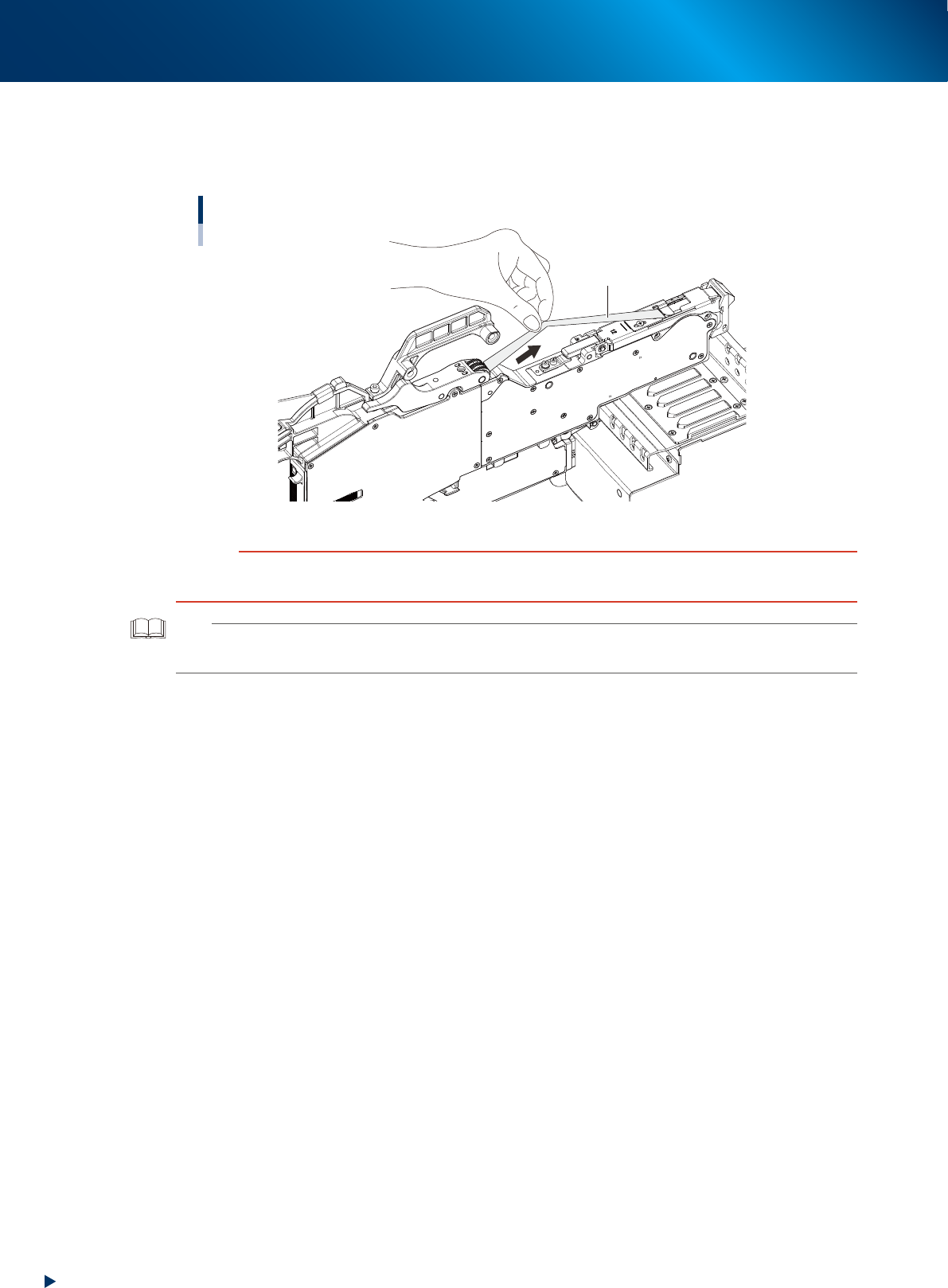
Reel the cover tape to take up the slack.
Pull the cover tape lightly to the arrowed direction and the take-up roller rotates to take up the slack
automatically.
Taking up the slack of the cover tape
Cover tape
23209-KMX-00
c
CAUTION
Take up the cover tape until all slacks on the cover tape removed.
During this operation, be careful not to be winded your fingers in the roller unit while taking up the cover tape.
TIP
The take-up roller performs taking up motion upon turning on the feeder.
Also, the taking up cover tape can be performed by reattaching the feeder after detaching from temporary tape set station.
4. Preparing component tape
2-53
Chapter 2 Basic operation
0
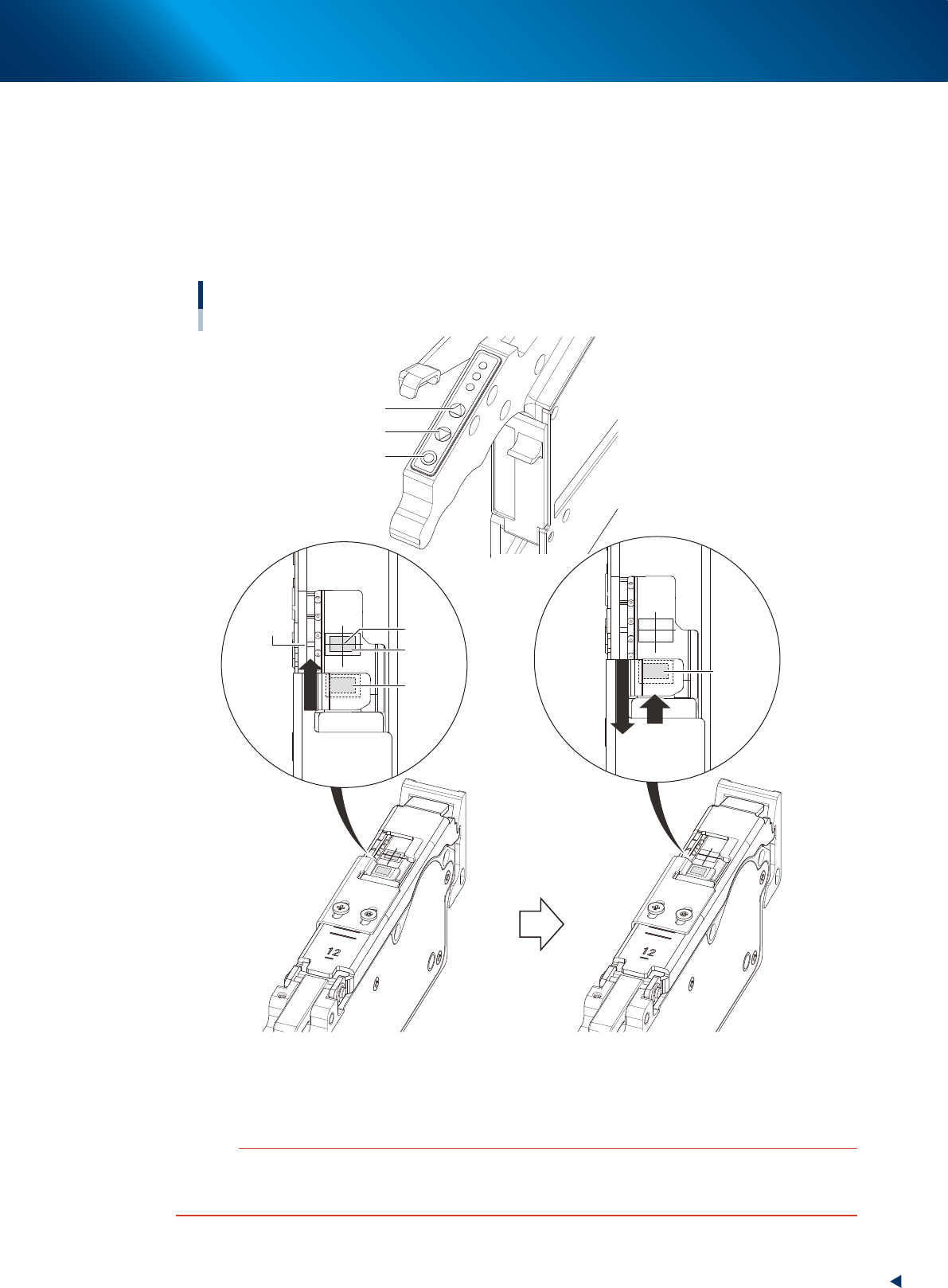
Align the first component with the standby position.
If pressing the [FEED] button and the [BACK] button on the feeder, the tape can be transferred or
returned with the pitch setting corresponding to the feeder type.
1. Press the [FEED] button and transfer the tape temporary to locate the first component on the
pickup position (spot: white mark or notch).
2. After pressing the component pitch and the [BACK] button once to return the component, press
the [FEED] button once and align the first component with the standby position.
Adjusting component position
[FUNC] button
[BACK] button
[FEED] button
Pickup
position
Marking
First
component
Standby
position
First
component
(Standby
position)
Press the [FEED] button to feed the
component to the pickup position.
Press the component pitch and the [BACK] button
once to return the component. Then press the [FEED]
button once and align the first component with the
standby position.
23210-KMX-00
c
CAUTION
Make sure to align the component with the standby position by the [FEED] button. Press the [BACK] button twice or more to
return the component. Then press the [FEED] button to align the component with the standby position. If aligning the
standby position by the [BACK] button, the pickup position offset of the fist component may occur.

4. Preparing component tape
2-54
Chapter 2 Basic operation
►
Button operations and corresponding feed pitches
Feeder type Setting Pitch
[FEED], [BACK]
Pressed 1 Time
[FUNC+FEED]
[FUNC+BACK]
Pressed 1 Time
ZS Feeder 4mm All pitches 1mm 1mm
ZS Feeder 8mm
0 2mm
1mm1 1mm
2 and higher 2mm
ZS Feeder 12/16mm, 24mm,
32mm, 44mm, 56mm、72mm,
88mm, 104mm
0
2mm
2mm
2 and higher Setting pitch
TIP
• For handling the feeder of 12 mm or wider, set the components pitch on the power station. Then, press the [FUNC] and
[FEED] buttons or the [FUNC] and [BACK] buttons simultaneously. The feeder feeds the tape by the set pitch. See
Chapter 2, "5. Setting tape feed pitch" in "ZS/ZSR FEEDER User's Manual" for the setting.
• Continuous feed is possible by pressing and holding the "FEED / BACK" button.
• Continuous feed is not possible by pressing and holding the "FUNC + FEED" and "FUNC + BACK" buttons.
• See the “SS Feeder User’s Manual” for setting the feed pitch of SS feeder.