YRM20_Ope_E.pdf - 第210页
1. Flow from starting up machine to production 3-30 Chapter 3 Flow from starting up machine to production 1.12 Resuming operation from the stopped point If resuming to mount a board that has been reset due to an error oc…

1. Flow from starting up machine to production
3-29
Chapter 3 Flow from starting up machine to production
e
6
Press the emergency stop button.
When the emergency stop screen appears, press the emergency stop button and then press the [OK]
button. By pressing the emergency stop button, the application starts power shutdown process.
7
Turn off the main switch of the machine.
When completing the power shutdown process, a message “NO SIGNAL” appears on the screen.
When confirming the message, turn the main switch to left at the lower right of the main machine to
shut it down.
c
CAUTION
• Do not turn off the main switch unnecessarily while ignoring the set procedure. Otherwise, destruction of data or
damage to devices could occur.
• Do not turn on the main switch immediately after turning it off. Otherwise, such an operation could lead to damage
to the control board. Be sure to wait for 2 seconds or so after powering off the machine before turning it on again.
1. Flow from starting up machine to production
3-30
Chapter 3 Flow from starting up machine to production
1.12 Resuming operation from the stopped point
If resuming to mount a board that has been reset due to an error occurrence in the middle of production or
mounting the components on a particular block or at a particular mounting point, use this “Halfway
Continue (Resuming operation from the stopped point)” function. Note that this function can be used just
for the first board after the operation is resumed, with routine mounting operation beginning from the next
board.
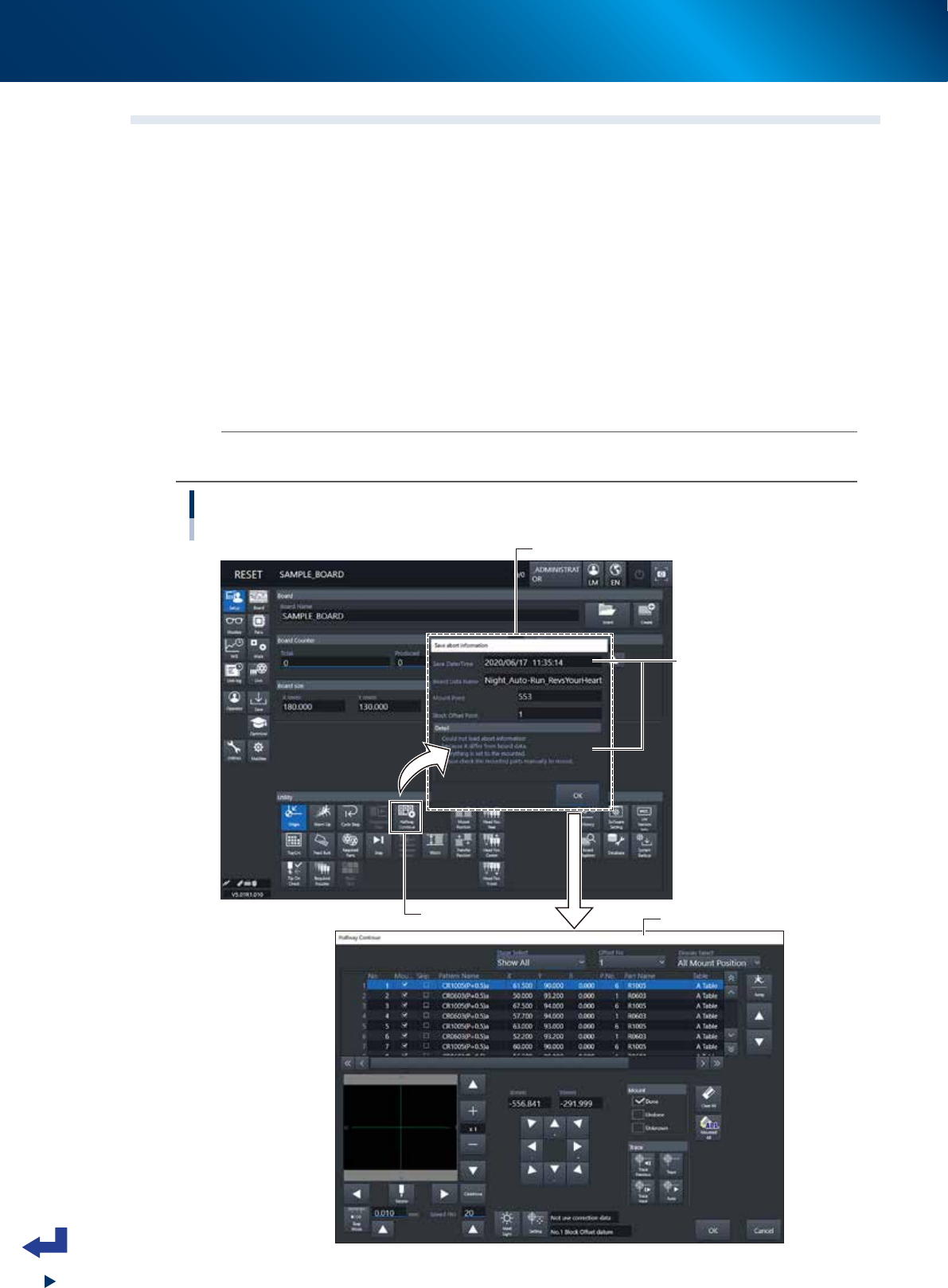
1
Press the [Halfway Continue] button.
Press the [Halfway Continue] button on the “Setup” screen, then the “Save abort information” screen
appears.
2
Read out the aborted information that has been saved.
After confirming the “Save Date/Time” and other details on the “Save abort information” screen,
press the [OK] button to open the “CONFIRMATION OF BOARD FIX” screen and then open the
“Halfway Continue” screen.
n
NOTE
When system error occurred and machine stopped due to power outage, the error message "Check the inside of machine" may
appear in addition to “CONFIRMATION OF BOARD FIX” screen. In this case, follow the message and check machine inside.
Halfway Continue
[Setup] screen -"Halfway Continue" screen
[Halfway Continue] button
“Save abort information” screen
“Halfway Continue” screen
Check the aborted time
and details.
24320-KMX-00
1. Flow from starting up machine to production
3-31
Chapter 3 Flow from starting up machine to production
3
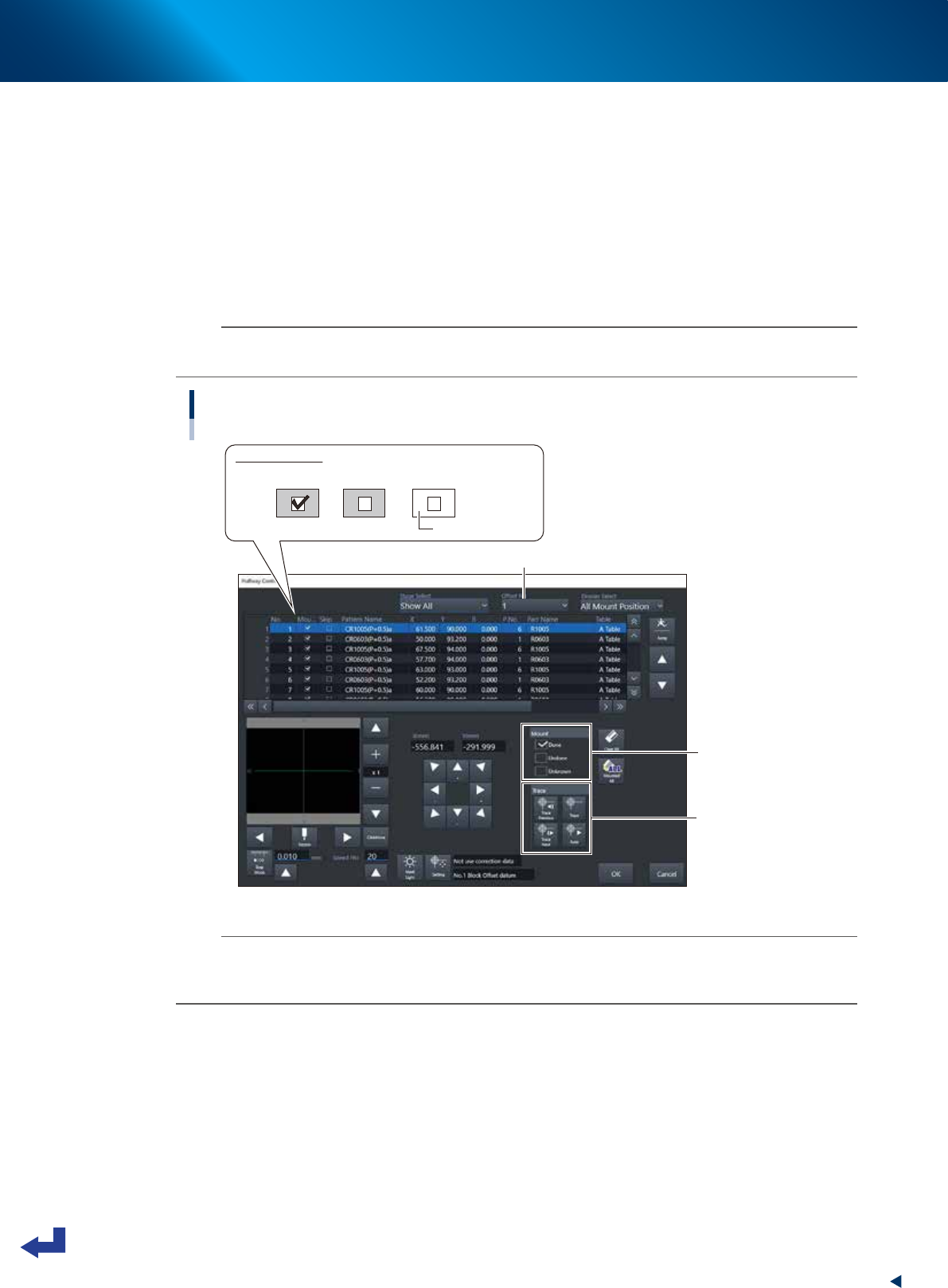
Check and edit the state of mounting.
Check the state of component mounting of the aborted information. For instance, if the machine has
stopped due to an error after a head picked up a component, the mounting information column
indicates “Unknown”.
After selecting the mounting points to be checked, press the [Trace] button to move the head unit
(camera) to the actual mounting position. While checking each of the mounting points on the board
with the camera, pressing the [Mount] check button changes the setting of the selected mounting
status.
After changing all the "Unknown” positions to “Done” or “Undone”, press the [OK] button to exit the
screen.
n
NOTE
Pressing the [OK] button while an “Unknown” mounting point still remains, an error message appears. The “Halfway
Continue” screen cannot be closed.
Editing on “Halfway Continue” screen
"Halfway Continue" screen
[Mount] check button
[Trace] button
Mounted status
Done Undone Unknown
Background: Yellow
Select “Offset No.”
24321-KMX-00
n
NOTE
When using the block offset function for a multi-board, for instance, selecting the “Offset No.” enables to edit the state of
components mounting per block. However, the editing on the “Halfway Continue” screen is available only when mounting
the first board.
4
Resume the automatic operation.
Press the [START] button to resume the automatic operation. The machine starts mounting the
components at the mounting points set to “Undone” of the first board after resumption.