YSP_Users_E.pdf - 第125页
4-22 4 Creating and setting the data l Relation between rolling stroke and over stroke If the rolling stroke is set vary small and the o ver stroke is set very large, the squeegee will land onto the solder . Set the roll…
4-21
4
Creating and setting the data
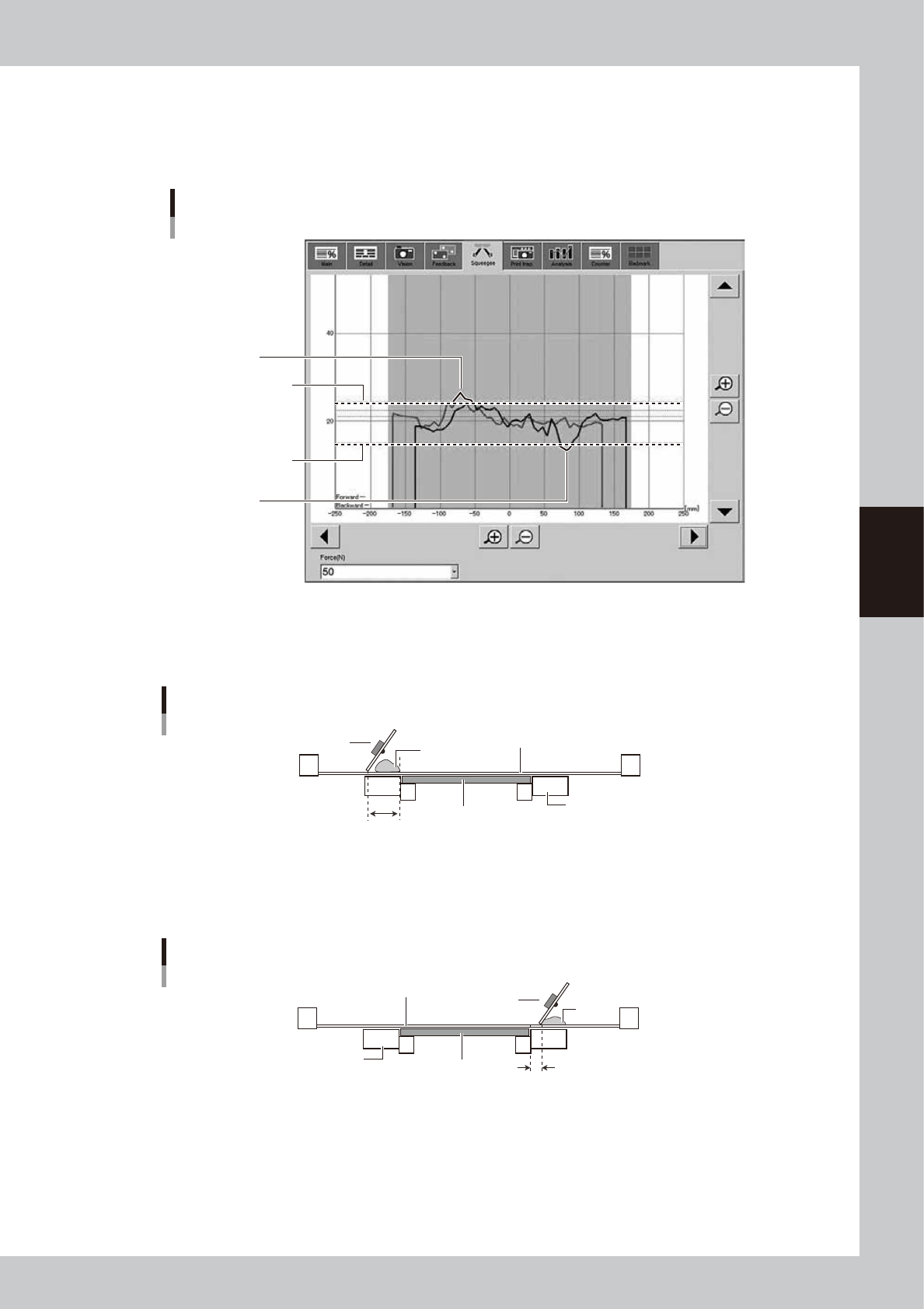
m,n: Squeegee Pressure Uooer Range(N), Squeegee Pressure Lower Range(N)
Set the upper and lower range for the print pressure as the offset of the squeegee pressure.
Yellow parts of the line in the graph below show the period when the pressure is out of range.
Setting “0.000” deactivates monitoring the pressure.
Squeegee Pressure Upper Range and Lower Range
Squeegee Pressure
Upper Range
Squeegee Pressure
Lower Range
When the value exceeds
the upper range
When the value exceeds
the lower range
64454-L3-00
K: Rolling Stroke (mm)
Specify the distance (millimeters) from the position at which the squeegee lands on the mask to the edge of the board.
Usually set to 40 to 45mm.
Rolling stroke
Squeegee
Solder
Mask surface
Conveyor
Board
Rolling stroke
63414-L3-10
L: Over Stroke (mm)
Specify the distance (millimeters) from the other edge of the board to the position at which the squeegee takes off the
mask after printing solder. Usually set to 5 to 10mm.
Over stroke
Solder
Board
Conveyor
Mask surface
Over stroke
Squeegee
63415-L3-10
4-22
4
Creating and setting the data
l
Relation between rolling stroke and over stroke
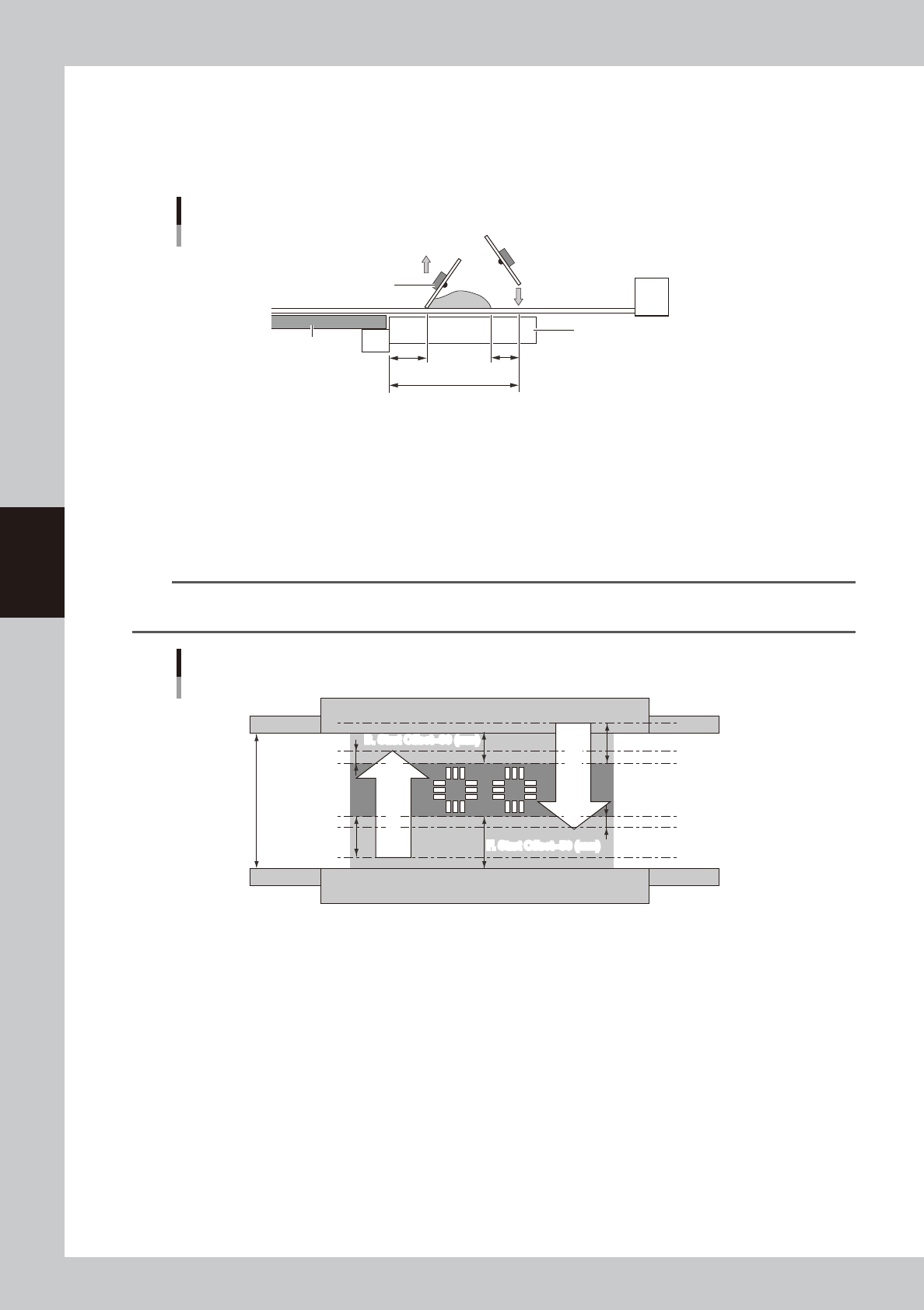
If the rolling stroke is set vary small and the over stroke is set very large, the squeegee will land onto the solder. Set the
rolling stroke to a distance of "over-stroke + solder width + margin (+
α
)" as
shown below. If either of the rolling stroke or
over stroke distances exceeds 50mm, the squeegee goes away from the conveyor, and so the printing pressure may
become abnormal.
Relation between rolling stroke and over stroke
+α
Board
Conveyor
Rolling stroke
Squeegee
Over stroke
Squeegee moves
down at rolling
stroke start position.
63427-L3-00
M: F. Start Offset (Forward movement start offset)
This parameter sets how far to print (or that amount of offset) inwards on the board from the closer edge of the board (or
lower edge in drawing below).
N: B. Start Offset (Backward movement start offset)
This parameter sets how far to print (or that amount of offset) inwards on the board from the farther edge of the board (or
upper edge in drawing below).
n
NOTE
The print range of the squeegee is basically a reference position determined by the F. Start Offset and B. Start Offset
parameters. You can use this print range to set the "Rolling Stroke" and "Over Stroke" parameters.
Squeegee print range
Board size Y=130 (mm)
Over Stroke=10 (mm)
B. Start Offset=30 (mm)
F. Start Offset=50 (mm)
B. Start Offset=30 (mm)
F. Start Offset=50 (mm)
Rolling Stroke=40 (mm)
Rolling Stroke=40 (mm)
Over Stroke=10 (mm)
Forward printing
Return printing
Forward printing
Return printing
63416-L3-00
As shown in the drawing above, let's consider cases where you print in the dark shaded area 50 mm from the closer edge
(lower edge in drawing) and 30 mm from the farther side of a board whose Y size is 130mm.
When the rolling stroke is made 40 mm and the "Over Stroke" 10 mm as a distance for good solder paste uniformity, the
print movement range of the squeegee during forward and return printing is the section shown by the arrows in the
drawing. The parameter settings will then be as follows.
Rolling Stroke (mm) 40.000
Over Stroke (mm) 10.000
S. Start Offset (mm) 50.000
B. Start Offset (mm) 30.000
O: F. & B. Mask Offset
Select whether to apply the same manual alignment offset for the forward and backward printing. When this parameter is
set to "Same Offset", the forward and backward printing operations are performed under the conditions specified for the
"F. Mask Offset X, Y, Z, R", and the settings for the "B. Mask Offset X, Y, Z, R " are disabled.

4-23
4
Creating and setting the data
P: F. Mask Offset X (mm)
When printing in the forward direction (from the front side to the inner side), the mask surface may stretch in the
advancing direction, causing an X-direction shift versus the land patterns. To correct this positional shift, enter an offset
value here.
If shifted in the plus direction : Enter a plus offset value.
If shifted in the minus direction : Enter a minus offset value.
Q: F. Mask Offset Y (mm)
When printing in the forward direction (from the front side to the inner side), the mask surface may stretch in the
advancing direction, causing a Y-direction shift versus the land patterns. To correct this positional shift, enter an offset
value here.
If shifted in the plus direction : Enter a plus offset value.
If shifted in the minus direction : Enter a minus offset value.
R: F. Mask Offset Z (mm)
When printing in the forward direction (from the front side to the inner side), the mask surface may stretch in the Z
direction. Enter this offset here. Leave this parameter set to "0.000" in most cases.
S: F. Mask Offset R (deg)
When printing in the forward direction (from the front side to the inner side), the mask surface may stretch in the
advancing direction, causing a R-direction shift versus the land patterns. To correct this positional shift, enter an offset
value here.
If shifted counterclockwise : Enter a plus offset value.
If shifted clockwise : Enter a minus offset value.
T: B. Mask Offset X (mm)
When printing in the backward direction (from the inner side to the front), the mask surface may stretch in the advancing
direction, causing a X-direction shift versus the land patterns. To correct this positional shift, enter an offset value here.
This parameter is disabled when the "F. & B. Mask Offset" is set to "Same Offset".
If shifted in the plus direction : Enter a plus offset value.
If shifted in the minus direction : Enter a minus offset value.
U: B. Mask Offset Y (mm)
When printing in the backward direction (from the inner side to the front), the mask surface may stretch in the advancing
direction, causing a Y-direction shift versus the land patterns. To correct this positional shift, enter an offset value here.
This parameter is disabled when the "F. & B. Mask Offset" is set to "Same Offset".
If shifted in the plus direction : Enter a plus offset value.
If shifted in the minus direction : Enter a minus offset value.
V: B. Mask Offset Z (mm)
When printing in the backward direction (from the inner side to the front), the mask surface may stretch in the Z
direction. Enter this offset here. Leave this parameter set to "0.000" in most cases. This parameter is disabled when the "F.
& B. Mask Offset" is set to "Same Offset".
W: B. Mask Offset R (deg)
When printing in the backward direction (from the inner side to the front), the mask surface may stretch in the advancing
direction, causing an R-direction shift versus the land patterns. To correct this positional shift, enter an offset value here.
This parameter is disabled when the "F. & B. Mask Offset" is set to "Same Offset".
If shifted counterclockwise : Enter a plus offset value.
If shifted clockwise : Enter a minus offset value.
X: Escape Position
This is the escape position where the squeegee head moves back from the solder printing area so that you can make
setups on the mask or conveyor table such as for supplying solder or changing the conveyor unit setups. Set to "Standard
Position" in most cases. If you specify another position, select "Defined Position" and set the SY and SZ coordinates for
the "Escape Position SY and SZ" parameters.
Y, Z: Escape Position SY, SZ
If you want to specify the escape position where the squeegee head moves back from the solder printing area, enter the
desired SY and SZ (height) coordinates. Settings here will be valid only when the "Escape Position" parameter is set to
"Defined Position".