YSP_Users_E.pdf - 第273页
E-11 Printing guide 3.6.2 Board separation distance n Function T his parameter sets a movement distance during the board separation oper ation. n Setting range and initial value T his parameter can be set in a range of 0…
E-10
Printing guide
About attack angle
The attach angle is normally used with its initial value except for special cases (examples described below).
•
If the viscosity is high and low, the attack angle needs to be increased and decreased, respectively as corrective
measures against the solder viscosity trouble.
•
The filling volume needs to be adjusted when printing at a high speed.
•
The filling volume needs to be finely adjusted for the metal squeegee.
•
If the filling pressure is needed, the attack angle is decreased to increase the filling pressure level.
3.5 Solder supply interval
n
Function
This parameter sets how many boards are printed by one solder supply operation.
n
Setting range and initial value
This parameter can be set in a range of 0 to 9999 boards.
The initial value is 50 boards.
n
Setting procedures
The number of boards to be input is determined from the ratio of solder consumption per board (gram) to solder supply
volume.
Normally, enter the number of boards that may consume 10 to 20% of the solder supply volume.
Example:
Assuming that the solder consumption per board is 1g and the solder supply volume is 100g, enter 10 to 20 boards that
consume 10 to 20 g of solder in the [Solder Supply Interval] field.
3.6 Detach pattern
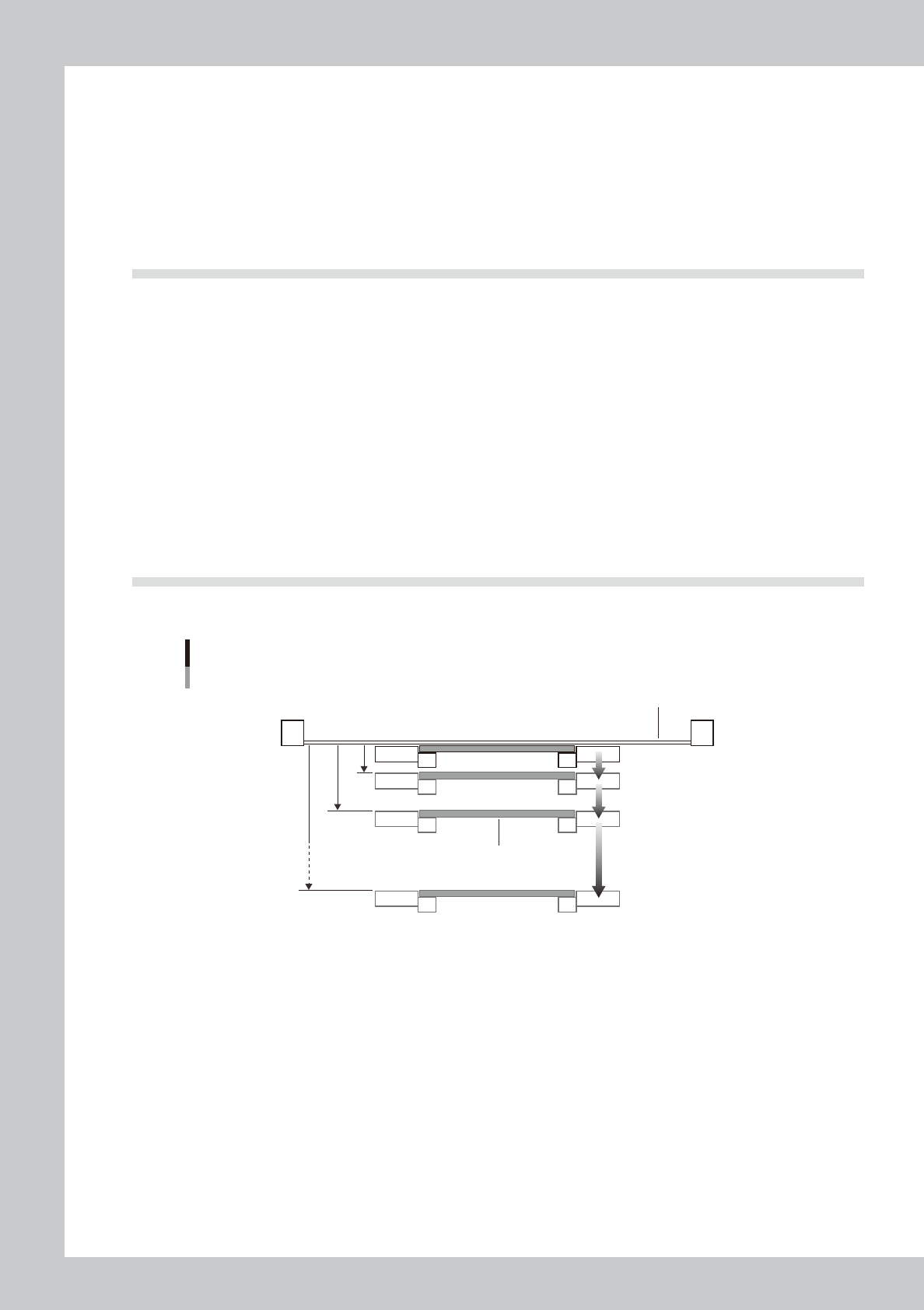
On the [Print] – [Squeegee] tab, press the [Detail Setting] and set the parameters on the [Detach Pattern] tab.
Board separation setting
Board
Mask
Distance from printing
height (0.01mm steps)
[0.01∼7.00mm]
Board separation speed
(0.01mm/s steps)
[0.01∼20.0mm/s]
63E05-L3-00
3.6.1 Board separation speed
n
Function
This parameter sets a speed during the board separation.
n
Setting range and initial value
This parameter can be set in a range of 0.001 to 20.000mm/sec.
The initial value is 3.000mm/sec.
n
Setting procedures
Set this parameter while carefully checking the solder shape and the solder remaining at the mask apertures during the
printing.
If this speed is too fast, solder may remain at the mask apertures. Conversely, if this speed is too slow, a solder
entanglement or spread may occur in the printed solder.

E-11
Printing guide
3.6.2 Board separation distance
n
Function
This parameter sets a movement distance during the board separation operation.
n
Setting range and initial value
This parameter can be set in a range of 0.001 to 7.000mm.
The initial value is 2.000mm.
n
Setting procedures
Set this parameter by taking the mask thickness and/or warpage into consideration.
If this distance is too long, the tact becomes slow. Conversely, if the distance is too short, a trouble occurs, such as
board sticking to or removing from the backside of the mask.
3.7 Cleaning
3.7.1 Cleaning interval
n
Function
This parameter determines a cleaning interval.
n
Setting range and initial value
This parameter can be set in a range of 0 to 9999 boards. When this parameter is set at “0”, the cleaning is not operated.
The initial value is 10 boards.
It is also possible to combine the dry cleaning with the wet cleaning.
n
Setting procedures
If this cleaning interval is too long, solder spread or solder bridge occurs. If the cleaning interval is too short, this may
adversely affect the tact.
n
NOTE
You can also perform the cleaning with the time interval control (1 to 9999 min.) setting on the [Cleaner] tab screen.
Additionally, you can also use a combination of the board count control and the time interval control for the cleaning
operation.
3.7.2 Cleaning repeat
n
Function
This parameter determines the number of cleaning reciprocating cycles per cleaning operation.
n
Setting range and initial value
This parameter can be set in a range of 1 to 9 cycles.
The initial value is 1 cycle.
n
Setting procedures
Increase the number of repetition cycles if you want to further clean the backside of the mask.
3.7.3 Cleaning speed
n
Function
This parameter sets a speed at which the cleaner wipes away solder adhering to the backside of the mask.
n
Setting range and initial value
This parameter can be set in a range of 1 to 225mm/sec.
The initial value is 22mm/sec.
n
Setting procedures
If this speed is too fast, the solder at the mask apertures cannot be wiped away. Conversely, if this speed is too slow, this
may adversely affect the tact.
To further clean the mask apertures, slow down the speed.
E-12
Printing guide
4.
Causes of troubles predicted from symptoms (Appendix)
The following describes the relationship between the print trouble symptom and the conditions that may be
the cause of the trouble.
4.1 Positional deviation
n
Edge clamp pressure setting
• The board deviates after completion of the recognition since the edge clamp set pressure is weak.
• The board is recognized in the warpage status since the edge clamp set pressure is strong.
n
Incorrect mark position coordinates
The position is not corrected precisely since proper numeric values are not input to the mark position coordinates.
n
Alignment offsets X, Y, and R
If a variation in deviation by board is large, all variations in deviation cannot be corrected by set offset values.
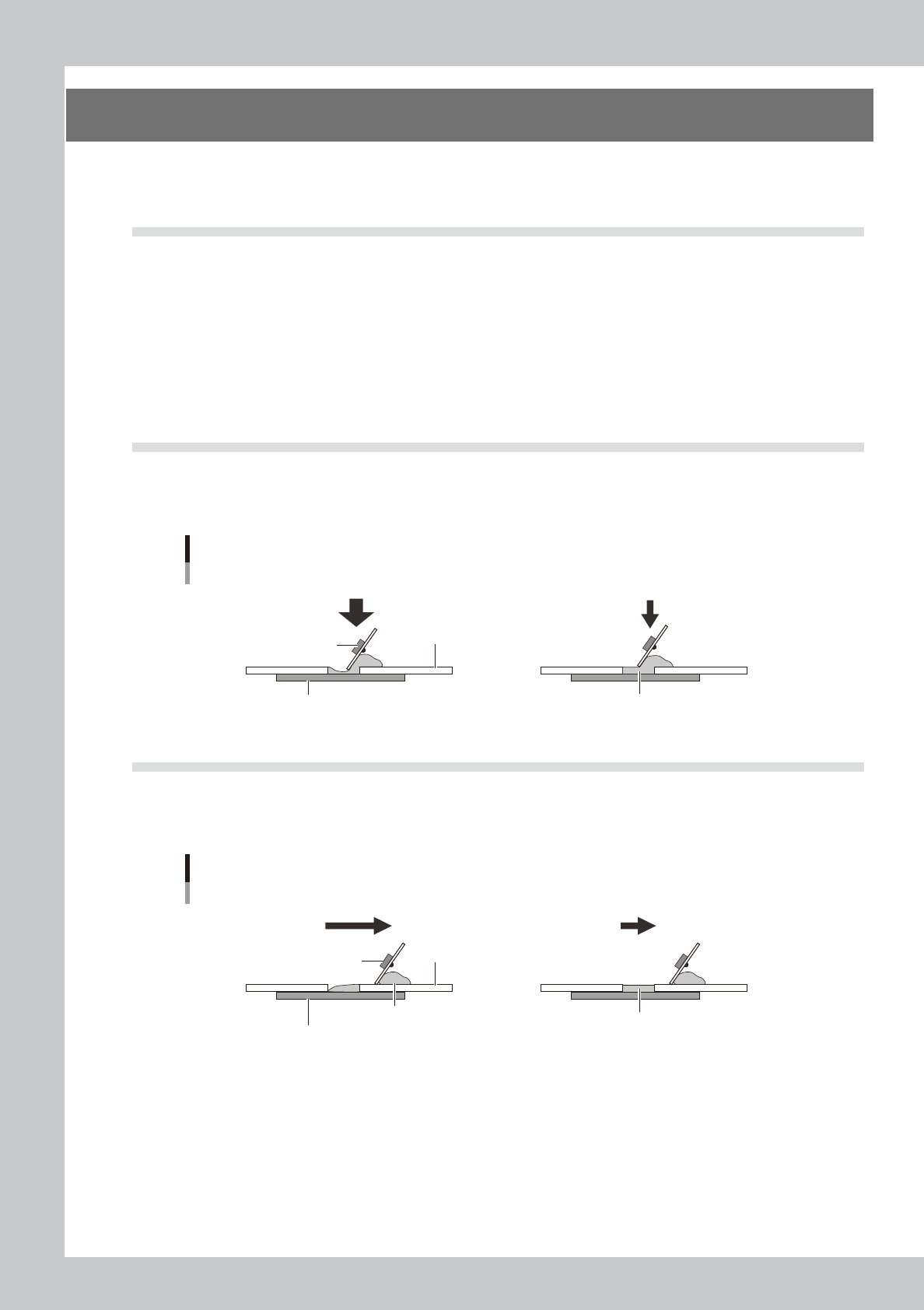
4.2 Blur
n
Squeegee pressure (For urethane squeegee)
The squeegee pressure level is too high to the set squeegee speed and attack angle.
Squeegee pressure
OK
NG
Board
Mask
Squeegee
Excessively high pressure
Solder
Appropriate pressure
63E02-L3-00
4.3 Insufficient filling
n
Squeegee speed
The mask apertures are not sufficiently filled with solder since the squeegee speed is fast.
Squeegee speed
OKNG
Solder
Board
Mask
Squeegee
Excessively high speed
Solder
Appropriate speed
63E01-L3-00