YSP_Users_E.pdf - 第209页
Chapter 7 Replacing the consumable par ts T his chapter explains how to replace the consumable parts such as cleaning gauze rolls. Before beginning w ork, be sure to read "1. Precautions" in this chapter and fo…
6-24
6
Other functions
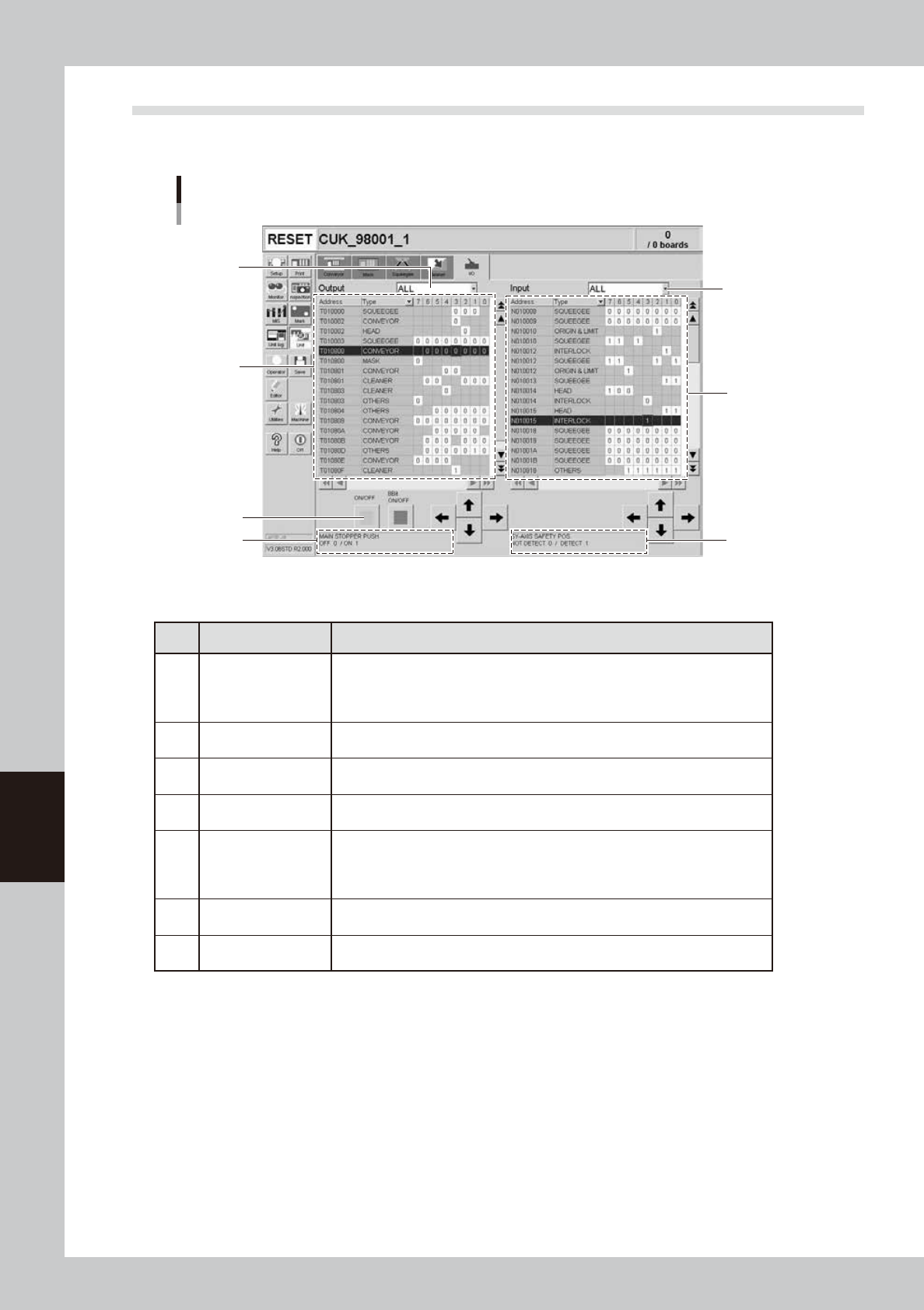
4.6 [Unit] - [I/O] tab screen
The [Unit] - [I/O] tab screen allows you to check the I/O signal status and switch each output signal on or off.
How to read this [I/O] tab screen is described below.
[Unit] - [I/O] tab screen
3
1
7
5
2
6
4
64623-L3-00
n
Items/Operation buttons
Item/button name Function
1 Output signal status
The status of each digital output signal is expressed in binary digits (1 and 0).
Each signal is identified by a code name consisting of an alphabet letter and
numbers such as "T00275". To select each signal, click on it in the grid or click
the up/down and right/left arrow buttons to move the cursor there.
2
Output signal
description box
Shows the name of the currently selected output signal and a description of what
"0" and "1" mean.
3
Unit selection
drop-down list
Select a unit from this drop-down list whose output signal status you want to
display.
4 ON/OFF
Clicking this button turns the currently selected signal on or off. (The [8bit ON/
OFF] button is not currently used.)
5 Input signal status
The status of each digital input signal is expressed in binary digits (1 and 0).
Each signal is identified by a code name consisting of an alphabet letter and
numbers such as "N005E0". To select each signal, click on it in the grid or click
the up/down and right/left arrow buttons to move the cursor there.
6
Input signal
description box
Shows the name of the currently selected input signal and a description of what
"0" and "1" mean.
7
Unit selection
drop-down list
Select a unit from this drop-down list whose input signal status you want to
display.

Chapter 7 Replacing the consumable parts
This chapter explains how to replace the consumable parts such as cleaning gauze rolls. Before beginning work, be sure to
read "1. Precautions" in this chapter and follow the instructions.
Contents
1. Precautions 7-1
2. Replacing the squeegee 7-2
2.1 Replacing the unit 7-2
2.2.1 Metal squeegee scraper 7-3
2.2.2 Urethane squeegee scraper 7-4
3. Replacing the cleaning gauze roll 7-6
3.1 Using the same roll size 7-7
3.2 Changing the roll size 7-8
4. Refilling the cleaning solvent 7-10
4.1 Precautions when handling cleaning solvent 7-10
4.2 Refilling the cleaning solvent 7-10
4.3 Long-term storage tasks 7-12
5. Suction-blower unit 7-13
5.1 Replacing the filter 7-13
5.2 Replacing the blower hose 7-14
5.3
Cleaning and replacing the filter for the mask vacuum chuck
7-16
6. Replacing the conveyor belt 7-17
6.1 Board carry-in and carry-out conveyors 7-17
6.2 Board clamp unit (board clamp table) 7-20

7-1
7
Replacing the consumable parts
1. Precautions
Be sure to observe the following precautions when replacing consumable parts.
• Parts replacement must be performed by or under the direction of person who has received training from YAMAHA or a
YAMAHA sales representative.
• Always turn off the power to the machine before replacing consumable parts.
• Be careful not to allow any foreign matter to penetrate inside the machine during parts replacement.
• When replacing parts, always use parts approved by YAMAHA or a YAMAHA sales representative.
• Do not modify any parts in the machine. Modification may result in poor performance or threaten operator safety.