YSP_Users_E.pdf - 第241页
8-9 8 Inspection and maintenance 2.3.2 Board clamp unit (board clamp table) n Required tools • Hex wrench (3mm, 4mm, 5mm) 1 Change the conv ey or width to a conv enient width for maintenance work. 1. Press the [Width] bu…
8-8
8
Inspection and maintenance
4
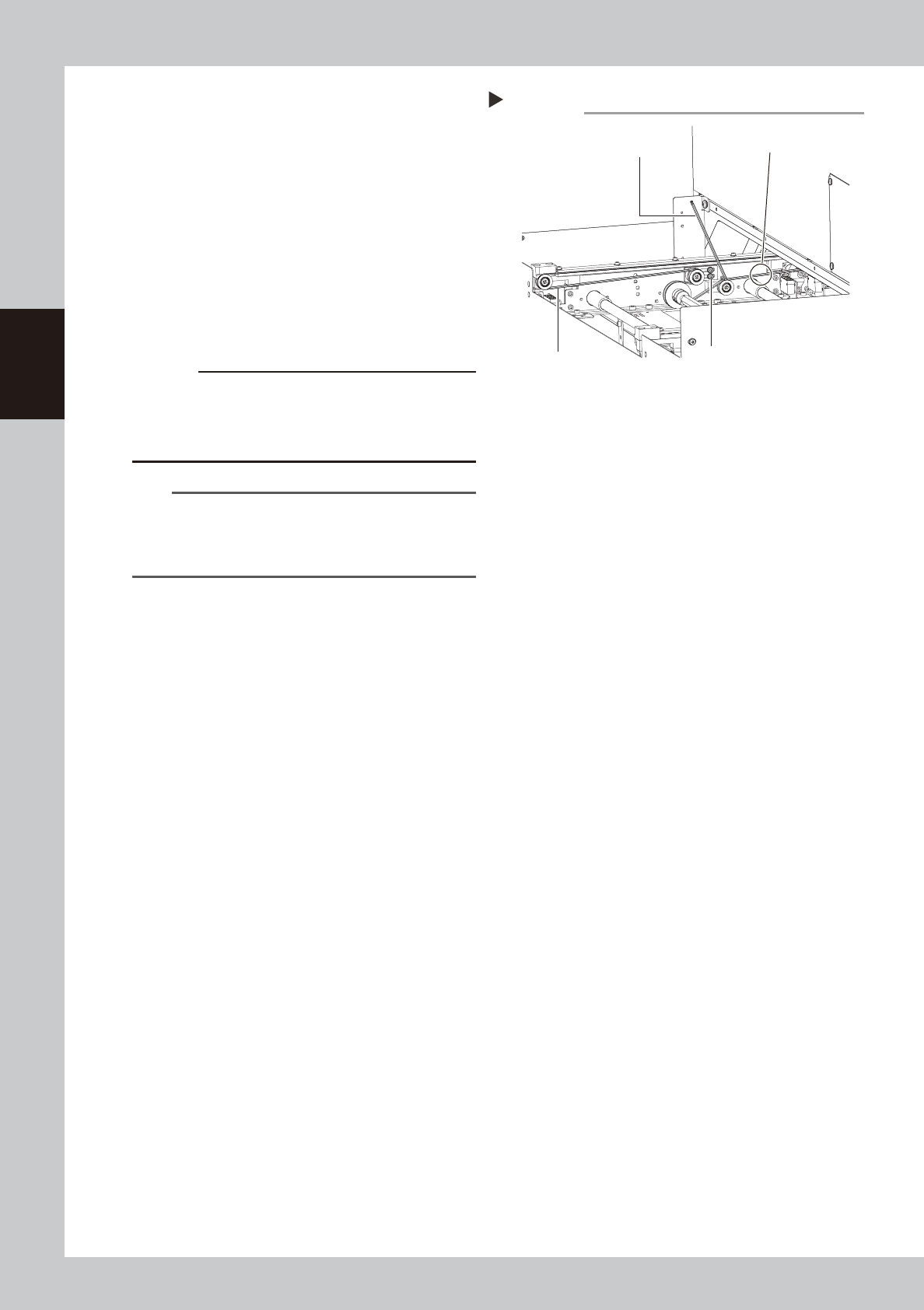
Loosen the belt tension.
Use the hex wrench (3mm) to Loosen the
two mounting bolts of the tensioner (pulley
bracket) so that he tensioner can move. It
doesn't need to remove the bolts.
63812-L3-00
5
Adjust the belt tension.
Slide the tensioner to adjust the belt tension.
6
Tighten the mounting bolts of the
tensioner (pulley blacket).
If the belt tension isl loose, adjust the
tensioner position to tighten the belt.
c
CAUTION
Tighten the mounting bolts of the pulley and pulley
bracket to the following torques:
• Pulley mounting bolt : 3.8N•m.
Be careful not to tighten the bolts excessively.
n
NOTE
The specification of the conveyor belt tension is in the
following. Use the tension meter to adjust as needed.
• Conveyor : 184 to 197 Hz
• Conveyor extension : 102 to 109 Hz
7
Check the belt rotating condition.
1. Cancel emergency stop.
2. Press the [Conveyor Drive Allow] buttons
on the [Unit] - [Conveyor] screen to turn
on the conveyor motor and check the
belt rotation.
3. If the slip of the motor pulley, the belt
rotation fluctuation and the deflection
are excessive, adjust the tensioner (pulley
blacket) position and transfer a board
again and check the condition.
8
Reattach the conveyor cover.
Tighten the four screws on the plate with
pushing the plate upward to reattach the
conveyor cover.
Step 4,5
Tension measurement positions
Adjusting the conveyor belt tension
Tensioner (pulley bracket)
mounting bolt
Hex wrench (3mm)
Conveyor belt
8-9
8
Inspection and maintenance
2.3.2 Board clamp unit (board clamp table)
n
Required tools
• Hex wrench (3mm, 4mm, 5mm)
1
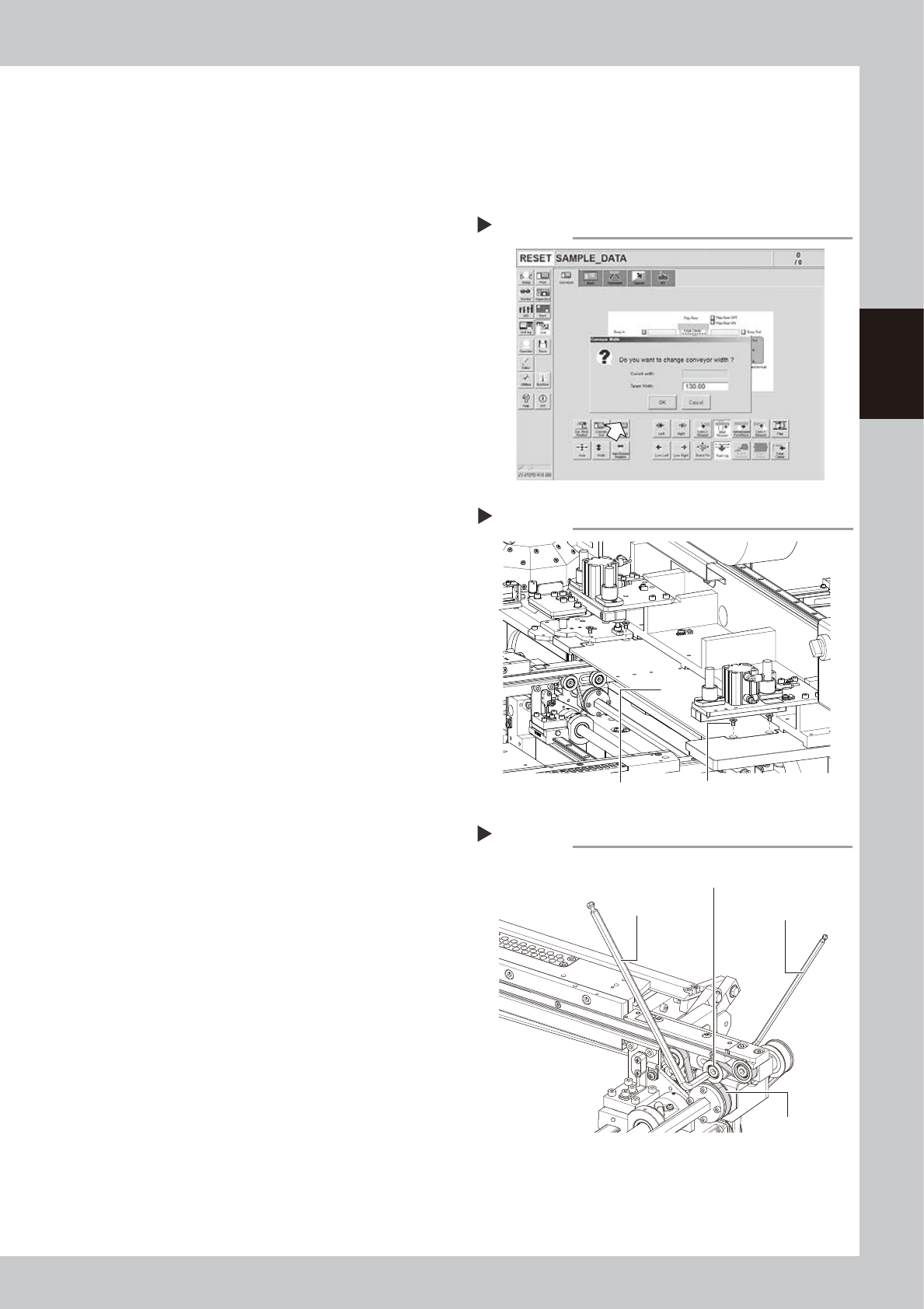
Change the conveyor width to a
convenient width for maintenance
work.
1. Press the [Width] button to display the
"Conveyor Width" dialog.
2. In the "Target Width" box, enter a width
large enough for maintenance work
(about 200mm) and press [OK].
The conveyor is changed to the width
that was just entered.
64802-L3-00
e
2
Press the emergency stop button
and open the upper door.
The machine must be in emergency stop to
ensure safety during work.
3
Remove the mask guide plates.
Remove the mask guide plates on the left
and right of the mask clamp. Remove the
mask guide plate on the right. Remove bolts
(4 pcs.) with a hex wrench (3mm) to detach
the mask guide plate. Remove the mask
guide plate on the left with the same
procedure.
63813-L3-00
4
Loosen the belt tension.
The tensioner is on the right side on the
conveyor.
Use the hex wrench (4mm and 5mm) to
Loosen the two mounting bolts of the
tensioner (pulley) so that the tensioner can
move. It doesn't need to remove the bolts.
63811-L3-10
5
Adjust the belt tension to slide the
tensioner (pulley).
Changing the conveyor width
Step 1
Step 3
Removing the mask guide plate
Mask guide plate Bolt
Step 4,5
Adjusting the conveyor belt tension
Tensioner (pulley)
mounting bolt
Hex wrench (5mm)
Hex wrench (4mm)
Conveyor belt

8-10
8
Inspection and maintenance
6
Tighten the mounting bolt of the
tensioner (pulley).
If the belt tension isl loose, adjust the
tensioner position to tighten the belt.
c
CAUTION
Tighten the mounting bolts of the pulley and pulley
bracket to the following torques:
• Pulley mounting bolt : 5.5N•m.
Be careful not to tighten the bolts excessively.
n
NOTE
The specification of the conveyor belt tension is in the
following. Use the tension meter to adjust as needed.
• Board clamping part : 519 to 554Hz
7
Check the belt rotating condition.
1. Cancel emergency stop.
2. On the [Unit]-[Conveyor] tab, press the
[Convey In] and [Convey Out] buttons to
turn on the conveyor motor and check
the belt rotation.
3. If the slip of the motor pulley, the belt
rotation fluctuation and the deflection
are excessive, adjust the tensioner
(pulley) position and transfer a board
again and check the condition.
8
Return the mask guide plate to its
original position.