YSP_Users_E.pdf - 第225页
7-16 7 Replacing the consumable parts 5.3 Cleaning and replacing the filter for the mask vacuum chuck n Required tools • Phillips screwdriver • Replacement filter (KGR-M9933-F0X FIL TER, SPARE ) • Air blow tool (option) …

7-15
7
Replacing the consumable parts
9
Clamp the blower hose.
1. Using the flat-blade screwdriver, tighten
the hose band on the vacuum pipe to
clamp the hose.
2. Using the Allen wrench (4mm), tighten
the mounting bolts on the hose clamps (2
bolts on each clamp) to clamp the
blower hose.
0
Close the front and rear covers of
the machine.
7-16
7
Replacing the consumable parts
5.3 Cleaning and replacing the filter for the mask vacuum chuck
n
Required tools
• Phillips screwdriver
• Replacement filter (KGR-M9933-F0X FILTER, SPARE
)
• Air blow tool (option)
e
1
Press the emergency stop button.
To ensure the work safety, be sure to put the
machine in the emergency stop status.
2
Move the print table into the back.
Move the print table into the back manually
so that it becomes easier to work on the
filter unit.
3
Open the upper door.
Open the upper door at the rear side of the
machine.
4
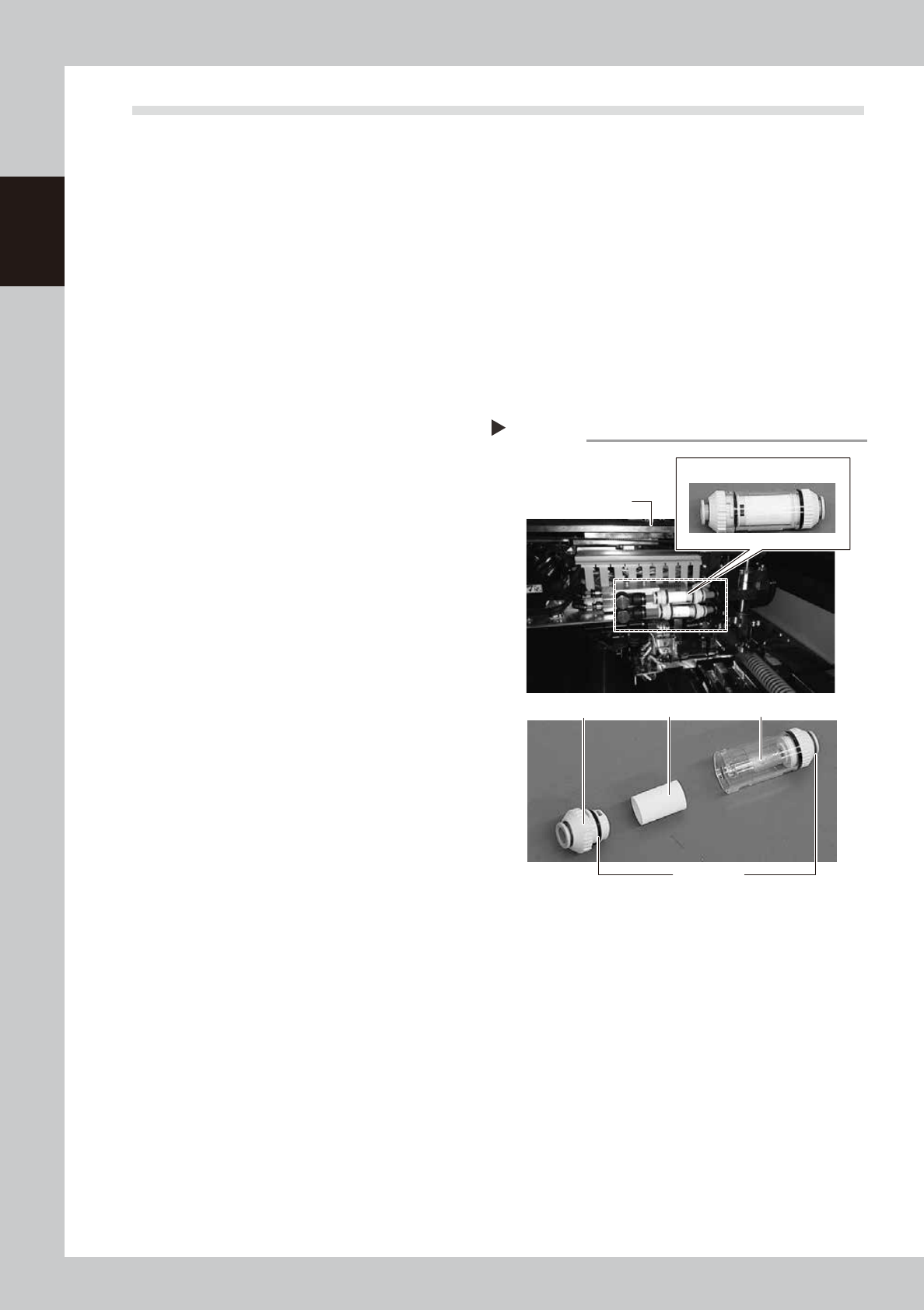
Remove the filter unit.
Remove the filter unit from the air hose.
63725-L3-00
5
Take the filter out of the filter unit.
Turn the joint cap, which has marks L (Lock)
and O (Open) on it, to the “O” direction and
take the filter out of the transparent case.
6
Clean the filter.
Use the air blow tool to blow away dust and
impurities trapped in the filter, by blowing air
from the inside and also from the outside. If
the filter is excessively dirty and cannot be
cleaned, replace it with a new filter.
7
Reattach the filter unit.
1. Put the filter into the transparent case
and tighten the removed joint cap by
turning it to the “L” direction.
2. Connect the air hose so that the arrow
mark (
▲
) on the filter unit is located on
the ejector side.
Filter unit
Backup unit
joint cap
Filter Transparent caseL and O marks
Step 4,5
Filter unit
7-17
7
Replacing the consumable parts
6. Replacing the conveyor belt
If significant looseness, contamination, or scuffing is found in the conveyor belt in a periodic inspection, the
conveyor belt (hereafter "belt") needs to be replaced. Follow the steps below to replace the belt.
6.1 Board carry-in and carry-out conveyors
n
Required tools
• Hex wrench (2mm, 3mm)
• Phillips screwdriver
• Oil-based permanent marker
• Brush
• Spatula (Plastic)
• Replacement conveyor belt (refer to "2.2.1 Parts to be replaced during periodic replacement" in chapter 8.)
1
Change the conveyor width to a
convenient width for maintenance
work.
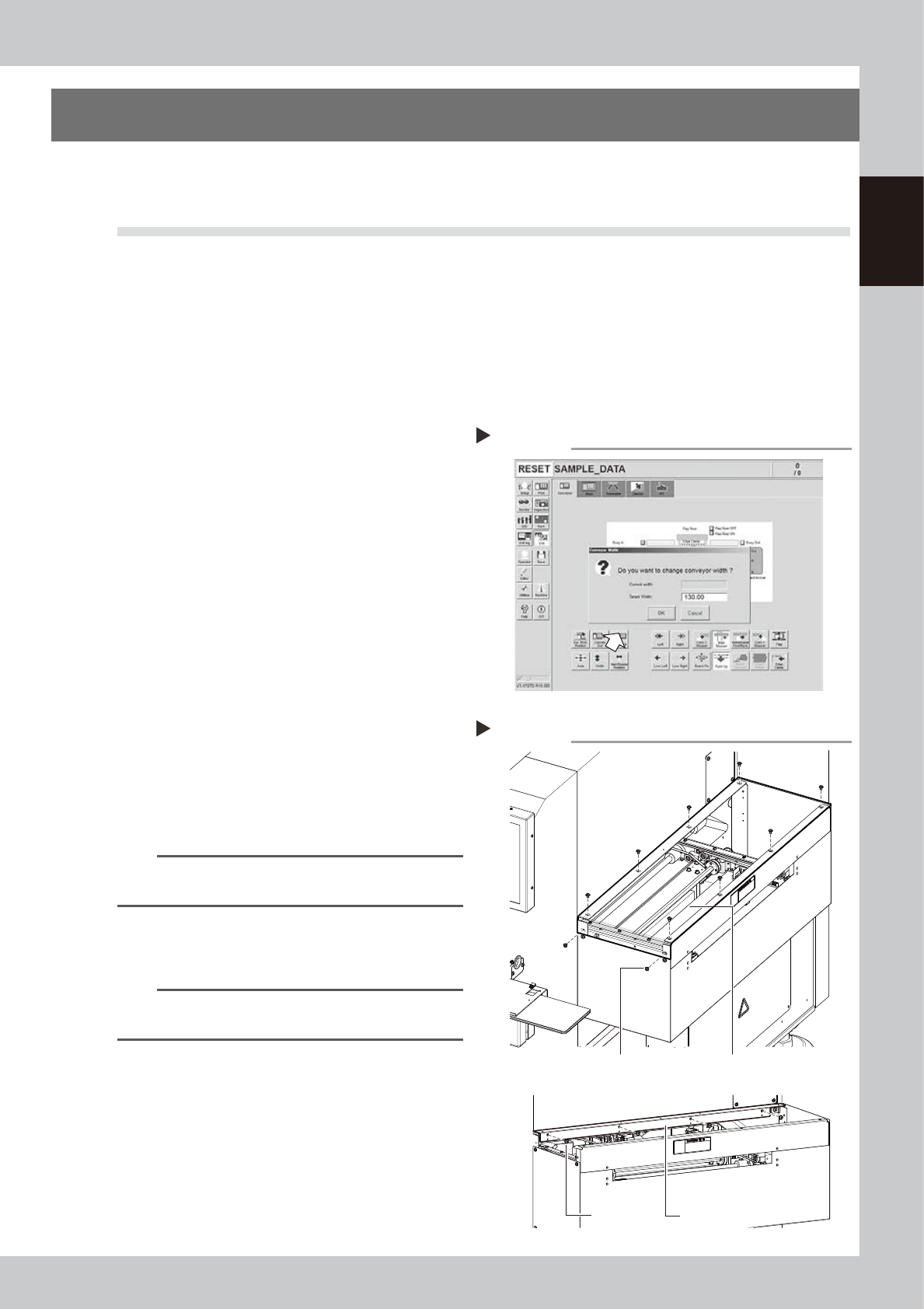
1. Press the [Width] button to display the
"Conveyor Width" dialog.
2. In the "Target Width" box, enter a width
large enough for maintenance work
(about 200mm) and press [OK].
The conveyor is changed to the width
that was just entered.
64702-L3-00
e
2
Press the emergency stop button.
3
Detach the conveyor cover.
Detach the conveyor cover (Acrylic cover
and plate) to access the conveyor.
1. Detach the acrylic cover.
Remove 10 screws to detach the acrylic
cover.
n
NOTE
There are washers with screws. Be careful not to lost
them.
2. Detach the plate.
Remove 4 screws to detach the plate.
63726-L3-00
TIP
In the case of the extension conveyor (Option) , open
the safety cover of the extension conveyor to work.
Removing the conveyor cover
Step 3
Screw
Acrylic cover
Screw
Plate
Changing the conveyor width
Step 1