YSP_Users_E.pdf - 第132页
4-29 4 Creating and setting the data l Detailed setting for board count control On the “Cleaning Detail Setting” screen that opens with the [Detail Setting] button, a maximum of 10 cleaning operations (5 forward/return o…
4-28
4
Creating and setting the data
6. Cleaner data setting
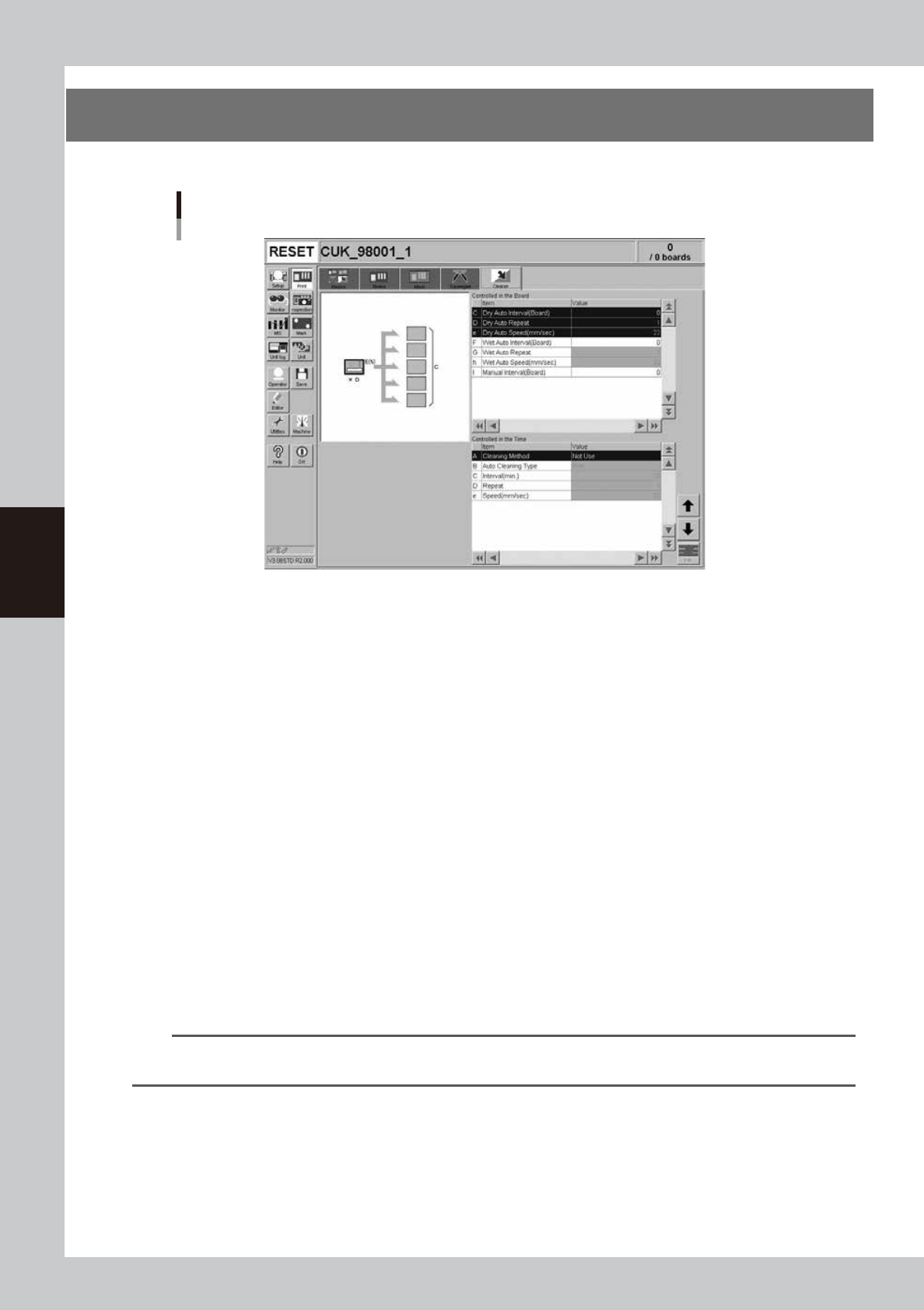
The following parameter items can be checked and edited on the [Print]-[Cleaner] tab.
[Print] - [Cleaner] tab
64426-L3-00
l
Board count control
Set the following parameters to control mask cleaning by board count (number of boards produced).
C: Dry Auto Interval (Board)
Set the interval (board count) to perform automatic mask cleaning without using the solvent.
D: Dry Auto Repeat
Specify the desired count at which to repeatedly move the cleaning unit back and forth during dry automatic cleaning.
e: Dry Auto Speed (mm/sec)
Set the speed at which the cleaning unit moves under the mask during dry automatic cleaning.
F: Wet Auto Interval (Board)
Set the interval (board count) to perform automatic mask cleaning using the solvent.
G: Wet Auto Repeat
Specify the desired count to repeatedly move the cleaning unit back and forth during wet automatic cleaning.
h: Wet Auto Speed (mm/sec)
Set the speed at which the cleaning unit moves under the mask during wet automatic cleaning.
I: Manual Interval (Board)
Set the interval (board count) to perform manual mask cleaning. When this parameter is specified at the same board
count as "Dry Auto Interval" or "Wet Auto Internal", manual cleaning is given priority.
n
NOTE
If two or more cleaning methods are designated at the same timing, the order of priority will be "Manual", "Wet Auto"
and "Dry Auto.
4-29
4
Creating and setting the data
l
Detailed setting for board count control
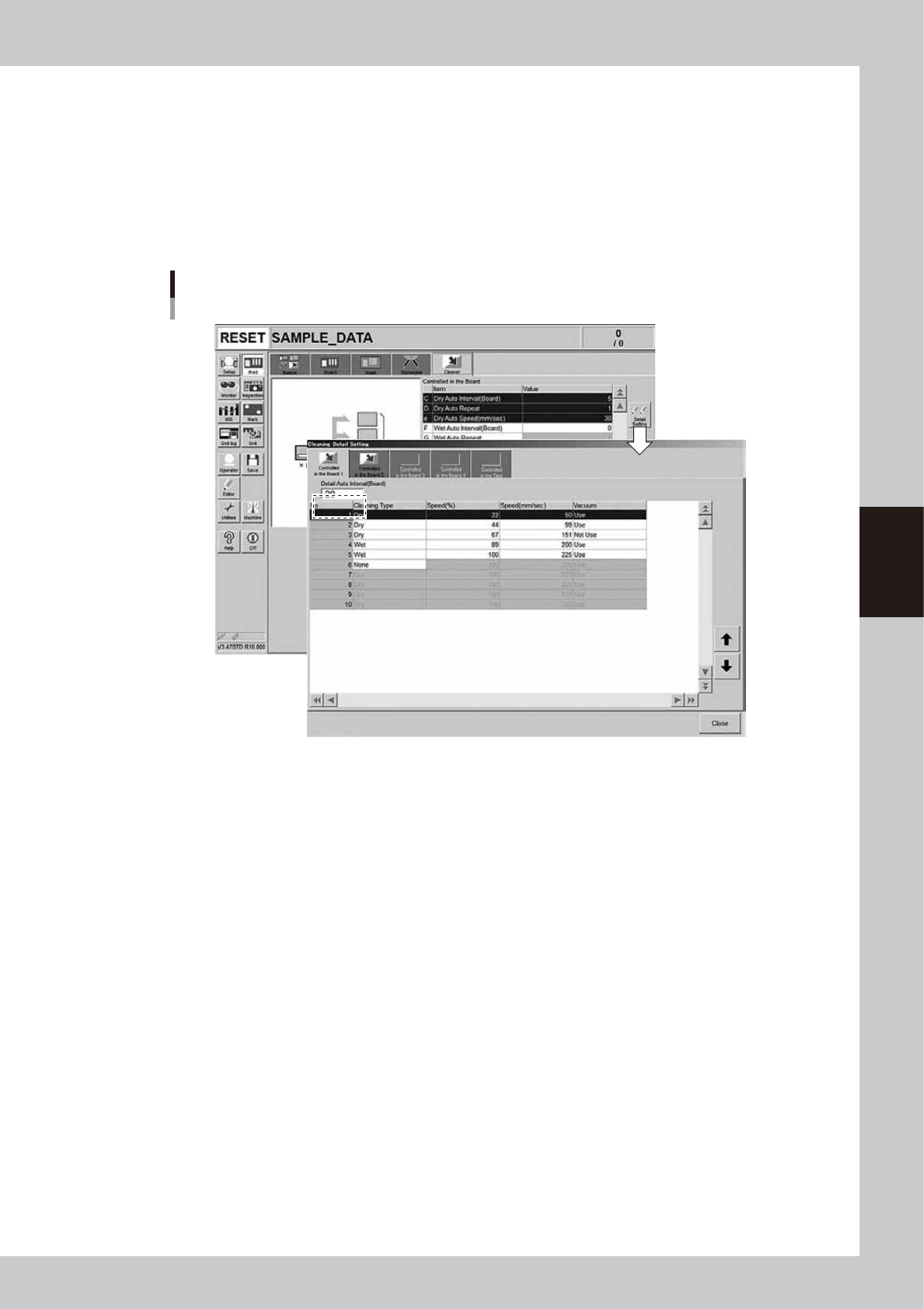
On the “Cleaning Detail Setting” screen that opens with the [Detail Setting] button, a maximum of 10 cleaning operations
(5 forward/return operations) at specified board count intervals (up to 4 cleaning types set on the [Controlled …1] tab to
[Controlled …4] tab) can be specified.
In the “Detail Auto Interval” box, enter the interval (board count) to perform cleaning. Then, set the cleaning type,
speeds, and vacuum suction for each operation.
If the cleaning type is set to “None”, no cleaning will be performed from that point onward.
If the “Detail Auto Interval” is set to “0”, the settings on all other board count control tabs will be disabled.
[Print] - [Cleaner] tab
[Detail Setting] button
64453-L3-00
4-30
4
Creating and setting the data
n
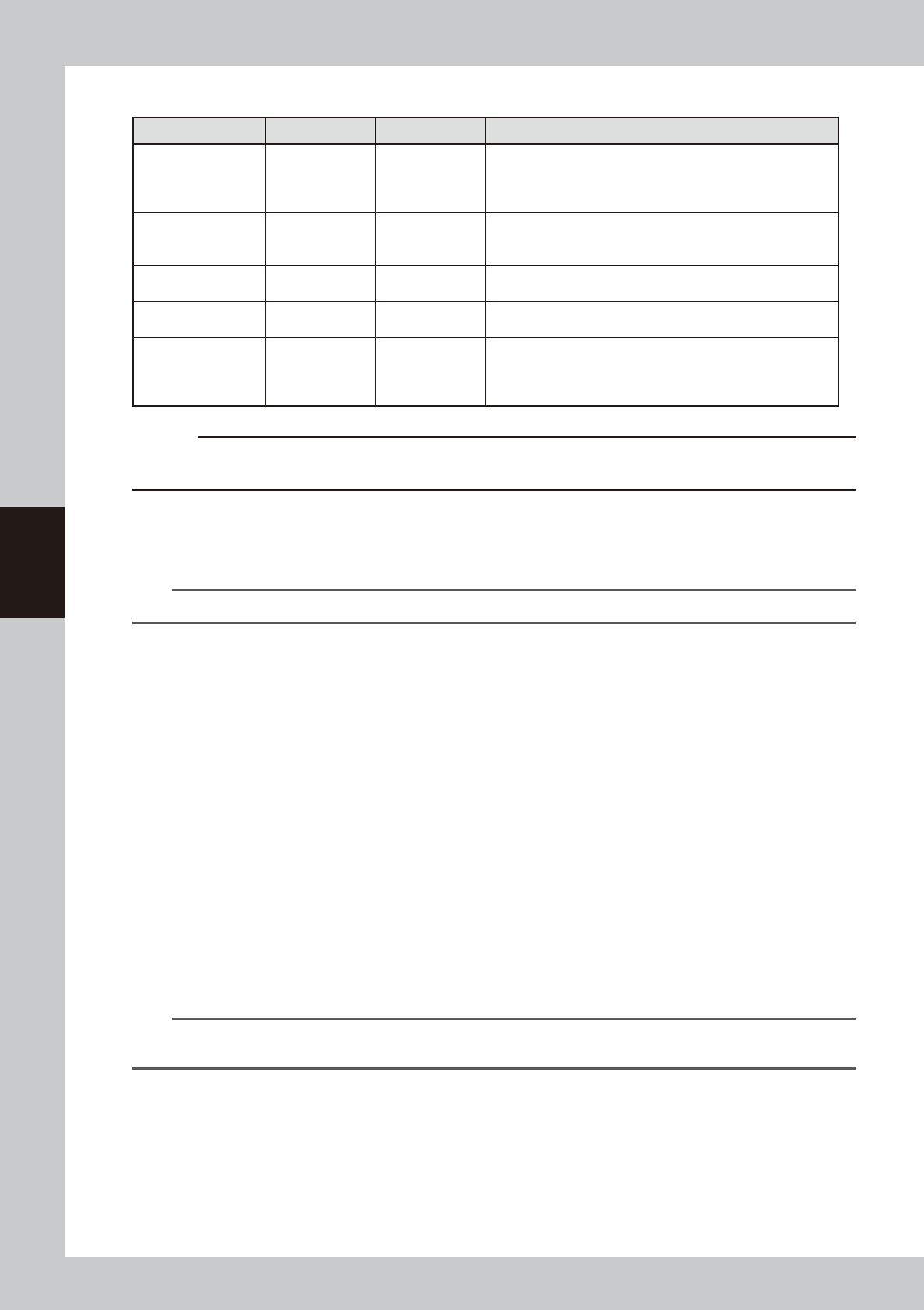
Setting parameters
Parameters Default Input range Description
Detail Auto Interval
(Board)
0 0 to 9999
(Only in board count control)
Set the interval (board count) to perform cleaning. If “0” is
set, the settings on all other board count control tabs will be
disabled
Cleaning type Dry
Dry
Wet
None
Dry : Performs cleaning with dry gauze.
Wet : Performs cleaning with gauze moistened with solvent.
None : Does not perform cleaning from this point onward.
Speed (%) 100 1 to 100
Set the speed (%) at which the cleaning unit moves during
cleaning. (This setting is linked with the speed (mm/sec) below.)
Speed (mm/sec) 225 1 to 125
Set the speed (mm/sec) at which the cleaning unit moves during
cleaning. (This setting is linked with the speed (%) above.)
Vacuum Use
Use
NotUse
Use : Cleaning unit moves while vacuum-sucking excess
solder during cleaning of mask.
Not Use : Cleaning unit moves without vacuum-sucking excess
solder during cleaning of mask.
c
CAUTION
If suction is used during wet cleaning, the discharged solvent will dry off quickly. So when this combination of
parameters is selected, an error message “Ea: 8816 Data check warning” appears. Change the parameter settings.
When you enter a value in the “Dry Auto Interval (Board)”, “Wet Auto Interval (Board)” and “Manual Interval (Board)” on
the [Print]-[Cleaner] tab, these can be used with detailed cleaning settings. But the auto interval and manual interval
settings must satisfy the following relation: (Dry < Wet < Board count control 1 < Board count control 2 < Board count
control 3 < Board count control 4 < Manual interval)
TIP
The cleaning counter value can be checked on the [Monitor] - [Counter] tab.
l
Time interval control
Use this when you want to perform mask cleaning at certain time intervals even during standby status. For example, if the
"Cleaning Method" is set to "Auto" and the "Interval" to "10" (minutes), then the mask will be automatically cleaned when
10 minutes have elapsed after a board was last printed or the mask was last cleaned.
A: Cleaning Method
Select the mask cleaning method from "Auto", "Manual" or "NotUse". When set to "Auto", the mask is automatically
cleaned according to the specified conditions.
B: Auto Cleaning Type
When the "Cleaning Method" is set to "Auto", select whether to use the cleaning solvent (alcohol) by specifying "Wet" or
"Dry".
C: Interval
Set the interval (minutes) to perform automatic mask cleaning.
D: Repeat
Specify the desired count to repeatedly move the cleaning unit back and forth during automatic cleaning.
e: Speed (mm/sec)
Set the speed at which the cleaning unit moves under the mask during automatic cleaning.
TIP
Time interval control is maintained even when the machine is in reset status or is stopped with the [STOP] button.
However, the cleaning timing will differ depending on the timing at which the machine resumes.