YSP_Users_E.pdf - 第253页
A-2 A Appendix 1.2 Connection between machines T o exchange signals such as board request and oper ation status with the downstream or upstream machine, the "NEXT INTERF ACE" and "PREVIOUS INTERF A CE"…
A-1
A
Appendix
1. Specifications
1.1 Air regulator unit
1.1.1 Air supply
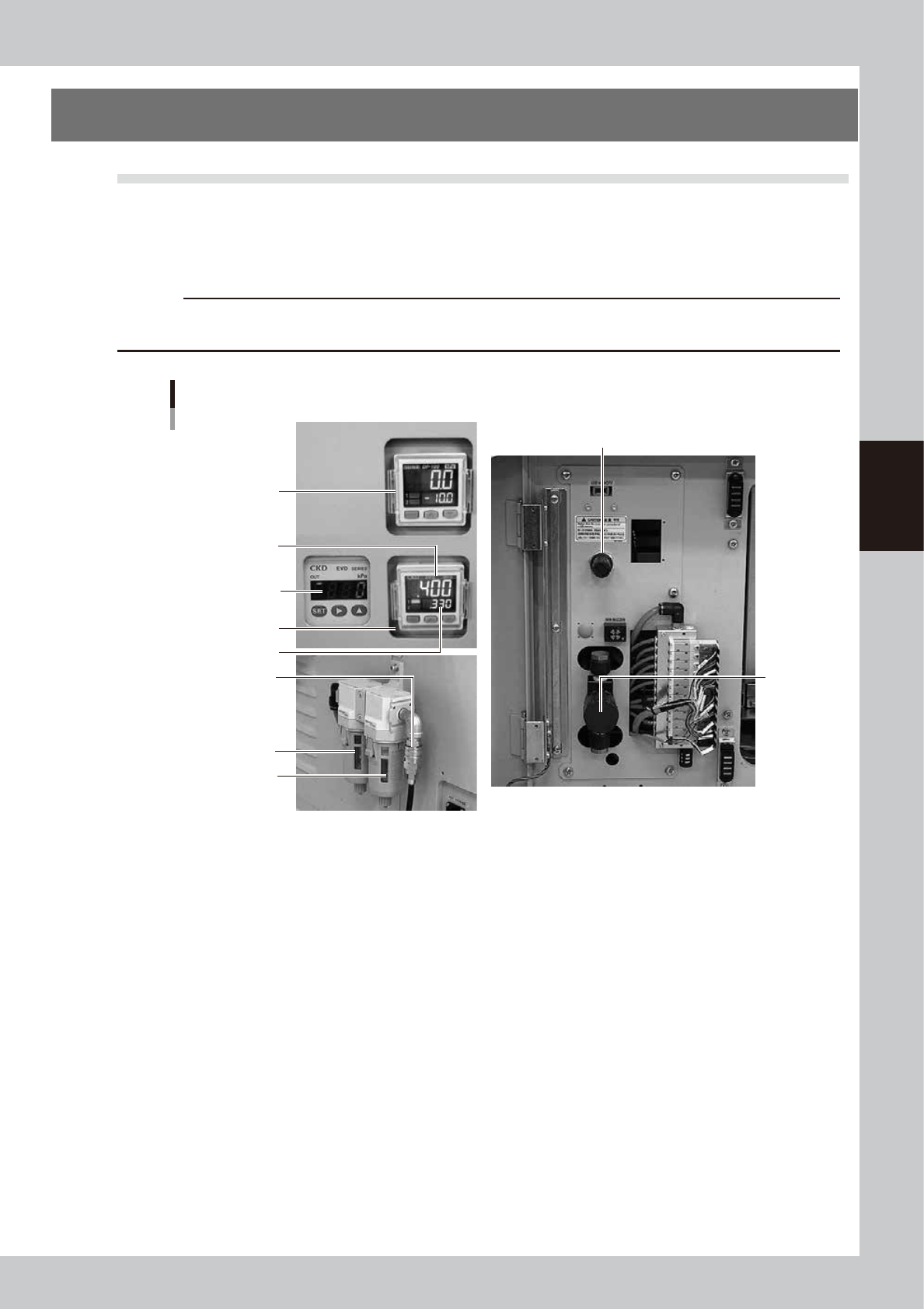
The air pressure regulator is located behind the front lower left panel of the machine. The air pressure regulator
must be correctly set to supply the machine at an optimum air pressure.
c
CAUTION
Before setting the air pressure, make sure that the pressure from the primary air supply is within an appropriate range
(0.45MPa or less).
Air pressure regulator and air connector
Air filter
Mist filter
3
Pressure-drop
detection level
Set air pressure level
2
1
4
5
6
63004-L3-00
1. Air pressure display
Shows the set air pressure level (upper portion) and the pressure-drop detection level (lower portion). Use the pressure
regulator knob to display the pressure levels described below.
Note that the pressure-drop detection level has been set at the value shown below before shipment from the factory.
• Set air pressure level: 0.40MPa
• Pressure-drop detection level: 0.33MPa
2. Supply air pressure regulator valve knob
Use this knob to adjust the supply air pressure to a proper set pressure level.
Turn the knob to adjust the supply air pressure so that the set air pressure level shows “0.40MPa”.
3. Air pressure supply/shutoff switch
Turning this switch to the right shuts off air supply and exhausts air that remains inside the machine.
4. Pressure gauge (for edge clamp)
Shows the edge clamp air pressure.
5. Pressure gauge (for cleaner suction)
Shows the cleaner's vacuum air pressure level (negative pressure level).
6. Source air connector
Prepare an air hose with an inner diameter of at least 8mm having a 30SH socket (Nitto Koki, or equivalent), and connect
it to this connector. Use dry, clean air passed through an air filter.
A-2
A
Appendix
1.2 Connection between machines
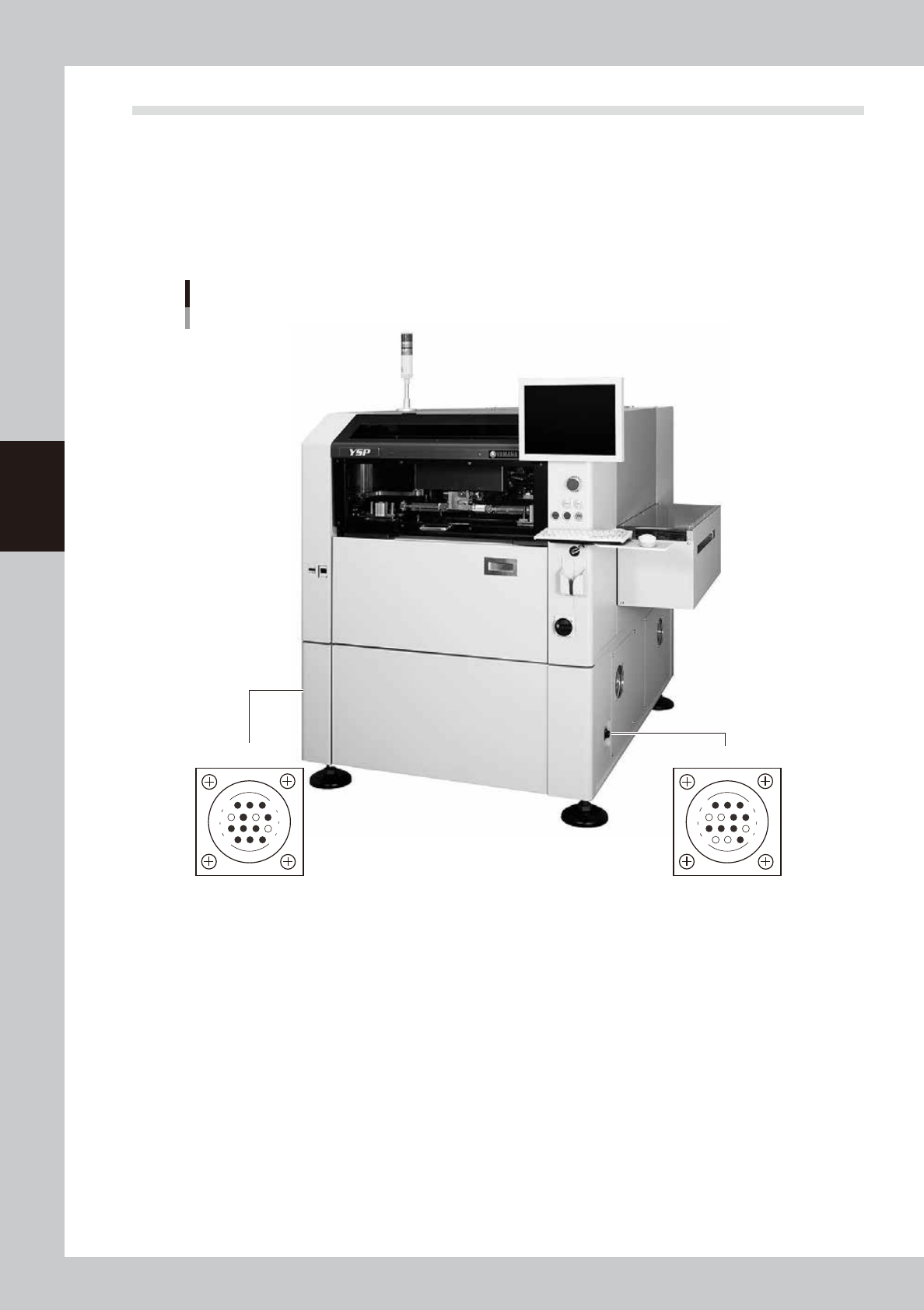
To exchange signals such as board request and operation status with the downstream or upstream machine, the
"NEXT INTERFACE" and "PREVIOUS INTERFACE" connectors located on both sides of the machine are used.
The "NEXT INTERFACE" connector connects to the downstream machine, and the "PREVIOUS INTERFACE"
connector connects to the upstream machine such as a loader. In the case of standard right-to-left flow, the
PREVIOUS INTERFACE connector is located on the right side panel and the NEXT INTERFACE connector on the
left side panel when viewed from the front of the machine. Both connectors use a 14-pin receptacle (AMP
206043-1).
PREVIOUS INTERFACE NEXT INTERFACE
Machine-to-machine interface connectors
Connector : AMP 206043-1 (14-pin receptacle)
14
11
12
7
4
8
3
1
14
11
12
7
4
8
1
3
63005-L3-00
A-3
A
Appendix
1.2.1 PREVIOUS INTERFACE connector
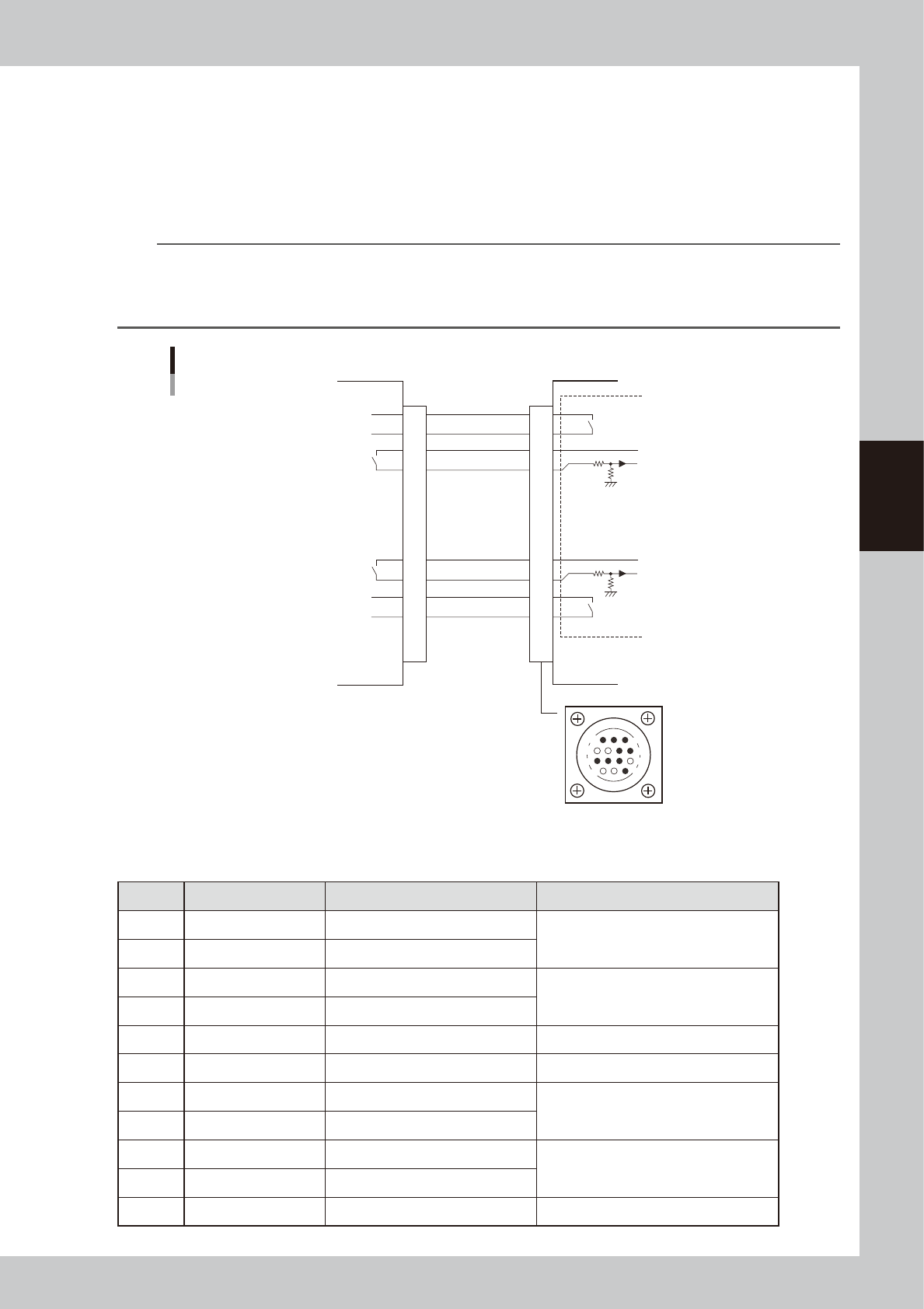
When the following three conditions are met, the PREVIOUS INTERFACE circuit in the machine allows the next
board to be carried in.
1. Machine is ready for carrying in a board (BUSY OUT: ON)
2. Board carry-in signal is input from the upstream machine. (BA IN [N0108221] : ON)
3. Automatic operation signal is input from the upstream machine. (UR IN [N0108222] : ON)
n
NOTE
• When the automatic operation signal (UR IN) from the loader turns off during transfer of a board, the machine
temporarily stops carrying in the board.
• When the board being carried in is detected by the entrance sensor, the BUSY OUT signal turns off.
• Carrying in the board is finished when both the BUSY OUT and BA IN turn off.
1
2
3
4
5
6
7
8
9
10
11
12
13
14
7
12
4
8
1
14
11
3
BUSY OUT
(T01080E4)
+24V
+24V
LR OUT
(T01080E7)
UR IN
(N0108222)
BA IN
(N0108221)
I/O BOARD
Upstream
This machine
PREVIOUS INTERFACE connector
PREVIOUS INTERFACE circuit
Signal input during board carry-in
Signal output to request board carry-out
Signal output during automatic operation
Signal input during automatic operation
63006-L3-00
n
Board transfer signal specifications
PREVIOUS INTERFACE
Pin No. Signal name I/O specifications Signal specifications
1 BUSY OUT (T01080E4) Relay contact (zero voltage) output Signal output during board carry-in
2 BUSY OUT (T01080E4) Relay contact (zero voltage) output
3 +24V Input common (+24V) Signal input of board carry-out request
4 BA IN (N0108221) Voltage input
5 NC (with dummy pins) (Prevents misinsertion.)
6 to 8 NC
9 +24V Input common (+24V) Signal input during automatic operation
10 UR IN (N0108222) Voltage input
11 LR OUT (T01080E7) Relay contact (zero voltage) output Signal output during automatic operation
12 LR OUT (T01080E7) Relay contact (zero voltage) output
13 to 14 NC