YSP_Users_E.pdf - 第220页
7-11 7 Replacing the consumable parts 4 Disconnect the refill tool. When the tank has been refilled with the solvent completely, the solvent supply from the refill tool is stopped automatically. Disconnect the refill too…
7-10
7
Replacing the consumable parts
4. Refilling the cleaning solvent
4.1 Precautions when handling cleaning solvent
w
WARNING
USE ONLY ISOPROPYL ALCOHOL OR ETHYL ALCOHOL (ETHANOL) AS THE CLEANING SOLVENT. OTHER SOLVENTS MAY
CAUSE FIRES.
w
WARNING
NEVER USE ACETONE FOR CLEANING. ACETONE MAY DAMAGE SOLVENT TUBES OR CLEANING UNIT, CAUSING CLEANING
FLUID TO LEAK THROUGH DAMAGED PARTS. ALSO BE SURE TO USE VIRGIN CLEANING FLUID (DO NOT USE USED CLEANING
FLUID).
w
WARNING
BE CAREFUL WHEN USING ISOPROPYL ALCOHOL, SINCE INHALING ALCOHOL FUMES OVER LONG PERIODS CAN BE
HAZARDOUS TO HEALTH.
4.2 Refilling the cleaning solvent
When the remaining volume of the cleaning solvent is low, the cleaning solvent does not reach the pump. If
this happens, the error screen appears and the wet cleaning cannot be performed. Follow the steps below to
refill the cleaning solvent using the special tool.
n
NOTE
Before beginning work, fill up the solvent refilling bottle to make it easier to refill the solvent. Also make sure the bottle
cap is tightly closed.
1
Press the emergency stop button
and open the front lower safety
cover.
2
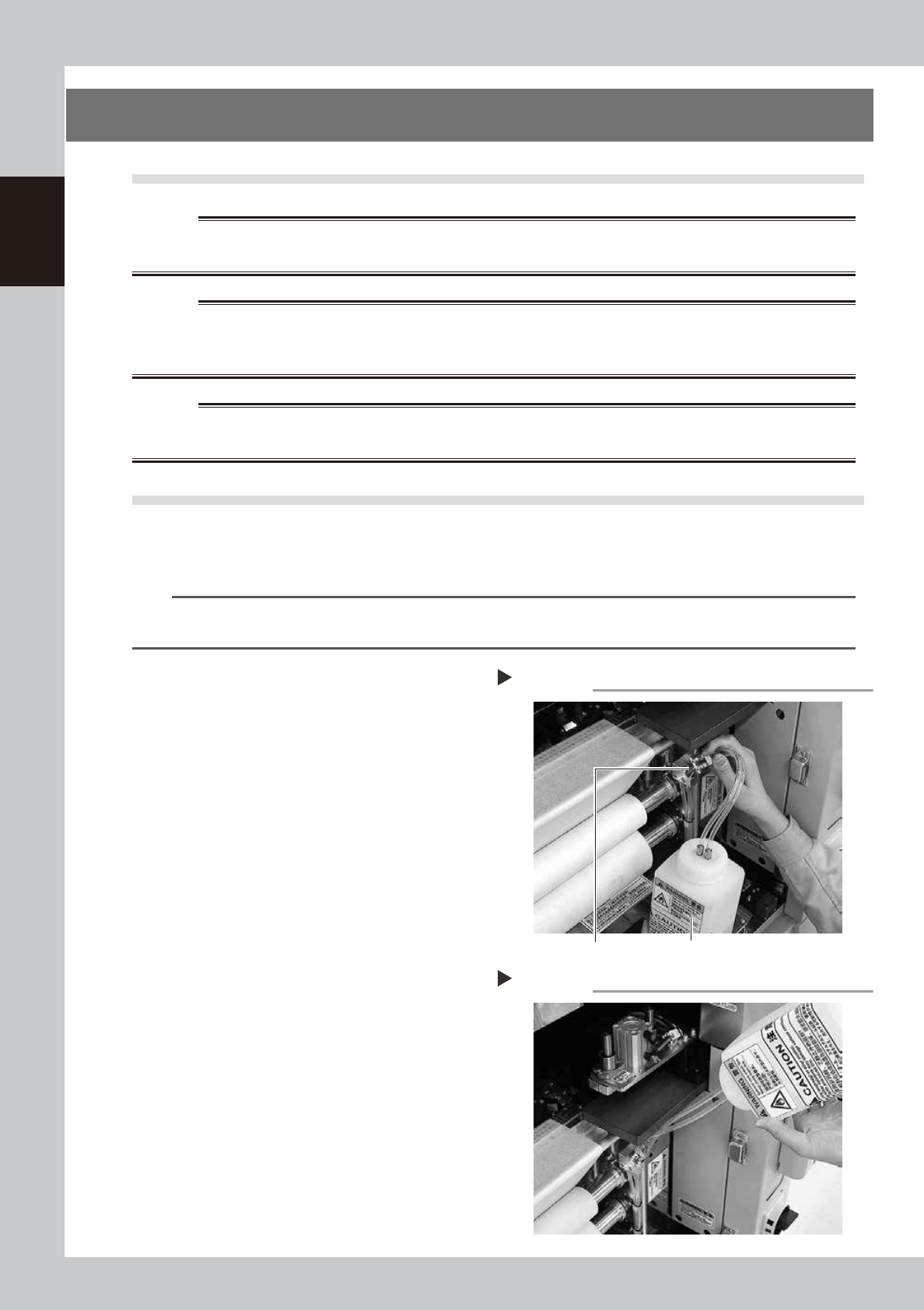
Insert the nozzle into the joint.
Insert the nozzle of the refill tool (solvent refill
bottle) filled with solvent into the refilling
joint of the solvent tank.
63717-L3-10
3
Pour the solvent into the tank.
Pour the solvent into the tank by inverting
the bottle as shown.
63719-L3-00
Inserting the nozzle
Step 2
Bottle for refilling solvent
Joint
Refilling the solvent
Step 3
7-11
7
Replacing the consumable parts
4
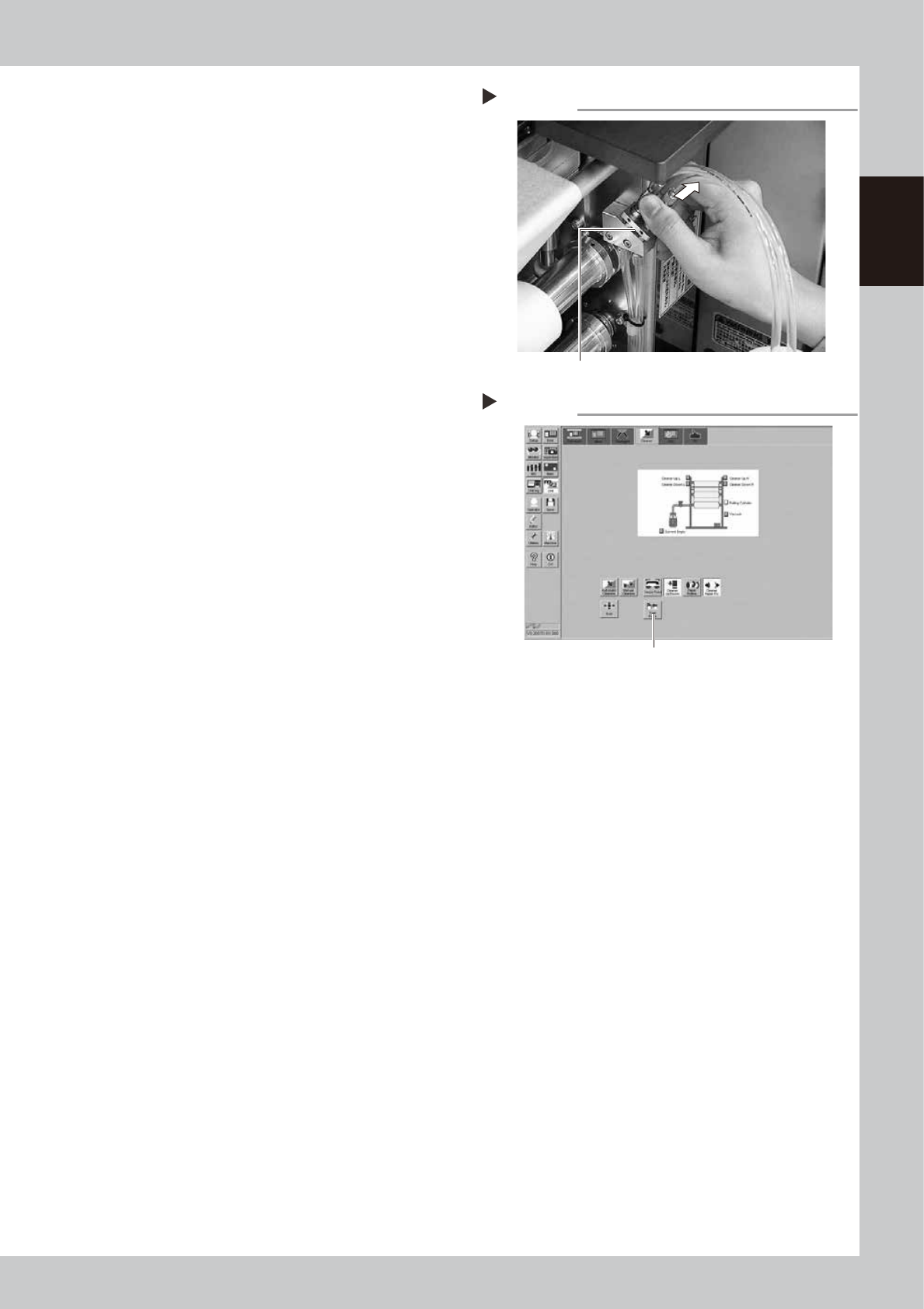
Disconnect the refill tool.
When the tank has been refilled with the
solvent completely, the solvent supply from
the refill tool is stopped automatically.
Disconnect the refill tool from the joint.
63718-L3-10
5
Close the front lower cover and
cancel the emergency stop.
6
Supply the solvent to the solvent
arrival sensor.
1. Select the [Cleaner] tab on the [Unit]
screen.
2. Press the [Solvent Pump] button to supply
the solvent to the solvent arrival sensor.
3. Stop the pump when the solvent seeps
out to the gauze roll.
64701-L3-00
7
Check the solvent supply status.
Check that the yellow signal lamp on the
top of the machine is off and the "ERROR"
sign in the status area on the operation
screen has disappeared.
Disconnecting the nozzle
Step 4
Pull and disconnect the nozzle from the joint.
Solvent pump
Step 6
Press this button.
7-12
7
Replacing the consumable parts
4.3 Long-term storage tasks
If the solvent pump is not used for extended periods (about 6 months or more), then it may dry out internally
and cause operating defects. The solvent path within the pump must be blocked to prevent this from happening.
The path blocking procedure is described below.
n
Blocking the solvent path
1
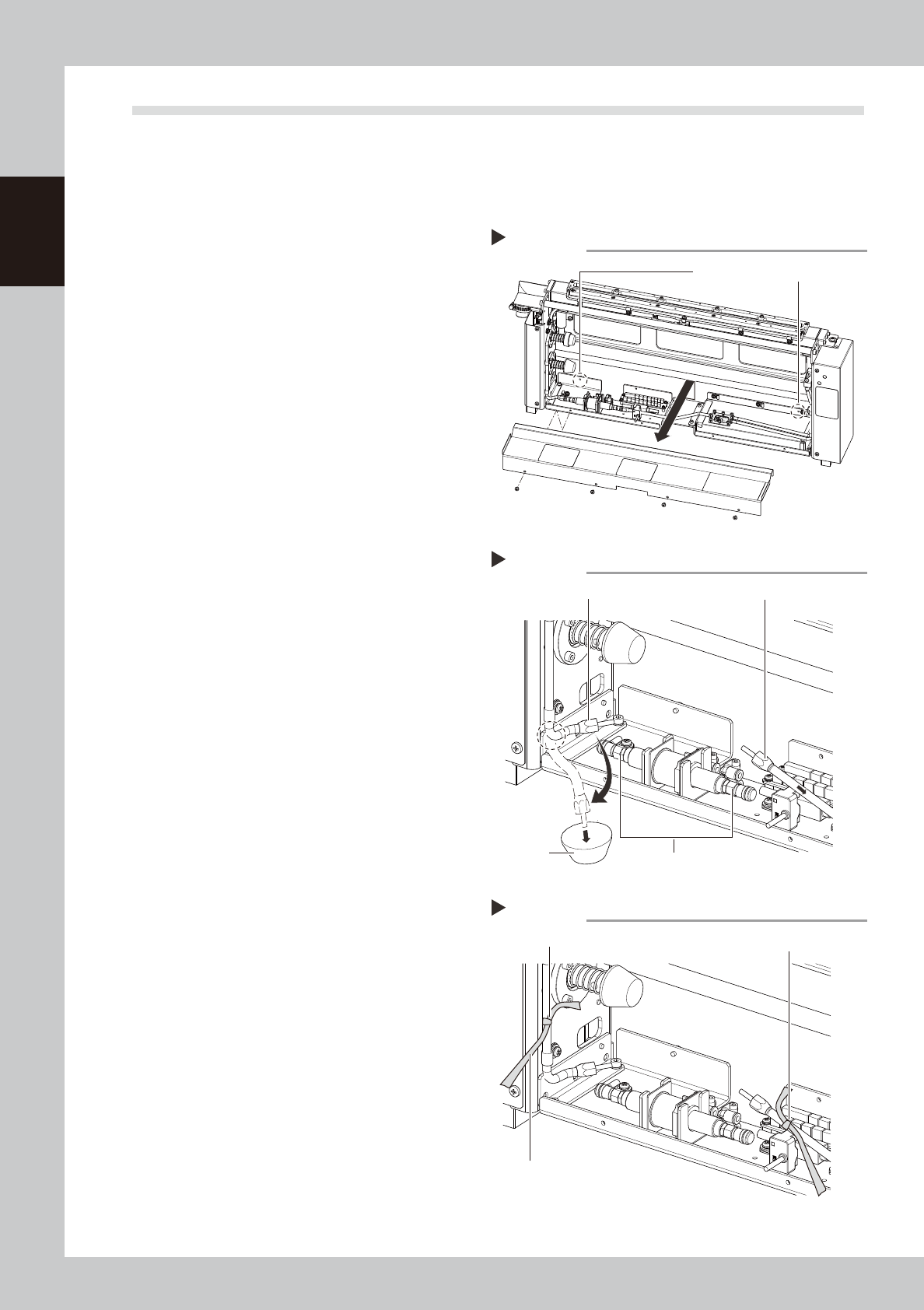
Remove the cleaner cover.
1. Loosen the two screws (enclosed by a
dashed line circle in the figure on the
right) clamping the rear side of the
cleaner cover. (No need to remove
them)
2. Next remove the screws at 4 locations on
the near side (see drawing).
3. Raise the cover upward and then pull
toward you to remove it.
63720-L3-00
2
Remove the joints.
Remove the joints from two locations, one
on the head side and the other on the tank
side from the shut-off valve joint. Use caution
because alcohol remaining in the hose will
come out when the joint on the head side is
removed.
1. Remove the head side joint in the bent
state as shown by the dashed line in the
figure on the right.
2. Prepare a container, free the bent
location and let the alcohol drain into
the container.
3. Remove the tank side joint and then
quickly point it upward to let the alcohol
in the hose return back to the tank.
63721-L3-00
3
Mark the hoses you removed.
Mark the two hose sections you removed in
step 2 by winding yellow ribbon or a similar
item around them.
63722-L3-00
4
Reattach the cleaner cover.
Reinstall the cleaner cover in the reverse of
the procedure that you removed it in step 1.
Place a ribbon on the outer side of the
cover so that others will know that the joints
were removed.
n
Resetting operation
Connect the hoses in the reverse of the "Blocking the
solvent path" procedure and refill with solvent by
referring to 4.2 "Refilling the solvent". When finished
refilling, operate the solvent pump to make sure it
operates correctly.
Removing the cleaner cover
Step 1
First loosen these two screws.
Removing the joints
Step 2
Joint (to head)
Shut-off valve joint
Container
Joint (to tank)
Hose markings
Step 3
Marking (yellow ribbon, etc.)
Marking
As seen from outside the cover