JANETS_INM.pdf - 第119页
J aN et s Inst r ucti on Manual 4. User Manage ment 4- 11 An ap pl ic ation to b e di sp layed in the l auncher can b e selec ted b y disp lay sett ing . The app li cati ons to b e set ar e di sp layed in the l auncher f…
JaNets Instruction Manual 4. User Management
4-10
4.8 Setting the Properties
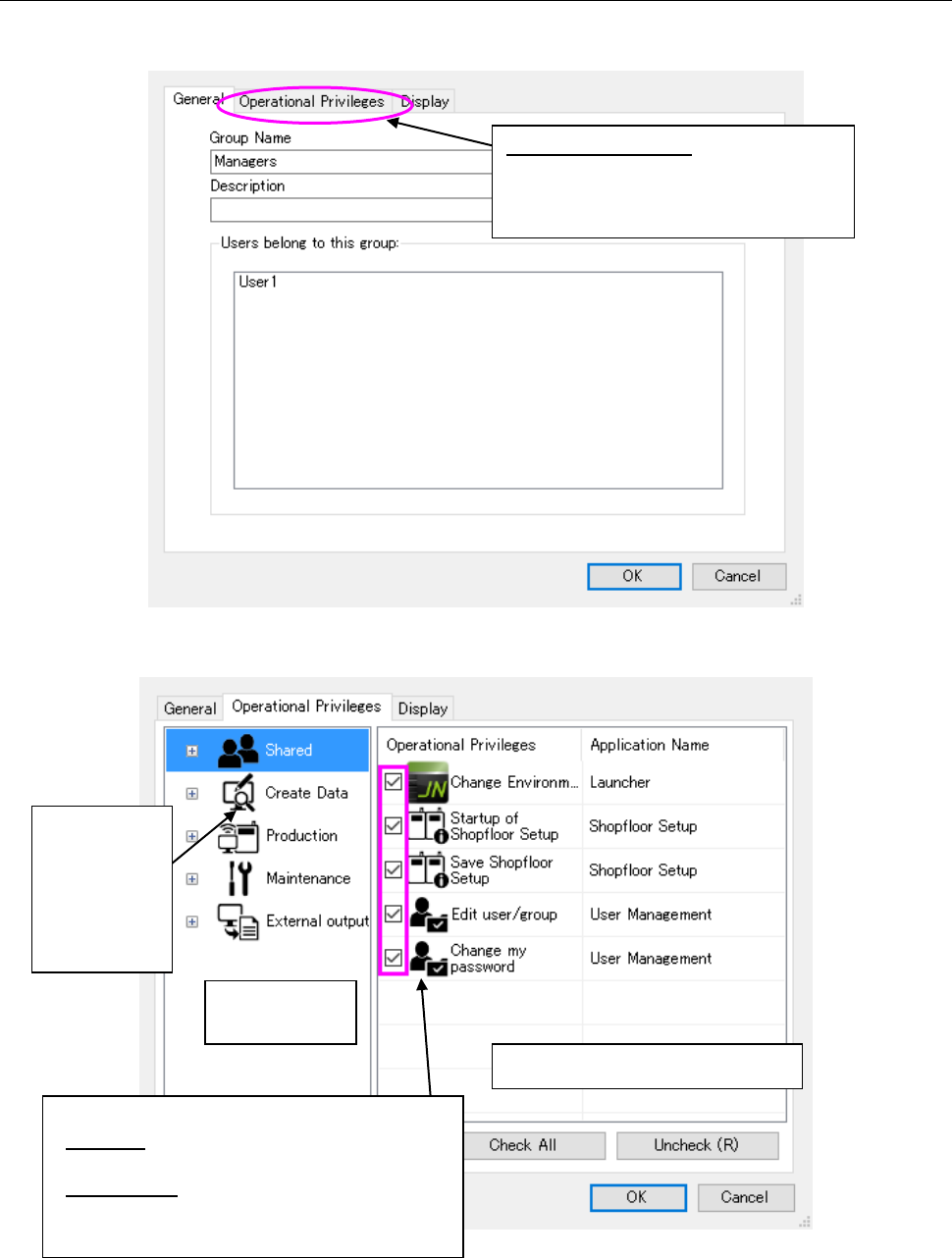
Select the <Properties> button on the Group setting screen, and then select a group whose
detailed information is to be displayed.
Figure 4.8-1 Properties setting screen (General)
Figure 4.8-2 Properties setting screen (Operational Privileges)
* If you change the operational privileges of a group of a user who is logging in the system now,
the new operational privileges are enabled after the corresponding application starts up next
time.
Operational privileges setting area
Application
selecting area
Select an
application
whose
operational
privileges are
to be set.
Set the operational privileges of each application.
Checked: having the corresponding operational
privilege
Not checked: Not having the corresponding
operational privilege
Operational privilege:
Displays the screen that allows you to
set the operational privileges of each
application.
JaNets Instruction Manual 4. User Management
4-11
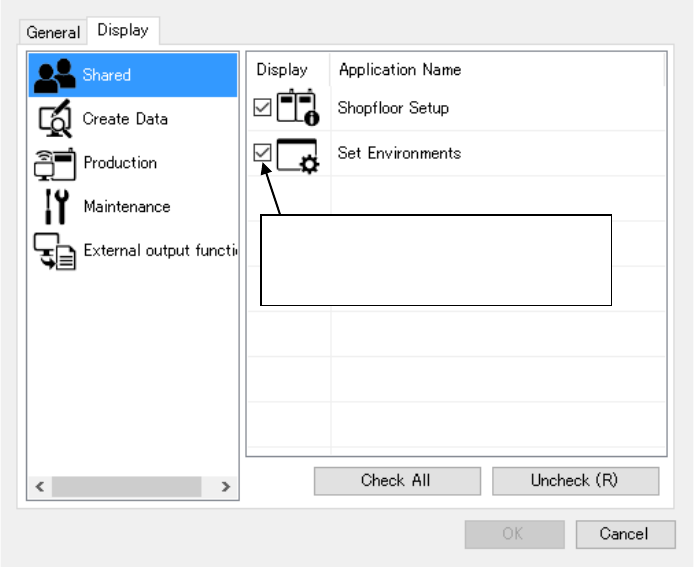
An application to be displayed in the launcher can be selected by display setting.
The applications to be set are displayed in the launcher for each of the group setting in which the
user belongs and the user setting.
Figure 4.8-3 Display setting screen
* The application is displayed by
checking off. It is not displayed by
removing a displayed check-off mark.

JaNets Instruction Manual 4. User Management
4-12
4.9 Operational Privileges of Each Application
1. Operational privileges of the “Shared” functions
2. Operational privileges of the Create Data
3. Operational privileges of production
Application
Privilege name
Prohibited operation(s) when you do not have this privilege
Program
Downloader
Registration and/or
clearance of a line to be
monitored
Registering and/or clearing a line to be monitored
Specification of a
production program
Specifying a production program and reservation file for a line to
be monitored
Forced termination of
production
Forcing a termination of production
Download
Downloading a production program
Upload
Uploading a production program
Change of an environment
setting
Changing an environment setting
Application
Privilege name
Prohibited operation(s) when you do not have this privilege
Launcher
Change environmental set…
Changing the environment settings
User
Management
Edit user/group
Adding, editing or deleting a user/group
Change my password
Changing the password of a user who logged in the system
Shopfloor
Setup
Startup of Shopfloor Setup
Starting up the Shopfloor Setup
Save Shopfloor Setup
Editing a floor, line, machine and so on
Registering or deleting equipment, saving of the floor
assignment information
Component
Database
Register Data
Registering from external data (such as a third party and a
production program)
Loading an association setup file
Update data
Updating of the database
Changing or deleting a component code, reel information or a
barcode format
Add data
Adding new data
Associating a component code, registering a reel or registering a
barcode format
Change environmental
settings
Changing the environmental settings
Refresh Package Code
Updating a package code
Add Package Code
Adding a package code
Register Package Code
Registering from external data (a package code file)
Application
Privilege name
Prohibited operation(s) when you do not have this privilege
Program
Editor
Save Production Program
Saving a created production program file
Optimize
Executing the Optimization function
Change Optimization
Changing an optimization option
Change environment
Changing the environment settings
Export to Database
Exporting component data onto the database
Import from Database
Importing component data from the database
CAD Conversion
Converting process of CAD data
Change User Format
Editing the user format definition of CAD data
Job Optimizer
Save Reservation File
Saving a crated reservation file
Optimize
Executing the Optimization function
Change Optimization
Changing an optimization option
Change environment
Changing the environment settings