JANETS_INM.pdf - 第488页
JaNets Instr ucti on Man ual 12 . Machine Program R elater 12 -6 Selecti ng a divided file Select a divi ded progr am of each m achine to be rel ated. Figure 12.3 -5 Selectin g a divided file Figure 12.3 -6 Selectin g a …
JaNets Instruction Manual 12. Machine Program Relater
12-5
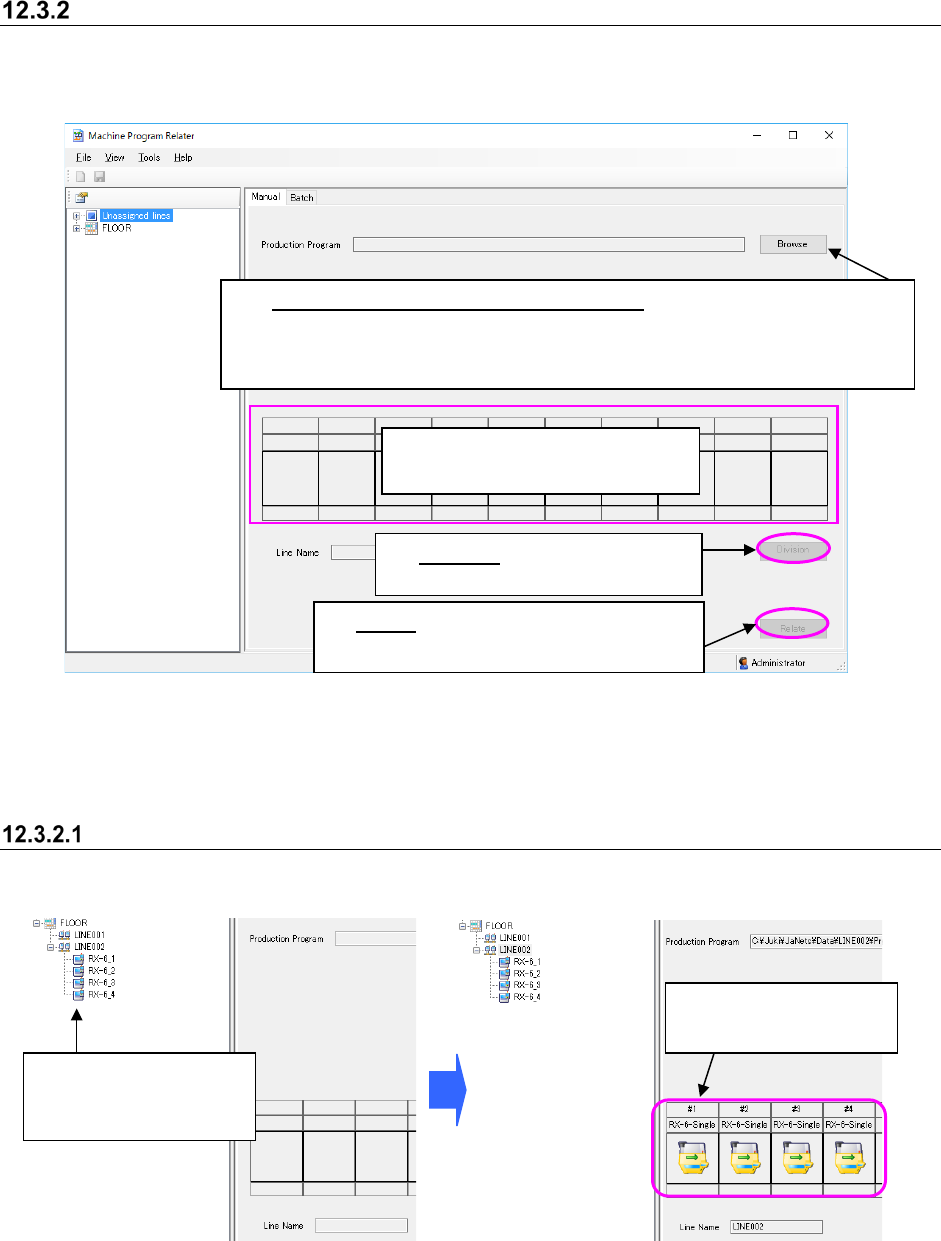
Procedure for manual relating
Perform the operations from ① to ④ below. When both the “Production Program” field and the
“Line Name” field are blank when the screen appears for the first time.
Figure 12.3-3 “Manual” relating screen
Selection of the production program to be related is not essential.
If you leave the “Production Program” field blank, a new production program is created.
Selecting a production line
Specify a production line to relate a file to.
Figure 12.3-4 Selecting a production line
* Note that PWB data may not be completely created from a file divided with an RX-7 series in
some case. Therefore, be sure to follow Step 1 “Select a production program to be related” if
there is any RX-7 series on the production line.
②
See Section 12.3.2.1 “Selecting
a production line.”
①
Select a production program to be related:
When you click the <Browse> button, the “Open” dialog box appears on the
screen. Specify a file, and click the <Open> button on this dialog box .
Note that you can select a production program whose extension is “*.iss” only.
The selected production
line is displayed here.
Select a production line
or a machine within the
Line Explorer.
③
Division: See Section 12.3.2.2
“Selecting a divided file.”
④
Relate:
See Section 12.3.2.3 “Executing
the process for relating a file manually.”
JaNets Instruction Manual 12. Machine Program Relater
12-6
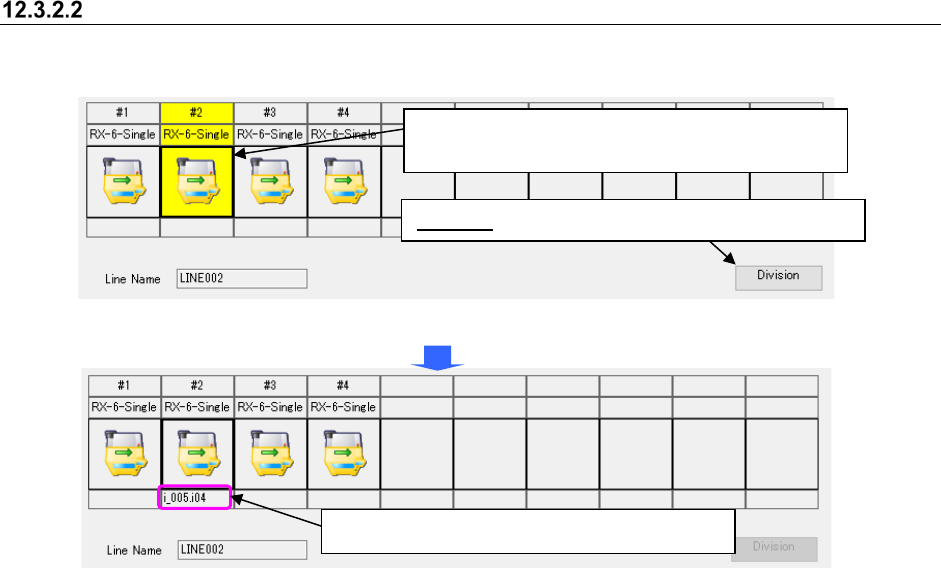
Selecting a divided file
Select a divided program of each machine to be related.
Figure 12.3-5 Selecting a divided file
Figure 12.3-6 Selecting a divided file – Setting a divided file
Division: Specify a file on the “Division” dialog box.
When you select a machine, the <Division> button
located at the lower right corner is enabled.
The divided file is set to the specified machine.

JaNets Instruction Manual 12. Machine Program Relater
12-7
Divided files/production programs you can select here are shown in the table below.
Table 12.3-1 Selectable divided files/production programs
File type
Description
Optimized division file (*.m01 to *.m10) Division file for each machine created after optimization with MI
Line Optimizer
Optimized division file (*.i01 to *.i10, *.e45)
Division file for each machine created after optimization with
production program files created by 2050 and 2050R, and
program editor
Optimized division file (*.i01 to *.i10, *.e46)
Division file for each machine created after optimization with
production program files created by 2055R, 2060, 2060R, and
program editor
Optimized division file (*.i01 to *.i10, *.e47)
Division file for each machine created after optimization with
production program files created by 2070, and program editor
Optimized division file (*.i01 to *.i10, *.x4d)
Division file for each machine created after optimization with
production program files created by 2077, and program editor
Optimized division file (*.i01 to *.i10, *.e48)
Division file for each machine created after optimization with
production program files created by 2080 and 2080R, and
program editor
Optimized division file (*.i01 to *.i10, *.x21) Division file for each machine created after optimization with
production program files created by 3020 and 3020R, and
program editor
Optimized division file (*.i01 to *.i10, *.x11)
Division file for each machine created after optimization with
production program files created by 3010 and 3010A, and
program editor
Optimized division file (*.i01 to *.i10, *.x21)
Division file for each machine created after optimization with
production program files created by 3020V, 3020VR, 3020VA,
3020VRA, and program editor
Optimized division file (*.i01 to *.i10, *.x01)
Division file for each machine created after optimization with
production program files created by FX-3, FX-3R, FX-3RA, and
program editor
Optimized division file (*.i01 to *.i10, *.s01x)
Division file for each machine created after optimization with
production program files created by RS-1 and RS-1R, and
program editor
Optimized division file (*.i01 to *.i10, *.j01x)
Division file for each machine created after optimization with
production program files created by RX-6 and RX-6R, and
program editor
Optimized division file (*.i01 to *.i10, *.prd) Division file for each machine created after optimization with
production program files created by RX-7/RX-7R, and program
editor
Optimized division file (*.i01 to *.i10, *.e71)
Division file for each machine created after optimization with
production program files created by JM-10, and program editor
Optimized division file (*.i01 to *.i10, *.x41)
Division file for each machine created after optimization with
production program files created by JM-20, and program editor
Optimized division file (*.i01 to *.i10, *.s30x)
Division file for each machine created after optimization with
production program files created by JM-100, and program editor