JANETS_INM.pdf - 第605页
JaNets In structio n Manual 16 Component D ataba se 16 -5 Menu item Description Package Code (P) Add (A) Adds packag e code. C an only be s elected when the component fo rm scr een is disp layed. Delete (D) Deletes pa ck…
JaNets Instruction Manual 16 Component Database
16-4
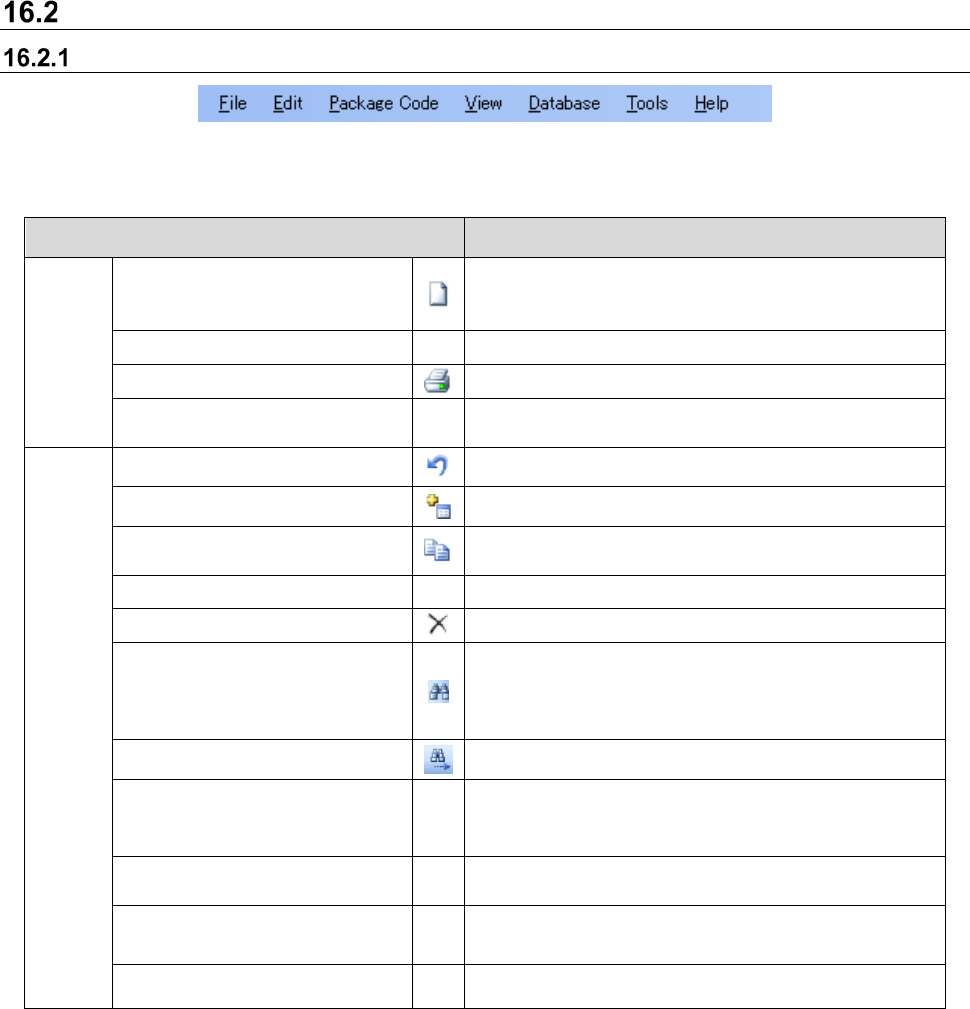
Menu Layout
Menu items
Figure 16.2-1 Component data menu
Table 16.2-1 Component data menu items
Menu item Description
File (F)
Import Data…
Downloads component data from production programs
and other component libraries as well as those supplied
by third parties and records them in the database
Ctrl+I
Export (E)
Exports component data and adhesion data
Print & Save to file...
Ctrl+P
Prints component data
Close component
database (X)
Closes component database
Edit (E)
Go back (Z)
Ctrl+Z
Goes back to the nearest previous input
Add (A)...
Ctrl+A
Adds to list data
Copy (C) ...
Ctrl+C
Copies component data displayed on the grid. Can only
be selected when the component data tab is displayed.
Change (E) Ctrl+E
Changes currently selected data in each list
Delete (D)
Ctrl+D
Deletes component data displayed on the grid
Find (F)...
Ctrl+F
When the component data tab is displayed, a dialog is
displayed to find the designated [Component name]. If
other tabs are displayed, a dialog is displayed to find
characters within the list.
Find next (N) F3
Finds next data
Replace (R)...
Ctrl+R
Replaces all set items of component data at once. Can
only be selected when the component data list is
displayed.
Change component
name (H)...
Ctrl+H
Changes component names. Can only be selected when
the component data list is selected.
Change adhesion
pattern name (B)...
Ctrl+B
Changes the names of adhesion patterns. Can only be
selected when the adhesive data list is selected.
Tag assignment (T)
Ctrl+T
Registers a tag and assigns it to Component data.
JaNets Instruction Manual 16 Component Database
16-5
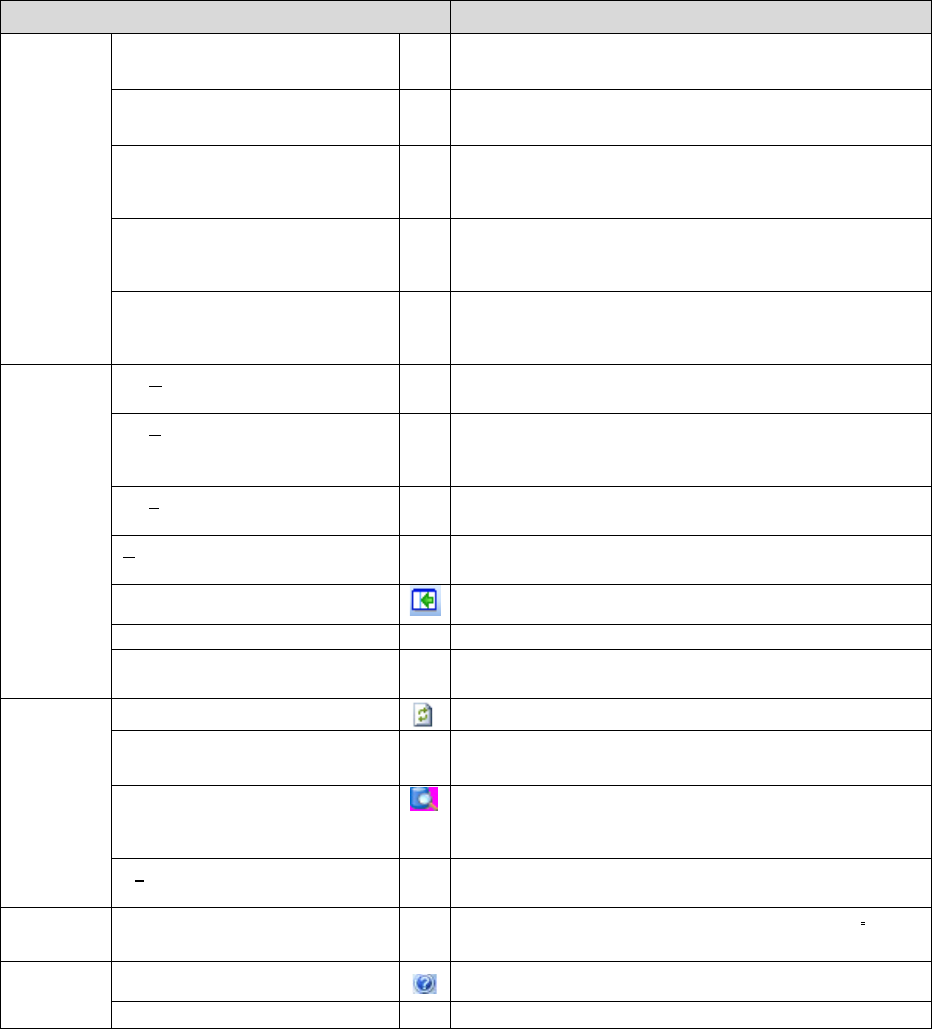
Menu item Description
Package
Code (P)
Add (A)
Adds package code. Can only be selected when the
component form screen is displayed.
Delete (D)
Deletes package code. Can only be selected when the
component data tab is selected.
Update (U)
Updates package code. Can only be selected when the
component form screen is displayed and the package
code is related.
Recall (R)
Update the related component data in the package code
list. Can only be selected when the component data tab is
selected.
Package Code
Assignment (P)
Assigns package code to two or more component data.
Can only be selected when the component data tab is
selected.
View (V)
By Component Type
(C)
Ctr+Shif
t+C
Displays components by type on the grid. Can only be
selected when the component data list is displayed.
By Packaging Style
(P)
Ctr+Shif
t+P
Displays by packing style on the grid.
Can be selected when the component data list is
displayed.
By needle type (N)
Ctr+Shif
t+N
Displays by needle type on the grid. Can only be selected
when the adhesive data list is displayed.
All (A)
Ctr+Shif
t+A
Displays all data without regard to component type or
packaging type
Program Explorer
Switches program explorer display ON/OFF
Tool bar (T)
Switches tool bar display ON/OFF.
Status bar (B)
Switches status bar display ON/OFF. When displayed, it
can display the input range for each value input.
Database
(D)
Reflesh (S)
Ctrl+S
Saves component database being edited currently.
Refresh View (I)
Acquires component data recorded in the server and
redisplays it.
Re-search (R)
Re-searches component data registered in the server to
display it in the list. (The “Search through Component
Database” screen is displayed.)
Synchronize
IFS-NX Server (Y)
The component data registrated currently in the IS server
is reflected to IFS-NX server.
Tools (T) SetEnvironments
(E)…
Sets the environment for the component database.
Help (H) Table of Contents (C)
Displays help for the database
About (A)
Displays the version of the database
JaNets Instruction Manual 16 Component Database
16-6
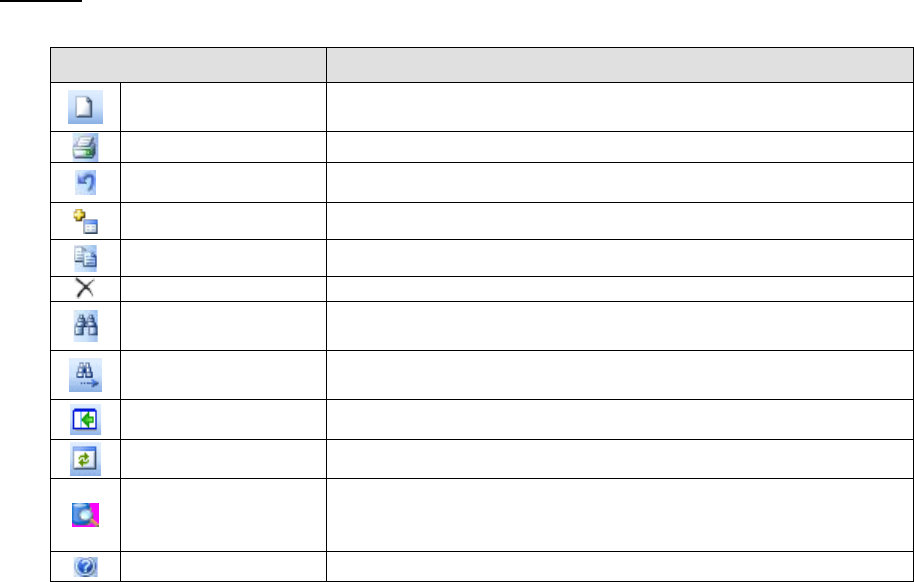
Tool bar
Table 16.2-2 Tool bar items
Tool bar item Description
Import external data Downloads component data from production programs or other
companies’ component libraries and records in the database
Print
Prints component data
Return to previous
Returns to the previous input item
Add
Adds component data
Copy
Copies component data displayed on the grid
Delete
Deletes component data displayed on the grid
Find
Displays dialog box to find designated character column data from
within the list
Find next
Finds the next data after the designated cursor position with currently
set find parameters
Program Explorer
Switches program explorer display ON/OFF
Revise
Saves component database being edited currently.
Re-search
Re-searches component data registered in the server to display it in the
list. (The “Search through Component Database” screen is
displayed.)
Help
Database help display