JANETS_INM.pdf - 第727页
JaNets In structio n Manual 19 T ra ceMonitor 19 - 28 19 -3- 11 Set Env ironments Select the menu c omman ds, [T ools], and then [Set Env ironment s] or press t he Alt key and the E key at the same t ime to start up the …
JaNets Instruction Manual 19 TraceMonitor
19-27
The file formats that can be used for saving a file are shown below.
File format: XML file (*.xml) format and CVS file (*.csv) format
Example: Timeline data output to the L1 production line at 12:58:00 on April 5, 2019 is saved
in CSV format as shown below.
TimeSeries_L1_20190405125800.csv
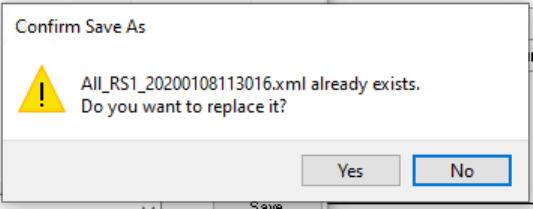
When you specify a file that exists already, the inquiry message for overwriting it appears on the
screen.
Figure 19-3-50 Confirmation message for overwriting a file
<Yes>: Overwrites an existing file.
<No>: Names a file, and then returns to the “Save as” dialog box.
JaNets Instruction Manual 19 TraceMonitor
19-28
19-3-11 Set Environments
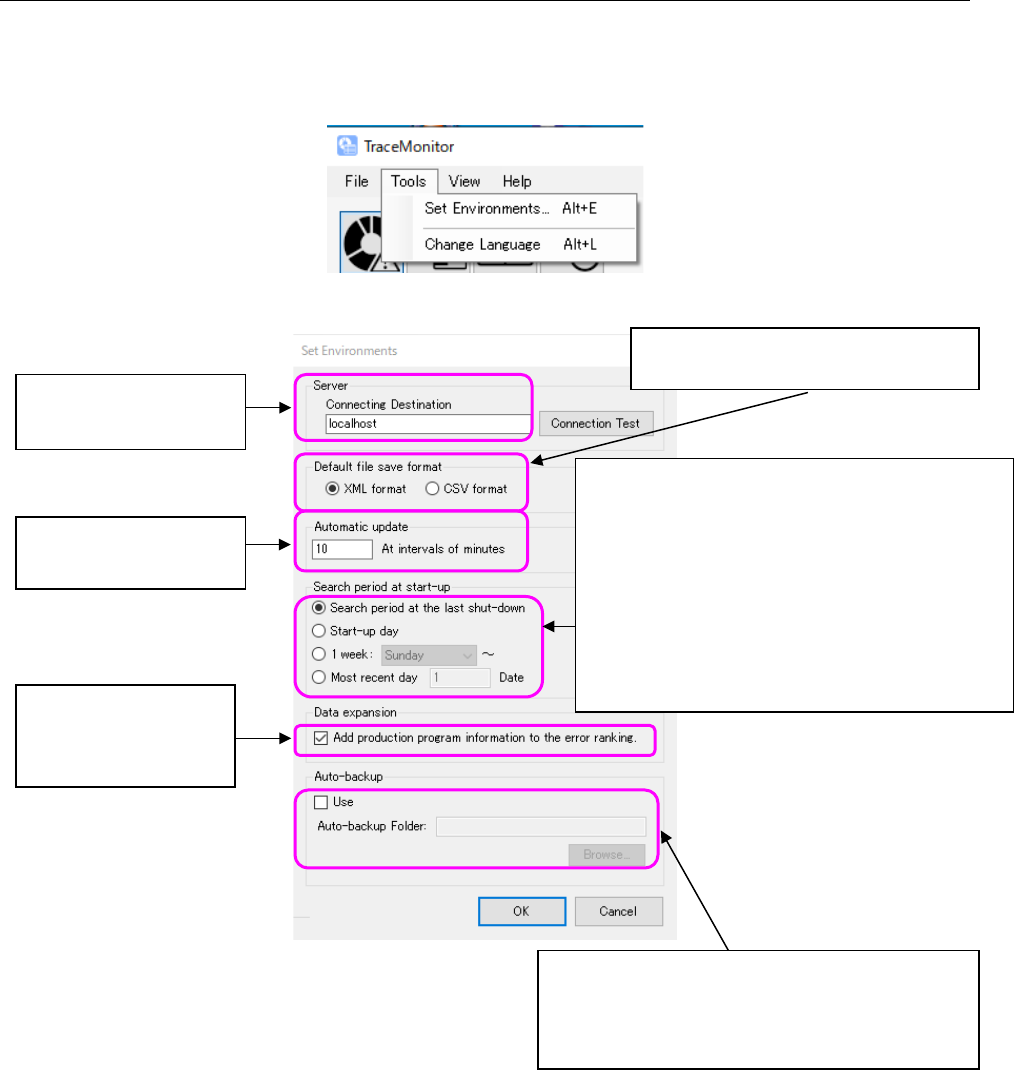
Select the menu commands, [Tools], and then [Set Environments] or press the Alt key and the E key
at the same time to start up the “Set Environments” menu, and specify the default file saving format
of TraceMonitor.
Figure 19-3-51 “Set Environments” menu
Figure 19-3-52 “Set Environments” dialog box
Data obtaining destination
Default: localhost
Automatic update interval
Default: 10 minutes
When you check off this
check box, the tool chip
for the error ranking is
displayed additionally.
The checked format is a file type to be
selected by default when a file is saved.
When you check off this check box, TraceMonitor
automatically backs up the database.
TraceMonitor copies data stored in the database 90
or more days ago into the backup folder.
Specify the period to be entered by default as the
search period when TraceMonitor starts up.
Search period at the last shut-down: Time when
the search was performed at the end when you quit
TraceMonitor the last time
Start-up day: 00:00 to 23:59 on the start-up day
1 week (day is to be specified): One week from the
specified day of the week including the start-up day
Most recent day: Specified number of days
including the start-up day
JaNets Instruction Manual 19 TraceMonitor
19-29
19-4 List of Output Data
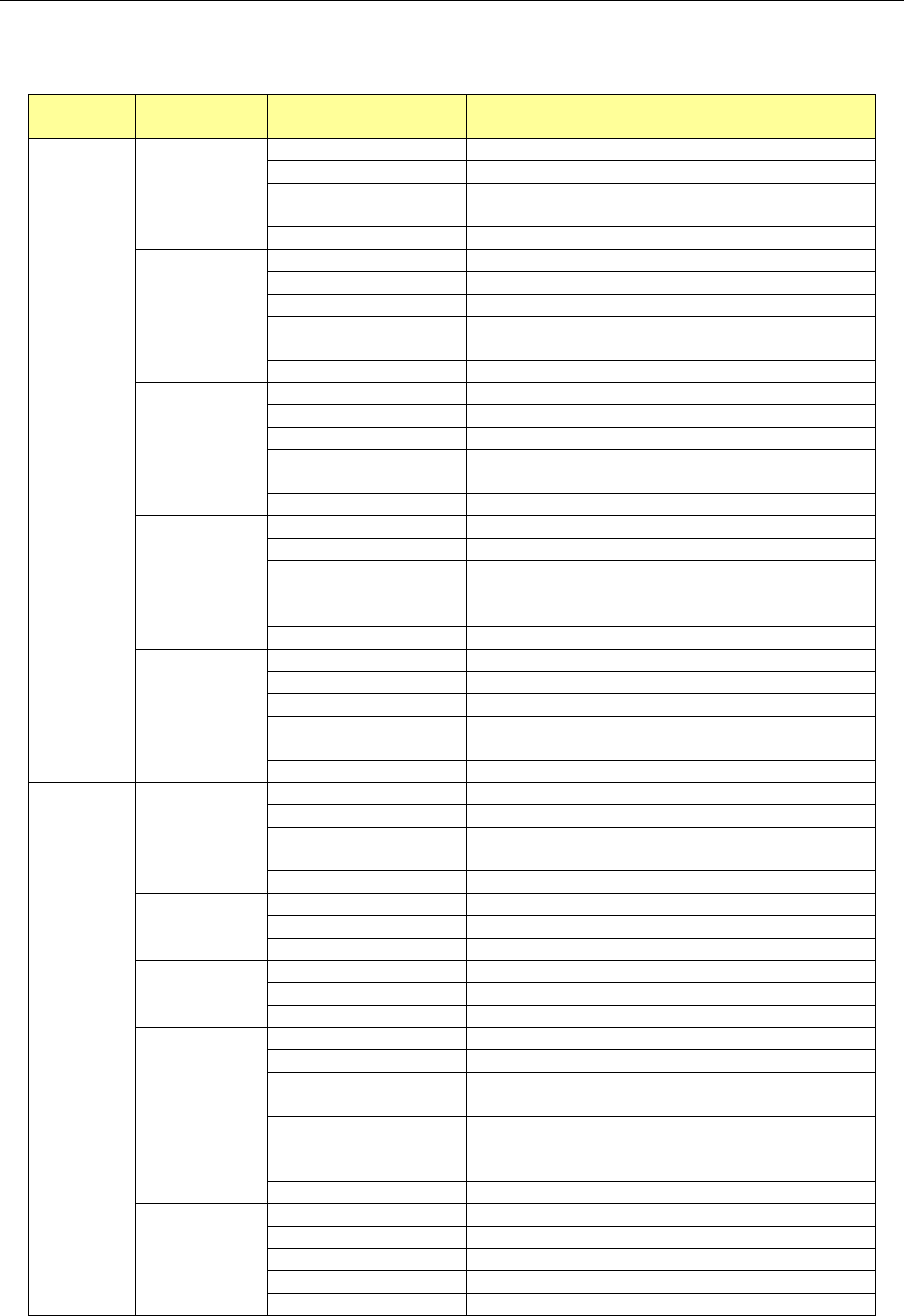
Data to be output from the selected screen is shown in the table below.
Table 19-4-1 List of output data
Selected
screen
Item Sub item Description
Worst
ranking
Error rankings
Number of errors
Number of main errors that occurred
Main error
Error code of an error that occurred
Final error occurrence
date and time
Date and time when the last error occurred
Error details
Description of an error that occurred
Worst
Component
Number of errors
Number of errors that occurred
Machine name
Name of a machine at which an error occurred
Machine type
Model name of a machine
Unit
Name of a unit of a machine at which an error
occurred
Component name
Name of a component at which an error occurred
Worst Feeder
Number of errors
Number of errors that occurred
Machine name
Name of a machine at which an error occurred
Machine type
Model name of a machine
Unit
Name of a unit of a machine at which an error
occurred
Feeder
Position of a feeder at which an error occurred
Worst Feeder
Serial
Number of errors
Number of errors that occurred
Machine name
Name of a machine at which an error occurred
Machine type
Model name of a machine
Unit
Name of a unit of a machine at which an error
occurred
Feeder serial
Serial number of a feeder at which an error occurred
Worst Nozzle
Number of errors
Number of errors that occurred
Machine name
Name of a machine at which an error occurred
Machine type
Model name of a machine
Unit
Name of a unit of a machine at which an error
occurred
Nozzle
Number of a nozzle at which an error occurred
Individual
ranking
Error rankings
Number of errors
Number of main errors that occurred
Main error
Error code of an error that occurred
Error occurrence date
and time
Date and time when the last error occurred
Error details
Description of an error that occurred
Component
name ranking
Number of errors
Number of errors per component name
Component Name
Name of a component at which an error occurred
Main error
Main error code selected in the “Error rankings” list
Placement ID
ranking
Number of errors
Number of errors per placement ID
Placement ID
Placement ID at which an error occurred
Main error
Main error code selected in the “Error rankings” list
Feeder error
ranking
Number of errors
Number of errors per feeder
Machine name
Name of a machine at which an error occurred
Unit
Name of a unit of a machine at which an error
occurred
Feeder
Position of a feeder at which an error occurred
(When a Holder/DTS/MTC/MTS is used, “supply
position#supply device sub-index” is displayed.)
Main error
Main error code selected in the “Error rankings” list
Nozzle error
ranking
Number of errors
Number of errors per nozzle
Machine name
Name of a machine at which an error occurred
Unit
Unit of a machine at which an error occurred
Nozzle
Head number of a nozzle at which an error occurred
Main error
Main error code selected in the “Error rankings” list