JANETS_INM.pdf - 第555页
JaNets Instr ucti on Man ual 13 . Program D ownloa der 13 - 59 13.14.2.2 Propagation setting Perform sett ings related to pr opagatio n. Figure 13.14 -3 Environment - Propaga tion setti ng Propagab le productio n operat …

JaNets Instruction Manual 13. Program Downloader
13-58
<Change Planned No. of PWBs>
“Threshold value for the minimum number of PWBs you can specify”:
Specify the minimum number of PWBs you can specify if the system notifies a machine of
change of the planned number of PWBs to be produced.
Specify a value in the range of 5 to 20.
JaNets Instruction Manual 13. Program Downloader
13-59
13.14.2.2 Propagation setting
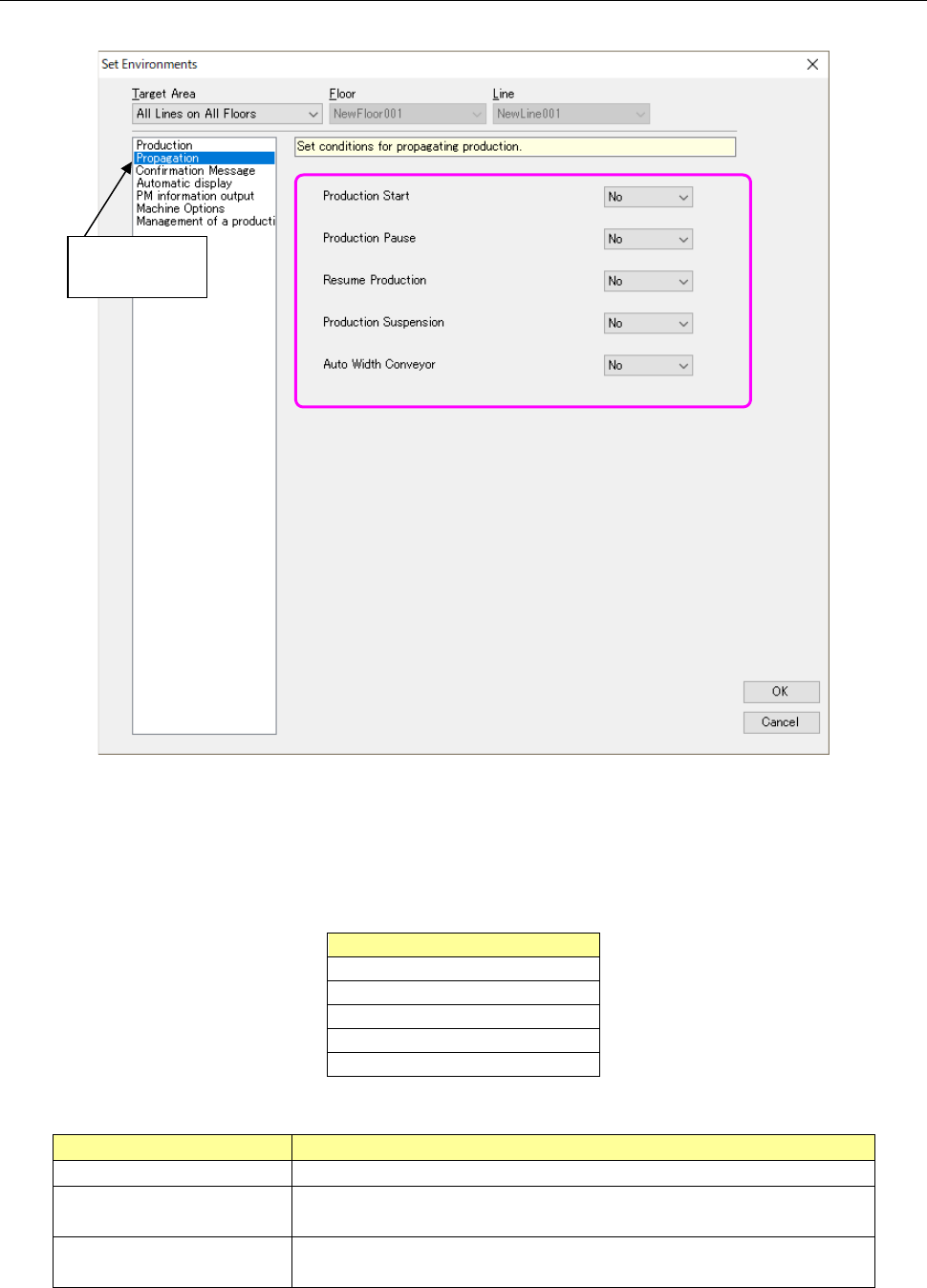
Perform settings related to propagation.
Figure 13.14-3 Environment-Propagation setting
Propagable production operations are as shown in Table 13.14-2, and the types of propagation are
as shown in Table 13.14-3.
Table 13.14-2 Propagable production operations
Production operation
Production Start
Production Pause
Resume Production
Production Suspension
Auto Width Conveyor
Table 13.14-3 Type of propagation
Propagation
Contents
None
The propagation of production operations is not performed.
Lower-rank propagation Production operations are propagated only to the lower-order machine
than the machine of propagation source.
All-rank propagation Production operations are propagated to all the machine of the line in
which the machine of propagation source is arranged.
Select
“Propagation.”
JaNets Instruction Manual 13. Program Downloader
13-60
13.14.2.3 Confirmation message setting
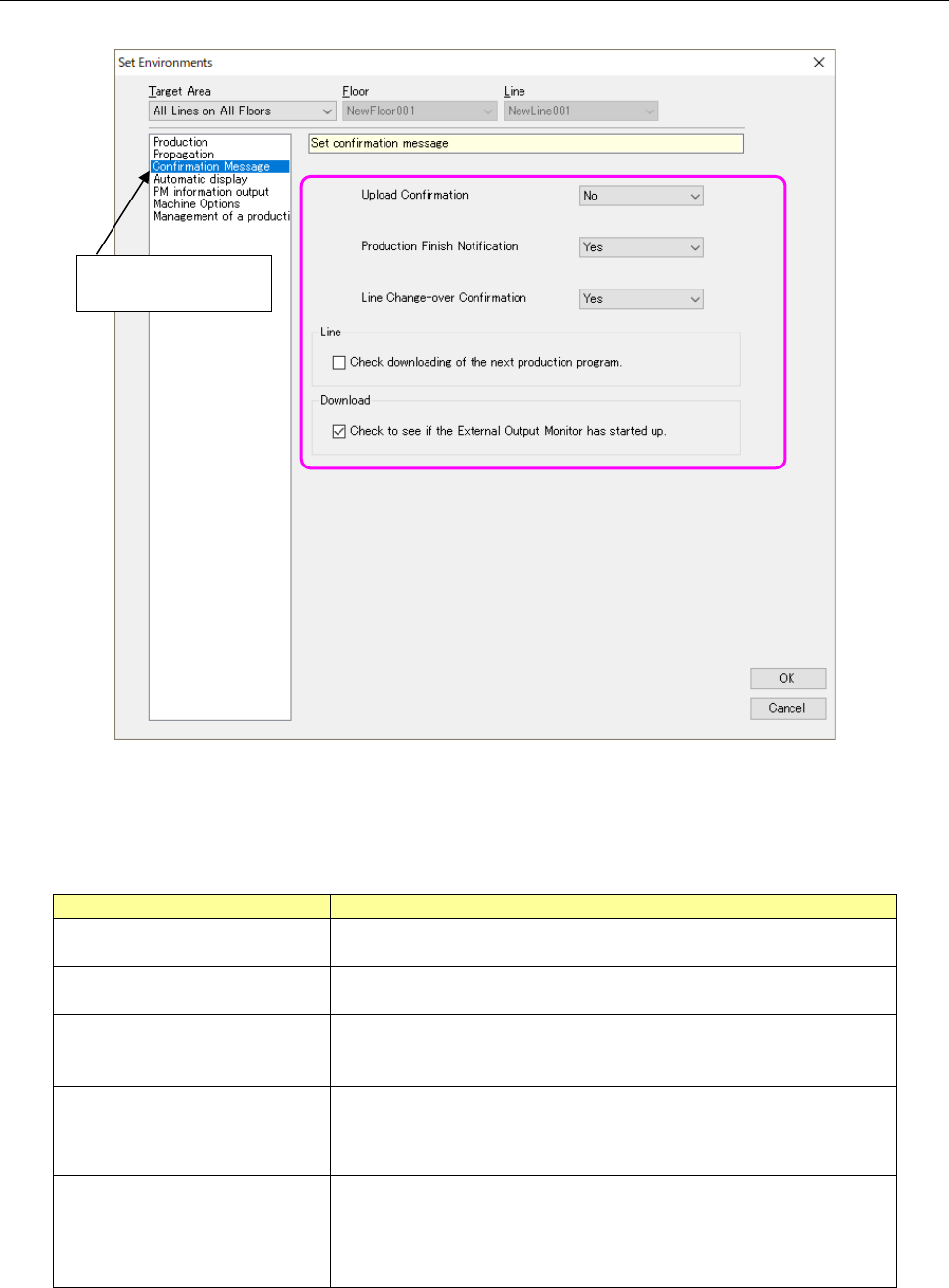
Perform the settings related to confirmation messages.
Figure 13.14-4 Environments – Confirmation message setting
The set contents are as shown in Table 13.14-4.
Table 13.14-4 Types of confirmation messages
Confirmation message
Contents
Upload confirmation Set whether a confirmation message of upload processing execution is
displayed or not.
Production finish notification
Set whether a message for notification of production completion is
displayed or not.
Line change-over confirmation Set whether a confirmation message of line change-over is displayed
or not when a production program or reservation file of other than the
active line is read.
Check downloading of the next
production program
Set whether to display the confirmation message before a production
program for the next PWB production is downloaded to the production
line that is producing a PWB when “Line” is selected as the “Loading
Mode.”
Check to see if the External
Output Monitor has started up.
Set whether to check the starting-up condition of the External Output
Monitor when a program is downloaded.
* This check box is not displayed and the system does not check to
see if the External Output Monitor has started up already when the
license of the External Output Monitor is invalid.
Select “Confirmation
Massage.”