JANETS_INM.pdf - 第521页
JaNets Instr ucti on Man ual 13 . Program D ownloa der 13 - 25 If the system f ails to notify any m achine of the change of the planne d number of PWBs t o be produced, t he conf irmatio n messa ge appears o n the screen…
JaNets Instruction Manual 13. Program Downloader
13-24
[4] The value of menu item “Minimum number of PWBs you can specify” is greater than or equal
to the value of the menu item “Changed setting of the ‘Planned No. of PWBs’,” the <Notice of>
button is disactivated and you cannot change the planned number of PWBs to be produced.
[5] While the planned number of PWBs to be produced is being displayed on the screen, you
cannot perform automatic download/upload.
[6] When you use an RX-7 series machine, the menu item “Planned No. of…” is not updated
even though you change the planned number of PWBs to be produced by the machine.
13.9.8.2 Notification of change of the number of PWBs planned to be produced
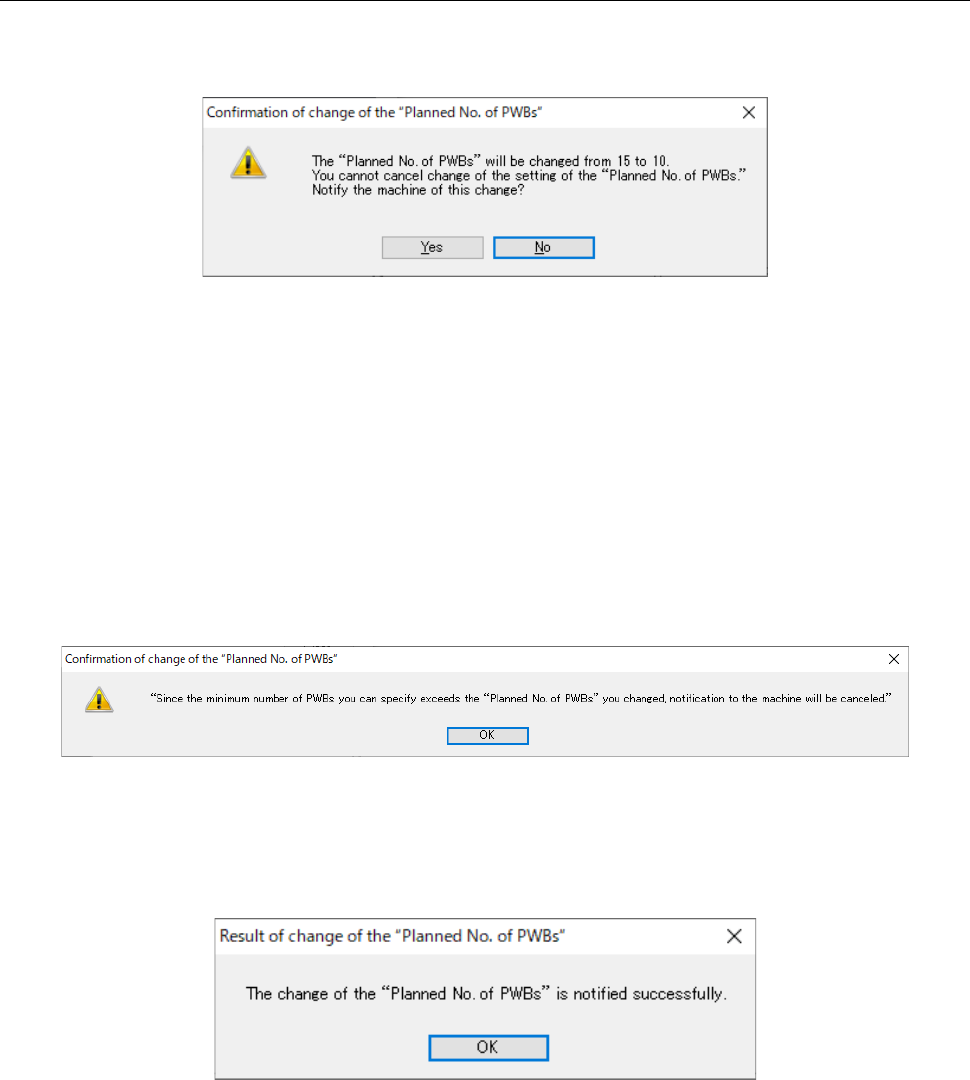
When you click the <Notify of> button while the “Stats” column shows “In Progress,” the
confirmation message is displayed as shown in Figure 13.9-11.
Figure 13.9-11 “Confirmation of change of the “Planned No. of PWBs” screen
When you press the <Yes> button, the system changes the planned number of PWBs specified in
the program(s) whose number is set to be changed and that is (are) displayed in the Production
schedule list, and notifies the machine of change of the planned number of PWBs to be produced.
When you press the <No> button, the system cancels notification to the machine.
* Even though all machines fail to change the planned number of PWBs to be produced, the
system change the planned number of PWBs to be produced of the Production schedule list.
If the value of the menu item “Minimum number of PWBs you can specify” exceeds the value of
the menu item “Changed setting of the ‘Planned No. of PWBs’” while this change is being
confirmed, the system cancels notification to the machine of the change.
Figure 13.9-12 Cancel of change of the planned number of PWBs to be produced
When the system notifies the machine of change of the planned number of PWBs to be produced
successfully, the confirmation message appears on the screen as shown in Figure 13.9-13.
Figure 13.9-13 Success message
JaNets Instruction Manual 13. Program Downloader
13-25
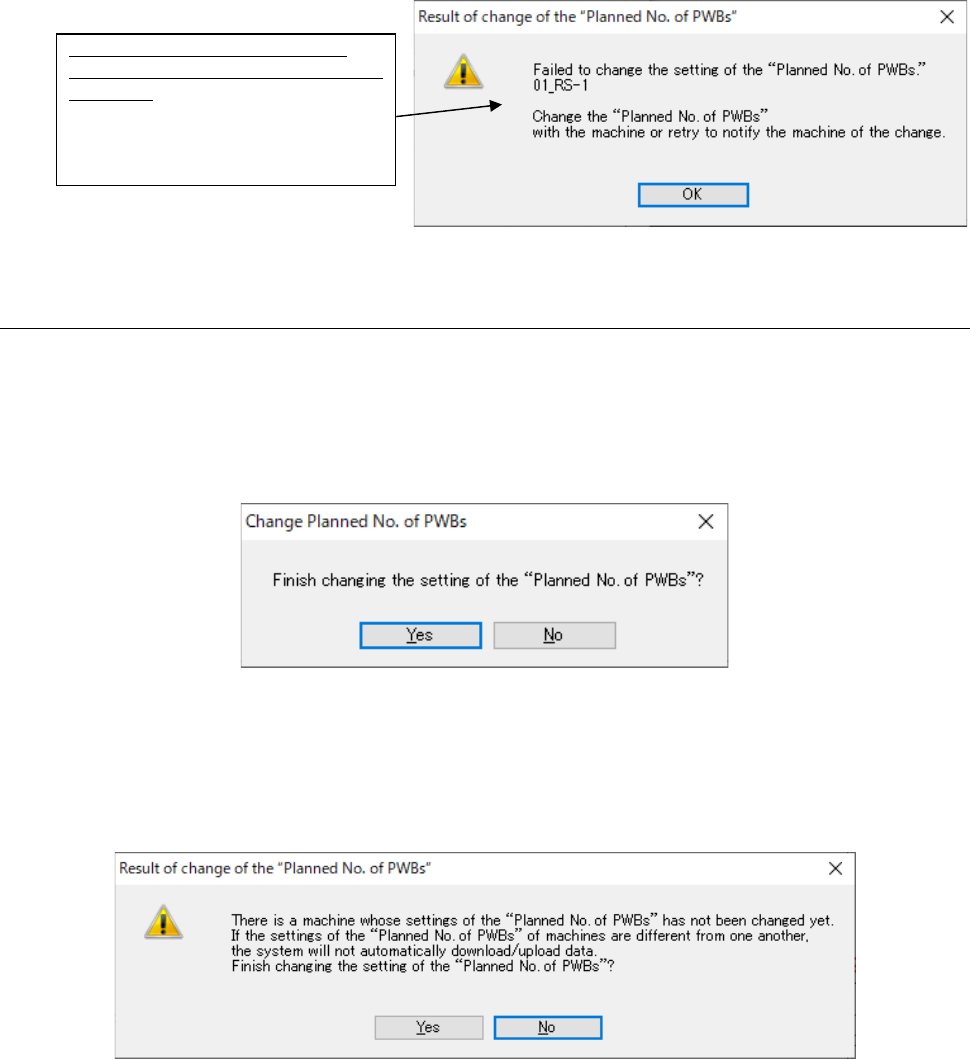
If the system fails to notify any machine of the change of the planned number of PWBs to be
produced, the confirmation message appears on the screen as shown in Figure 13.9-14.
Figure 13.9-14 Failure message
13.9.8.3 Quitting the “Change of Planned No. of PWBs” screen
When you click the <Close> button, the message for confirming quit operation appears on the
screen.
If no machine changed the planned number of PWBs to be produced or if all machines changed
the respective numbers, the confirmation message appears on the screen as shown in Figure
13.9-15.
Figure 13.9-15 Confirmation message for quitting the screen
when the system succeeded in notifying the machine(s) of the change
If any machine fails to change the planned number of PWBs, the confirmation message appears
on the screen as shown in Figure 13.9-16.
Figure 13.9-16 Confirmation message for quitting the screen
when the system failed to notify the machine of the change
List of machines whose number of
PWBs to be produced the system failed
to change:
Machines whose number of PWBs
to be produced the system failed to
change are displayed here.

JaNets Instruction Manual 13. Program Downloader
13-26
13.9.9 Next production program reservation
After the production program to be downloaded next is reserved and the uploading and
combination of the current production program is completed, the reserved production program is
automatically downloaded.
<Precautions>
[1] The next production program can be reserved only for the line that is under production by
each production program. It cannot be reserved for a line in which production has been
completed or a line in which the reserved file is under production.
[2] The number of next production programs that can be reserved is 1. It is impossible to reserve
multiple programs for a single line as a next production program.
[3] After the next production program is downloaded to one of machines of the production line,
you cannot change the setting of the “Planned No. of PWBs” of the next production program.
[4] When you open another production program, reservation information of the next
production program is deleted.
[5] When the system starts reserving the next production program for the production line, it does
not download/upload any production program to the production line that is being reserved until
the reservation is completed or canceled. It loads/unloads a production program to any
production line other than the production line that is being reserved.