JANETS_INM.pdf - 第159页
JaNets In structio n Manual 5. Shopflo or Setu p 5- 39 INS Bulk Feeder setting Figure 5.6 - 11 “Equipment Setup” scre en (INS bulk feede r) R- A TC setting Figure 5.6 - 12 “Equipment Setup” scree n (R - AT C ) Select M o…
JaNets Instruction Manual 5. Shopfloor Setup
5-38
Setting up equipment
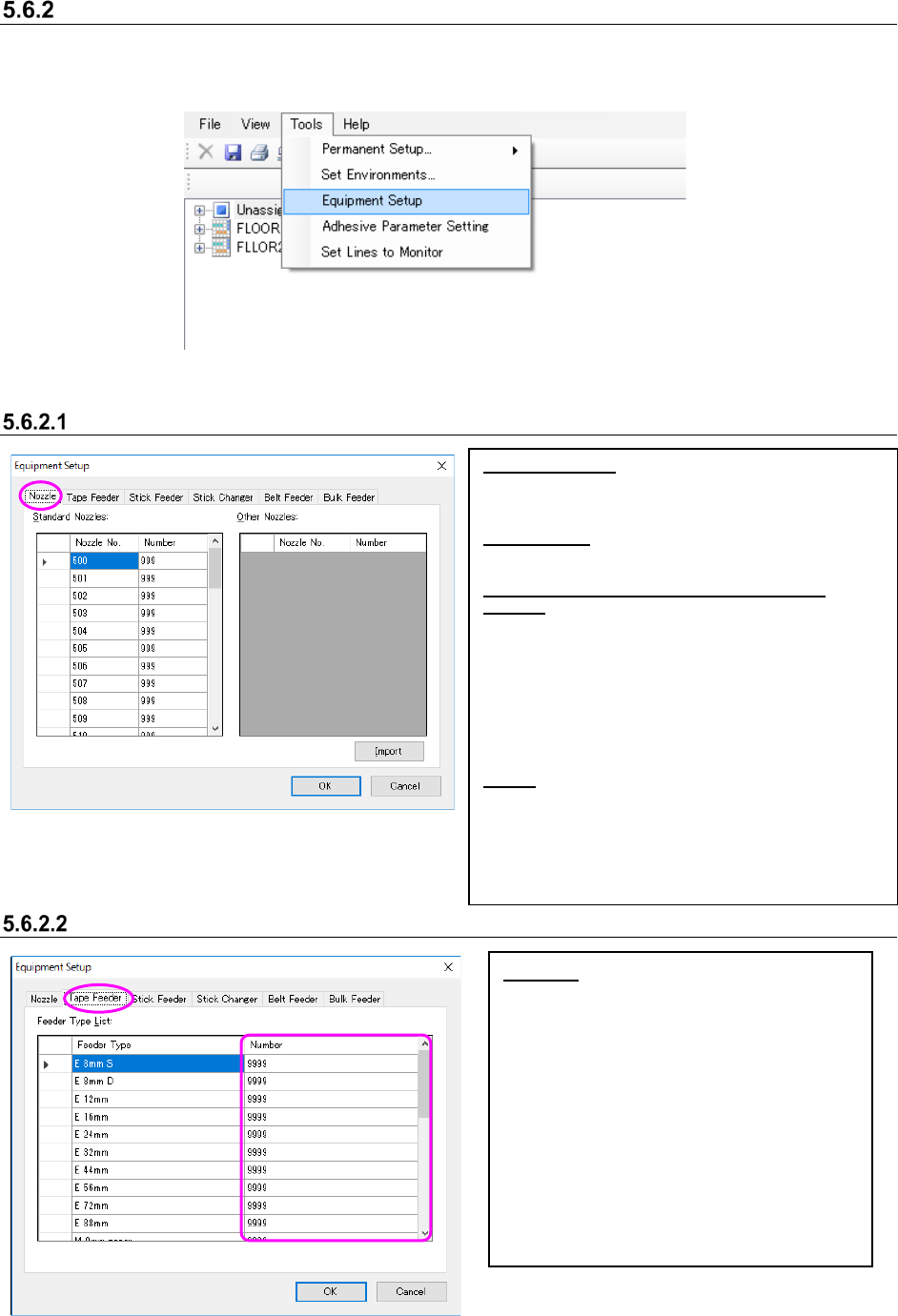
You can control the number of nozzles or feeders owned by a user. Select the [Tools] command
from the menu bar, and then the [Equipment Setup] command from the “Tools” menu. The
“Equipment Setup” screen appears.
Figure 5.6-8 [Tools] – [Equipment Setup]
Setting nozzles
Figure 5.6-9 “Equipment Setup” screen (Nozzle)
Setting the number of Supply device
Figure 5.6-10 “Equipment Setup” screen (Tape Feeder)
Standard Nozzles:
[Nozzle No.]: Nozzle Nos. 500 ~ 511, 501H ~ 503H,
506H ~ 508H, 601M ~ 604M, 606M, 608M ~ 611M,
607M, 619M ~ 621M and 7500 ~ 7509 are displayed.
Other Nozzles:
“Nozzle No.”: The nozzle number imported from the
INI file is displayed.
Key operations for the Standard Nozzles/Other
Nozzles:
Enter the number in the “Number” cell directly. When
you press the [ALT] key and the [O] key at the same
time, you can move to the top “Number” cell of the
“Other Nozzles.”
Use the up/down arrow key to move to the “Number”
cell above or below the current cell.
When you click the <OK> button without entering any
value in the “Number” cell, “0” is entered in the
“Number” cell.
Import:
The system obtains the nozzle number from the INI file
* When you import the nozzle number, put the INI file
in the installation folder \Custom\Nozzle of the
JaNets manually.
When no INI file is available, optimization cannot be
executed normally.
* Obtain INI file from the mounter main body.
Number: Set the number of tape feeders
owned by a user.
* Enter a number in the “Number” cell
directly.
* Use the up/down arrow key to move to the
“Number” cell above or below the current
cell.
* When you press the [ALT] key and the [L]
key at the same time, you can move to the
top “Number” cell.
* When you click the <OK> button without
entering any number in the “Number” cell,
“0” is entered in the cell.
JaNets Instruction Manual 5. Shopfloor Setup
5-39
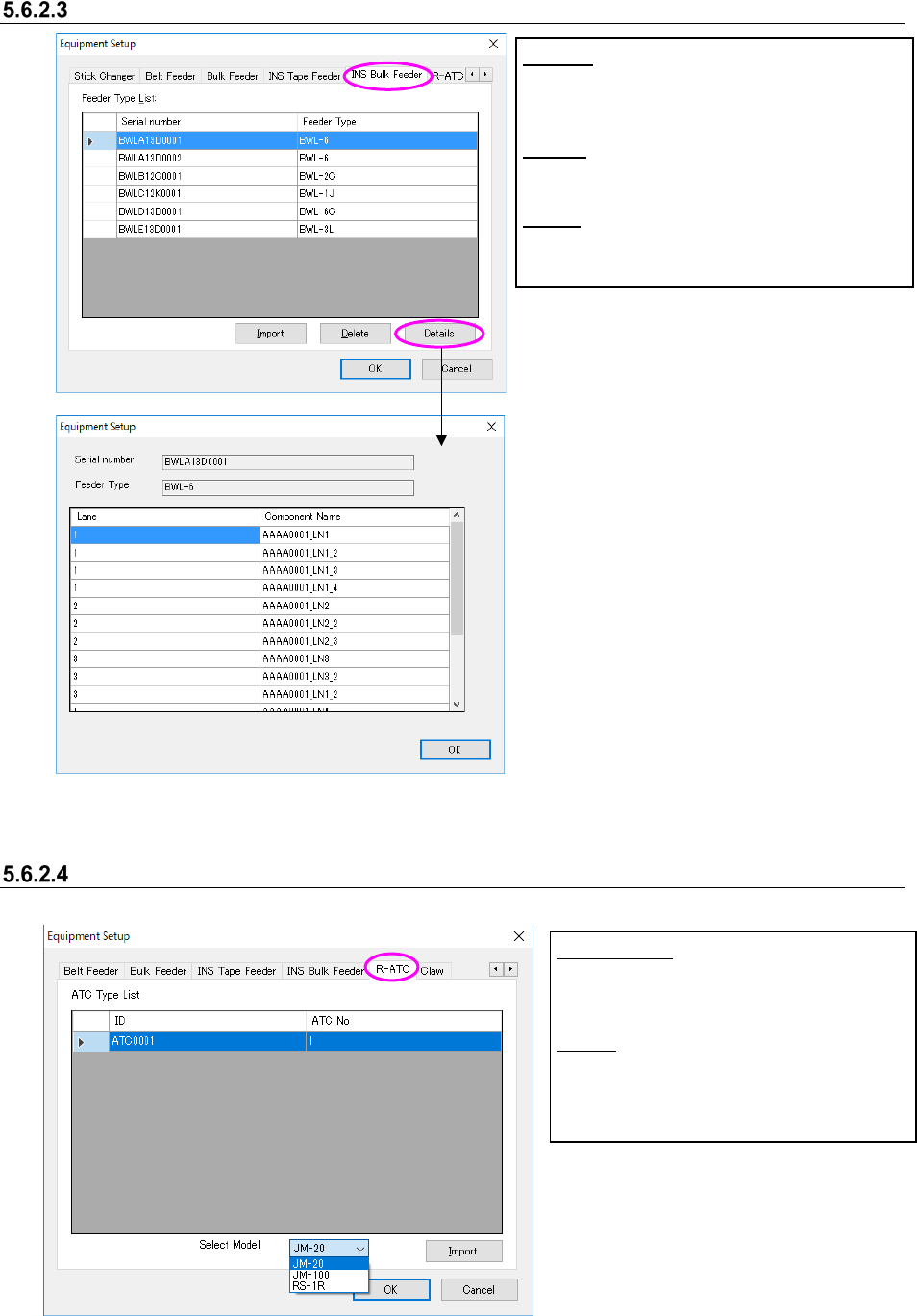
INS Bulk Feeder setting
Figure 5.6-11 “Equipment Setup” screen (INS bulk feeder)
R-ATC setting
Figure 5.6-12 “Equipment Setup” screen (R-ATC)
Select Model:
Select an R-
ATC machine model whose
information is to be imported.
Import:
The system loads R-ATC information
from the INI file.
Import:
The system obtains the INS bulk feeder setting
from the INI file.
Delete:
The system deletes the INS bulk feeder setting.
Details:
The system displays a component on each lane of
the INS bulk feeder on the screen.
JaNets Instruction Manual 5. Shopfloor Setup
5-40
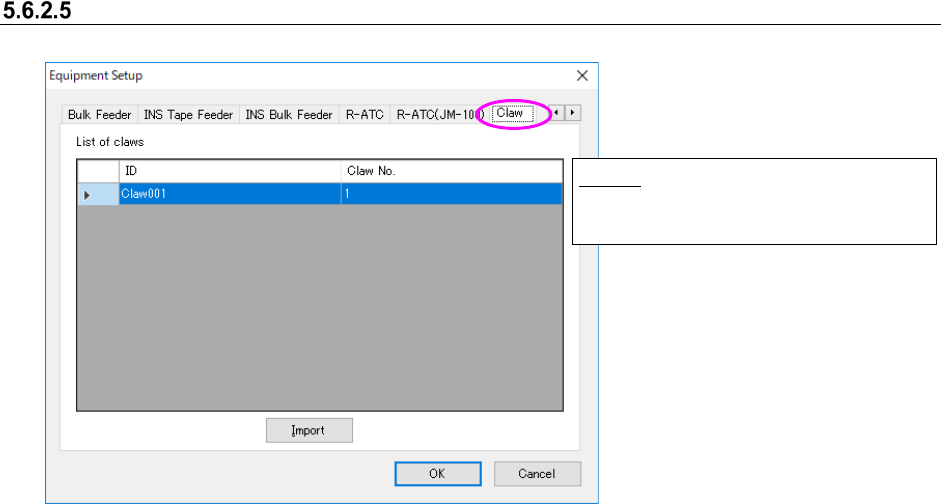
Claw Setting
Figure 5.6-13 “Equipment Setup” screen (Claw)
Import:
Take in Claw for JM-100 from INI file.