JANETS_INM.pdf - 第21页
JaNets Instr ucti on Man ual 1. Overview 1-8 Syste m Configurati on 1.3.1 Supported m achine models Item Specifications Supported machi ne models Maximum num ber of machine s that can be conn ected to one prod uction lin…
JaNets Instruction Manual
1. Overview
1-7
Some functions work differently depending on whether the setting of connection to Data Manager is
enabled or disabled. If the description is effective only when the system is connected to a server, it
is described so or is shown together with the corresponding section number.
1.2.5 Equipment Manager
Equipment Manager is an option of Line Manager. The functions, which can be used when the
Equipment Manager option is enabled, are provided with a mark in the description or title in this
document.
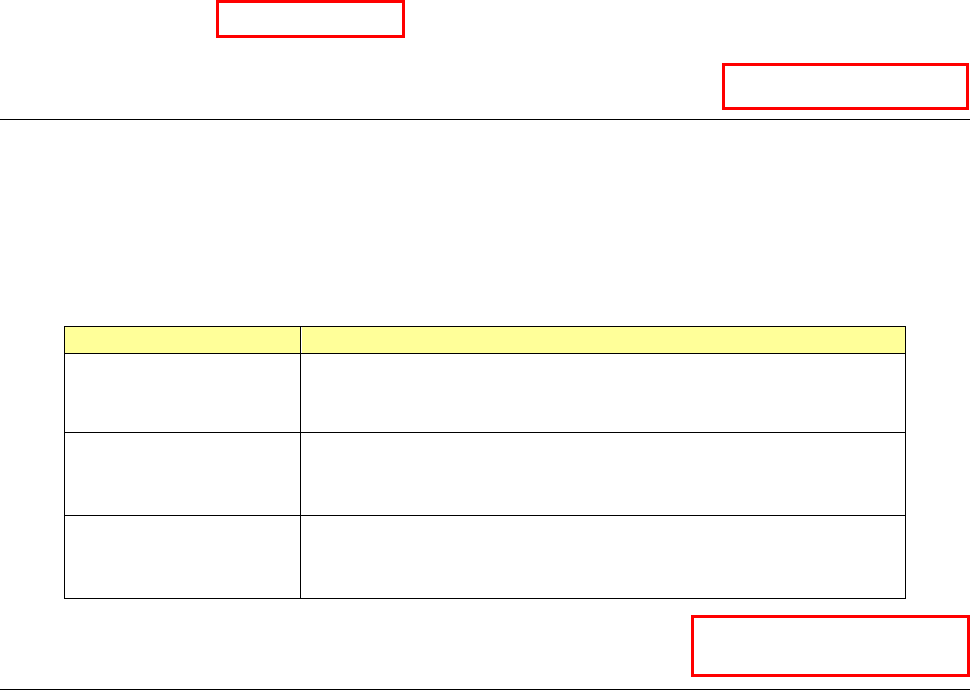
When you use Equipment Manager, you can use the following functions: production line
configuration including a printer and an inspection machine, online PWB production and linkage
between machines.
Name
Overview
Shopfloor Setup
Line configuration including a printer and an inspection
machine
Setting of the device linkage function.
Program Editor
Association of production programs to be used with a printer
and an inspection machine
Setting of the device linkage function.
Program Downloader
Online production with a production line including a printer and
an inspection machine
Setting of the device linkage function.
1.2.6 TraceMonitor
TraceMonitor is an option of Line Manager. Functions you can use when the TraceMonitor option
is enabled are described in this manual or the corresponding mark is put to the respective titles for
the functions so that you can know it immediately.
When you use TraceMonitor, it collects information on each device to accumulate the information.
When you want to just refer to information collected with JaNets with JaNets installed on another PC,
you do not need the TraceMonitor option.
TraceMonitor
Equipment Manager
Data Manager
JaNets Instruction Manual
1. Overview
1-8
System Configuration
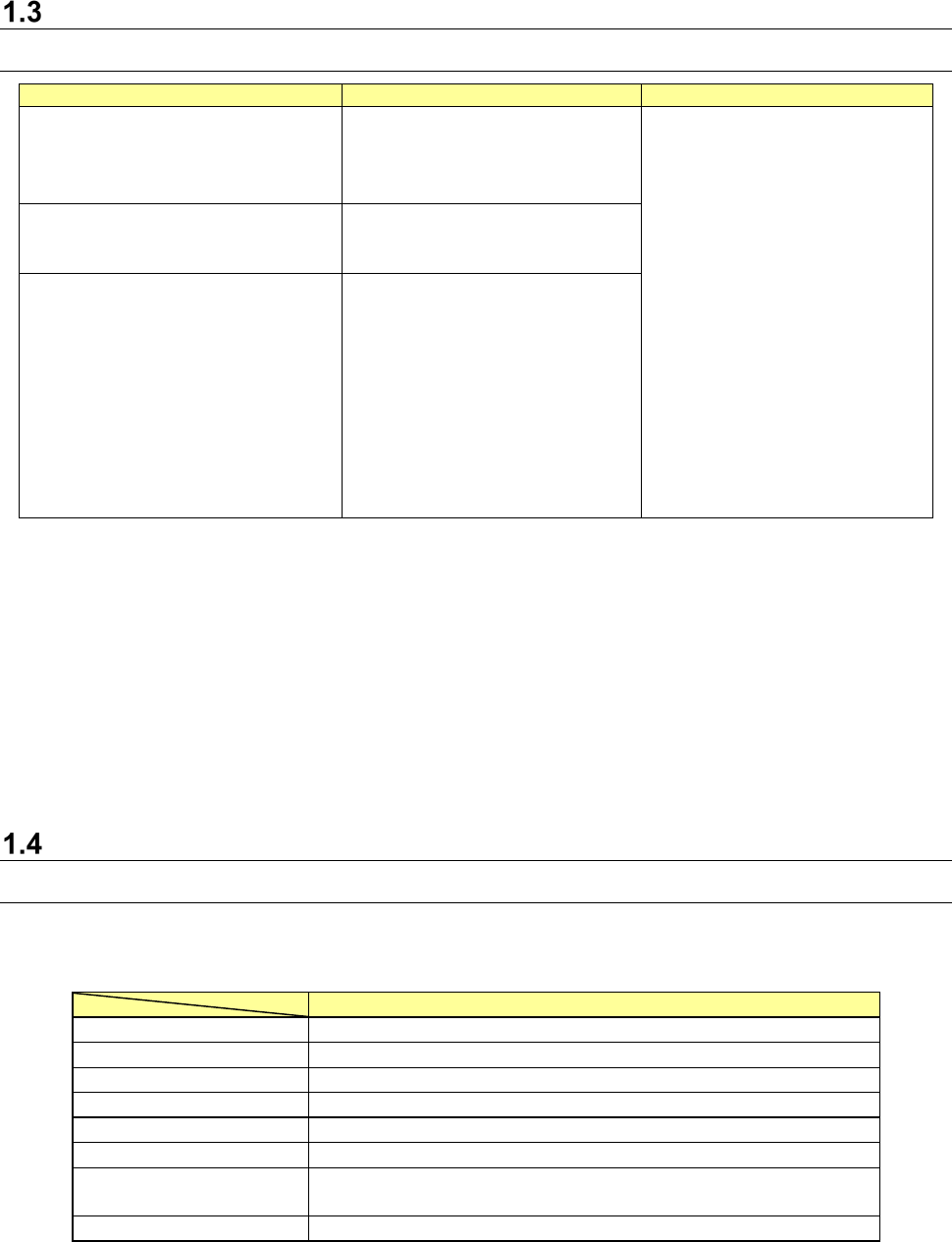
1.3.1 Supported machine models
Item
Specifications
Supported machine models
Maximum number of machines that
can be connected to one production
line
10
RS-1/RS-1R *5
RX-7/RX-7R *5
RX-6(RX-6B*1)/RX-6R *5
KE-3010A/3020VA/3020VRA
KE-3010/3020V/3020VR
KE-3020/3020R
KE-2070/2080/2080R
KE-2050R/2055R/2060R
KE-2050/2060
FX-3/RX-3R/FX-3RA
KD-2077
JX-350 *2
RV-1 *3
RV-2 *3
RV-2-3D *3
RP-1 *3
JM-10 *4
JM-20 *4
JM-100 *4 *5
Maximum number of machines that
can be created
50
200 when Data Manager is used
Maximum number of lines that can be
connected
15
*1 Treat RX-6B as RX-6.
*2 A JX-350 is supported in EPU mode only.
*3 The Equipment Manager license is required for a printer and an inspection machine
respectively.
*4 You cannot create any production line that connects a mounter, an adhesive dispenser and an
inserting machine.
You can create a production line configured of a printer, an inspection machine and an
inserting machine.
*5 Machine models supporting TraceMonitor.
Specifications of a used PC
1.4.1 JaNets PC
Specifications of a PC on which the JaNets operates are shown below (note that you have
to use a keyboard/mouse/printer supported with the Operating System (OS)).
Recommended specifications
CPU
Intel Core i3 3.0GHz or higher
Memory
8 GB or more
HDD capacity
500 GB or more
Available hard-disk space
50 GB or more
CD-ROM drive
1 or more
Screen resolution
FWXGA 1366×768 pixel or higher
Interface
1000BASE-T LAN connector (RJ-45) × 1
USB 2.0/3.0 × 1
OS
Microsoft Windows 10 Pro (64bit)
*1 A “DPI setting” for screen supports “normal size (96 DPI)” only.
* Intel and Core i3 are trademarks of Intel Corporation in the U.S.A. and other countries.
* Microsoft and Windows10 are trademarks of US Microsoft Corporation in the U.S.A. and other
countries.
JaNets Instruction Manual
1. Overview
1-9
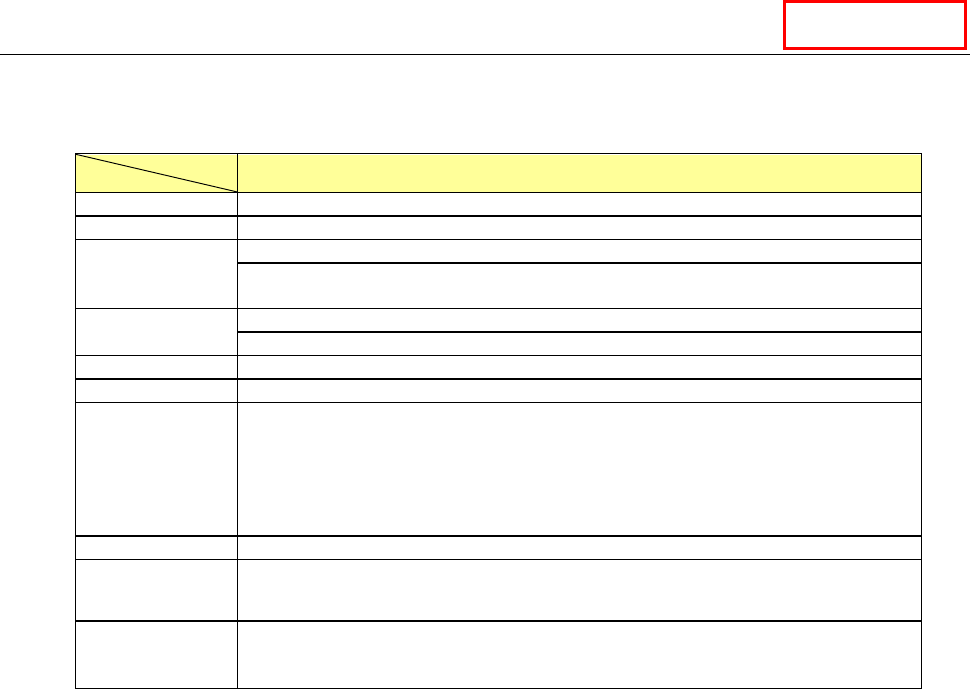
1.4.2 Data Manager PC
The specifications of a PC on which Data Manager operates are shown below (note that you have
to use a keyboard/mouse/printer supported by the OS).
Specifications of a PC on which Data Manager operates
CPU
Intel Xeon CPU (3.00 GHz) or higher
Memory
8 GB or more
HDD capacity
1 TB or more
It is recommended to create the drives C and D and use the drive D as the data
storage area.
HDD unoccupied
space capacity
250 GB or more
RAID is required for mirroring.
DVD
1 or more
Screen resolution
XGA (1024 × 768) or higher
Interface
Keyboard (USB 2.0/3.0 or mini DIN 6-pin) × 1
Mouse (USB 2.0/3.0 or mini DIN 6-pin) × 1
1000BASE-T LAN connector (RJ-45) × 1
* When a UPS is used, an I/F port compatible with the UPS is required separately.
* When a printer is used, an I/F port compatible with the printer is required
separately.
Back-up device
LTO-5 1.5 TB (when not compressed)/3.0 TB (when compressed)
OS
Microsoft Windows Server 2012 R2 Standard Edition (64bit)
Microsoft Windows Server 2016 Standard Edition (64bit)
Uninterruptible
power supply
system (UPS)
Approximately 100 minutes at 100 VA/70 W
(APC Smart-UPS 1000 or equivalent)
* Intel and Xeon are trademarks of Intel Corporation in the U.S.A. and other countries.
* Microsoft and Windows Server are trademarks of US Microsoft Corporation in the U.S.A. and
other countries.
Data Manager