JANETS_INM.pdf - 第409页
JaNets Instr ucti on Man ual 8. Job Optim izer 8- 24 Print Figure 8.3 - 39 Main scr een – [ File] – [Pri nt] Figure 8.3 - 40 “ Prin t ” dialog box ① Configuration: Changes the m achine to print. Select Prod uction Progra…
JaNets Instruction Manual 8. Job Optimizer
8-23
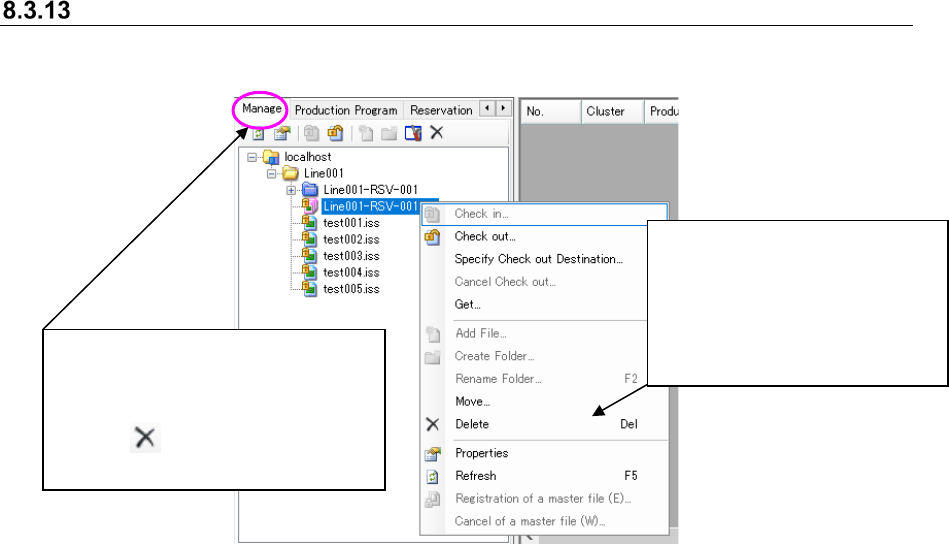
Deleting a reservation file from a database
Perform the operation ① or ② below.
Figure 8.3-38 Main screen – [Program Explorer (“Manage”)] – [Delete]
②
Select the [Delete] command.
* The confirmation message for
deleting the file appears on
the screen. When you click
the <Yes> button, the selected
file is deleted, and the
message is closed.
①
Select a reservation file (or two or
more reservation files) displayed on
the “Manage” tab of the Program
Explorer, and then click the “Delete”
icon ( ) of the tool bar for the
Program Explorer.
JaNets Instruction Manual 8. Job Optimizer
8-24
Print
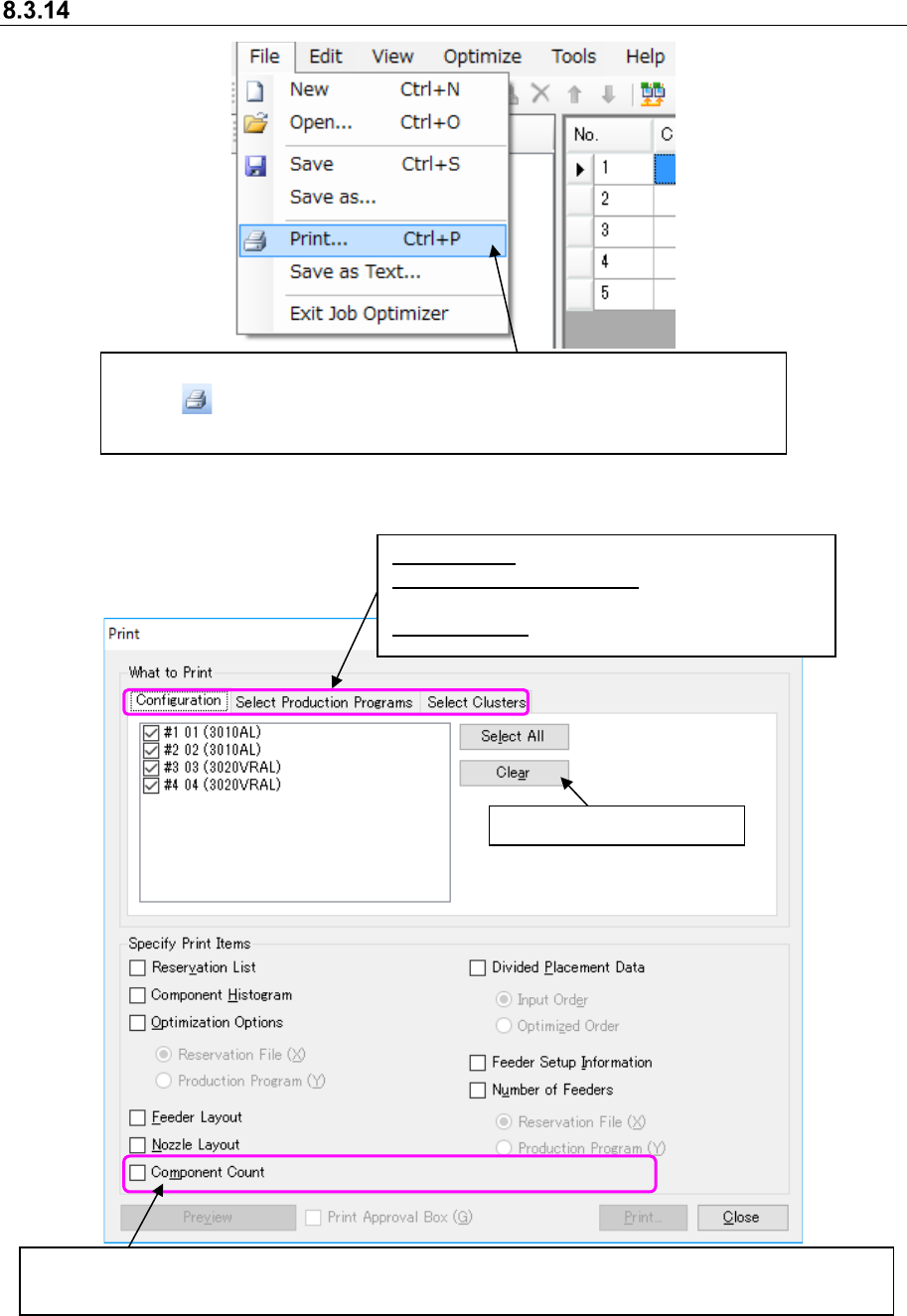
Figure 8.3-39 Main screen – [File] – [Print]
Figure 8.3-40 “Print” dialog box ①
Configuration: Changes the machine to print.
Select Production Programs:
Changes a production program to be printed.
Select Clusters: Changes a cluster to be printed.
Select the [File] command, and then the [Print] command, or click the
“Print” ( ) tool from the toolbar. The “Print” dialog box ① appears on the
screen.
This button deselects a check box.
When this dialog box appears on the screen, none of the print items are selected. When you select a print
item, the dimmed <Preview> button, “Print Approval Box” check box and <Print> button are enabled.
JaNets Instruction Manual 8. Job Optimizer
8-25
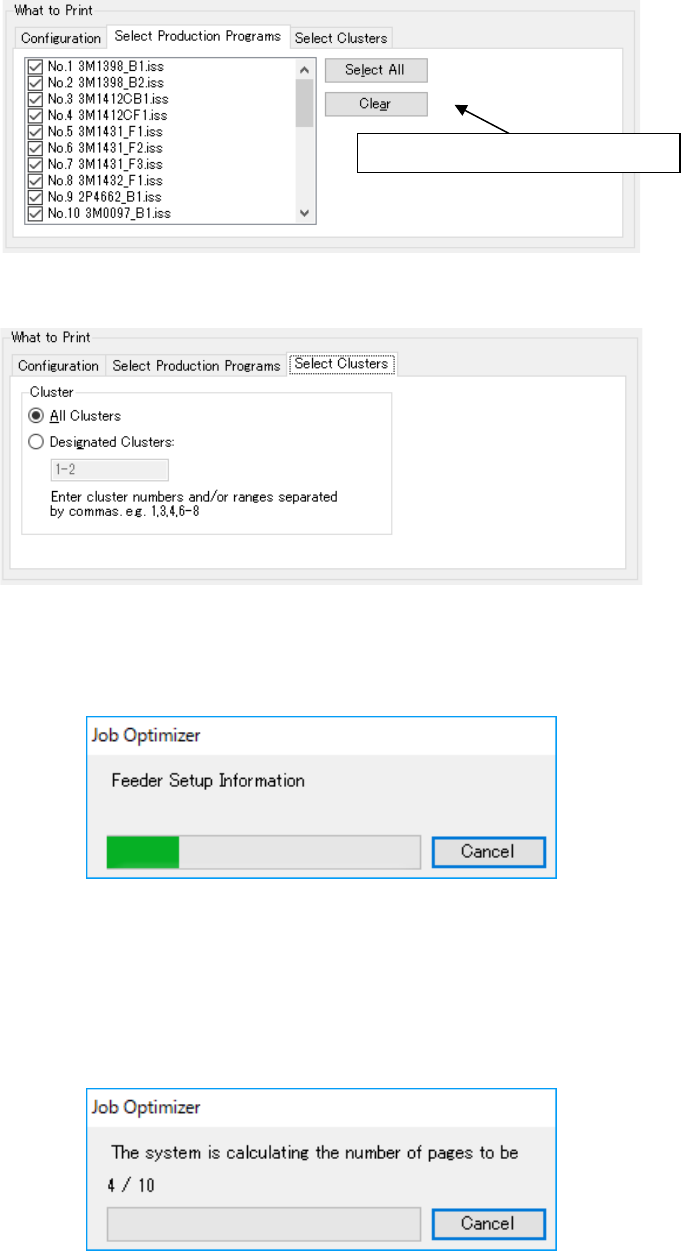
Figure 8.3-41 “Print” dialog box ①– “Select Production Programs”
Figure 8.3-42 “Print” dialog box ①– “Select Clusters”
The <Print> button displayed on the screen above starts creating a document to be printed.
Figure 8.3-43 Creating a document
When the Job Optimizer finishes creating a document to be printed, it starts calculating the
number of pages to be printed. When you select the <Cancel> button to cancel this calculation, the
Job Optimizer displays the Figure 8.3-44 Calculating the number of pages to be printed Figure
8.3-46 “Print” dialog box ② screen.
Figure 8.3-44 Calculating the number of pages to be printed
This button deselects a check box.