JANETS_INM.pdf - 第269页
JaNets In structio n Manual 7. Program Editor 7- 62 Setting for determining the component d irection Figure 7.4 - 89 “ Setting for determi ning the component direc tion ” screen T able 7.4 - 54 Items displayed on the “ S…
JaNets Instruction Manual 7. Program Editor
7-61
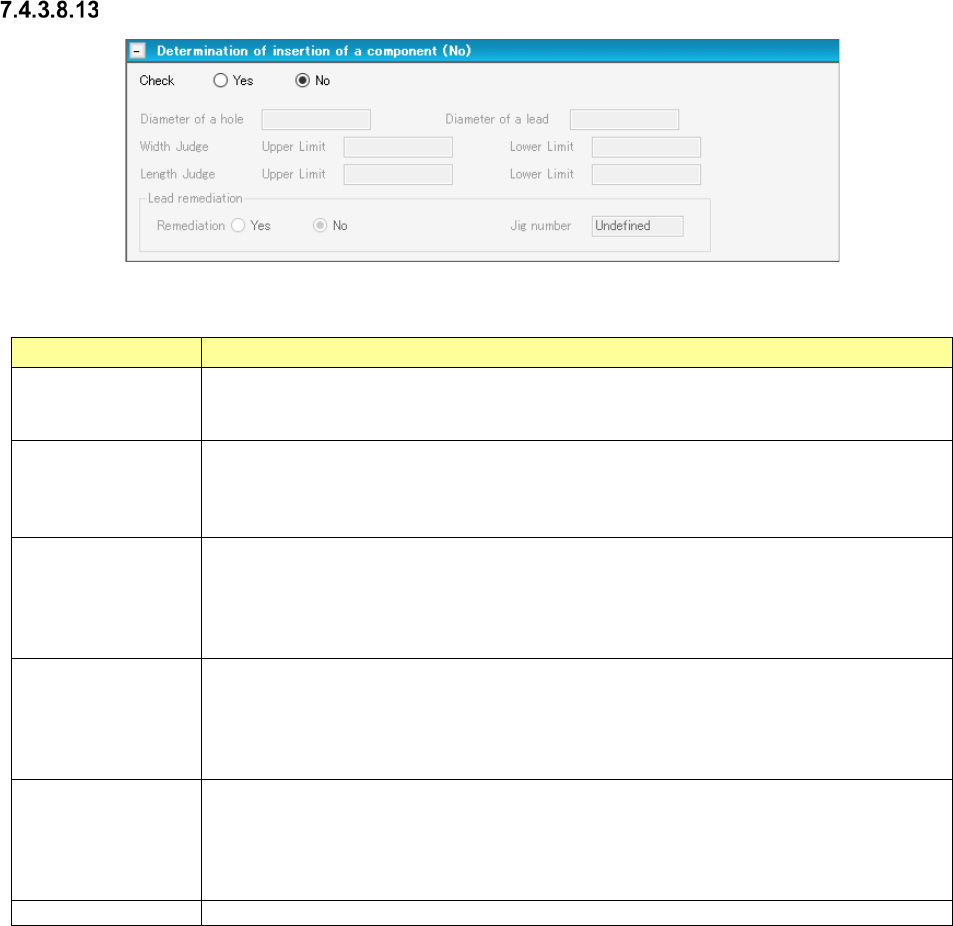
Determination of insertion of a component
Figure 7.4-88 “Determination of insertion of a component” screen
Table 7.4-53 Items displayed on the “Determination of insertion of a component” screen
Item Description
Check
Yes/No
Specify whether to decide if a component can be inserted into a board with the corre-
sponding radio button.
The “No” radio button is selected by default.
Determination of
insertion of a com-
ponent
Diameter of a hole
You can enter this field when you select the “Yes” radio button of the menu item “Check.”
Enter the diameter of a through hole of a component.
The input range is 0.01 to 15.00 mm. Note that it changes to the range of the lead diameter
to 33.5 mm when the lead diameter is set. A blank character is entered by default.
Determination of
insertion of a com-
ponent
Diameter of a lead
You can enter this field when you select the “Yes” radio button of the menu item “Check.”
Enter the diameter of a lead of a component.
The input range is 0.01 to 15.00 mm. Note that it changes to the range of 0.01 mm to the
diameter of the through hole when the through hole diameter is set. A blank character is
entered by default.
Determination of
insertion of a com-
ponent
Width Judge/Length
Judge
You can enter these fields when you select the “Yes” radio button of the menu item “Check.”
Enter the size for deciding a component.
Input range: 0.01 to 150.00 mm
The respective default values are calculated based on the through hole diameter and the
lead diameter.
Lead remediation
Yes/No
Select whether to correct a lead or not with the corresponding radio button.
You can select this menu item only when “INS Tape” is selected as the packaging style,
“MRF-S” or “MRF-L” is selected as the type, and the “Yes” radio button of this “Check” menu
item is selected.
The “No” radio button is selected by default.
Jig number
“Undefined” is selected by default.
JaNets Instruction Manual 7. Program Editor
7-62
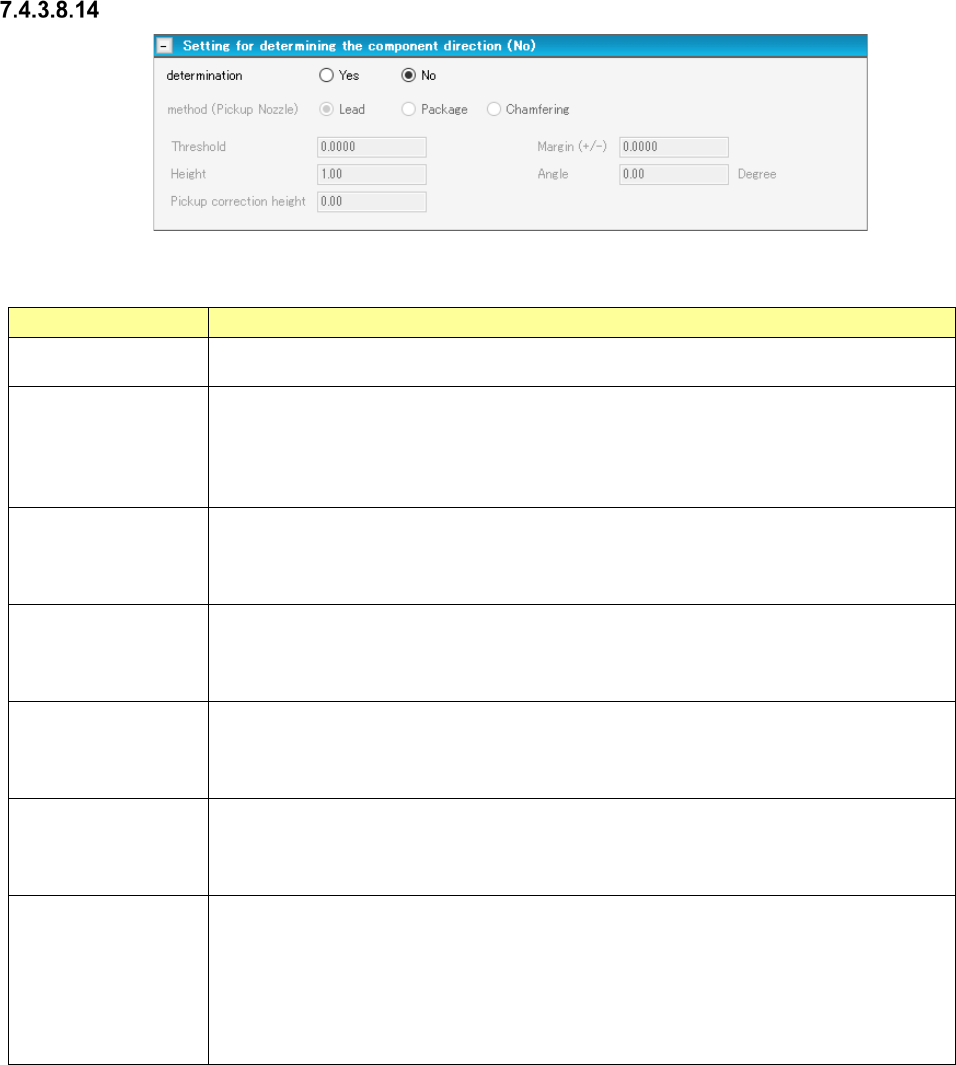
Setting for determining the component direction
Figure 7.4-89 “Setting for determining the component direction” screen
Table 7.4-54 Items displayed on the “Setting for determining the component direction” screen
Item
Description
Determination
Yes/No
Select whether to determine the component direction with the corresponding radio button.
The “No” radio button is selected by default.
Setting for determin-
ing the component
direction
method
You can enter this field when you select the “Yes” radio button of the menu item “determi-
nation.” Select the determining method among “Lead,” “Package” and “Chamfering.”
The “Lead” radio button is selected by default.
When you select a pickup nozzle, “method (Pickup Nozzle)” is displayed as the menu item.
When you select a gripper nozzle, “method (Gripper Nozzle)” is displayed.
Setting for determin-
ing the component
direction
Threshold
You can enter this field when you select the “Yes” radio button of the menu item “determi-
nation.” Enter the reference value for deciding the direction.
Input range: - 2.0000 to 2.0000 mm Default value: 0.0000 mm
Setting for determin-
ing the component
direction
Margin (±)
You can enter this field when you select the “Yes” radio button of the menu item “determi-
nation.” Specify the margin (±) of the threshold value that does not generate any error for
the measurement result.
Input range: 0.0000 to 55.00 mm Default value: 1.00 mm
Setting for determin-
ing the component
direction
Height
You can enter this field when you select “Yes” for the menu item “determination” and
“Package” or “Chamfering” for the menu item “method.” Enter the height of a component
to be applied when a package is recognized.
Input range: 0.00 to 55.00 mm Default value: 1.00 mm
Setting for determin-
ing the component
direction
Angle
You can enter this field when you select “Yes” for the menu item “determination” and
“Chamfering” for the menu item “method.” Enter the angle to be applied when the system
decides the component direction.
Input range: - 90.00 to 90.00 degrees Default value: 0.00 degrees
Setting for determin-
ing the component
direction
Pickup correction
height
You can enter this field when you select “Yes” for the menu item “determination” and “Lead”
or “Package” for the menu item “method.”
However, you cannot enter this field when you select a gripper nozzle regardless of the
setting of the menu item “method.”
Enter the component pick-up correction height to be applied when the system decides the
component direction.
Input range: 0.00 to 55.00 mm Default value: “Component height” – 0.3 mm
JaNets Instruction Manual 7. Program Editor
7-63
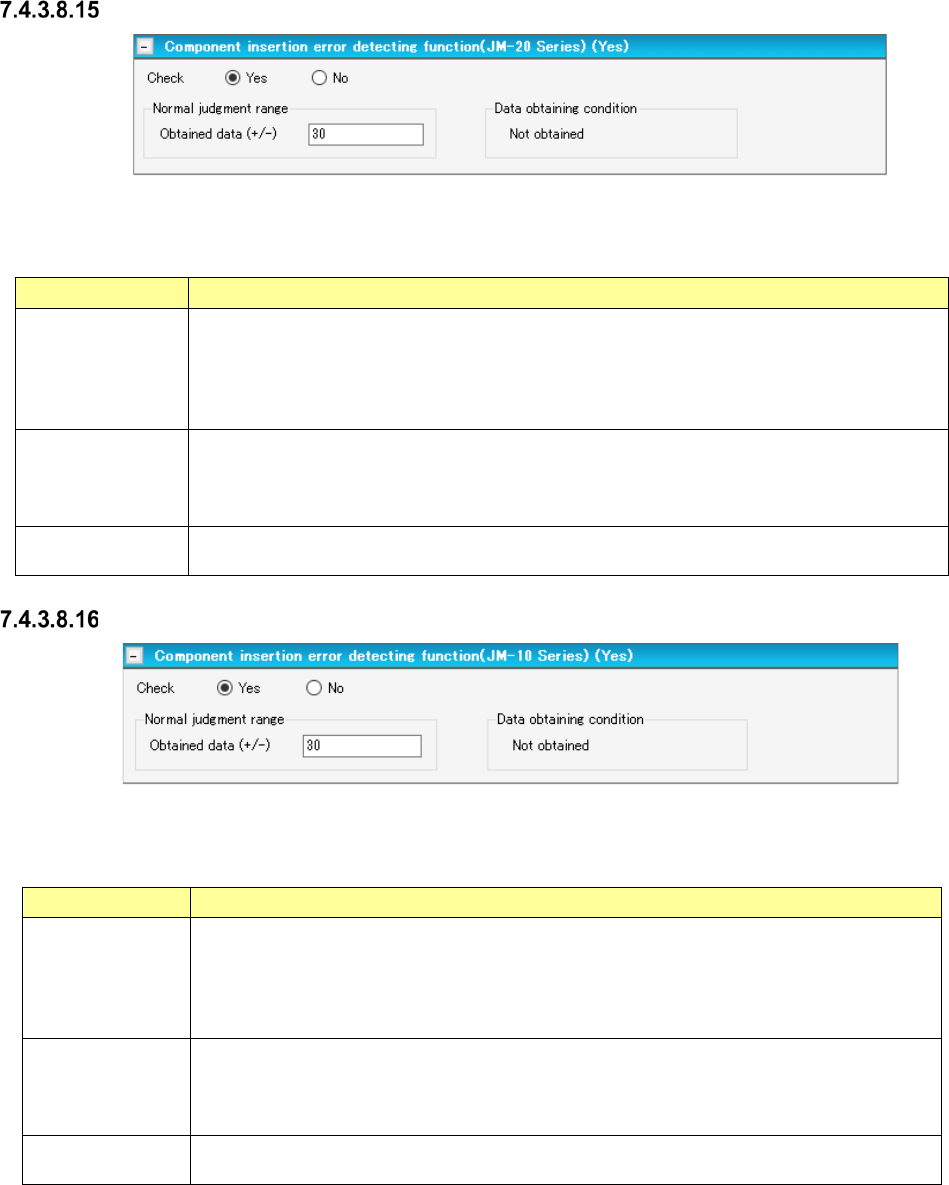
Component insertion error detecting function (JM-20 Series)
Figure 7.4-90 “Component insertion error detecting function” (JM-20 series) screen
Table 7.4-55 Menu items displayed on the
“Component insertion error detecting function” (JM-20 Series) screen
Item Description
Check
Yes/No
Select whether to detect a component insertion error with the JM-20 with the corresponding
radio button.
You can select this menu item only when “Insertion component” or “INS electrolytic capacitor”
is selected as the component type.
The “No” radio button is selected by default.
Normal judgment
range
Set the normality judgment range based on the data obtained with the JM-20.
A total of the torque ratio in normal operation and the value specified here becomes the upper
limit of this range, while the value specified here subtracted from the torque ratio becomes
the lower limit of this range.
Data obtaining
condition
Shows the torque ratio obtaining condition. “Not obtained” or “Obtained” is displayed here.
Component insertion error detecting function (JM-10 Series)
Figure 7.4-91 “Component insertion error detecting function” (JM-10 Series) screen
Table 7.4-56 Menu items displayed on the
“Component insertion error detecting function” (JM-10 Series) screen
Item
Description
Check
Yes/No
Select whether to detect a component insertion error with the JM-10 with the corresponding
radio button.
You can select this menu item only when “Insertion component” or “INS electrolytic capaci-
tor” is selected as the component type.
The “No” radio button is selected by default.
Normal judgment
range
Set the normality judgment range based on the data obtained with the JM-10.
A total of the torque ratio in normal operation and the value specified here becomes the
upper limit of this range, while the value specified here subtracted from the torque ratio
becomes the lower limit of this range.
Data obtaining
condition
Shows the torque ratio obtaining condition. “Not obtained” or “Obtained” is displayed here.