JANETS_INM.pdf - 第545页
JaNets Instr ucti on Man ual 13 . Program D ownloa der 13 - 49 13.10.4.2 Reading a serial code Read with a cod e reader a serial co de to be used f or associati on with a pro duct ion program. A production pr ogram i s a…
JaNets Instruction Manual 13. Program Downloader
13-48
13.10.3 Associating a serial code with a production program
(Data Manager)
To associate a seral code with a production program that is saved to the Data Manager, you have
to select the “Data Manager” radio button for the menu item “Search” of the setting item
“Management of production program” on the “Set Environments” screen of the Program
Downloader (see Section 13.14.2.7).
<Note>
Even though you make the setting as described above, if the Data Manager connection license is
invalid or if the Data Manager is set to be unused with the JaNets launcher, the association screen
for a serial code and a production program saved locally appears.
See Section 17.3.9 “Associating a serial code with a production program” of Chapter 17 “Program
Explorer” for how to associate them.
13.10.4 Opening a production program associated with a serial code
Open the production program associated with the read serial code.
The target to be searched for is decided according to selection of the “Search” radio button of the
setting item “Management of production program” on the “Set Environments” screen of the
Program Downloader (see Section 13.14.2.7).
13.10.4.1 Calling the seral code reading screen
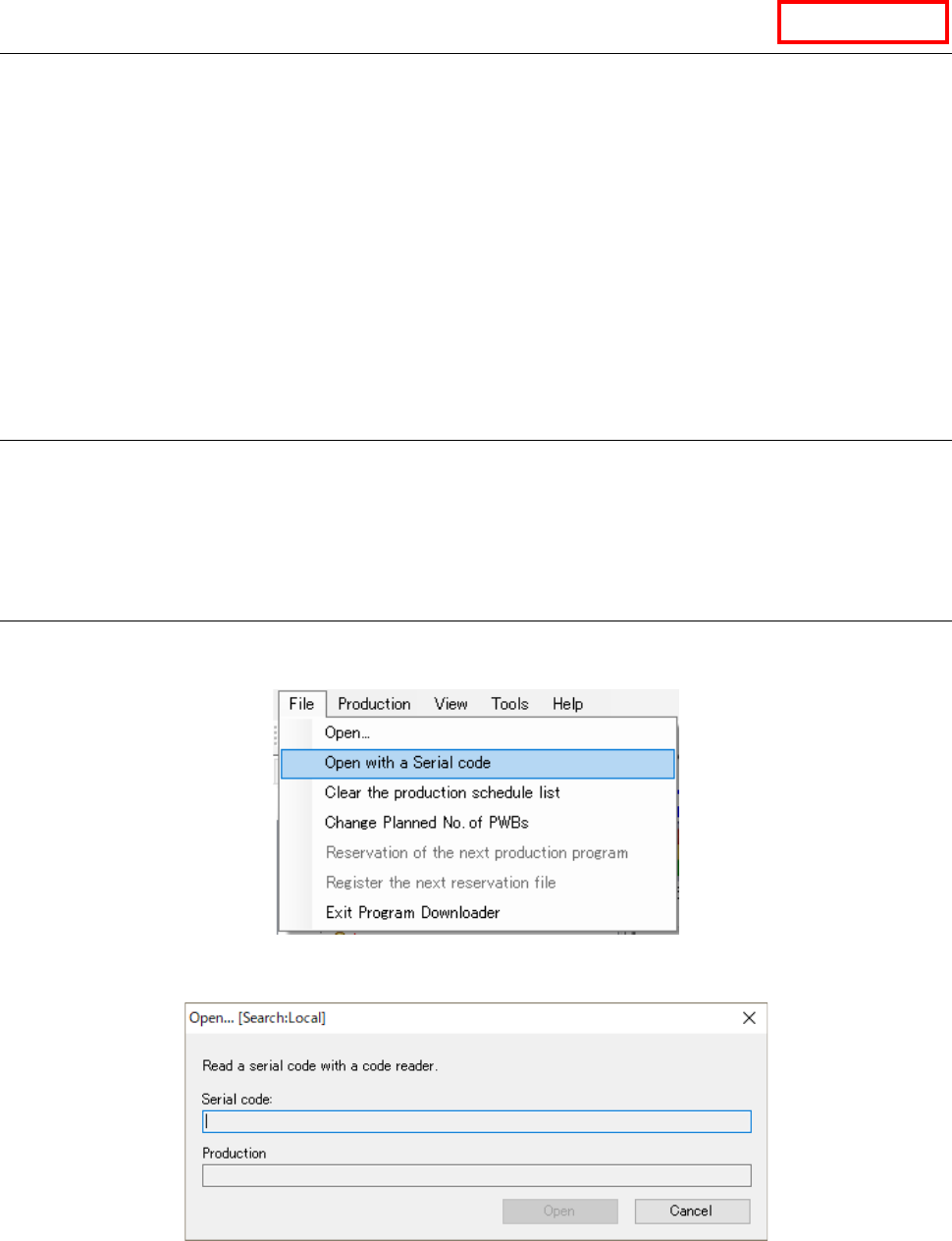
Select the menu commands: [File] – [Open with a Serial code] from the menu bar, the screen for
reading a serial code is displayed.
Figure 13.9-9 [Open with a Serial code] menu command
Figure 13.9-10 Screen for reading a serial code
The target association information to be searched for (Local/Data Manager) is displayed on the
title bar of the screen.
Data Manager
JaNets Instruction Manual 13. Program Downloader
13-49
13.10.4.2 Reading a serial code
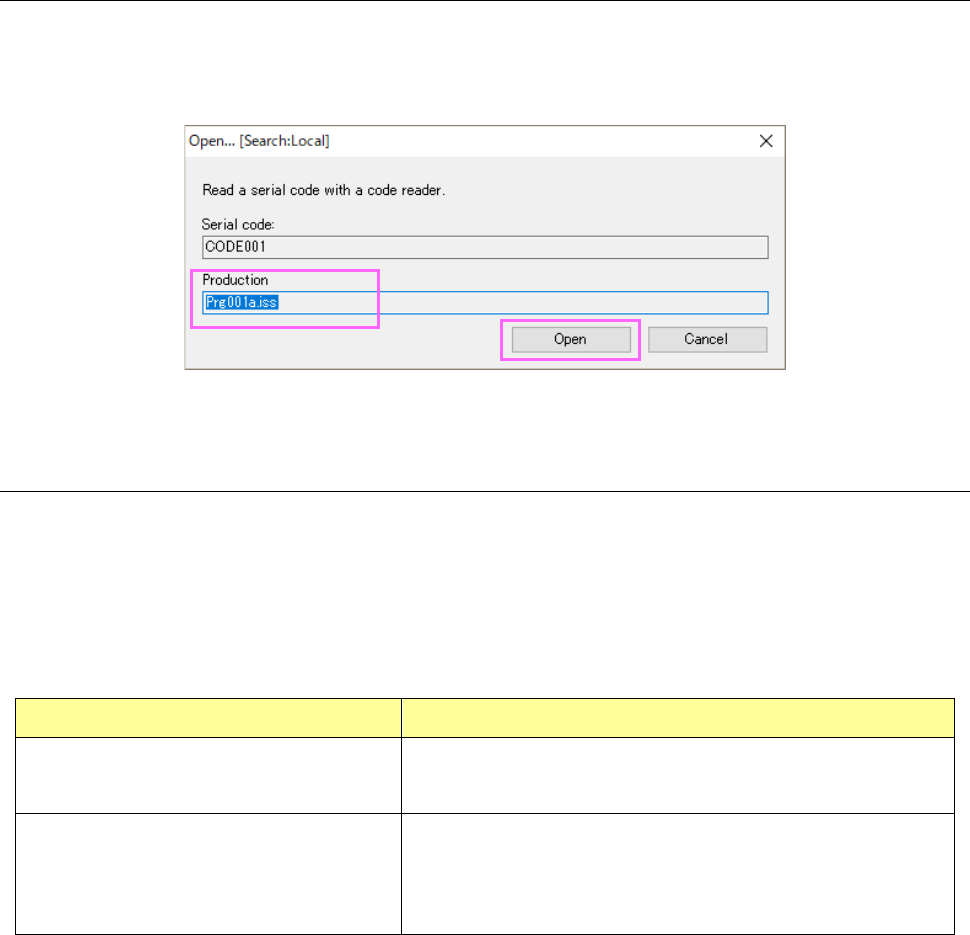
Read with a code reader a serial code to be used for association with a production program. A
production program is associated with the read serial code, and when the system confirms that a
production program associated with the read serial code exists, its program name is displayed on
the screen and the <Open> button is activated.
Figure 13.10-11 Screen displayed after a serial code is read
13.10.4.3 Opening a production program
When you click the <Open> button, a production program is opened. If it is registered in the Data
Manager, it is checked out (if it is not yet), and then opened.
The process for opening a production program associated with a read serial code varies
depending on the condition of the active production line at start-up of the screen for reading a
serial code.
Table 13.10-1 Operation for opening a production program associated with a serial code
Condition of an active production line Process for opening a production program
A production program is not downloaded to
the machine.
The system opens a production program as a normal one.
(Same operation as that to be performed when you select [Open]
from the “File” menu displayed on the menu bar)
The requirements for reserving the next
production program are satisfied (see
Section13.8.8).
The system reserves a production program as the next production
program.
(Same operation as that to be performed when you select the menu
commands: [File] – [Reservation of the next production program]
from the menu bar)
JaNets Instruction Manual 13. Program Downloader
13-50
13.11 Number-of-components
Now, set the number of components to be used for the target mounter for downloading into the
production program.
* For RX-7 series, it is impossible to set any number-of-components data.
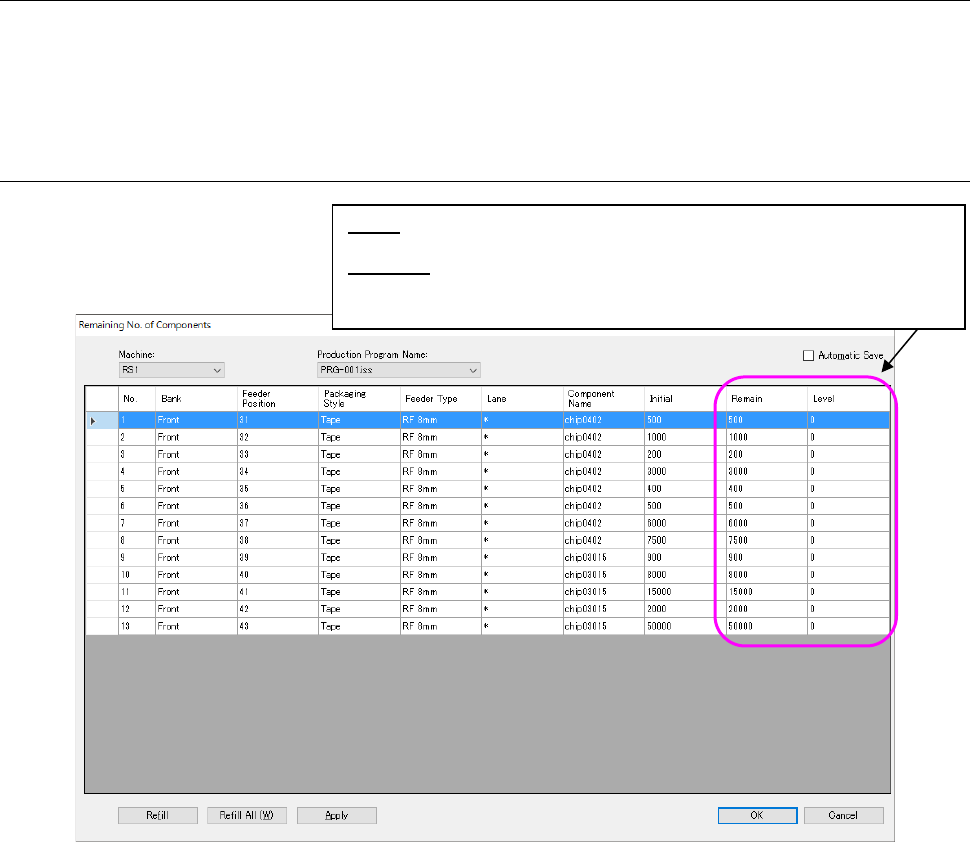
13.11.1 Number-of-components data
Figure 13.11-1 Number-of-components data
* Before downloading in a non-production status, the value set by job optimizer is displayed. In
the case of “on the way of production” or “after production”, the production result is displayed.
Level: Displays the residual number of components that will be used for the
reference for the issue of a warning.
Warning: Displays a component supply error.
* Displays that the residual number of components is less than the level.
If any case is not an error, this remains blank.