JANETS_INM.pdf - 第135页
JaNets In structio n Manual 5. Shopflo or Setu p 5- 15 Changing the configuration o f a production line to which machines are a lready assigned Figure 5.3 - 11 Machines on the production li ne view – by dragging Figure 5…
JaNets Instruction Manual 5. Shopfloor Setup
5-14
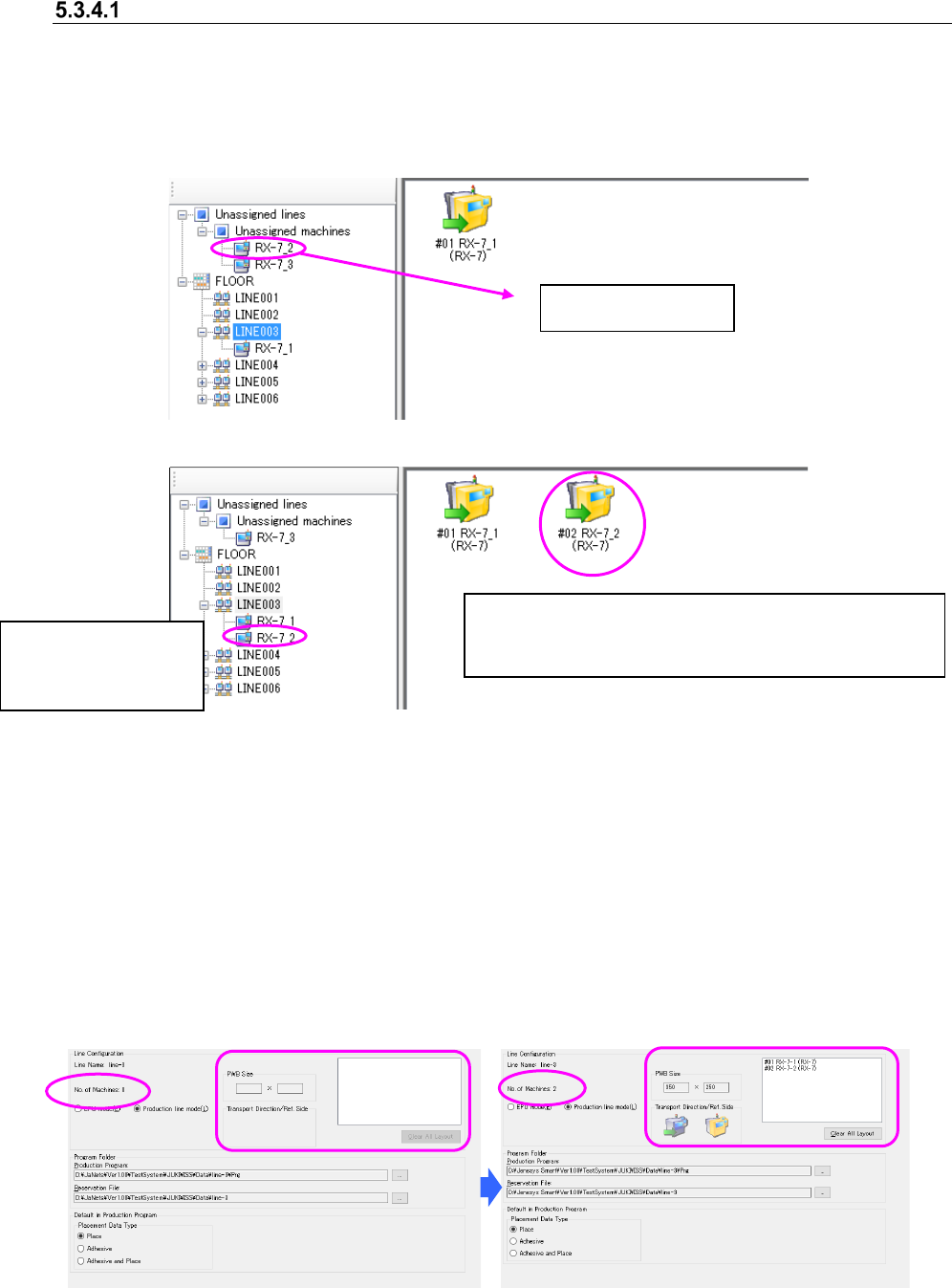
Assigning a machine to a production line
Perform the operation ① or ② below.
① Drag a machine located under the “Unassigned” machines of the floor configuration tree to
the production line view.
② Drag a machine located under a production line (or EPU) of the floor configuration tree to the
production line view.
Figure 5.3-7 Before assigning a machine to a production line
Figure 5.3-8 After a machine is assigned to a production line
(Board transport direction: Left to right, Reference side: Front)
* The machine numbers are automatically assigned from #1 to #10.
* You can assign up to ten machines to one production line mode.
* In the EPU mode, the number of machines that can be assigned for 1 line is 1.
* The applicator can be arranged collectively from the head of the line.
* An inserting machine and an adhesive dispenser/mounter are not assigned to the same
production line at the same time.
* The Equipment Manager license is required to assign a printer or an inspection machine to a
production line.
The displayed production line details are changed as shown below:
Figure 5.3-9 Production line details – Before a
machine is assigned to a production line
Figure 5.3-10 Production line details – After a
machine is assigned to a production line
Production line view
The machine icon that indicates the board transport
direction and the reference side, the assignment number,
the machine name and the model name are displayed.
A machine is moved to
the production line
layer of the
JaNets Instruction Manual 5. Shopfloor Setup
5-15
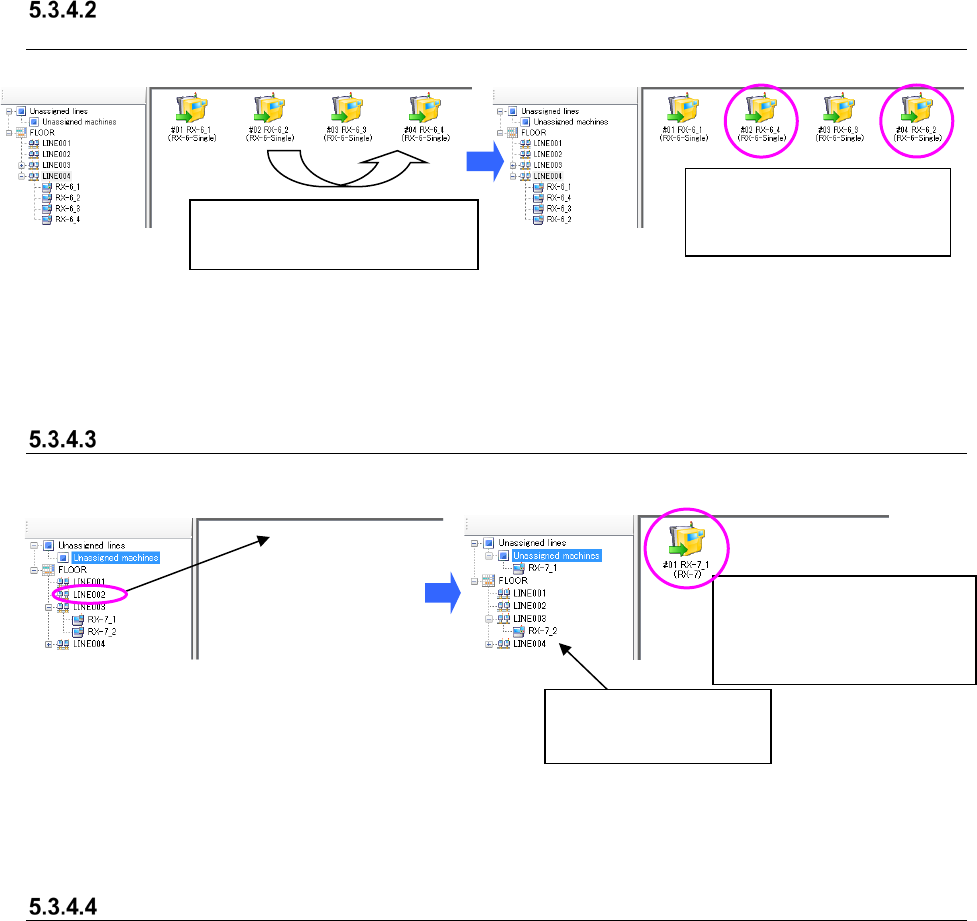
Changing the configuration of a production line to which machines are already
assigned
Figure 5.3-11 Machines on the production line
view – by dragging
Figure 5.3-12 After dropping a machine to the
destination machine position
Canceling a machine assignment to a production line
Figure 5.3-13 Before canceling assignment of
a machine to a production line
Figure 5.3-14 After canceling the assignment of
a machine to the production line
Clearing the entire production line assignment
When you click the <Clear All Layout> button on the production line details, the message
indicating that the entire production line assignment is to be cleared appears on the screen. When
you select the <Yes> button, the system clears all machines assigned to the production line. The
cleared machines are moved to the “Unassigned” machines of the floor configuration tree.
Drag and drop a machine to the
destination machine.
The machines are replaced
and assigned to the
production line.
The canceled machine is
moved to the “Unassigned”
machines of the floor
configuration tree.
The corresponding
machine icon is deleted.
JaNets Instruction Manual 5. Shopfloor Setup
5-16
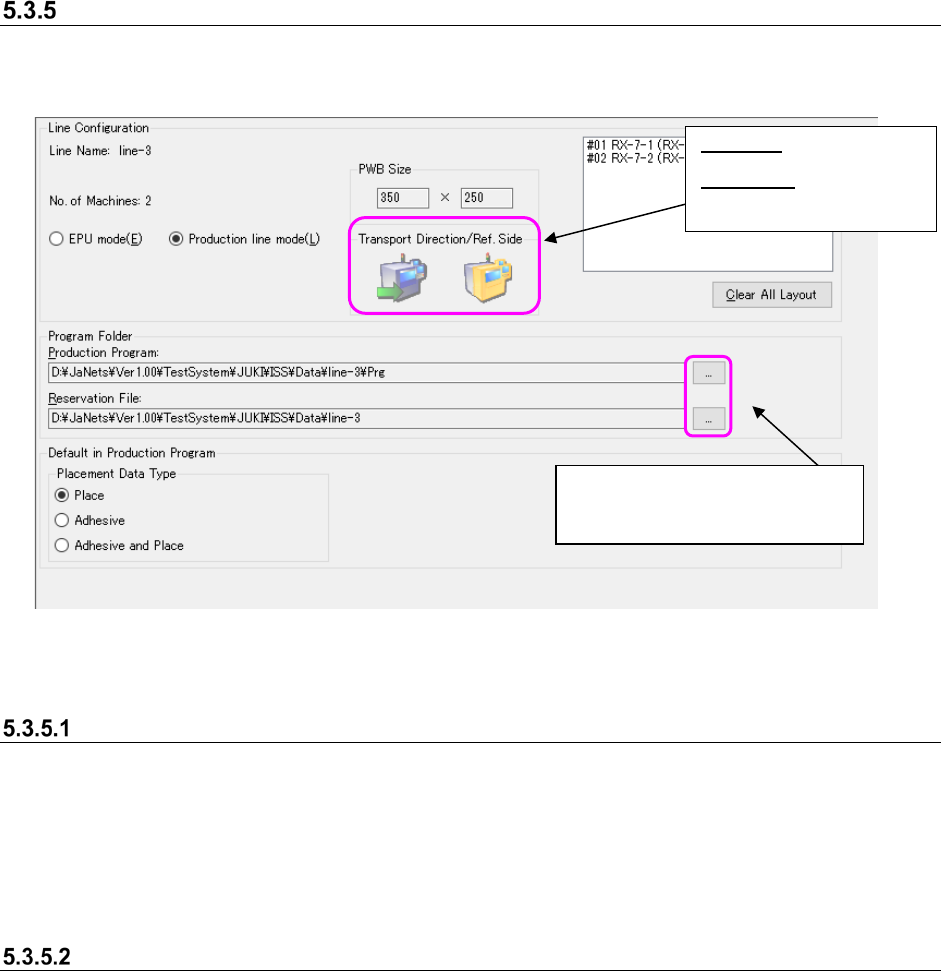
Production line details
On the production line details screen, set the line configurations (board size, board transporting
direction, reference side and number of connected machines) and set the production line
environment (set the program folder).
Figure 5.3-15 Production line details
Line Configuration
As the maximum size entered in the “PWB Size” fields, the minimum one of those of machines
assigned to a production line is displayed.
The setting of the “Transport Direction” field is based on the first machine assigned to the
production line view, while that of the “Ref. Side” field is based on the first mounter, adhesive
dispenser or inserting machine assigned to the production line view.
Environment settings of a production line
Set the folder path to which a production program file is to be stored on the production line details
screen.
- Initial folder path of a production program: JaNets installation folder\Data\Production line
name\prg
- Initial folder path of the reservation file: Install folder\Data\Line name of JaNets
* The “JaNets installation folder\Data” is set when the JaNets is installed.
* “\Production line name” is set when a new production line is created.
These buttons display the dialog
box for selecting a folder to which
the initial folder is set.
Left icon: Displays the
board transport direction.
Right icon: Displays the
reference side, front or
rear.