JANETS_INM.pdf - 第374页
JaNets In structio n Manual 7. Program Editor 7- 167 Reference feeder option Reference Feeder Setup T he syste m refers to t he feeder set i nfor mation of other product ion progra ms or res ervat ion files and makes t h…
JaNets Instruction Manual 7. Program Editor
7-166
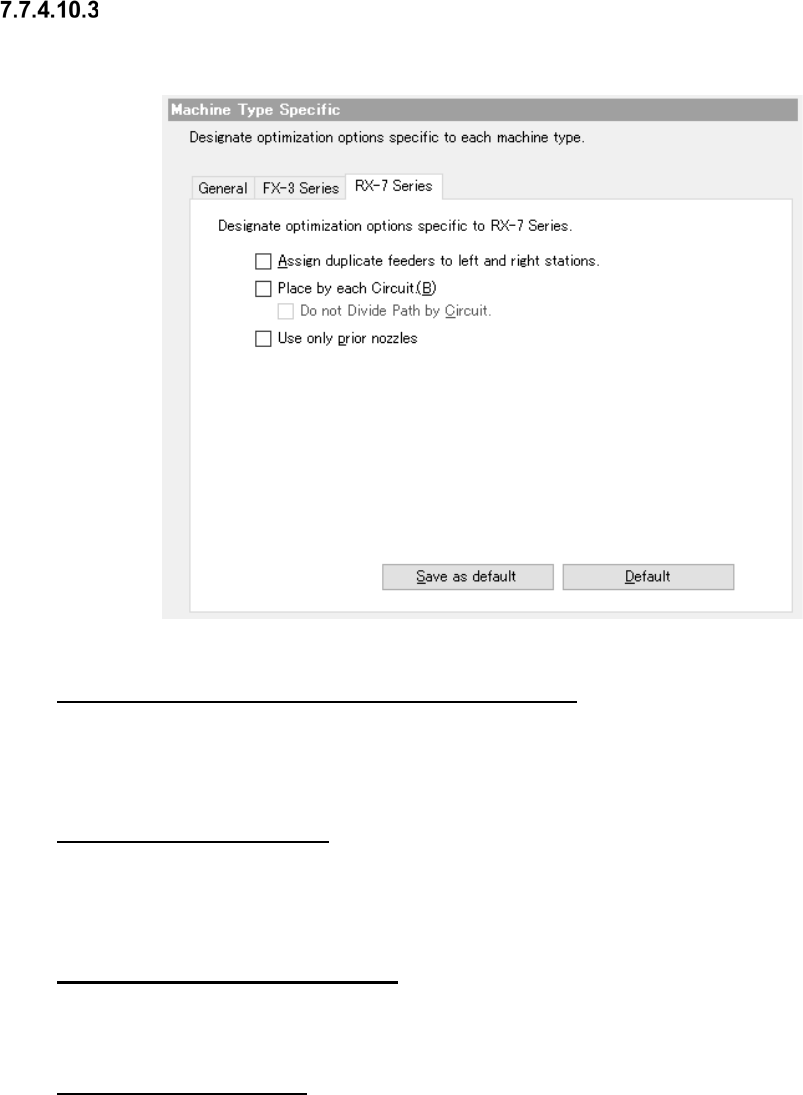
RX-7 Series options
When you select the “RX-7 Series” tab from Machine Type Specific, the following dialog box ap-
pears on the careen.
Figure 7.7-21 Machine Type Specific RX-7 Series option
“Assign duplicate feeders to left and right stations.”
When this option is enabled, the same components may be assigned to a station on either side in
order to maintain right-and-left balance. The same components are not assigned to a station on
either side when this option is disabled.
“Mounting for each circuit”
If this option is enabled, and when two or more circuits exist in a mount step, components are kept
from being assigned to two or more different circuits in one cycle. For the reference circuit only, the
placement order is determined.
“No path division for each circuit”
Set whether path division (placement point) is performed or not between stations for each circuit.
This is available when “Placement for each circuit” is enabled.
“Use only prior nozzles.”
For placing components for which multiple shared nozzles are set, check off this item for optimi-
zation. When the check box of this item is OFF (unchecked), the nozzle to be used is automatically
selected through optimization.
JaNets Instruction Manual 7. Program Editor
7-167
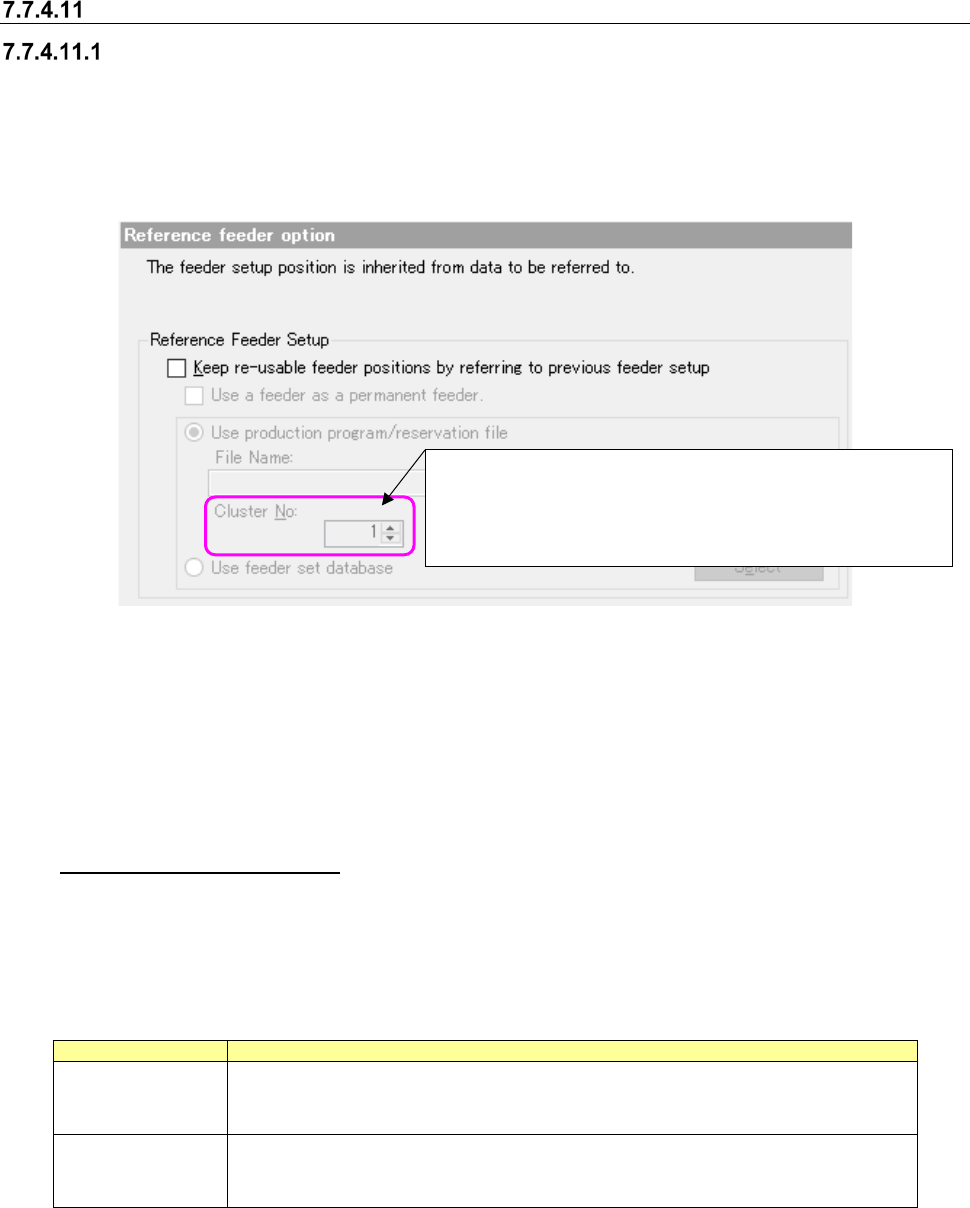
Reference feeder option
Reference Feeder Setup
The system refers to the feeder set information of other production programs or reservation files
and makes the feeder assignment of a production program contained in a reservation file that is to
be optimized common to the referred feeder set information.
* When a production line includes a JM series machine, the “Reference feeder option” cannot be
selected.
Figure 7.7-22 Reference Feeder Setup
When you select the <Browse> button, the system displays the dialog box for selecting a file. On
this dialog box, you can select a production program or a reservation file for the IS.
If you select a file whose line configuration is different from that of the active line set with the Job
Optimizer, the error message indicating that the selected file is different from that of the “Refer-
ence Feeder Setup” appears on the screen when you click the <Open> button on this dialog box.
Used as a permanent feeder
When you put a checkmark in this check box, the system regards the reference feeder setup as a
permanent feeder(s) that can be set with the Shopfloor Setup to execute the optimization function.
The differences between a permanent feeder and the reference feeder setup are shown in the ta-
ble below.
Table 7.7-6 Differences between a permanent feeder and the reference feeder setup
Item
Description
Permanent feeder
Occupies the corresponding place even when its component is not used.
Since the feeder is already located on the bank, any feeder resources are not con-
sumed.
Reference feeder
setup
Does not occupy the corresponding place when its component is not used, and
another component can be assigned to the place.
When this type feeder is assigned to the bank, the feeder resources are consumed.
Note the following points when you use this option.
- You have to register components that are to be used as a permanent feeder to the Compo-
nent database in advance.
- You cannot use both “a permanent feeder” and “Used as a permanent feeder in the reference
feeder setup” at the same time.
Specify a number in the range of 1 to the number of clusters in
a reservation file (up to 100).
The last cluster number in the reservation file is specified by
default.
JaNets Instruction Manual 7. Program Editor
7-168
- Component information (component type, packaging style, feeder type and feeding pitch) of
the Component database, that of the reference feeder (or of a permanent feeder) and that of
a production program have to be consistent with one another.
If any of them is not consistent with one another, the system cannot use a feeder as a per-
manent feeder or fails to execute the optimization function.
- Although such a feeder is interpreted as a permanent feeder with the optimization function, it
is not operated as a permanent feeder with another function.
Cluster No
If any cluster information is included in a reservation file, you can enter a value in the “Cluster No”
field after selecting the file.
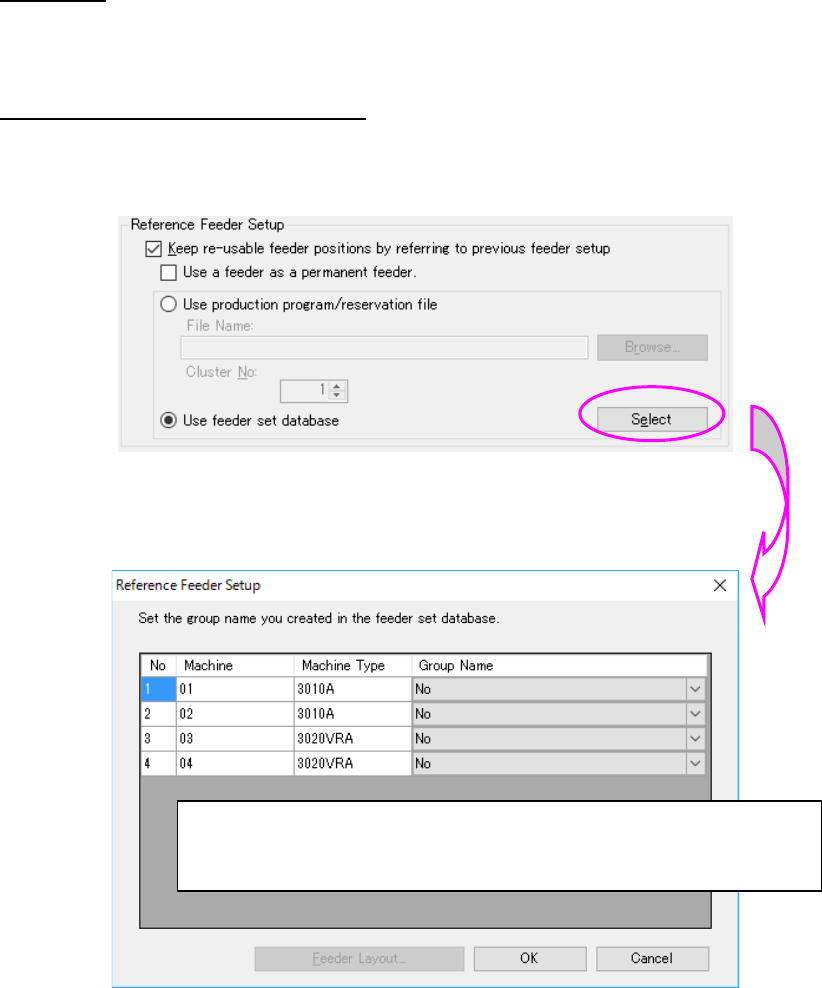
Reference to the feeder set database
When “Use of feeder set database” is selected, the feeder set of the feeder set database can be
referred as the reference feeder setup.
Figure 7.7-23 Use of feeder set database
The Reference feeder setup setting” dialog is displayed by “Setting.”
Figure 7.7-24 Reference feeder setup setting screen
“None” and the group name of a common bank type are displayed for the group.
A feeder set group name to be referred from can be selected from the combo box.
“OK”: The set contents are saves and completed.
“Cancel”: The set contents are aborted and completed.
“Feeder layout”: All the feeder layouts available for the line are displayed.