JANETS_INM.pdf - 第680页
JaNets In structio n Manual 17 Program Expl orer 17 - 28 Master file manag em ent When check ing in the res ervatio n file/produ ction pr ogram file in t he progr am expl ore, this f unction checks in not only the targ e…
JaNets Instruction Manual 17 Program Explorer
17-27
17.3.7.7 Displaying the properties of a production program/reservation file
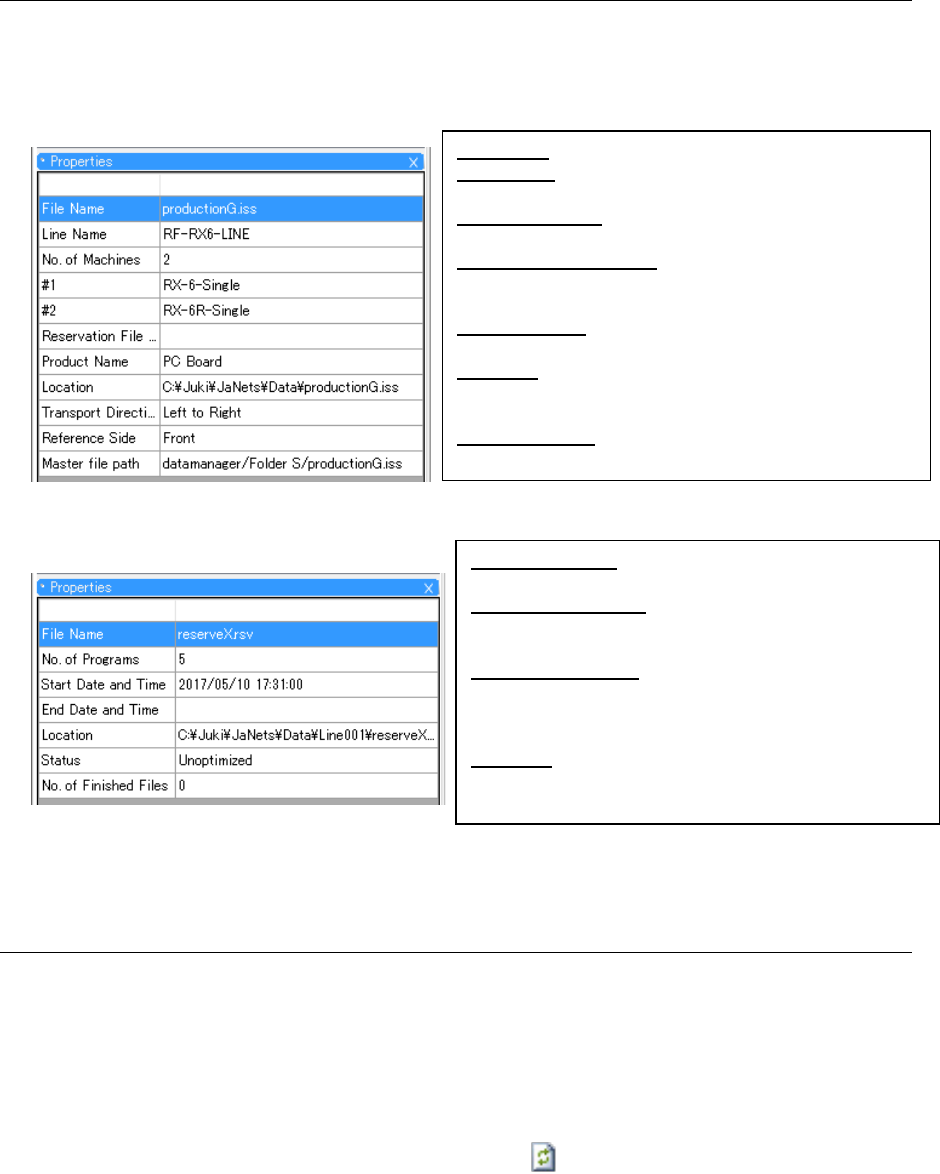
When you select the “properties” icon from the toolbar of the “Manage,” “Production Program” or
“Reservation File” screen, the “Properties” screen appears. When you select a tree item on this
screen, its information is displayed on the “Properties” screen.The following items are displayed
as the properties of a production program/a reservation file.
Figure 17.3-29 Properties of a production file
Figure 17.3-30 “Properties” screen for a reservation file
17.3.7.8 Updating the database
The Program Explorer does not display any information located in the database on a real-time
basis. When you perform the following operations, the system accesses the database and
displays the updated information.
1. When the Program Explorer starts up, the system accesses the database (When you starts up
the Program Explorer newly, it displays the newer information than that displayed with the
Program Explorer, which is started up already).
2. Select the “Update to the latest information” icon ( ) on the toolbar for the Program Explorer.
3. Click the right button of a mouse on the Program Explorer screen to display the pop-up menu.
Select the [Refresh] command on this pop-up menu.
4. When you check in/out a file or drag and drop it to access the database and operate it, the
system updates the displayed information.
* When the Program Explorer is started up with two or more applications, only the Program
Explorer, which is started up with the application that updated the displayed information,
updates the displayed information.
File Name: Displays the name of a production program.
Line Name: Displays the name of a production line for
which a production program is set.
No. of Machines: Displays the number of machines
configuring the production line.
Reservation File Name: Displays the name of an added
reservation file (If there is not such a reservation
file, this cell becomes blank).
Product Name: Displays the name of a product
registered in the current version.
Location: Displays the local destination in which a file
is stored (set as the destination for checking out
the file).
Master file path: Displays the registration destination
of a master file to which a production program file
No. of Programs: Displays the number of production
programs added to the reservation file.
Start Date and Time: Displays the earliest production
date and time among those of the added
production programs.
End Data and Time: Displays the last production date
and time among those of the added production
programs (If there is not such date and time, this
cell becomes blank).
Location: Displays the destination folder in the same
manner as the “Location” on the “Properties”
screen for a production program.
JaNets Instruction Manual 17 Program Explorer
17-28
Master file management
When checking in the reservation file/production program file in the program explore, this function
checks in not only the target production program but also the production program with the same
name registered in the master file.
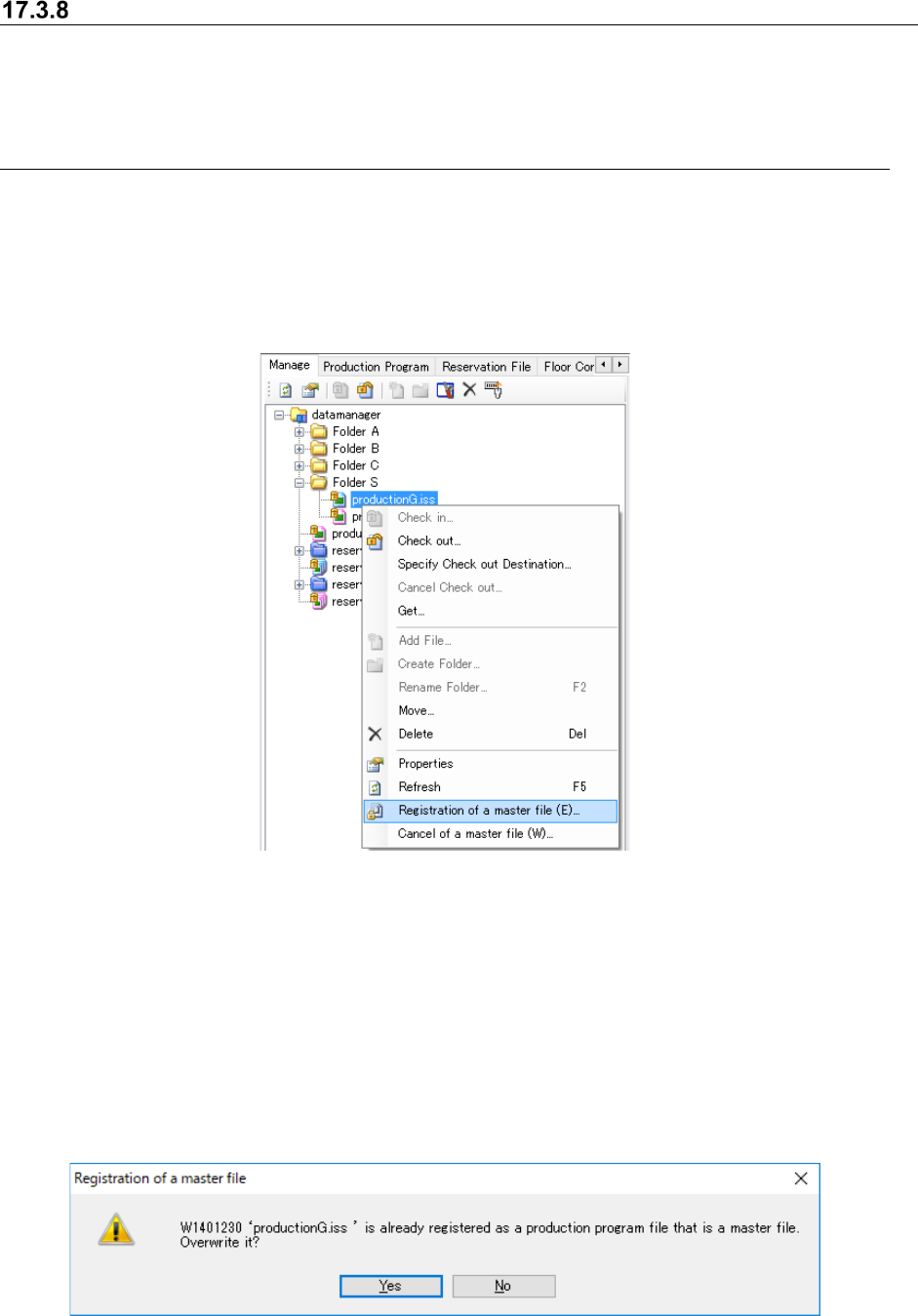
17.3.8.1 Registration/cancellation of a master file
On the management display screen, select an optional production program and then select
“Registration of a master file” in the menu displayed by clicking the right mouse button. Then,
the production program file can be registered as a master file.
Select the production program file registered as a master file, and then select “Cancel of a master
file” in the menu displayed by clicking the right mouse button. Then, the registration of a master
file can be cancelled.
Figure 17.3-31 Registration and cancellation of a master file
* The production program file registrable as a master file is only a production program file that is
not included in reservation files. The production file belonging to reservation files cannot be
selected between registration and cancellation.
* Regarding a production program file whose name is duplicated cannot be registered as a
master file. If such a duplicated production program file is registered, the following warning
message is displayed. When you select “Yes”, the destination of master file registration can
be changed.
* It is impossible to select multiple program programs and register or cancel them correctively
as master files
Figure 17.3-32 Warning message displayed when master file registration is duplicated.
JaNets Instruction Manual 17 Program Explorer
17-29
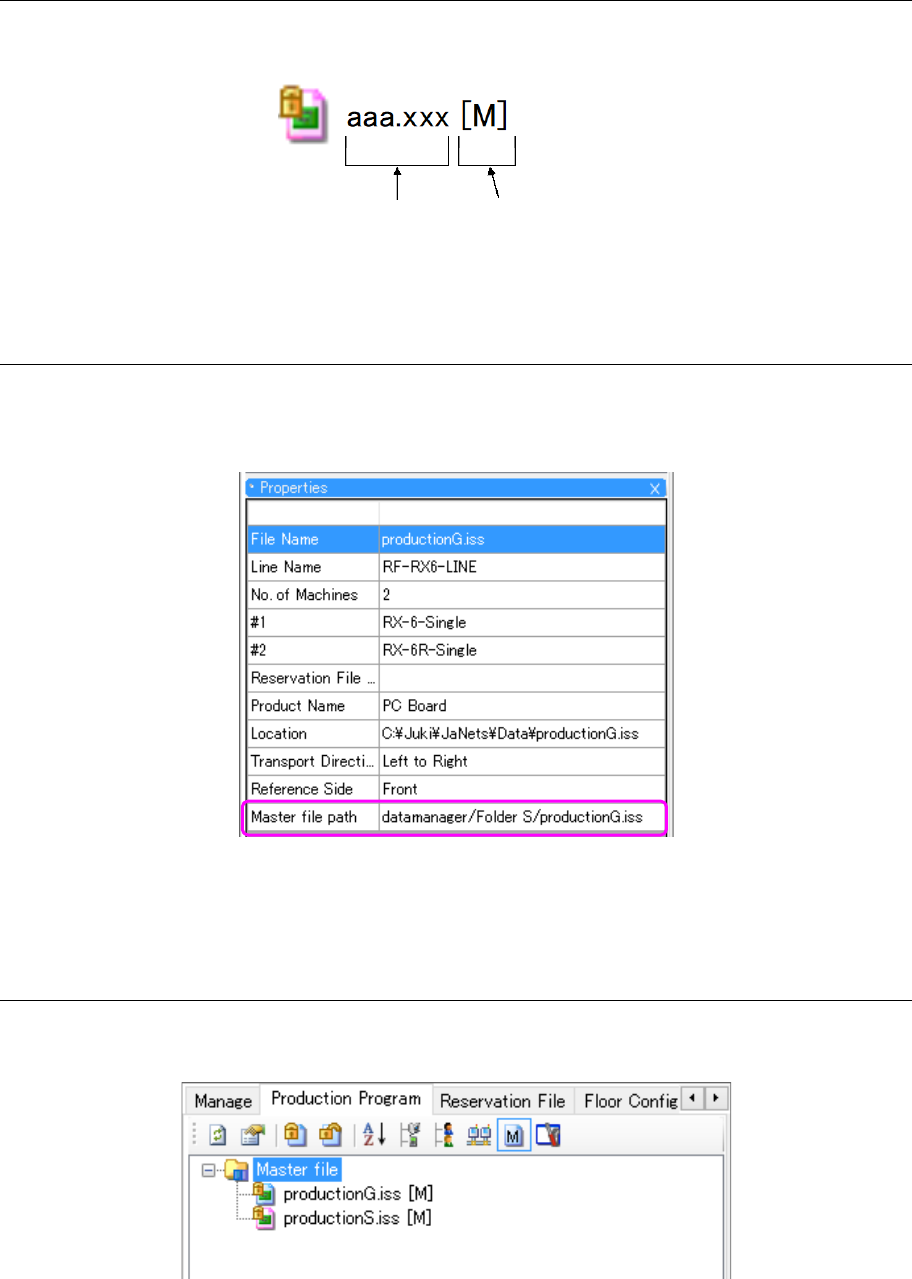
17.3.8.2 Display of the production program registered as a master file
On the management display screen and production program screen, “M” is displayed after the file
name and extension as a mark of a production program file registered as a master file.
Figure 17.3-33 Master file registration status
17.3.8.3 Display of the master file path in Properties
On the “Management”, “Production program” or “Reservation file” screen, select a production
program file to display the Properties screen. In the item of Master file path, the registration
destination of the master file to which the production program file belongs is displayed.
Figure 17.3-34 Master file path
* If no master file is registered, this item is blank.
17.3.8.4 Display of an extracted master file
Select the icon of master file in the tool bar. Then, only the production program files registered
as master files in the database are extracted and displayed.
Figure 17.3-35 Display of extracted master files
Master file registration
File name and extension