JANETS_INM.pdf - 第713页
JaNets In structio n Manual 19 T ra ceMonitor 19 - 14 19 -3-5-5 Feede r ranking information The “Fee der ranki ng” info rmat ion shows the ra nkin g for eac h feeder a ccord ing to t he error code selected in t he “Error…
JaNets Instruction Manual 19 TraceMonitor
19-13
19-3-5-3 Component name ranking information
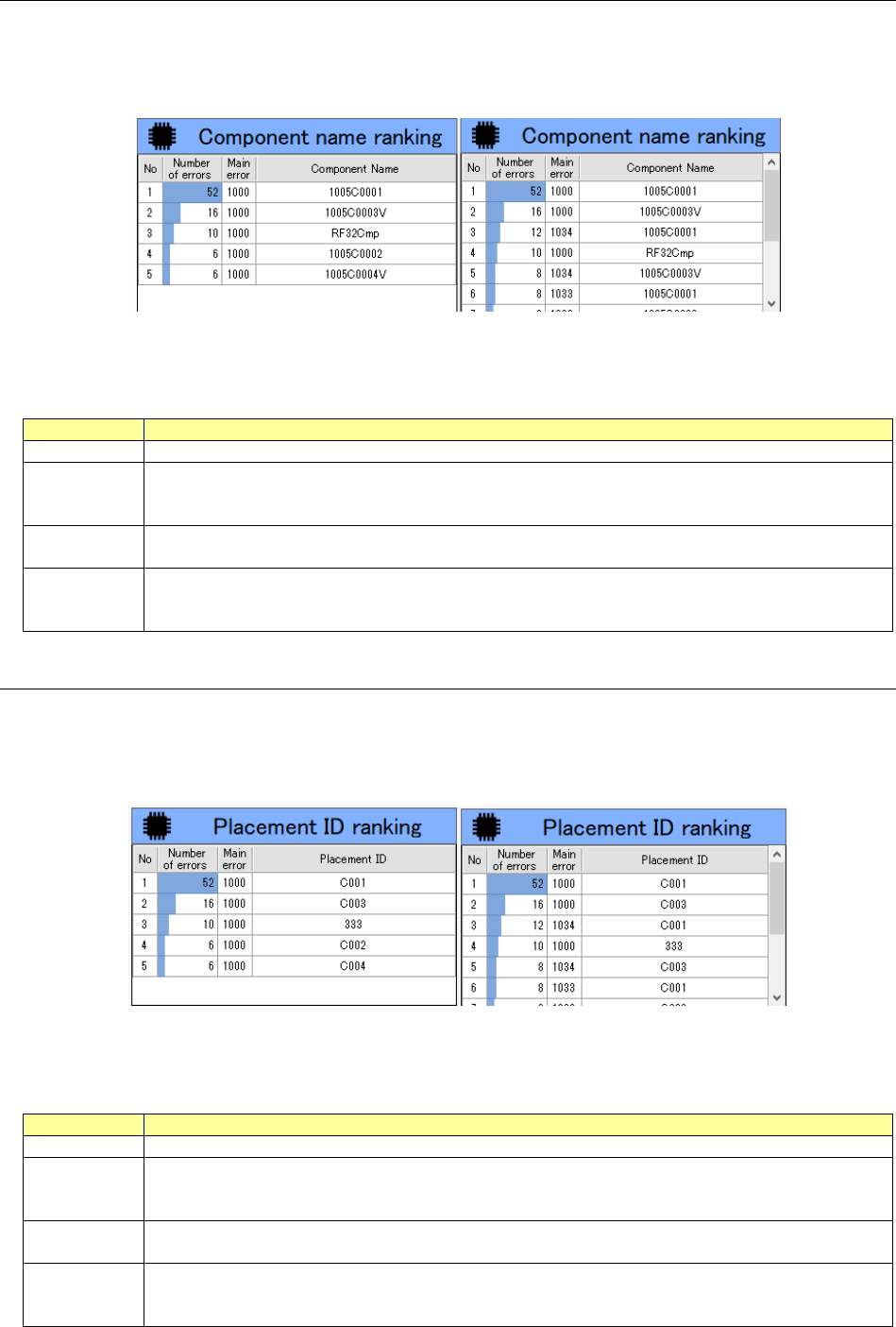
The “Component name ranking” screen shows the ranking for each component name according to
the error code selected in the “Error rankings” information list.
When any error code is not selected in the “Error rankings” information list, this screen shows the
component name ranking for all error codes.
Figure 19-3-23 “Component name ranking” information
(Left: when an error code is selected/Right: when any error code is not selected)
Table 19-3-4 Items of the “Component name ranking” information
Item
Description
No
Displays a serial number
Number of
errors
Displays the number of errors counted for each component name as for the selected error code.
When any error code is not selected, this column shows the number of errors counted for each
component name as for all error codes.
Main error
Displays the main error for the selected error code.
When any error code is not selected, this column shows the main errors for all error codes.
Component
Name
Displays a component name included in an error as for the selected error code.
When any error code is not selected, this column shows a component name included in each
error as for all error codes.
19-3-5-4 Placement ID ranking information
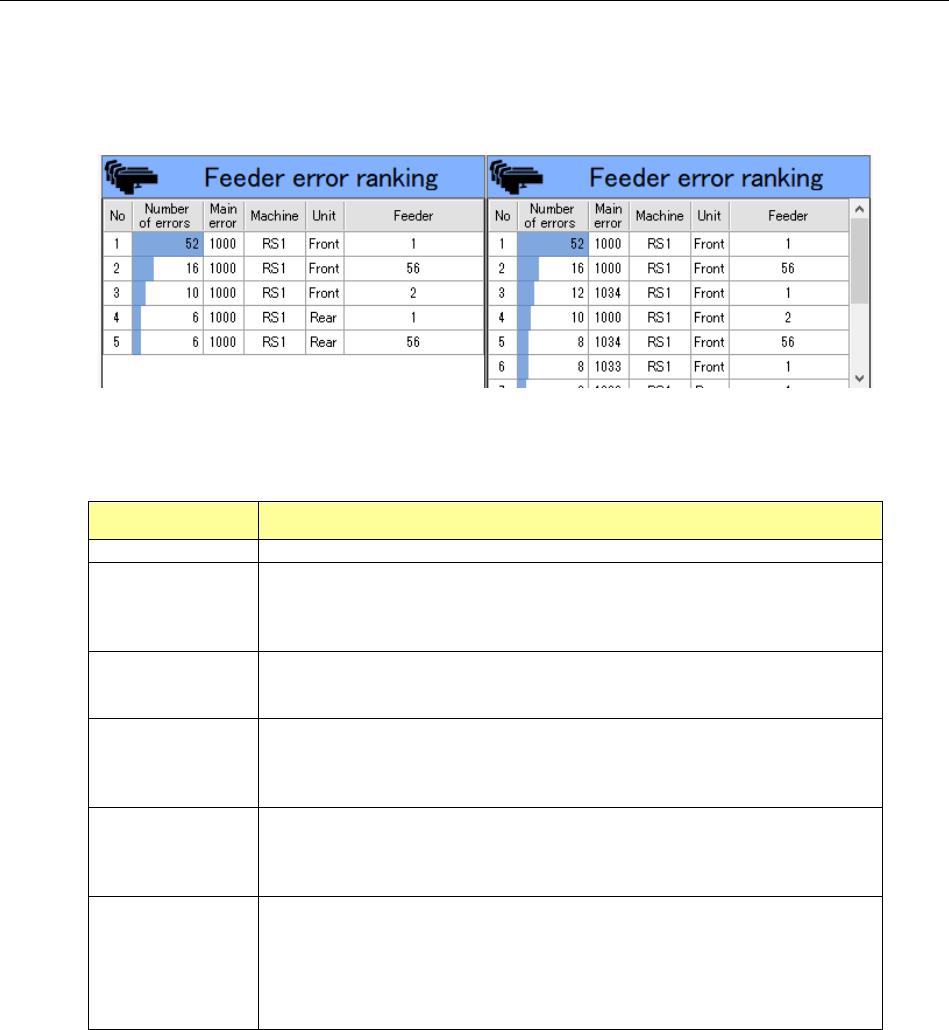
The “Placement ID ranking” information shows the ranking for each placement ID according to the
error code selected in the “Error rankings” information list.
When any error code is not selected in the “Error rankings” information list, this screen shows the
placement ID ranking for all error codes.
Figure 19-3-24 “Placement ID ranking” information
(Left: when an error code is selected/Right: when any error code is not selected)
Table 19-3-5 Items of the “Placement ID ranking” information
Item
Description
No
Displays a serial number
Number of
errors
Displays the number of errors counted for each placement ID as for the selected error code.
When any error code is not selected, this column shows the number of errors counted for each
placement ID as for all error codes.
Main error
Displays the main error for the selected error code.
When any error code is not selected, this column shows the main errors for all error codes.
Placement
ID
Displays a placement ID at which an error occurred as for the selected error code.
When any error code is not selected, this column shows each placement ID at which an error
occurred as for all error codes.
JaNets Instruction Manual 19 TraceMonitor
19-14
19-3-5-5 Feeder ranking information
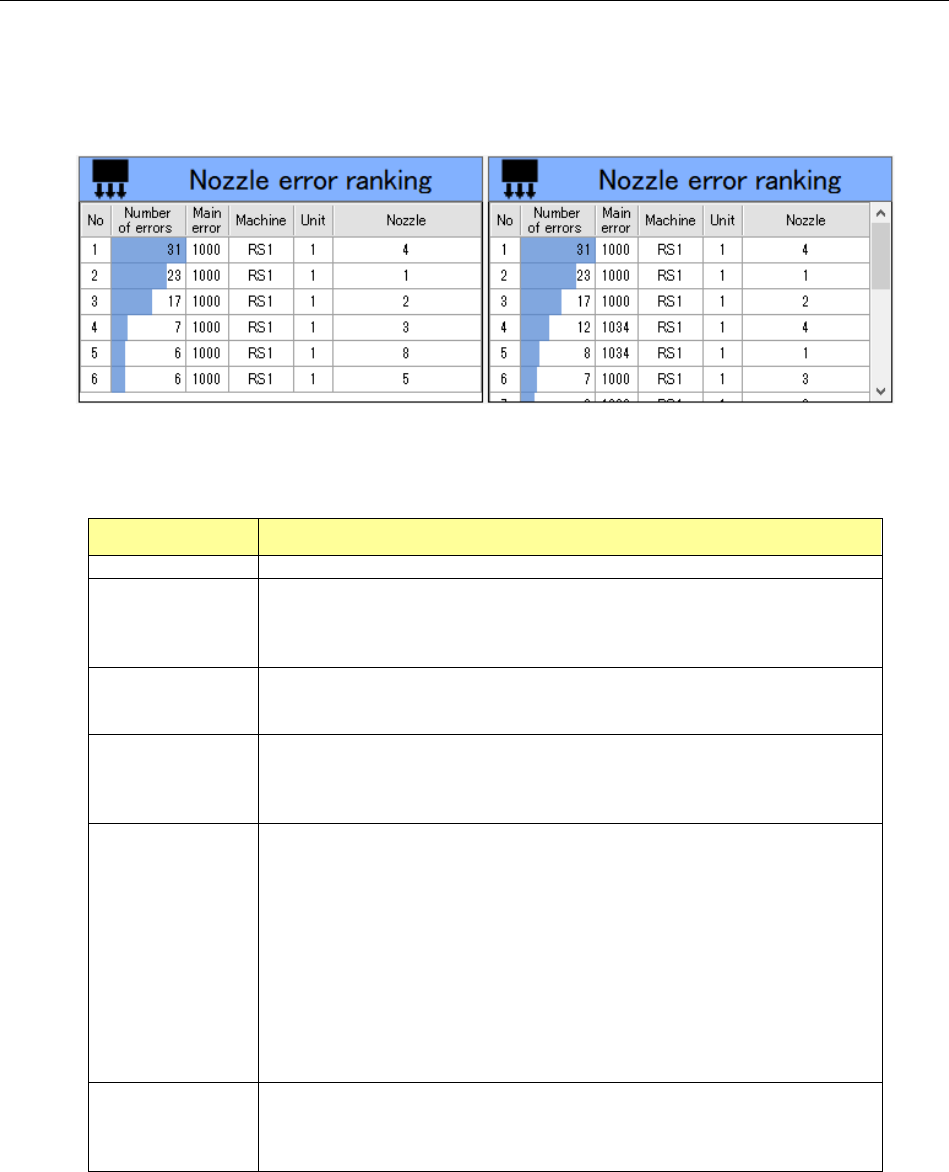
The “Feeder ranking” information shows the ranking for each feeder according to the error code
selected in the “Error rankings” information list.
When any error code is not selected in the “Error rankings” information list, this screen shows the
feeder error ranking for all error codes.
Figure 19-3-25 “Feeder error ranking” information
(Left: when an error code is selected/Right: when any error code is not selected)
Table 19-3-6 Items of the “Feeder error ranking” information
Item Description
No
Displays a serial number
Number of errors
Displays the number errors counted for each feeder as for the selected
error code.
When any error code is not selected, this column shows the number of
errors counted for each feeder as for all error codes.
Main error
Displays the main error for the selected error code.
When any error code is not selected, this column shows the main errors for
all error codes.
Machine
Displays the name of a machine at which an error occurred as for the
selected error code.
When any error code is not selected, this column shows the name of each
machine at which an error occurred as for all error codes.
Unit
Displays a unit of a machine at which an error occurred as for the selected
error code.
When any error code is not selected, this column shows a unit of each
machine at which an error occurred as for all error codes.
Feeder
Displays the position of a feeder at which an error occurred as for the
selected error code.
When any error code is not selected, this column shows the position of
each feeder at which an error occurred as for all error codes.
When a Holder/DS/MTC/MTS is used, this column shows the “supply
position#supply device sub-index.”
JaNets Instruction Manual 19 TraceMonitor
19-15
19-3-5-6 Nozzle error ranking information
The “Nozzle error ranking” information shows the ranking of each nozzle according to the error code
selected in the “Error rankings” information list.
When any error code is not selected in the “Error rankings” information list, this screen shows the
nozzle error ranking for all error codes.
Figure 19-3-26 “Nozzle error ranking” information
(Left: when an error code is selected/Right: when any error code is not selected)
Table 19-3-7 Items of the “Nozzle error ranking” information
Item Description
No
Displays a serial number
Number of errors
Displays the number errors counted for each nozzle head number as for
the selected error code.
When any error code is not selected, this column shows the number of
errors counted for each nozzle head number as for all error codes.
Main error
Displays the main error for the selected error code.
When any error code is not selected, this column shows the main errors for
all error codes.
Machine
Displays the name of a machine at which an error occurred as for the
selected error code.
When any error code is not selected, this column shows the name of each
machine at which an error occurred as for all error codes.
Unit
Displays a unit of a machine at which an error occurred as for the selected
error code.
When any error code is not selected, this column shows a unit of each
machine at which an error occurred as for all error codes.
1- to 4-digit error code
RX-7 0: Entire machine 1: Right side 2: Left side
RX-6 1: Front head 2: Rear head
RS-1/JM-100 1: Head, entire machine
6-digit error code
RX-6/RS-1/JM-100 1: Entire machine
RX-7 No error code is applied to the RX-7.
Nozzle
Displays the number of a nozzle head at which an error occurred as for the
selected error code.
When any error code is not selected, this column shows the number of
each nozzle head at which an error occurred as for all error codes.