JANETS_INM.pdf - 第377页
JaNets In structio n Manual 7. Program Editor 7- 170 Note of optimization to be performed for a pr oduction line including an RX - 7 series Layer The layer in the opt imizat ion on the JaNets is treate d based on t he va…
JaNets Instruction Manual 7. Program Editor
7-169
Others
The notes of the things that do not exist in an optimization option are described.
Notes on optimization of a production line including an RS-1 series machine
Manual nozzle attachment
You have to specify a nozzle that is to be attached in advance as a “Permanent Nozzle” when the
machine uses a manual nozzle attachment option.
The system handles such a machine so that “use setup nozzles” will be selected for the menu item
“Nozzle” regardless of the setting of the “Assignments” option tab to run a data consistency check
and perform optimization.
The setting of the menu item “Nozzle” is applied to the other machines assigned to the production
line.
Note on optimization to be performed for a production line including an
RS-1/JM-10 series
Permanent feeders
To prevent any head from interfering with a feeder or a component, set the “Head height at pro-
duction start” parameter of a production program for the machine main unit with the optimization
function. The “Feeder height,” which is one of the factors deciding this parameter, is calculated
based on the settings of the tray height and the tray depth both of which are saved in component
information of the Component Database. Therefore, if these settings are different from the actual
values, a head or a picked-up component may be in contact with a permanent feeder.
To use a permanent feeder of a tray holder, be sure to confirm that the settings of the Component
Database are consistent with the actual values. This also applies to the case in which you use the
“Used as a permanent feeder” option of the Reference Feeder Setup function.
Note of optimization to be performed for a production line including an
RS-1/RX-7 series
Restriction on height
In order to avoid a collision between the head and a placed component, the assignable compo-
nents on the upper stream side are limited if the lower stream side is under strict restriction.
For example, when the P16 heads of RX-7 are mounted on 2 machines, the placement of com-
ponents exceeding 3 mm is restricted on the upper stream side. Accordingly, even if the P8 head
of RX-7 is mounted on the first machine, a component with a height of 4 mm cannot be assigned
to the first machine.
In case of the “Max Part Height Option,” when the component height is restricted strictly with the
downstream side, components that can be assigned to the upstream side are restricted as well.
Interference with the PWB transport rail
When there are a placement position within 3 mm in the Y direction from the end of PWB, inter-
ference is caused to the PWB transport rail. As a result, an error occurs.
JaNets Instruction Manual 7. Program Editor
7-170
Note of optimization to be performed for a production line including an RX-7
series
Layer
The layer in the optimization on the JaNets is treated based on the value of the layer which can be
set up on the JaNets.
The quantity of component supply
Optimization of an RX-7 series usually assigns one unit of feeder in order to employ the charac-
teristic of a head efficiently. However, when "Assign duplicate feeders to left and right stations." of
"Machine Type Specific – RX-7 series" is selected, the components with many placement points
may be assigned to right and left stations. In this case, optimization is performed without protect-
ing a setup of the quantity of component supply for the said components.
If the balance between the left side and the right side is bad
Since optimization performed under the default conditions of an RX-7 series uses only one feeder
for one component, the balance between the left side and the right side may become worse if the
machine has to place components at many positions of a board. If you have to balance the left
side and the right side even by increasing the number of feeders, put a checkmark in the “Assign
duplicate feeders to left and right stations” check box on the “RX-7 series” tab invoked from the
“Machine Type Specific” screen, and then perform the Optimization function again.
When a long board is handled with an RX-7
When you use the long board option with an RX-7 series, you have to optimize a production pro-
gram so that it can be optimized for a long board regardless of the board size. Therefore, put a
checkmark in the “Assign duplicate feeders to left and right stations” check box on the “Machine
Type Specific” tab invoked from the “Machine Options” option to optimize the production program.
Unless you put a checkmark in this check box, the machine fails to optimize a production program.
Note that an RX-7 series with which the long board option is enabled cannot use data (production
program) created and optimized with the long board option disabled to produce any PWBs.
About the substrate exceeding RX-7 Substrate size, X = 350mm
When you optimize the substrate exceeding X = 350mm at RX-7 series, put a check mark on “Al-
locate the same components to left-right stations and perform optimization. The optimization fails if
you do not put the check mark.
Notes on optimization of a production line including a JM series machine
About optimization of a bowl feeder
When you are to allocate a bowl feeder to the system with the optimization function, you have to
register a target component to be supplied by a bowl feeder in Component Database in advance.
After registering the component, import the INI file with [Equipment Setup] – “INS Bulk Feeder” of
Shopfloor Setup.
When you are to optimize a BWL-6 bowl feeder with JM-10 series
To optimize a BWL-6 bowl feeder, you have to enable the bowl bank with Shopfloor Setup to
specify the serial number for the INS bulk feeder in advance in addition to perform the operation
described in “About optimization of a bowl feeder” above.
JaNets Instruction Manual 7. Program Editor
7-171
7.7.5 Executing the Optimization Process
* You can execute the optimization process only if you create a production program completely.
Otherwise, you cannot do it.
* The system performs a data coherence check when you execute the optimization process. If a
production program cannot produce any PWB with the active line, an error is displayed on the
execution status view of the Program Editor or the Job Optimizer.
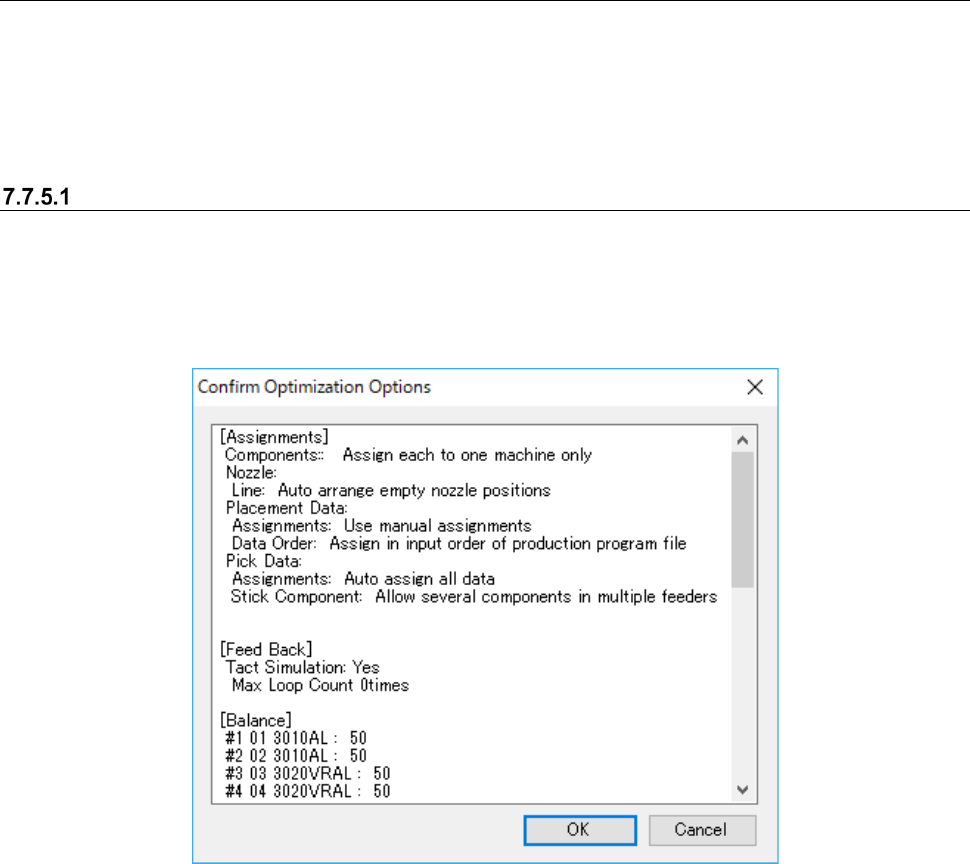
“Confirm Optimization Options” dialog box
When you select the <Go> button after checking the check box “Show the Confirm Optimization
Options dialog box” on the “Optimize” dialog box, the dialog box indicating that each option setting
of the Optimize application appears on the screen before the system starts the optimization pro-
cess.
Figure 7.7-25 “Confirm Optimization Options” dialog box
When you set the option “Show the Confirm Optimization Options" dialog box, the system saves
the settings of each application when you quit it regardless of selection of the <Save as Default>
button or the <Default> button.