00191025-01.pdf - 第160页
6 Single Functi ons SIPLACE 80S/F/G User’s M anual 6.3 Star Head Functions 80S Edition 07/97 from Software Version SR.010.xx 6 - 28 ● Use the s pace bar to m ove the cur sor bar into the colum n of the mag azine you w an…
SIPLACE 80S/F/G User’s Manual 6 Single Functions
Edition 07/97 from Software Version SR.010.xx 6.3 Star Head Functions 80S
6 - 27
●
This confirmation is required, when the actual nozzle configuration is not the same as the desired configu-
ration and if the state of the "desired" column is to be taken over into the "actual" column. This new nozzle
configuration is saved to the machine data. Before acknowledgment the nozzles in the corresponding mag-
azine of the nozzle-changer must be changed and there be 12 nozzles.
Once processing is completed, the two columns ("actual" and "desired") must match.
●
Press the Esc key to quit the menu "Magazine configuration".
6.3.4.2 Magazine Filling Level
Proceed as follows to call the menu item "Magazine filling level":
●
In the menu "Nozzle changer SP" use the cursor keys to move the cursor bar over the menu item "Maga-
zine filling level".
●
Press the
Return key
. The screen then displays the menu "Magazine filling level".
NOTE
If there are nozzles in the placement head, these will be returned to the corresponding magazines.
The number of nozzles per magazine cannot thus be greater than 12.
Fig. 6.3.10
NOTE
A magazine can be set up with a maximum of 12 nozzles of the same type.
Esc: abort
Magazine filling level
Error
State
Action
:
:
:
Magazine
No.
1
2
3
4
5
6
7
Actual
312
313
314
314
317
0
0
Filling level
6
4
0
2
12
0
0
Nozzle configuration
Ret.: refill
6 Single Functions SIPLACE 80S/F/G User’s Manual
6.3 Star Head Functions 80S Edition 07/97 from Software Version SR.010.xx
6 - 28
●
Use the space bar to move the cursor bar into the column of the magazine you want to fill.
●
Press the
Return key
to fill this magazine.
●
Press the Esc key to quit the "Magazine filling level" menu.
6.3.4.3 Replace One Nozzle
Proceed as follows to call the menu item "Replace one nozzle":
●
In the menu "Nozzle changer SP" use the cursor keys to move the cursor bar over the menu item "Replace
one nozzle".
●
Press the
Return key
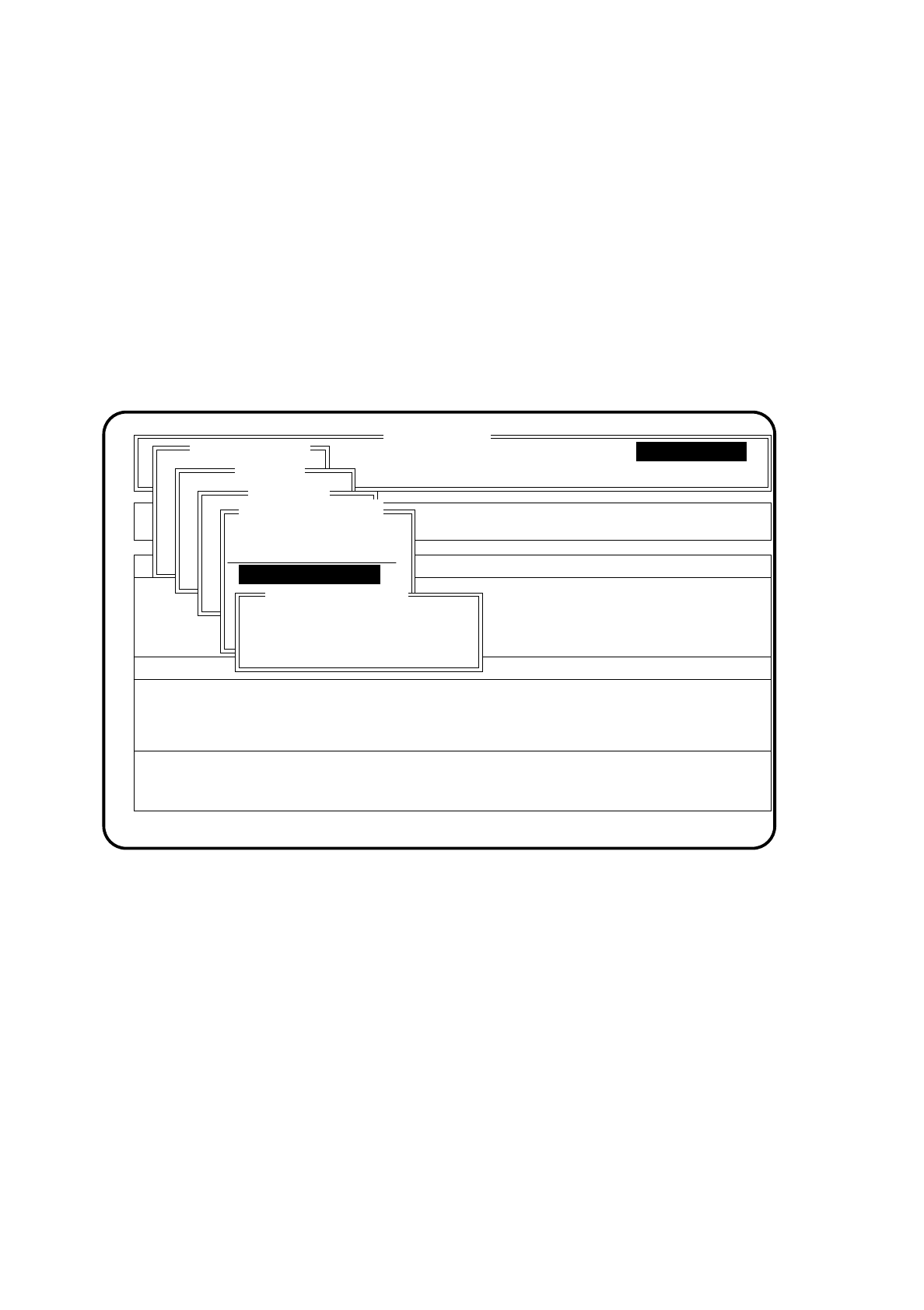
. The screen then displays the menu "Replace one nozzle".
Fig. 6.3.11
●
Input the segment no. where the nozzle is which you wish to replace.
●
Press the
Return key
. The nozzle is dropped into the rejects container and a new nozzle of the same type
picked up from the corresponding magazine.
●
Press the Esc key to quit the "Replace one nozzle" menu.
SI 80 V 10.x
Rüstung :
BE - Zuführung Display errors
Confirm errors
Machine options
Software options Vision system
Error
State
Action
Single functions
Transportfkt.
Breitenverstell.
Gantry 1
Transportfkt.
Breitenverstell.
Star head
:
:
:
Nullimpuls anfahren
Portal - Referenzlauf
Kopf
Prüfgerät
Pipettenkonf.
Nozzle changer SP
Magazine configuration
Magazine filling level
alle Pipetten aufrüsten
alle Pipetten wegwerfen
Replace one nozzle
Segment No.: 1
:
:
:
Single functions
Single functions
Replace one nozzle

SIPLACE 80S/F/G User’s Manual 6 Single Functions
Edition 07/97 from Software Version SR.010.xx 6.3 Star Head Functions 80S
6 - 29
6.3.4.4 Return All Nozzles
Proceed as follows to call the menu item "Return all nozzles":
●
In the menu "Nozzle changer SP" use the cursor keys to move the cursor bar over the menu item
"Return all nozzles".
●
Press the
Return key
. All nozzles in the Star head will be returned to the corresponding magazine.
●
Press the Esc key to quit the "Return all nozzles" menu.
6.3.4.5 Pickup All Nozzles
Proceed as follows to call the menu item "Pickup all nozzles":
●
In the menu "Nozzle changer SP" use the cursor keys to move the cursor bar over the menu item "Pickup
all nozzles".
●
Press the
Return key
. All nozzles are taken up from the nozzle changer.
●
Press the Esc key to quit the "Pickup all nozzles" menu.
6.3.4.6 Remove All Nozzles
Proceed as follows to select the menu item "Remove all nozzles":
●
In the menu "Nozzle changer SP" use the cursor keys to move the cursor bar over the menu item "Remove
all nozzles".
●
Press the
Return key
. All nozzles in the Star head will be dropped into the rejects container.
●
Press the Esc key to quit the menu "Remove all nozzles".
6.3.4.7 Lock open
Proceed as follows to call the menu item "Lock open":
●
Using the cursor keys position the light bar over the menu item "Lock open" in the "Nozzle changer star"
menu.
●
Press the return key. The striking plate of the nozzle change will open the nozzle-changer lock.
●
To quit the "Lock open" menu press the escape key.
NOTE
Before you quit the "Nozzle changer star" menu, use the function "Lock closed" to close the open lock. See
Section 6.3.4.8.