00191025-01.pdf - 第208页
7 Vision Systems SIPLACE 80S /F/G User’s Manual 7.2 PCB Vision S ystem Edition 07/97 from Software Version S R.010.xx 7 - 16 Line engine er Fig. 7.2.2 Row and column profiles of a double cross ● The pos ition of the fi d…
SIPLACE 80S/F/G User’s Manual 7 Vision Systems
Edition 07/97 from Software Version SR.010.xx 7.2 PCB Vision System
Line engineer 7 - 15
tion of the fiducial coordinates
–
1D pattern search procedure (1-dimensional procedure) for precise determination of the position of
the fiducials.
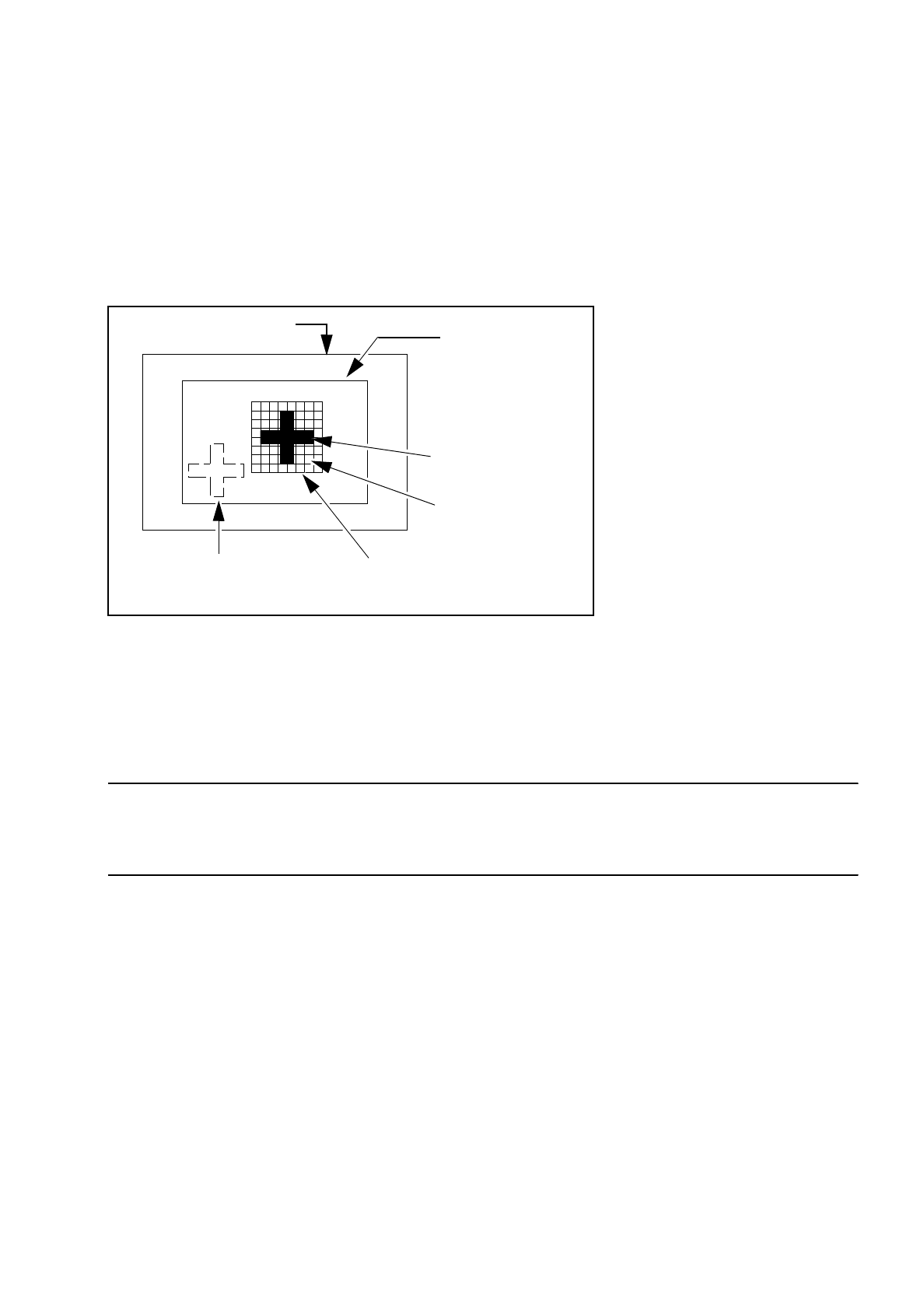
With the 2D pattern search procedure the template window is divided into in moxel areas. Moxels (
mo
saic pi
x-
el
s) are pixel fields with, for example, 16 x 16, 8 x 8 pixels etc. The lower the number of pixels, the higher the
resolution and the lower the search speed.
Fig. 7.2.1 Explanation of camera field of view, search area and template window
The template window is moved over the search area in moxel steps. The grey-scale values of each individual
moxel of the reference pattern are calculated. This reduced data structure contains enough information on the
rough structure and position of the reference pattern.
NOTE
The search window should be selected as small as possible in order to achieve a high search speed, but
should still be large enough to ensure clear reidentification of the fiducial.
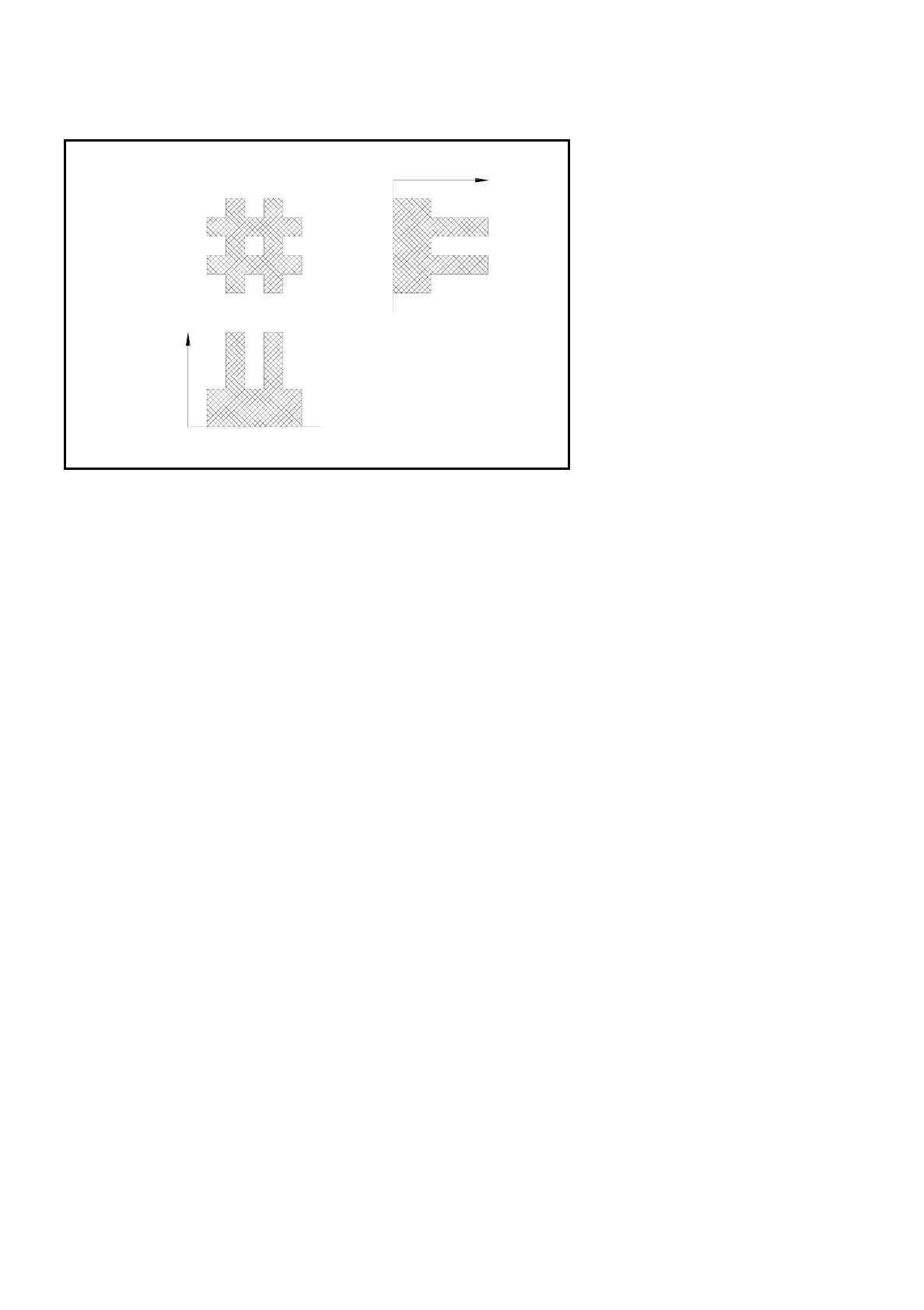
The 1D pattern search procedure is used for the exact determination of the pattern and position of the fiducial.
The fiducial image is analyzed by column and row and the grey-scale values within each individual column
and row added up. The next Figure shows this procedure using a double cross.
Search area for the
camera
≤
field of view
(The fiducial is
searched for within
this area)
Reference pattern
Moxel = pixel field
e.g. 16 x 16 pixels
Field of view of the camera
Fiducial to be found
Template window
(It contains the reference fiducial)
7 Vision Systems SIPLACE 80S/F/G User’s Manual
7.2 PCB Vision System Edition 07/97 from Software Version SR.010.xx
7 - 16 Line engineer
Fig. 7.2.2 Row and column profiles of a double cross
●
The position of the fiducial is precisely determined from the horizontal and vertical profiles. After teaching
is completed the fiducial structure parameters obtained are saved to the line computer.
●
Now the saved definition is tested. The gantry of the PCB camera moves over the board to all 4 corners of
the search area (worst case). In this test the vision system must reidentify the fiducial four times.
●
Finally, the coordinates of each individual fiducial (at least two) are entered manually into the NU-file or
transferred from the CAD file into the NU-file. In this way the coordinates and fiducial structure parameters
for the board which is to be placed are defined in the system as a model.
●
During the placement sequence the fiducial parameters are again determined using the image processing
methods described above (2D and 1D procedures). The pattern search window is moved over the search
area in moxel steps and a search is made for the greatest possible agreement between the grey-scale val-
ues of the reference pattern and the PCB search pattern (correlation procedure). Maximum correlation is
attained where the reference and search patterns agree.
●
When the fiducial has been found, the 1D pattern search procedure starts with a very precise determina-
tion of the geometry and coordinates of the fiducial. The precise fiducial template and coordinates are now
in each case determined via the column and row profiles (see Figure above) by means of the correlation
procedure. Position, rotation and shear of the board are determined using the coordinates obtained.
Reject fiducials (= ink dots) are also recorded and evaluated using the method described above.
7.2.5 Criteria for the creation of fiducials
As a fundamental rule the same criteria shall apply to both fiducials and also to reject fiducials (ink dots): clar-
ity of the fiducial shapes and easily recognizable structures which stand out clearly from their surroundings.
Fiducial
Sum of the
grey-scale
values by
columns:
column profile
Sum of the
grey-scale
values
by rows:
row profile

SIPLACE 80S/F/G User’s Manual 7 Vision Systems
Edition 07/97 from Software Version SR.010.xx 7.2 PCB Vision System
Line engineer 7 - 17
●
Using existing structures as fiducials
Instead of fiducials you can also use clearly identifiable structures within the layout. But note here that the
solder resist is accompanied by a drop in contrast.
●
Location of the fiducials
Position the fiducial where there are as few structures as possible and where it will stand out well from its
surroundings. Measuring outwards from the center of the fiducial the clearance should be at least fiducial
size + 1 mm on each side of the fiducial.
●
Types of fiducial
There are 2 types of fiducial:
–
positive fiducials:
The fiducial extends beyond the material of the PCB base.
–
negative fiducials:
The fiducial is etched into the material of the PCB base.
●
Fiducial shape
Always select a well-structured, distinct figure as fiducial shape which is parallel to the axes.
Recommended fiducial shapes:
Rectangle, square or circle
Characteristics
–
Lower information content (fiducials can easily be mistaken for test dots.)
NOTE
Make sure that there are no similar structures in the search area of the fiducials.
–
Less space required in the layout
–
Very robust in comparison to various tin-plating processes (for example hot tinning).
Recommended fiducial dimensions
–
for square and rectangle:
side length 1.2 mm - 2.2 mm
–
for the circle
diameter 1.2 mm - 2.2 mm
Double cross and single cross
Characteristics of the double cross
–
Higher information content
–
Needs more space in the layout
–
Sensitivity with respect to high tinning (bright copper presents more advantages).
–
If too low a fiducial quality is permitted, the risk exists that four incorrect positions will be recognized.