00191025-01.pdf - 第451页
9 Maintenance SIPLACE 80S /F/G User’s Manual 9.7 Wafflepack Changer Edition 07/97 from Software Version S R.010.xx 9 - 92 Fig. 9.7.3 Maintenance of the guide rails and z-lift axis of the wafflepack changer

SIPLACE 80S/F/G User’s Manual 9 Maintenance
Edition 07/97 from Software Version SR.010.xx 9.7 Wafflepack Changer
9 - 91
9.7.3 Preparatory Work
●
If the magazines are not yet empty, move the lift up to the refill position. Open the safety door of the waffle-
pack changer and remove the magazine trays from the lift. Note the information note at the start of Section
9.7. Close the safety door.
●
Insert a magazine tray in-between positions 10 and 26 in the magazine storage unit and transfer the tray
into the machine. The waffle-pack changer now travels the lift half-way up. The lubrication nipples are thus
made accessible.
●
Switch off the machine at the main switch. Undo all plug connections of the waffle-pack changer on the left-
hand side of the machine base (interface plug and the plug for the power supply unit).
●
Lift the waffle-pack changer using the lifting device and remove it from the placement machine.
9.7.4 Maintenance of the Guide Rails
●
Open the safety door of the wafflepack changer.
●
Clean the two guide rails for the magazine conveyor (see Fig. 9.7.2) over their entire circumference and
entire length using a little alcohol and a cloth.
●
Apply a little watchmaker’s oil to a clean cloth and lightly rub over the cleaned areas with it.
●
To enable you to reach all points of the guide rails, move the holding plate for the trays by hand (see Fig.
9.7.3).
●
Close the safety door and carry out the work described in Section 9.7.6 from Page 9 - 93.
9.7.5 Maintenance of the Spherical Rotating Liners of the Z-Lift Axis
The lift is half way up.
●
Using a size 2.5 hexagon socket spanner undo the fastening of the left-hand side panel of the waffle-pack
changer and remove it .
●
Grease the recirculating ball screw and the linear guides at the lubrication nipple using Urethyn E/M2 from
the grease gun (see Fig. 9.7.3).
●
Wipe away larger accumulations of grease or dirt at the ends of the two vertical guide rails with a cloth with
a little alcohol.
●
Fit the left-hand side panel back to the wafflepack changer.
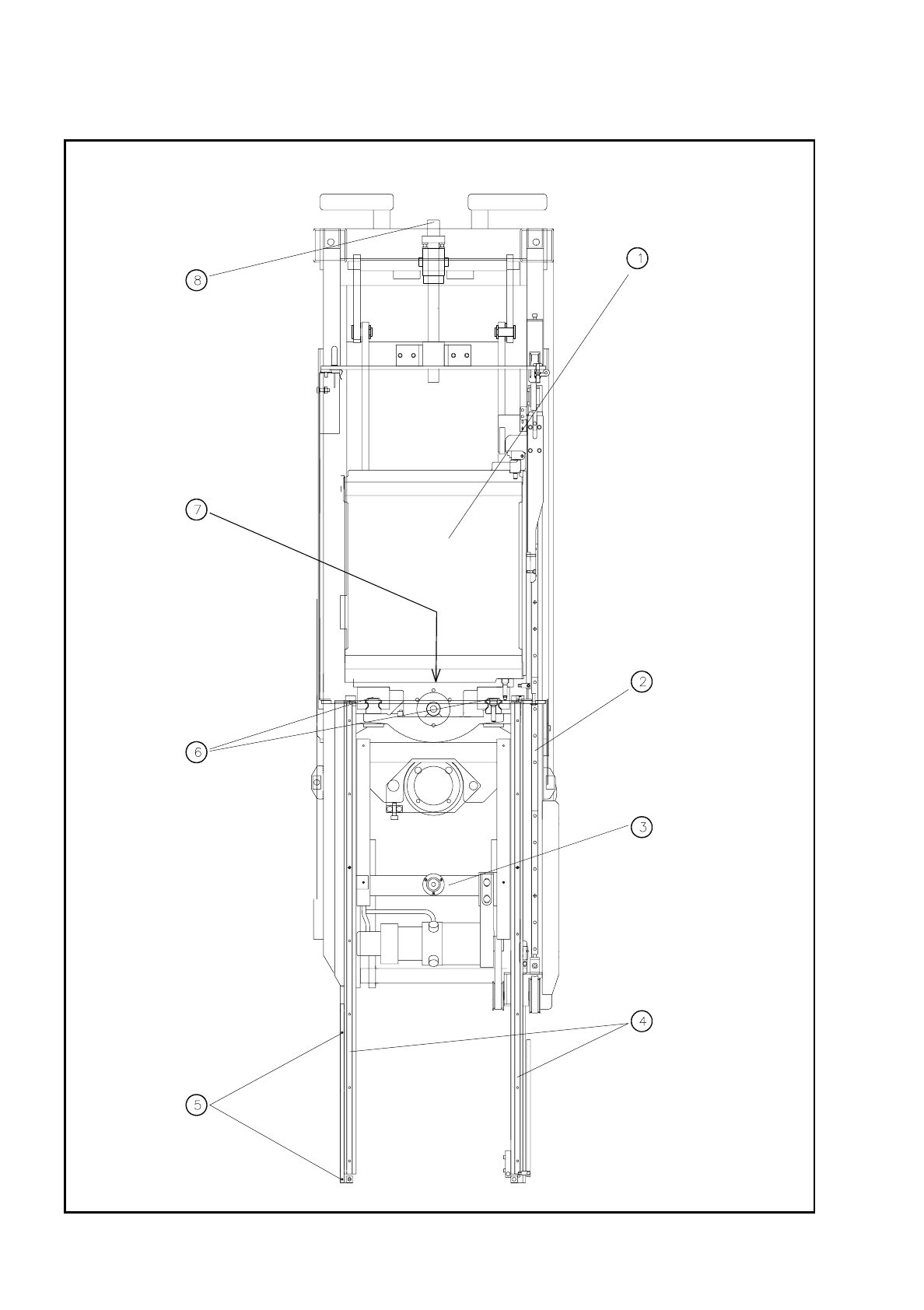
9 Maintenance SIPLACE 80S/F/G User’s Manual
9.7 Wafflepack Changer Edition 07/97 from Software Version SR.010.xx
9 - 92
Fig. 9.7.3 Maintenance of the guide rails and z-lift axis of the wafflepack changer

SIPLACE 80S/F/G User’s Manual 9 Maintenance
Edition 07/97 from Software Version SR.010.xx 9.7 Wafflepack Changer
9 - 93
Key to Fig. 9.7.3
1 Holding plate for trays
2 Guide rail for carriage
3 Machine spirit level
4 Guide rail for tray rest
5 Reference fiducials
6 Guide rails of the z-lift axis
7 Lubrication nipple for lift axis
8 Lift / lower
9.7.6 Concluding Work
●
Replace the wafflepack changer back in the machine using the lifting device as described in the Section
Components supply
.
●
Check next the spirit level on the wafflepack changer.
●
If necessary slide the trays including magazines back into the correct track.
●
Make sure that the trays have been restored in their correct places.
NOTE
When you refit the trays, note that magazine No. 1 must be replaced in its previous rotational position in
track 1 ( magazine 2 in track 2, and so on). If you do not do this, when you begin placement again there
will be an undefined state which can lead to errors in picking up components from the wafflepack changer.
For this reason it is not enough simply to check only the component allocations to the tracks of the waffle-
pack changer with the help of the ACTUAL display of the wafflepack changer set-up in the
Single
functions
menu.
●
Plug the interface and power supply plugs back into the machine base.
●
After the start of a placement program which also picks up components from the wafflepack changer, the
PCB camera will travel automatically over the fiducial on the wafflepack changer and registers its position.
●
changer and registers its position.