SG_FSE_SiplaceHF_HF3_00193901-05_eng.pdf - 第21页
1 - 1 1 S tudent Guide SIPLACE HF/HF3 Edition 09/2005 1 Operational safety 11 1.3.1.2 Position of protective switches on the placem ent machine Fig. 1.3 - 2 Position of protective switches on the placement machine 1. Pro…
1 - 10
Student Guide SIPLACE HF/HF3
1 Operational safety Edition 09/2005
10
1.3 Safety equipment
1.3.1 Switches and buttons on the placement machine
1.3.1.1 Position of switches and buttons on the placement machine
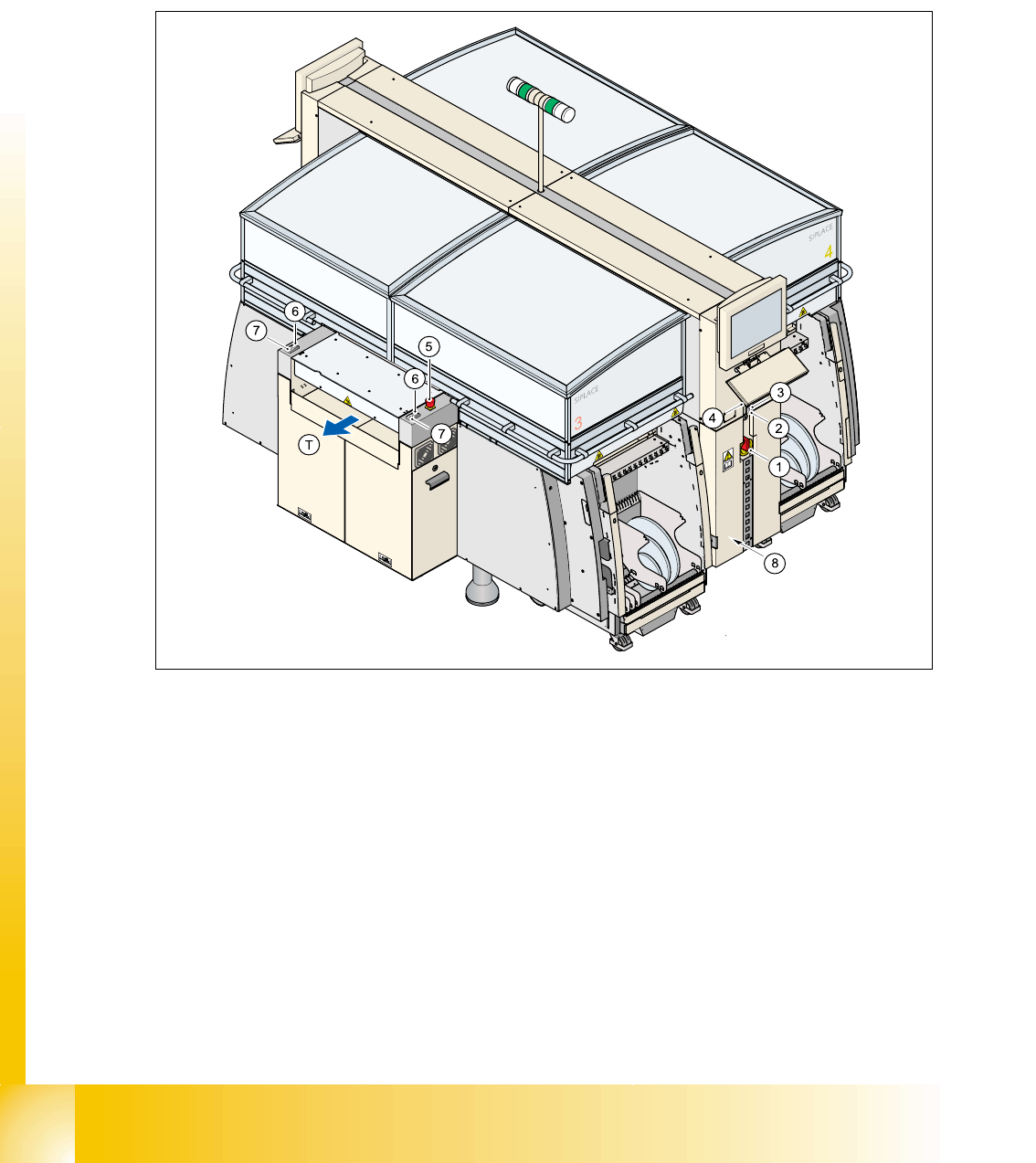
Fig. 1.3 - 1 Position of switches and buttons - View of the PCB output side
1. Main power switch
2. Stop button (black) on the operator panel on the power supply side
3. Start button (white) on the operator panel on the power supply side
4. Component counter on the operator panel on the power supply side
5. Emergency stop push-button on the output side
6. Start button (white) on the output side
7. Stop button (white) on the output side
8. Service socket in the power supply unit behind the cover
(T)PCB transport direction
1 - 11
Student Guide SIPLACE HF/HF3
Edition 09/2005 1 Operational safety
11
1.3.1.2 Position of protective switches on the placement machine
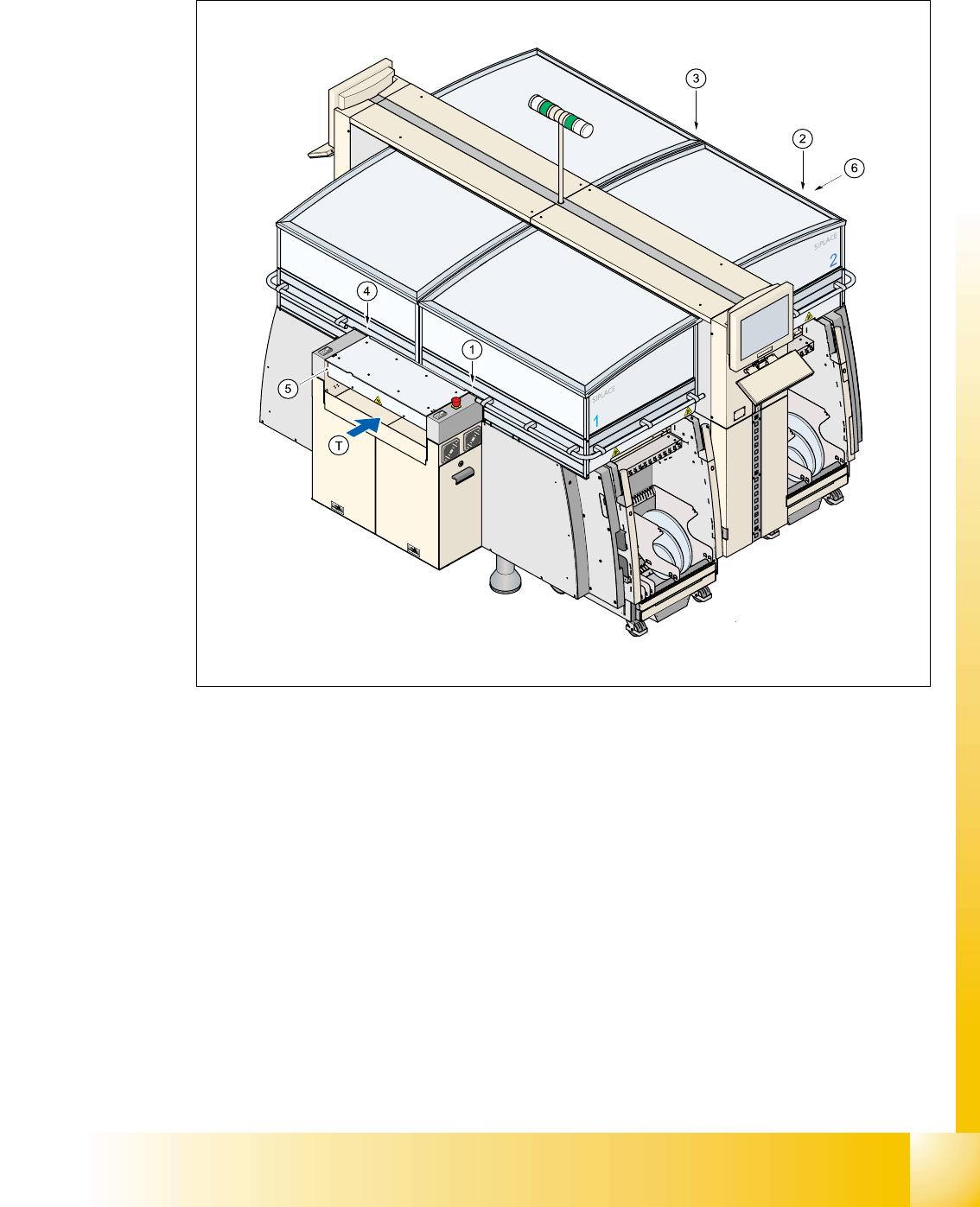
Fig. 1.3 - 2 Position of protective switches on the placement machine
1. Protective cover switch, location 1
2. Protective cover switch, location 2
3. Protective cover switch, location 3
4. Protective cover switch, location 4
5. Protective switch for the cover on the input side of the PCB conveyor
6. Protective switch for the cover on the output side of the PCB conveyor
(T)PCB transport direction

1 - 12
Student Guide SIPLACE HF/HF3
1 Operational safety Edition 09/2005
12
1.3.1.3 Description of the functions
Main power switch in the OFF position (items 1 in Fig. 1.3 - 1 1
The main power switch disconnects the three phases L1, L2, and L3 from the power supply.
WARNING 1
The following components still carry potentially lethal voltages even if the main power switch is
switched off:
– Cable connection terminals 1, 3, and 5 of the S1 main power switch
– Mains filter Z1
– Service socket X102
– F1 automatic circuit breaker for the service socket
– The color of all individual wires, which still carry potentially lethal voltages even if the main
power switch is switched off, is brown.
➠ Death, serious injury or considerable damage may result if these automatic placement sys-
tems are handled incorrectly.
➠ Always follow the applicable accident prevention and DIN regulations (particularly DIN EN 60
204, part 1) and the applicable regulations in your own country.
➠ The safety door to the power supply must ONLY be opened by appropriately qualified and
trained personnel.
Emergency stop push-button (item 5 in Fig. 1.3 - 1) 1
The emergency stop push-button is red and latches in the ON position when pressed. When you
press the emergency stop push-button the switching contact of the safety circuit opens and the
protective contactor combination (PCC K6) trips. The link voltage (250 VDC) for the gantry axes
and the link voltage (145 VDC) for the star axes is switched off. The servo amplifiers for the DP
and Z axes are still supplied with 40 VDC. The signaling contact of the emergency stop push-but-
ton closes and the message "emergency stop pressed" appears on the screen. The following
modules
– PCB conveyor
– PCB clamping
– width adjustment
– PCB stopper and the
– used tape cutter
are deactivated.
PLEASE NOTE Placement is interrupted and can then either be continued or canceled once the
machine is working correctly again.