SG_FSE_SiplaceHF_HF3_00193901-05_eng.pdf - 第399页
1 - 13 S tudent Guide SIPLACE HF/HF3 Edition 09/2005 9 Modular conveyor 13 9.2.1.1 Settings for the belt tension Please Note: In the modular transport, 3 dif ferent lengths of toothed bel ts are use d. The dif ferent bel…
1 - 12
Student Guide SIPLACE HF/HF3
9 Modular conveyor Edition 09/2005
12
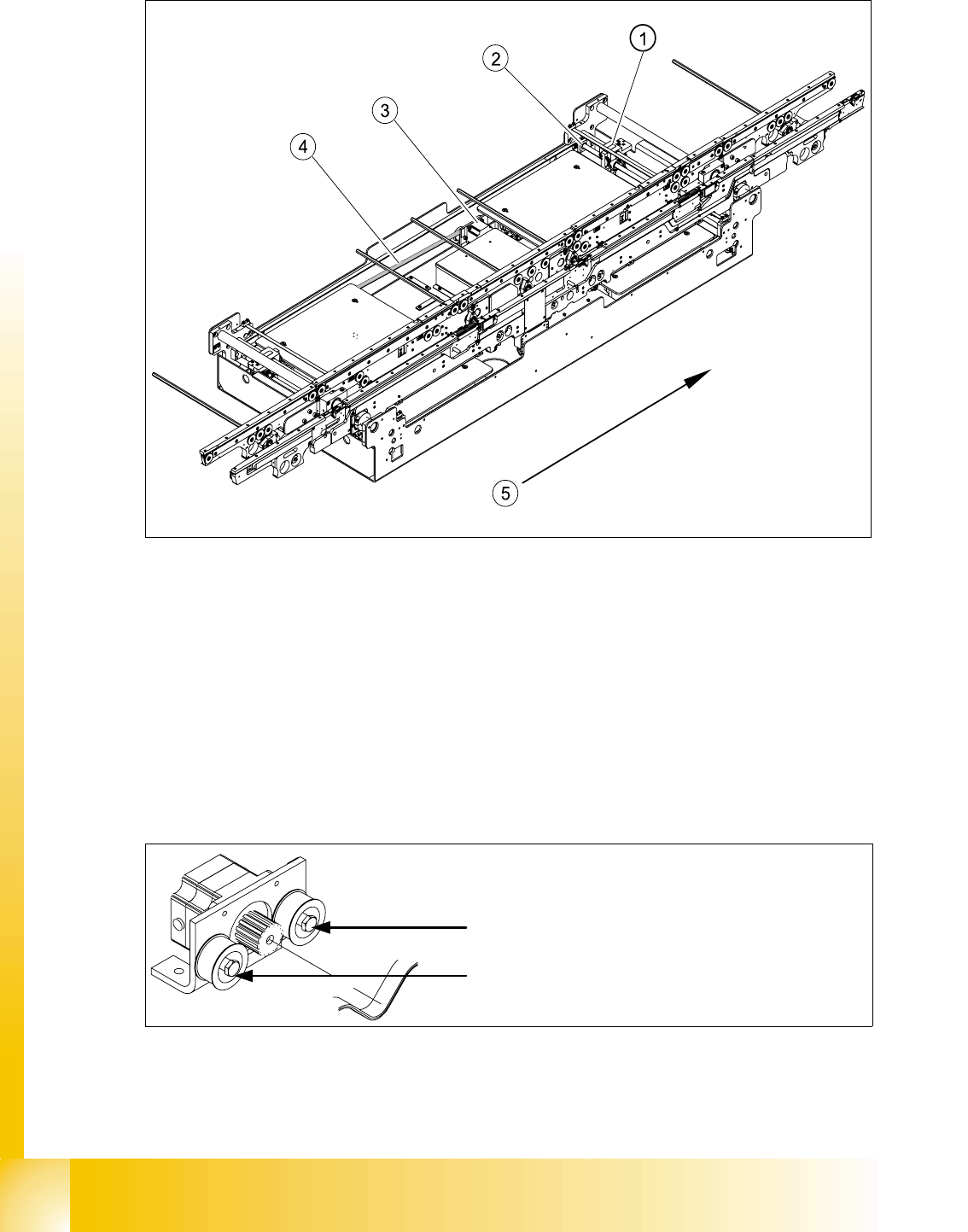
Fig. 9.2 - 2 Measuring and setting the belt tension for the width adjustment (showing HS-60)
Legend
The belt is tensioned by means of cams on the idler pulleys. The idler pulleys are located on the
left and right of the motor.
Fig. 9.2 - 3 Width adjustment motor
(1) Driver (2) Spindle with toothed wheel
(3) Width adjustment stepping motor (4) Toothed drive belt for adjusting the width /
measuring the belt tension
(5) Direction of PCB transport
Loosen the cam shaft on the idler pulley
and set the belt tension.

1 - 13
Student Guide SIPLACE HF/HF3
Edition 09/2005 9 Modular conveyor
13
9.2.1.1 Settings for the belt tension
Please Note:
In the modular transport, 3 different lengths of toothed belts are used. The different belt tensions
between the conveyor tracks results from the different arrangement of the hexagon shafts and id-
ler pulleys.
Belt tension for the width adjustment: 30 Hz +/- -2 Hz
Belt tension for track 1 (single and dual conveyors)
Input conveyor: 102 Hz +/- 10 Hz
Placement area 1: 66 Hz +/- 7 Hz
Intermediate conveyor: 94 Hz +/- 9 Hz
Placement area 2: 66 Hz +/- 7 Hz
Output conveyor: 102 Hz +/- 10 Hz
Belt tension for track 2 (dual conveyor)
Input conveyor 144 Hz +/- 14 Hz
Placement area 1: 71 Hz +/- 7 Hz
Intermediate conveyor 94 Hz +/- 9 Hz
Placement area 2: 71 Hz +/- 7 Hz
Output conveyor 144 Hz +/- 14 Hz
1 - 14
Student Guide SIPLACE HF/HF3
9 Modular conveyor Edition 09/2005
14
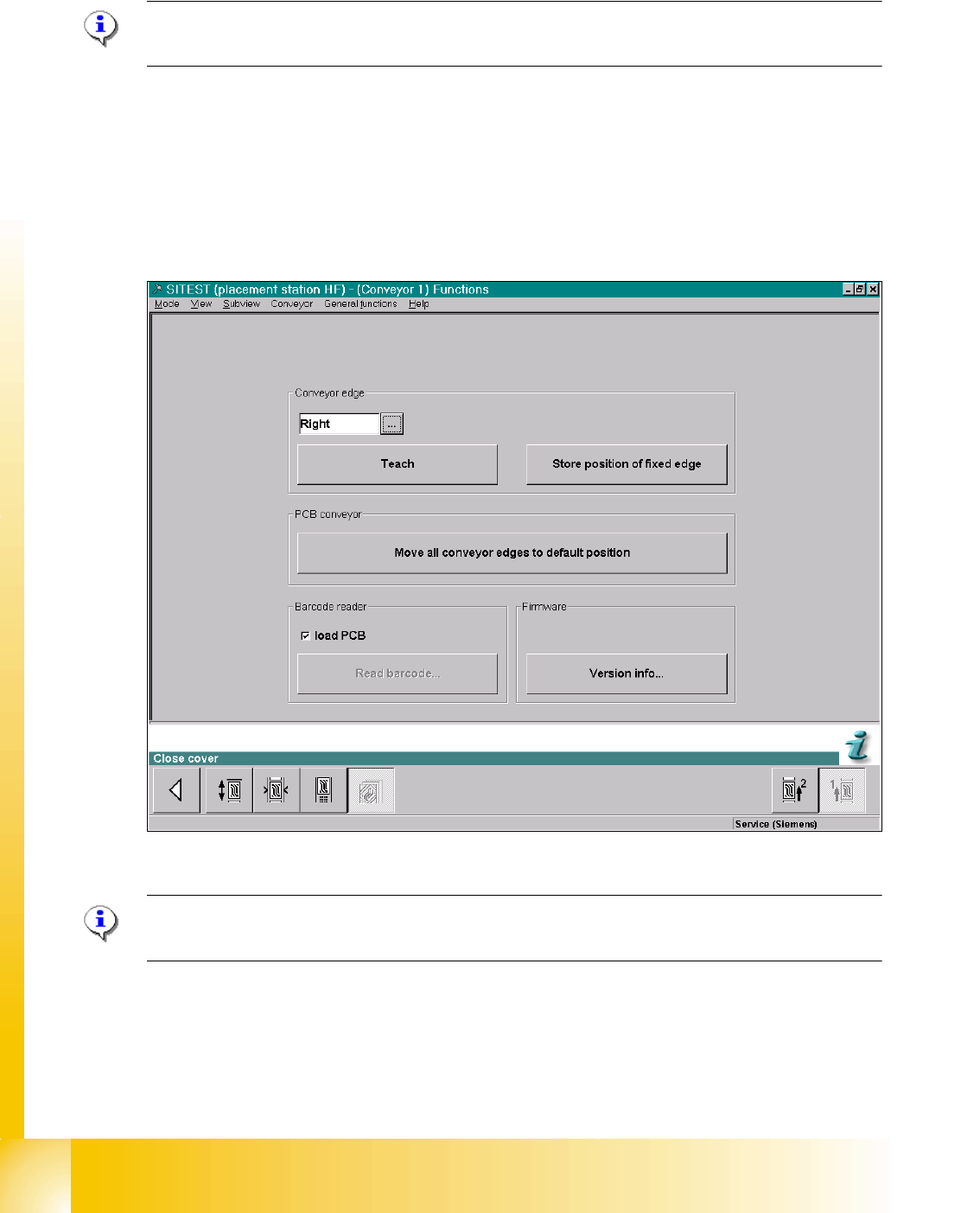
9.2.2 Setting the fixed conveyor rail (single and dual conveyor)
Please Note:
This menu is protected with the Siemens Service password.
The fixed conveyor rail can be set using the Sitest program, if necessary. If the taught position of
the fixed conveyor rail has been stored, these values will be used for the "Move all conveyor rails
to default position" function, i.e. the default values will be overwritten and will have to be retaught
as shown in Fig. 9.2 - 5.
If these dimensions are incorrectly set on the single or dual conveyor, the PCB reference corner
may be moved, leading to fiducial errors during placement.
Fig. 9.2.4 Sitest "Set fixed conveyor side"
Please Note: With SC/MC station-SW 505 or higher the Fixed rails are flexible moveable for
all conveyors by transport control firmware.
Two necessarities to change fixed conveyor rail(s):
- extend conveyor this move the fixed rail 34 mm outside only for HF- and
X-lines
- widen conveyor this move the 2nd conv. to limits and run dual conv. in
single conv. mode (std to 380mm / X/HF-line to 450mm)