00194614-08 Trainingsdoku. SG X-Serie_X4i SW70x (AL2)_EN.pdf - 第106页
Communication and Control X Feeder - Communication CAN Bus Student Guide SIPLACE X-Serie and X4I SW70x (AL2) 106 Data Transfe r 4.3.8.4 Data Transfer ▪ The communication with the DP d rives (CAN bus) is contactless via a…
Communication and Control
CAN Bus Communication CPP Head
105 Student Guide SIPLACE X-Serie and X4I SW70x (AL2)
CAN Bus Communication to the DP Drives
4.3.8.2 CAN Bus Communication to the DP Drives
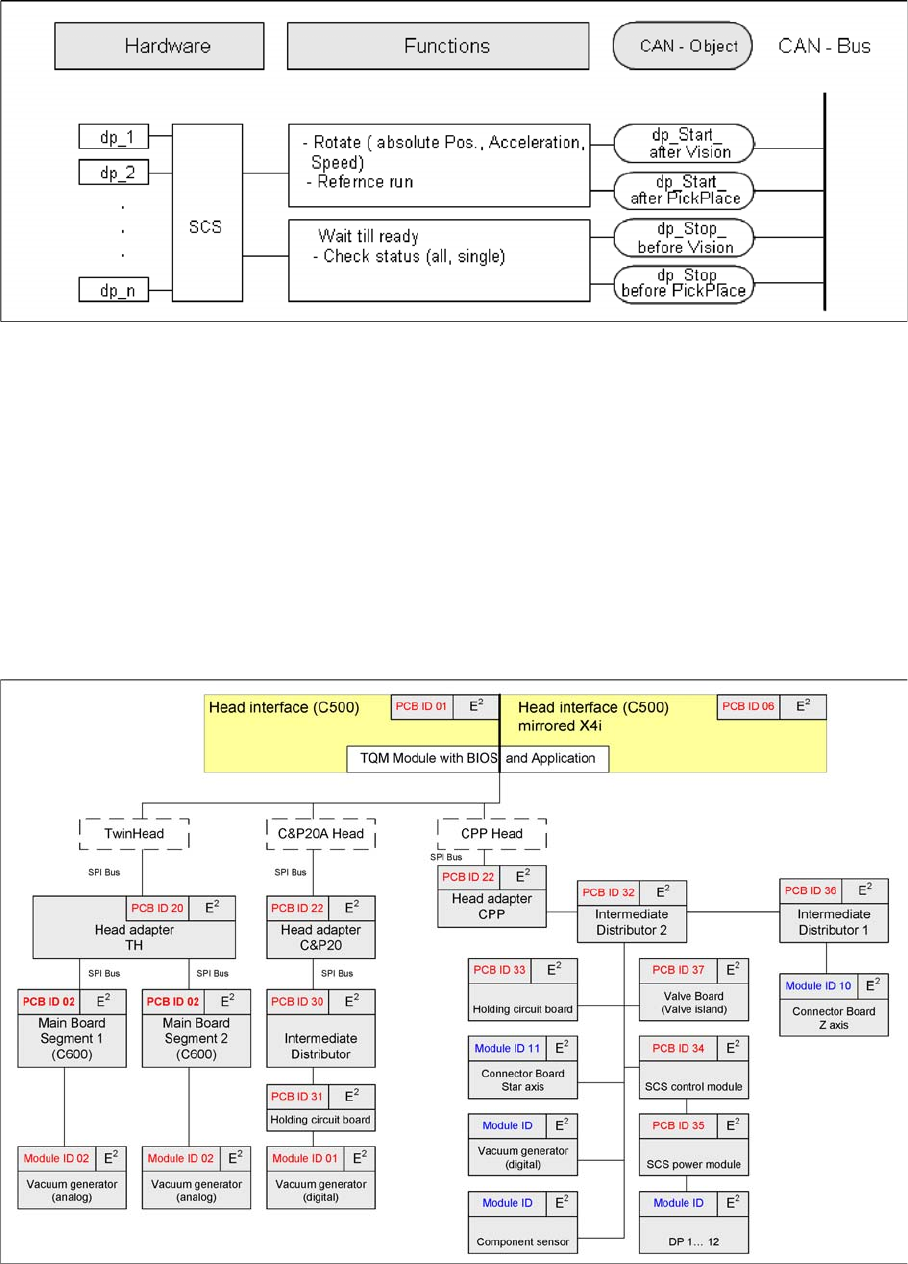
The data is supplied via the head CAN bus, from the head interface to the intermediate distributor.
The four CAN bus commands are identical to those for the C&P20A head:
▪ Starts a certain rotary axis after pickup/placement.
▪ Starts a certain rotary axis after Vision.
▪ Waits for a certain rotary axis before Vision.
▪ Waits for a certain rotary axis before pickup/placement.
EEPROMs on CPP H ead
4.3.8.3 EEPROMs on CPP Head
EEPROMs are present on all boards (except E/D transformer). Various data are stored there, according
to the individual functions e.g. production date, material number, zero point correction values, offset
values, plus operating and statistical data.
Communication and Control
X Feeder - Communication CAN Bus
Student Guide SIPLACE X-Serie and X4I SW70x (AL2) 106
Data Transfe r
4.3.8.4 Data Transfer
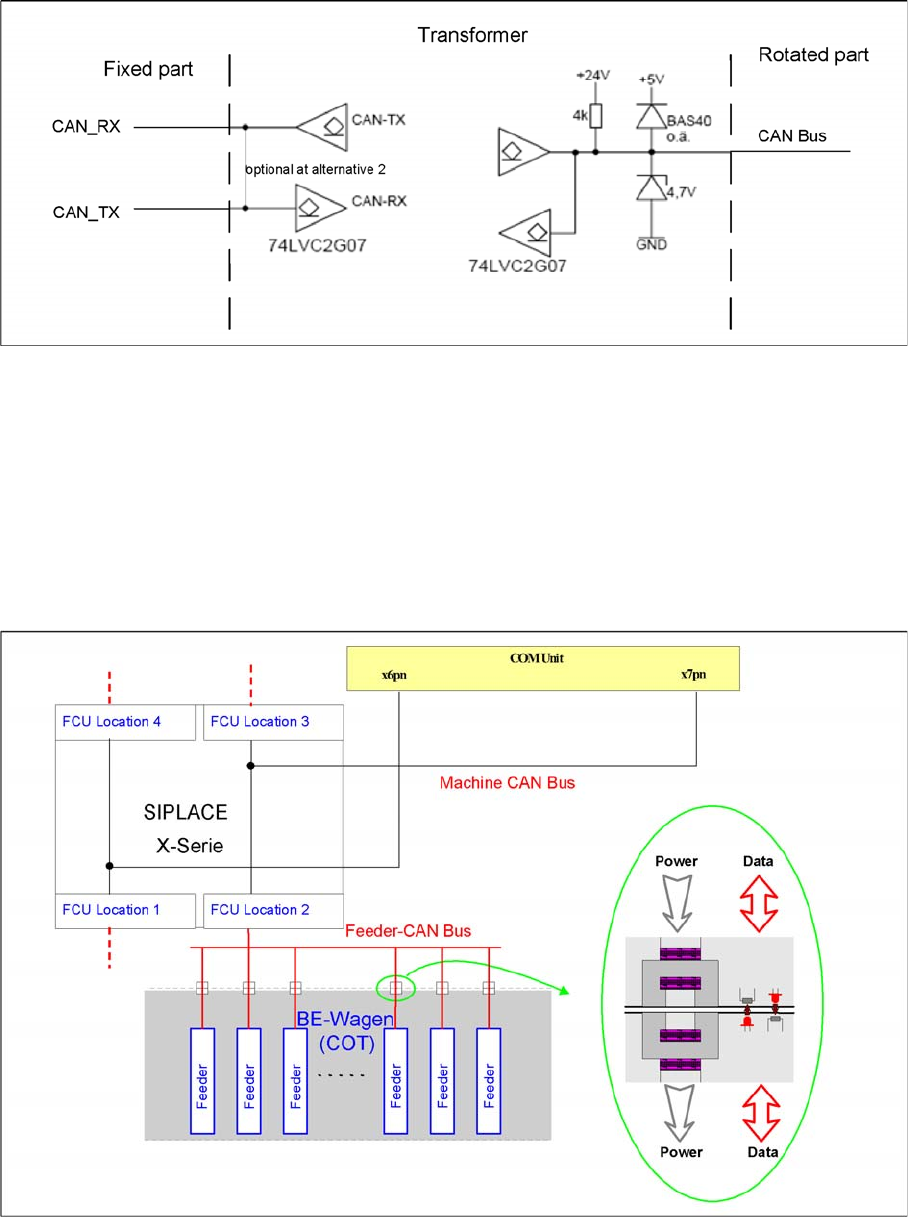
▪ The communication with the DP drives (CAN bus) is contactless via a transmitter unit (on the back
cover of the CPP head) and a receiver unit (on the valve terminal).
▪ This communication is via 2 channels, whereby channel 1 is responsible for supplying data to the
DP drives and channel 2 is responsible for communication to the Z down light barrier of the axis card
(HCU).
▪ The head CAN bus is – in this case – not used as a differential CAN bus with the CAN_L and CAN_H
signals but as a 1 wire CAN on the rotor.
X Feeder - Comm unicatio n
4.3.9 X Feeder - Communication
Communication X feeder
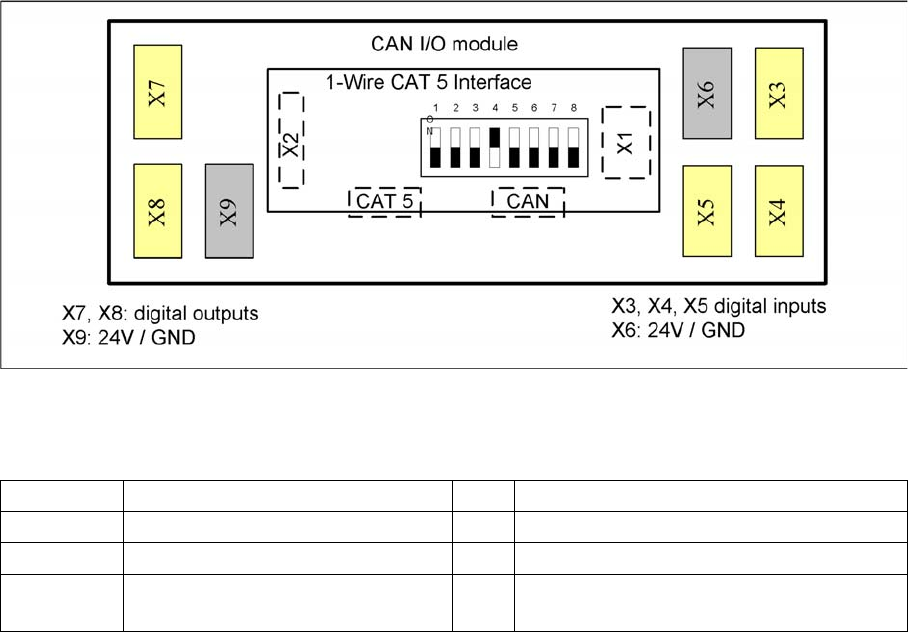
The communication between the Feeder Control Unit (FCU) and each X feeder is carried out via a CAN
bus. This CAN bus is only responsible for the communication between the FCU and the feeders and is
controlled by the machine CAN bus.
The data and power supply from the FCU to each feeder is contactless.
Communication and Control
CAN Bus CAN I/O Module (SLIO) SIPLACE X
107 Student Guide SIPLACE X-Serie and X4I SW70x (AL2)
CAN I/O Modu le (SLIO) SIPLA CE X
4.3.10 CAN I/O Module (SLIO) SIPLACE X
SIPLACE X machines use 2 CAN I/O modules. Both modules are absolutely identical and are located in
sectors 2 (main distributor) and 4 (subdistributor). The introduction of the one wire bus system means
that there is now an additional board plugged into the I/O module (Interface 1-Wire CAT5).
Product characteristics:
▪ Micro controller with integrated CAN controller
▪ Data memory
▪ Program memory (flash)
▪ CAN interface with 9 pin connector and address alignment
▪ 16 digital Output 24 V with status LED
▪ 24 digital Input 24 V with status LED
▪ Download interface
▪ Power supply 24V
The 8 digital inputs can be logically linked with the help of a FPGA (freely programmable gate array).
The FPGA is used for incoming security messages.
Example: Subdistributor
Legend
The jumper on the rear side activates the RS232 interface for service purposes.
DIP Switch on Main and Subdistributor (for Version -03)
4.3.10.1 DIP Switch on Main and Subdistributor (for Version -03)
DIP switch on CAN I/O module (X-series from Ma No. B-326, X4I).
Applies for main distributors [03046225-xx] and subdistributors [03046226-xx].
X1 CAN Bus Interface to I/O module X2 RS232 interface
X3, X4, X5 Digital inputs 24V X6 24 V / GND
X7, X8 Digital outputs 24V X9 24 V / GND
CAT5 Interface 1-Wire connector CAT5
cable
CAN CAN bus connector