00194614-08 Trainingsdoku. SG X-Serie_X4i SW70x (AL2)_EN.pdf - 第126页
Communication and Control One Wire Bus - Structure One Wire Bus Student Guide SIPLACE X-Serie and X4I SW70x (AL2) 126 A repeat i nitialization can be perform ed with the CACCIA tool ( see Function Control and Troubleshoo…
Communication and Control
One Wire Bus One Wire Bus - Structure
125 Student Guide SIPLACE X-Serie and X4I SW70x (AL2)
One Wire Bus in the SIPLACE X
4.5.1.2 One Wire Bus in the SIPLACE X
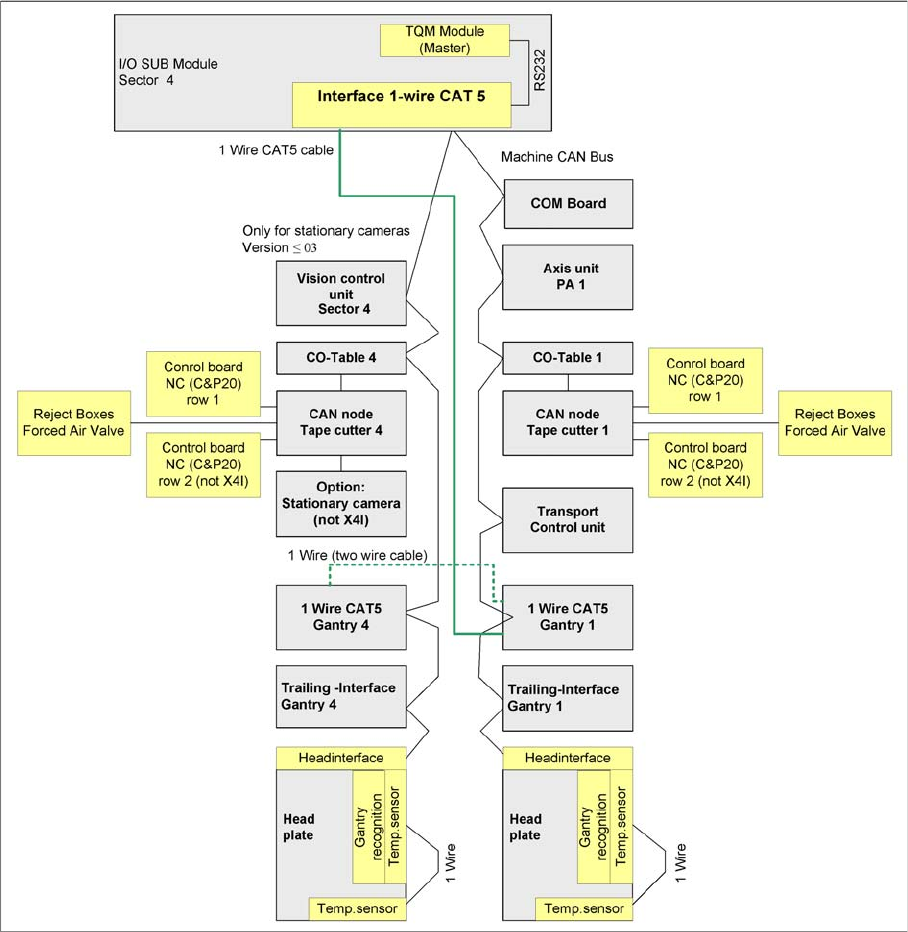
Overview of one wire subsystems e.g. PA1 on the SIPLACE X4I
In the SIPLACE X4I machine, the one wire bus is integrated via a separate CAT5 cable, which leads
from the main or subdistributor up to the trailing interface. The one wire bus is run through the trailing
cable from the trailing interface up to the head interface. This means that the cable structure is different
and only the temperature sensors are still monitored. The temperature values are used to calculate the
relevant offset values for placement accuracy.
Function Description
4.5.1.3 Function Description
When the machine is switched on, each one wire bus is assigned a fixed CAN ID.
One wire in PA1 --> CAN ID: 07d0
One wire in PA2 --> CAN ID: 07c0
During initialization of the bus system, each station registers with the master, after which the bus is ready
for operation.
In the non operative mode, the voltage level is 5 V on the one wire bus.
Communication and Control
One Wire Bus - Structure One Wire Bus
Student Guide SIPLACE X-Serie and X4I SW70x (AL2) 126
A repeat initialization can be performed with the CACCIA tool (see Function Control and Troubleshooting
for Service Work).
One Wire Bus Components
4.5.1.4 One Wire Bus Components
Assemblies:
1. Interface 1-Wire CAT5 on the SUB/MAIN module
2. 1 wire CAT 5 Gantry on the trailing interface (board between CAN bus and trailing interface)
3. 1 set of temperature sensors (replacement only as a set, due to serial number)
4. EEPROM for gantry recognition
Interface 1-Wire CAT5
Interface 1-Wire CAT5
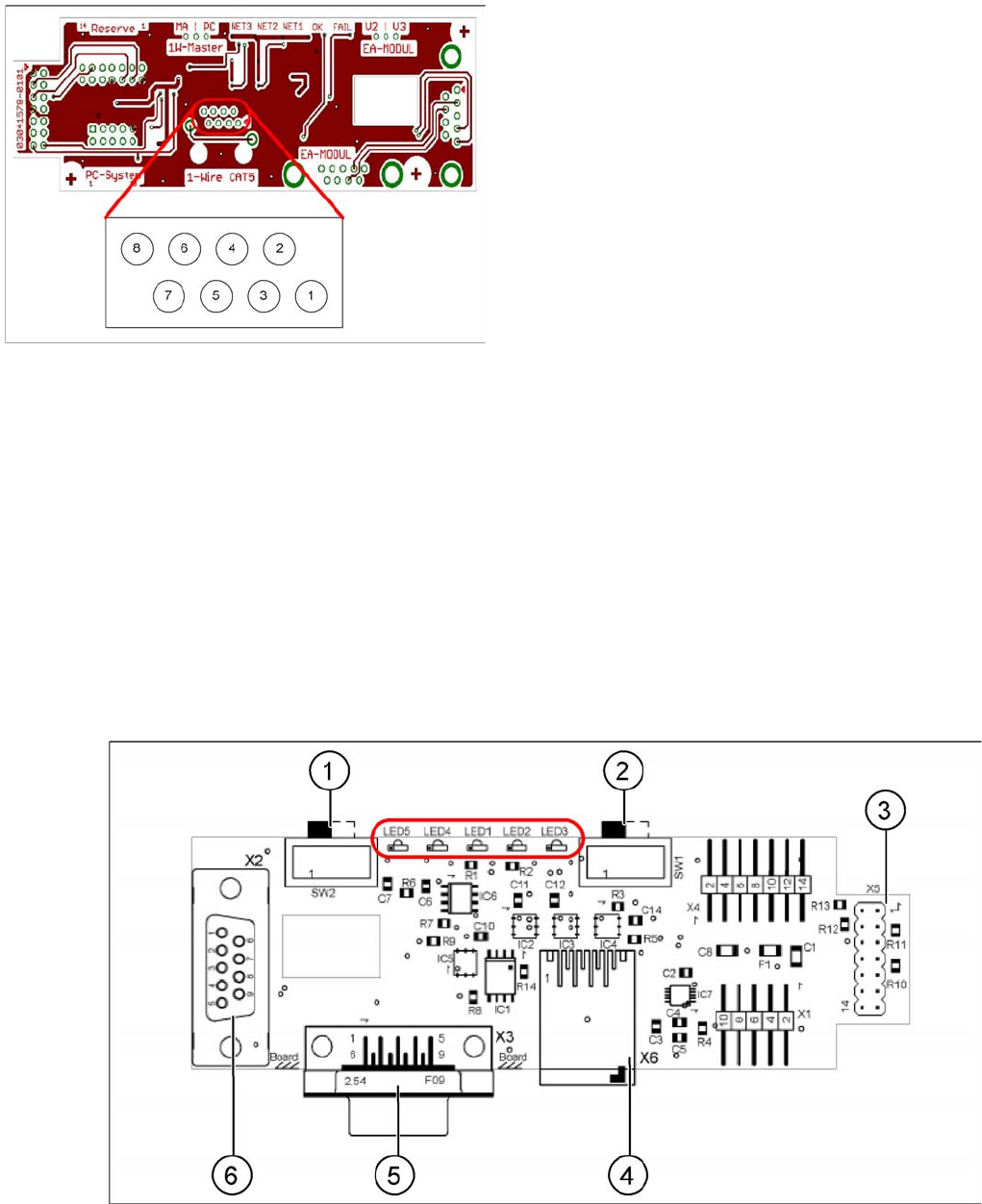
Interface 1-Wire CAT5 on the SUB/MAIN module (version 02) [03041578-01]
Interface 1-Wire CAT5
Legend
1. NC row 1 gantry 1/3
2. NC row 2 gantry 1/3
3. Temperature sensors gantry 1
4. Temperature sensors gantry 4
5. NC row 1 gantry 2/4
6. NC row 2 gantry 2/4
7. 24 V
8. GND
For initial analysis, the 5 V level can be measured at the
1-Wire-CAT5 connector of the interface.
The 24 V at pin 8 can be measured at the old 1-Wire and
serves as voltage supply for the nozzle changers. The
24 V are fed into the 1-Wire distributor. However, this is
not used at the interface.
Communication and Control
One Wire Bus One Wire Bus - Structure
127 Student Guide SIPLACE X-Serie and X4I SW70x (AL2)
Legend:
See also
4.3.10.1 DIP Switch on Main and Subdistributor (for Version -03) [ ➙ 107]
One Wir e CAT5 G antry Boar d
One Wire CAT5 Gantry Board
Tempera ture Sen sors and Gantry Rec ognition (EEPROM )
Temperature Sensors and Gantry Recognition (EEPROM)
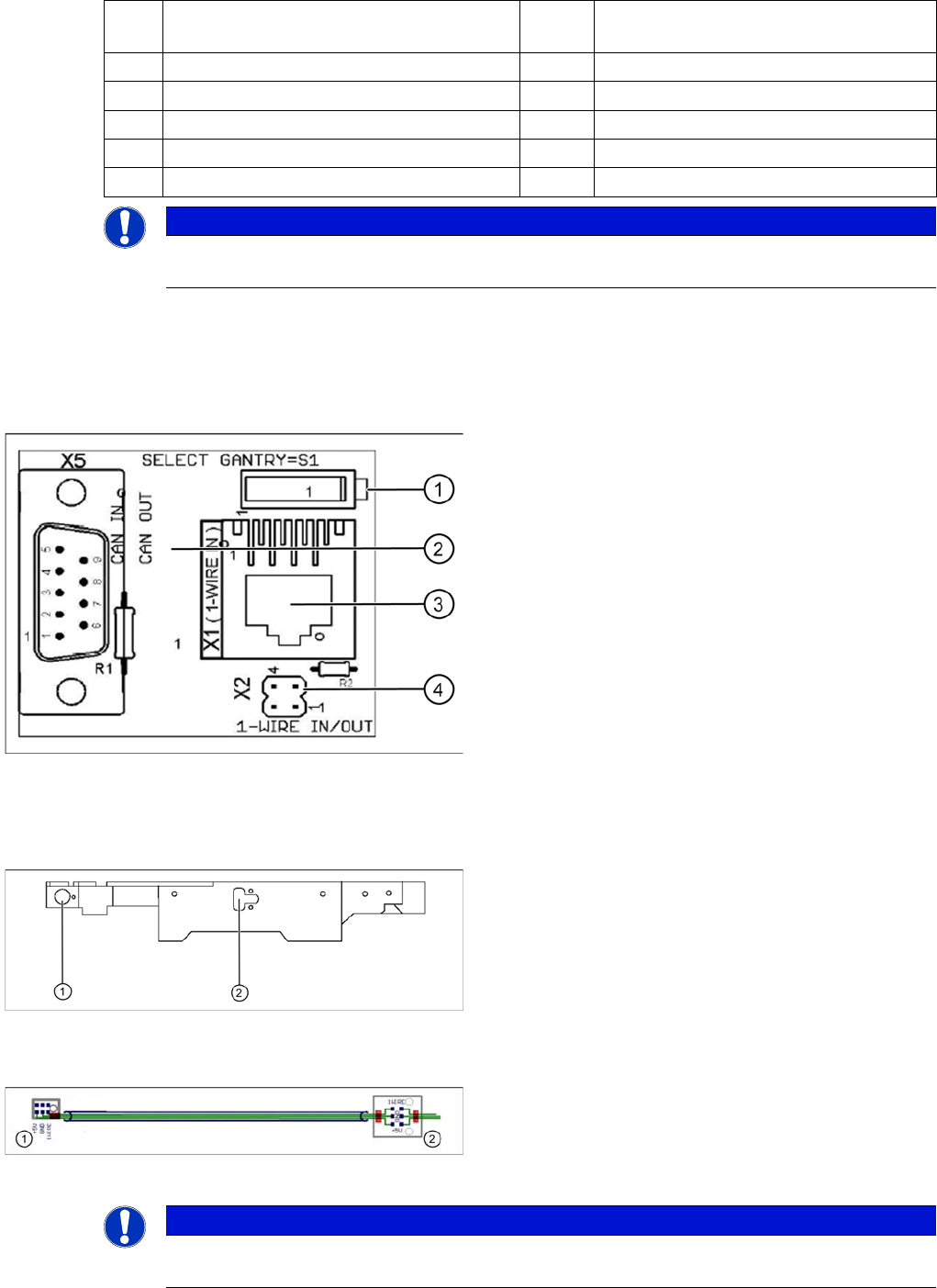
1 MA / PC switch must be set to MA
(machine)
LED 1 NC 1/3
2 Switch must be set to V2 LED 2 Temperature sensors
3 Interface 1-Wire CAT5 LED 3 NC 4/2
4 Connector CAT5 cable LED 4 Green "OK"
5 CAN Bus interface to the machine LED 5 Green "Error"
6 CAN Bus Interface to I/O module
NOTICE
In version 03, this board is integrated into the I/O module and settings are made with the DIL
switch of the I/O module.
One wire gantry board [03042214-01]
1 wire CAT 5 Gantry on the trailing interface (board
between CAN bus and trailing interface)
Legend:
1. Switches:
Position down = gantry 1/2,
position up = gantry 3/4
2. This board is located directly on the CAN bus
connector of the trailing interface.
3. Connector CAT5 cable direct from the 1 wire CAT5
interface
4. Connection to the second Gantry in the placement
area
Position of temperature sensors on the head assembly
plate (assembly side of placement head)
1 set of temperature sensors (replacement only as a set)
Legend
1. Temperature sensor on the PCB camera
2. Temperature sensor/ EEPROM gantry recognition
Temperature sensors / gantry recognition
Legend
1. Temperature sensor on the PCB camera
2. Temperature sensor/ EEPROM gantry recognition
NOTICE
The temperature sensors are directly connected to the connector X20 or X21 on the head
interface C500. Either one of these connectors can be used.