00194614-08 Trainingsdoku. SG X-Serie_X4i SW70x (AL2)_EN.pdf - 第340页
TwinHead Parameter and Calibrations Settings Student Guide SIPLACE X-Serie and X4I SW70x (AL2) 340 Manually Determining the DP Axis Zero Point Correction Manually Determining the DP Axis Zero Point Correction NOTICE! Man…
TwinHead
Settings Parameter and Calibrations
339 Student Guide SIPLACE X-Serie and X4I SW70x (AL2)
Determining the DP Axis Zero Point C orrection
Determining the DP Axis Zero Point Correction
You need the calibration nozzle [03008862-xx] to check the DP axis zero point correction value.
The zero point correction value is determined automatically with the calibration nozzle. However, it is
essential that the deviation of the current zero point correction value does not exceed +/- 5degrees.
If the deviation is more than 5 degrees, an error message will appear during automatic calibration. In this
case, you need to first perform the zero point correction calibration manually and then automatically.
Automaticall y Determining the DP Axis Zero Poi nt Correction
Automatically Determining the DP Axis Zero Point Correction
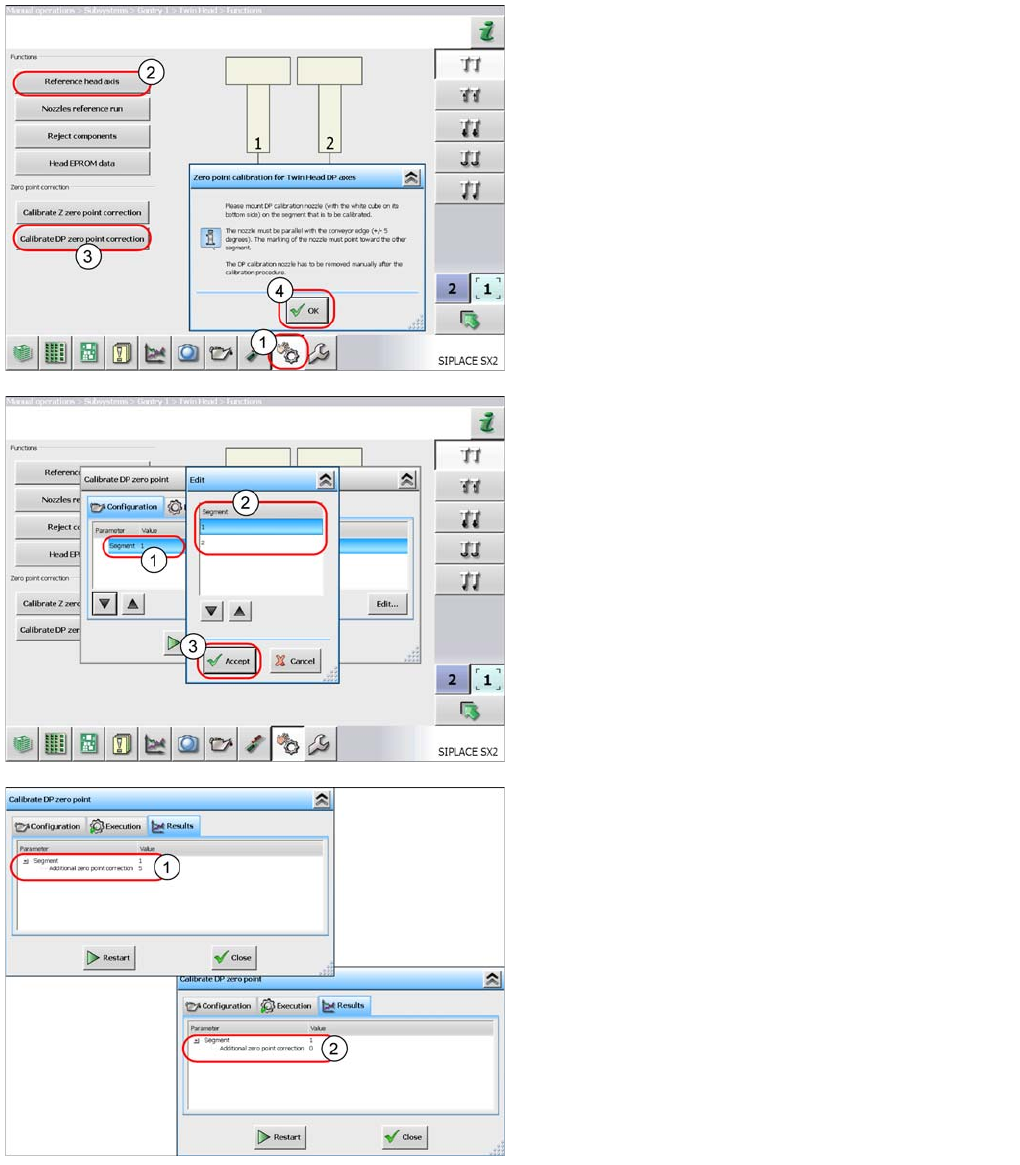
► Select Sensors and Functions (1).
► Start the Reference head axis (2) function.
► Select Calibrate DP zero point correction
(3).
► Follow the instructions in the window and confirm with
OK (4).
Note: the segment is selected in the next step.
► Once you have attached the calibration tool to
segment 1, select the START button to begin
automatic calibration.
The following applies for segment 2:
► Mark the line with Segment 1 (1) and select the
Edit button.
► In the next window, select segment 2 (2). Confirm the
settings with Accept (3) and start the automatic
calibration.
If the calibration is successful, a value will be shown in
the "Additional zero point correction" line (1).
This will be added to the existing value.
► Repeat the measurement until the Additional
zero point correction has a value of zero (2).
► Close the window. The value will be automatically
saved.
TwinHead
Parameter and Calibrations Settings
Student Guide SIPLACE X-Serie and X4I SW70x (AL2) 340
Manually Determining the DP Axis Zero Point Correction
Manually Determining the DP Axis Zero Point Correction
NOTICE! Manual determination of the DP zero
point correction value is only required if the automatic
calibration was terminated!
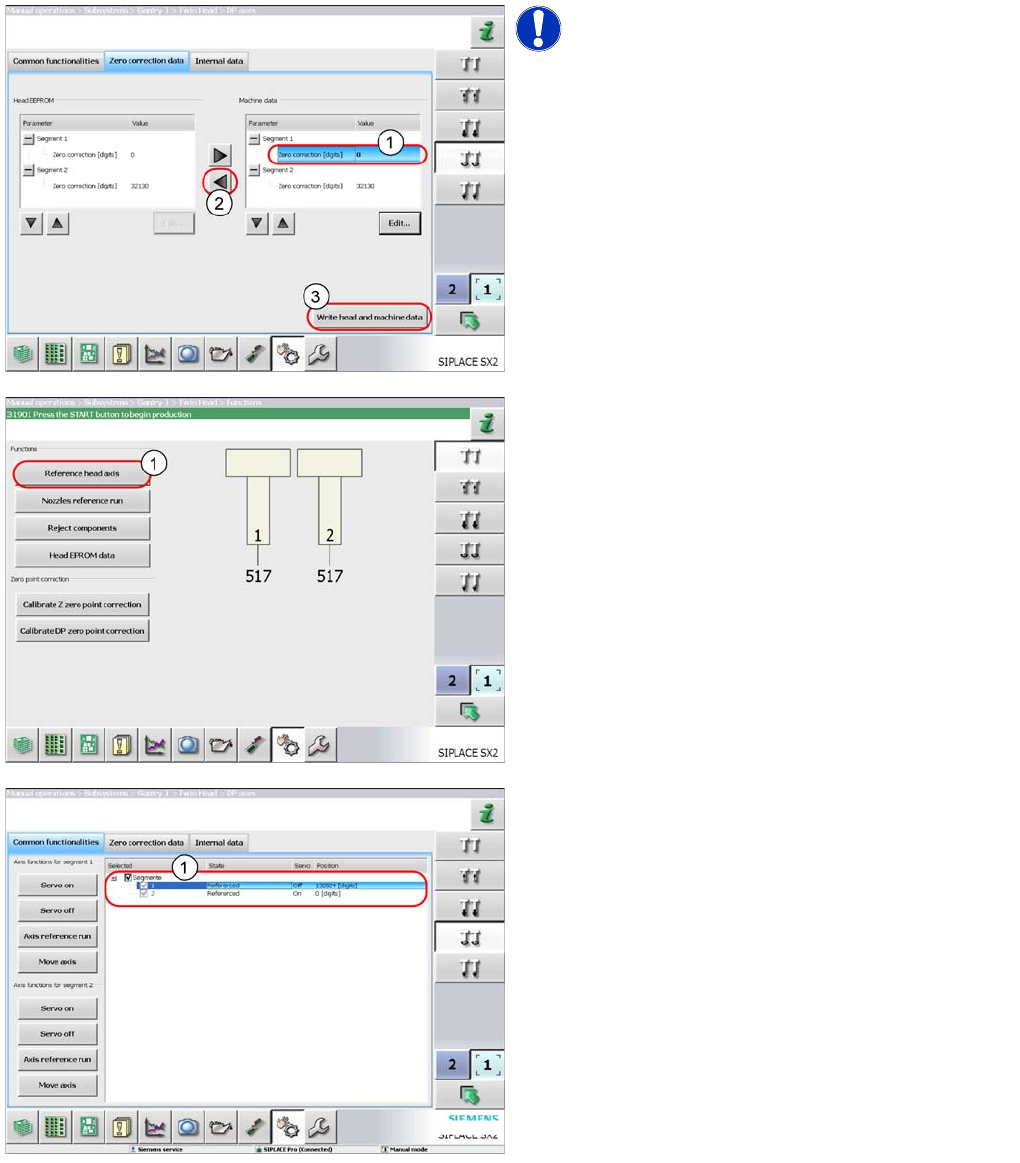
► Enter a value of zero at Zero correction (1) for
the DP axis of the respective segment.
► Select the button (2) to apply the value to the head
EEPROM.
► Select Write head and machine data (3) to
save the value.
► Select Reference head axis (1).
The DP axis is now positioned exactly on the zero pulse
of the incremental encoder.
► Switch over to the menu DP axis --> Common
functionalities. The axis should show the
status Referenced and a position of zero (1).
► Attach the calibration nozzle to the TwinHead
segment.
► Manually turn the DP axis with the calibration nozzle
so this is parallel to the conveyor edge (+/- 5Grad)
and the mark on the calibration nozzle points to the
other segment.
► Switch over to another menu and back to this one.
This refreshes and updates the view.
► Read the value at Position.
TwinHead
Settings Parameter and Calibrations
341 Student Guide SIPLACE X-Serie and X4I SW70x (AL2)
See also
9.4.2.2.3.1 Automatically Determining the DP Axis Zero Point Correction [ ➙ 339]
Setting the Pr essure Control Valve
Setting the Pressure Control Valve
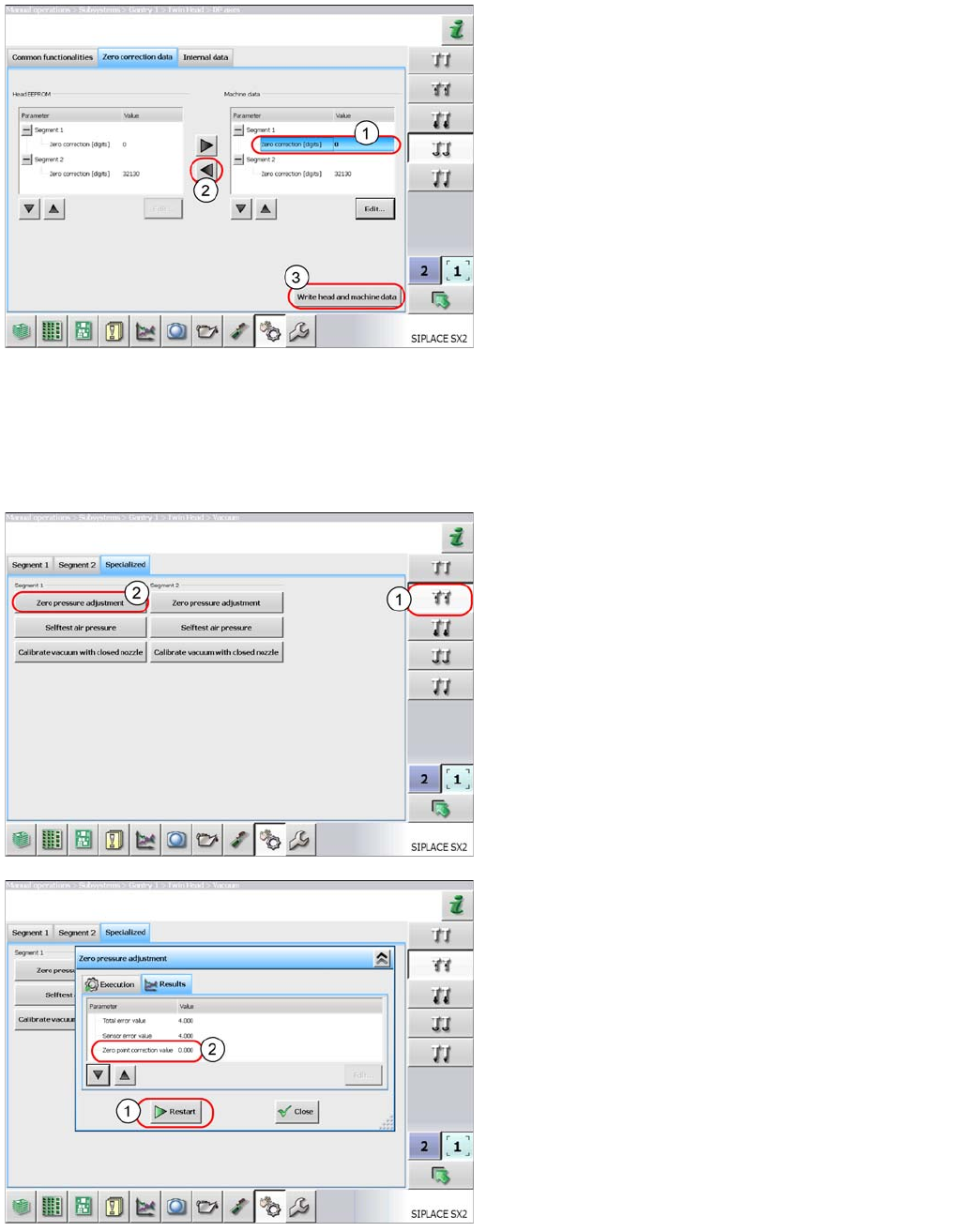
► Select Zero correction data and enter this
value in the Zero correction field (1) of the
relevant segment.
► Select the button (2) to apply the value to the head
EEPROM.
► Select Write head and machine data (3) to
save the value.
► Perform Reference head axis.
The nozzle should now be parallel to the conveyor edge.
► Perform automatic zero point correction of the DP
axis.
► Select the button shown (1).
► Select Zero pressure adjustment (2). This
switches the machine compressed air off and
measures the ambient pressure at the nozzle. The
pressure control valve is therefore set to the ambient
pressure. This is important when machines which are
installed at high altitudes need to be operated in
relation to sea level.
As a result, you will be issued with a zero point correction
value for the pressure control valve.
This function can be repeated with the
Restart button(1).
The zero point correction value should be 0 +/- 10.