00194614-08 Trainingsdoku. SG X-Serie_X4i SW70x (AL2)_EN.pdf - 第360页
Component Handling Operation X Feeder Student Guide SIPLACE X-Serie and X4I SW70x (AL2) 360 4 Pick Up Positions 8 mm X Feeder 10.2.7.2 4 Pick Up Positions 8mm X Feeder 3 Pick Up Positi ons 12mm X Feed er 10.2.7.3 3 Pick …
Component Handling
X Feeder Contactless Energy and Data Interface
359 Student Guide SIPLACE X-Serie and X4I SW70x (AL2)
Contactless Energy and Data Interface
10.2.6 Contactless Energy and Data Interface
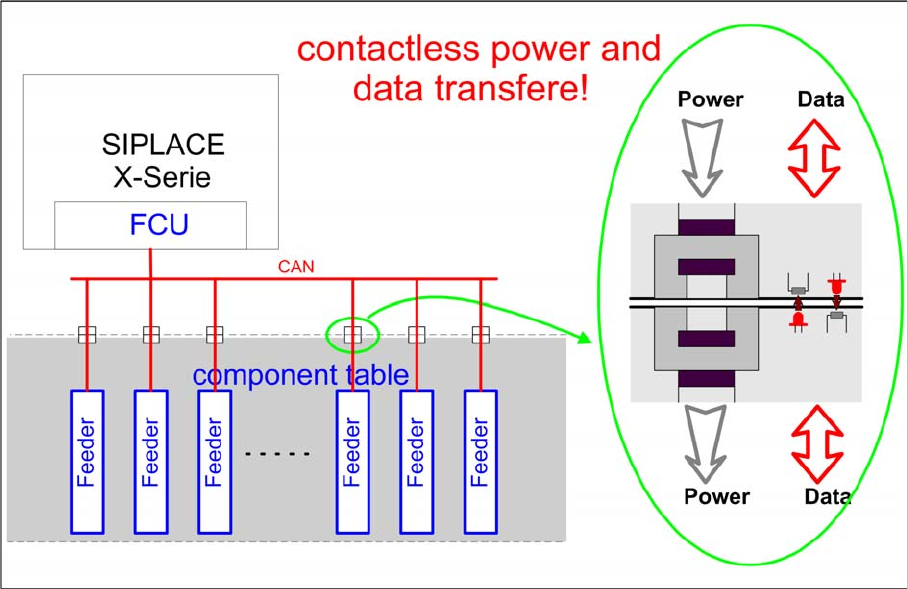
Contactless energy and data transfer
▪ The energy is transferred via induction
▪ The data is transferred via infrared and fiber optic technology
Operation
10.2.7 Operation
Adjustab le Step Sizes on the X Feeder
10.2.7.1 Adjustable Step Sizes on the X Feeder
8 mm X tape feeder module:
1, 2, 4, 8 mm
12 mm X tape feeder module:
4, 8, 12, 16 mm
16 mm X tape feeder module:
4, 8, 12, 16, 20 mm
24 mm X tape feeder module:
4, 8, 12, 16, 20, 24, 28, 32 mm
32 mm X tape feeder module:
4, 8, 12, 16, 20, 24, 28, 32, 36, 40 mm
44 mm X tape feeder module:
4, 8, 12, 16, 20, 24, 28, 32, 36, 40, 44, 48, 52 mm
56 mm X tape feeder module:
4, 8, 12, 16, 20, 24, 28, 32, 36, 40, 44, 48, 52, 56, 60, 64 mm
72 mm X tape feeder module:
4, 8, 12, 16, 20, 24, 28, 32, 36, 40, 44, 48, 52, 56, 60, 64, 68, 72, 76, 80 mm
88 mm X tape feeder module:
4, 8, 12, 16, 20, 24, 28, 32, 36, 40, 44, 48, 52, 56, 60, 64, 68, 72, 76, 80, 84, 88, 92, 96 mm
Component Handling
Operation X Feeder
Student Guide SIPLACE X-Serie and X4I SW70x (AL2) 360
4 Pick Up Positions 8mm X Feeder
10.2.7.2 4 Pick Up Positions 8mm X Feeder
3 Pick Up Positi ons 12mm X Feed er
10.2.7.3 3 Pick Up Positions 12mm X Feeder
1 Pick Up Position for Other X Feeders
10.2.7.4 1 Pick Up Position for Other X Feeders
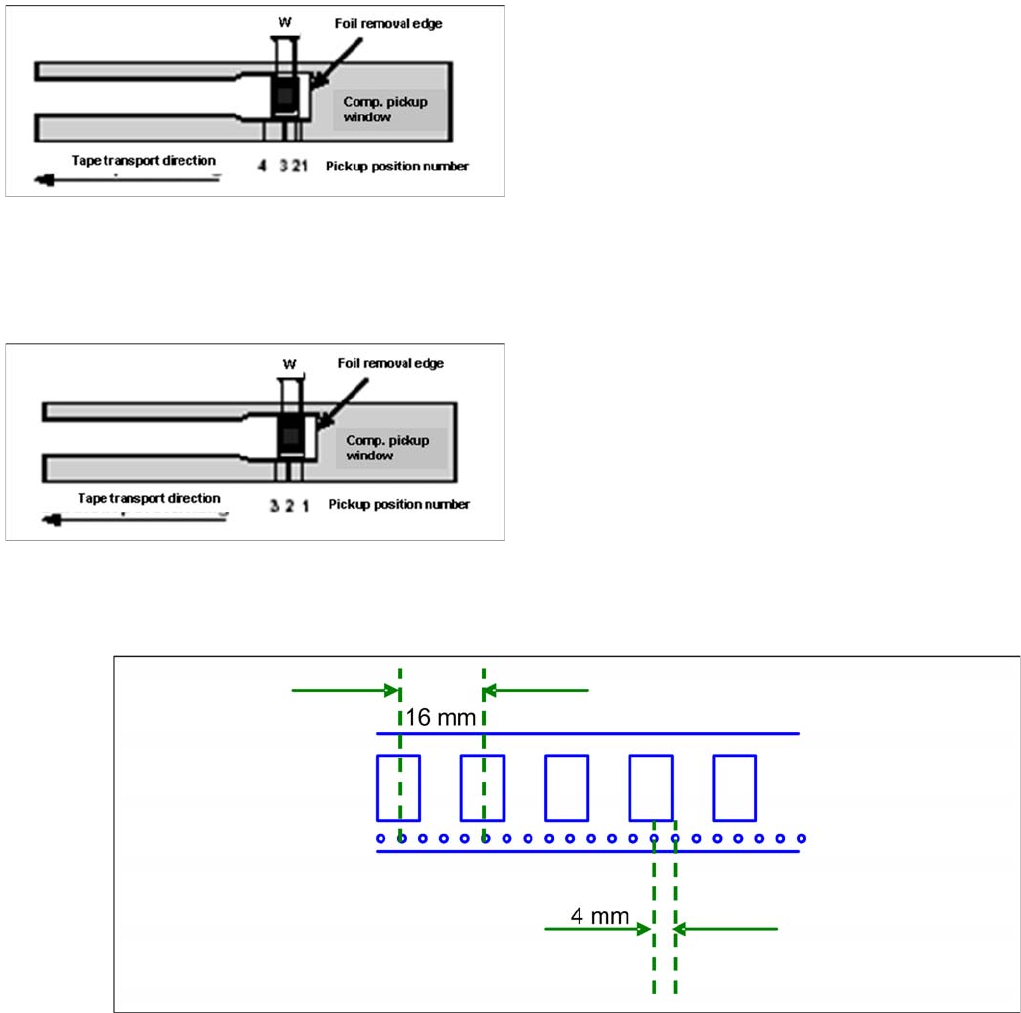
Pick up position for other X feeders
Pick up positions 8mm X feeder
▪ Comp. in 2 mm step in the reel are picked from Pos.
1. (e.g.0201, 0402)
▪ Component in 4 mm step and positioned across
(short component width W) in the reel are picked from
Pos. 2. (e.g. 0603, 0805, Micro-,Mini-Melf)
▪ Comp. in 4 mm step and along (long s. SOT23) in the
reel are picked from Pos. 3. (e.g. 1206, SOT23)
▪ Special-comp. in 8 mm step in the reel are picked
from Pos. 4.
Pick up positions 12mm X feeder
▪ Comp. with comp.width W up to 3mm (in feed
direction) are picked from Pos. 1.
▪ Comp. with comp.width W from 3 mm up to 7mm (in
feed direction) are picked from Pos. 2.
▪ Comp. with comp.width W from 7mm up to 11.5 mm
(in feed direction) are picked from Pos. 3
Component Handling
X Feeder Operation
361 Student Guide SIPLACE X-Serie and X4I SW70x (AL2)
X Feeder Operator Panel
10.2.7.5 X Feeder Operator Panel
Settings and Functions in the X Feeder Main Menu
10.2.7.6 Settings and Functions in the X Feeder Main Menu
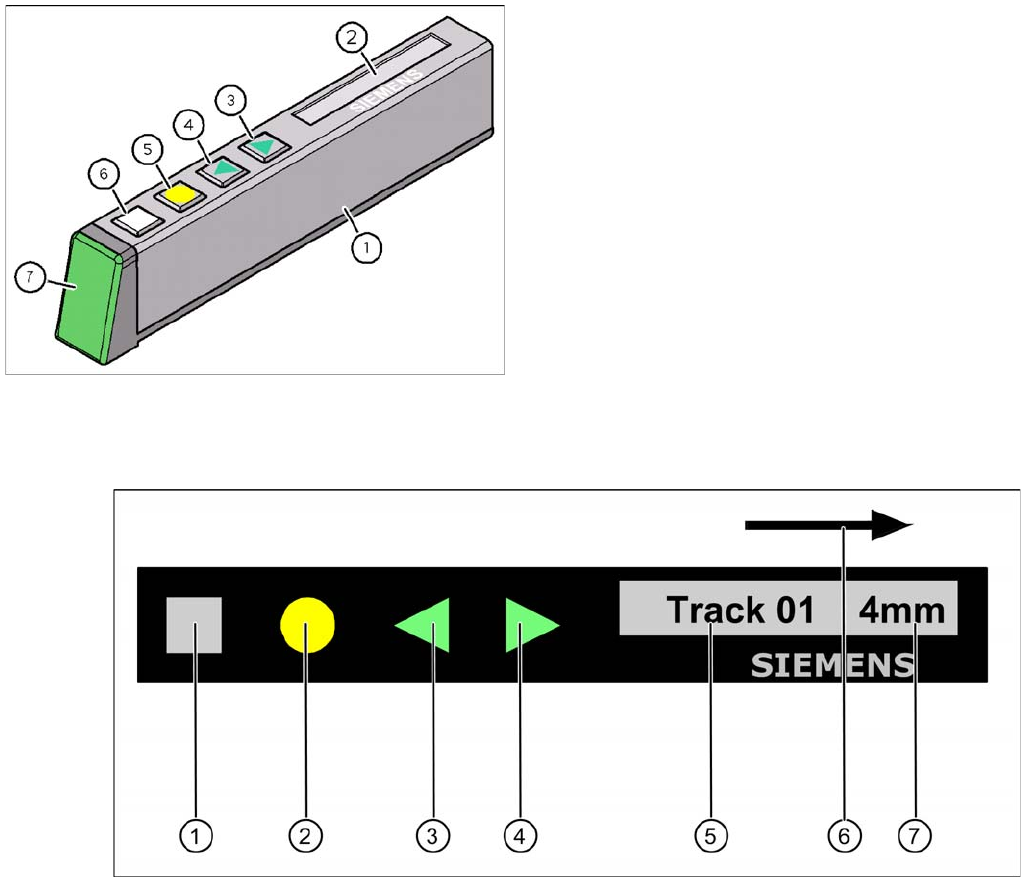
Control panel for X feeder
Legend
1. "SET" button:
– Press briefly to switch over to the next menu in the main view.
– Prolonged pressing sends a request to call up component verification.
2. "Foil" button:
– Pressing this button starts the drive motor for the cover foil, which runs until the foil has been
stretched tight and
– the motor toggle switch turns off or until the timer has counted 30 seconds.
3. "Backwards" button:
(Both functions should only be performed without the cover sheet fitted).
– Press briefly and the tape is move backwards by the set cycle step.
– Prolonged pressing moves the tape back.
4. "Forwards" button:
– Press briefly to move the tape by the set cycle step.
X Feeder Operator Panel
Legend
1. X feeder operator panel
2. LCD- Display (In the basic view shows the display the
track number and the step)
3. Button "Forward"
4. Button "Backward"
5. Button "FOIL"
6. Button "SET"
7. Status LED: