00194614-08 Trainingsdoku. SG X-Serie_X4i SW70x (AL2)_EN.pdf - 第255页
C&P20A Settings Boar d Descriptions for C&P20A 255 Student Guide SIPLACE X-Serie and X4I SW70x (AL2) Switch setting S1, S2 Intermediate distributor - position of DIP switch S1 (default setting: bold) S2 (default …
C&P20A
Board Descriptions for C&P20A Settings
Student Guide SIPLACE X-Serie and X4I SW70x (AL2) 254
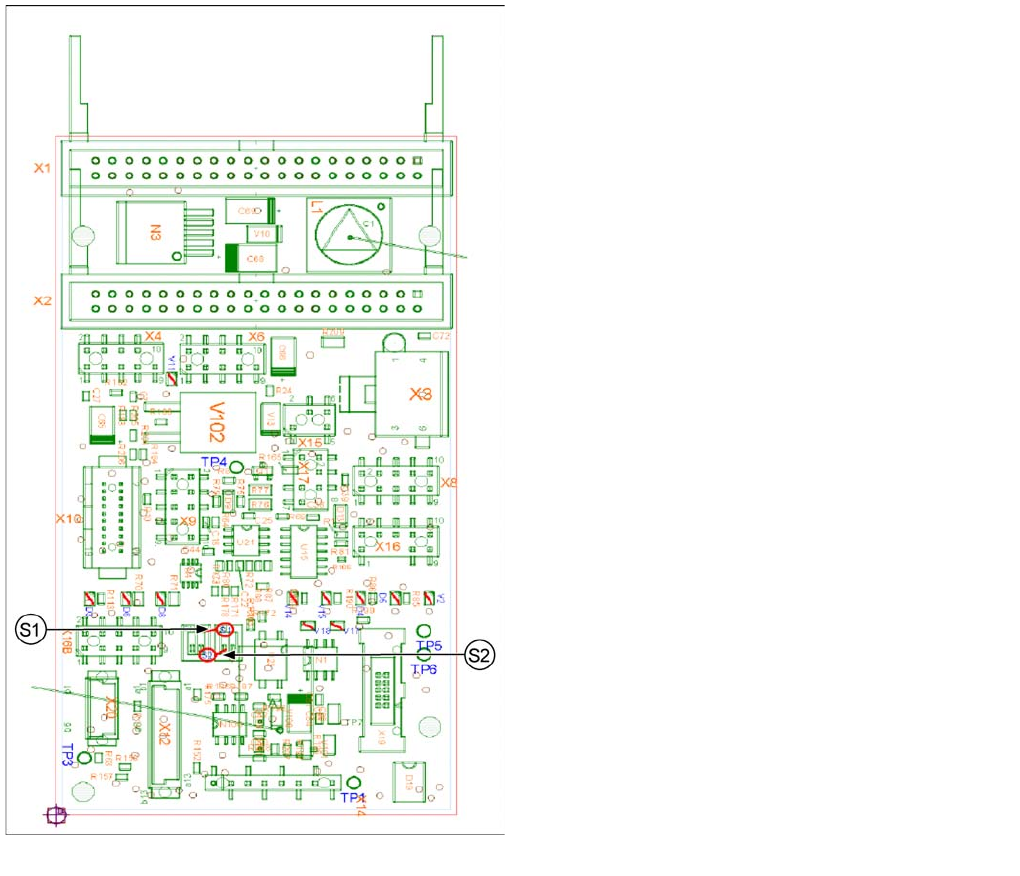
Intermediate Distributor - C&P20
Intermediate Distributor - C&P20
Intermediate distributor - position of the sockets
Legend
The following supply voltages and signals are routed by
the intermediate distributor to the individual placement
head modules or to the head board:
▪ Connector X1, 40 pole: connected with connector X1
on the head adapter board
▪ Connector X2, 40 pole: connected with connector X2
on the head adapter board
▪ Connector X3: connection for the star motor
▪ Connector X4: connection for the star incremental
encoder
▪ Connector X6: connection for the Z axis incremental
encoder
▪ Connector X8: connection for the Z motor
▪ Connector X9: connection for the component sensor
▪ Connector X12: connection for pressure control valve
▪ Connector X14: test connector X14_3: +5 V/X14_4:
+15 V/X14_5: -15 V/X14_7:24 V for DP motors
▪ Connector X15: connection for retract unit
▪ Connector X16: Internal CAN bus C&P20
C&P20A
Settings Board Descriptions for C&P20A
255 Student Guide SIPLACE X-Serie and X4I SW70x (AL2)
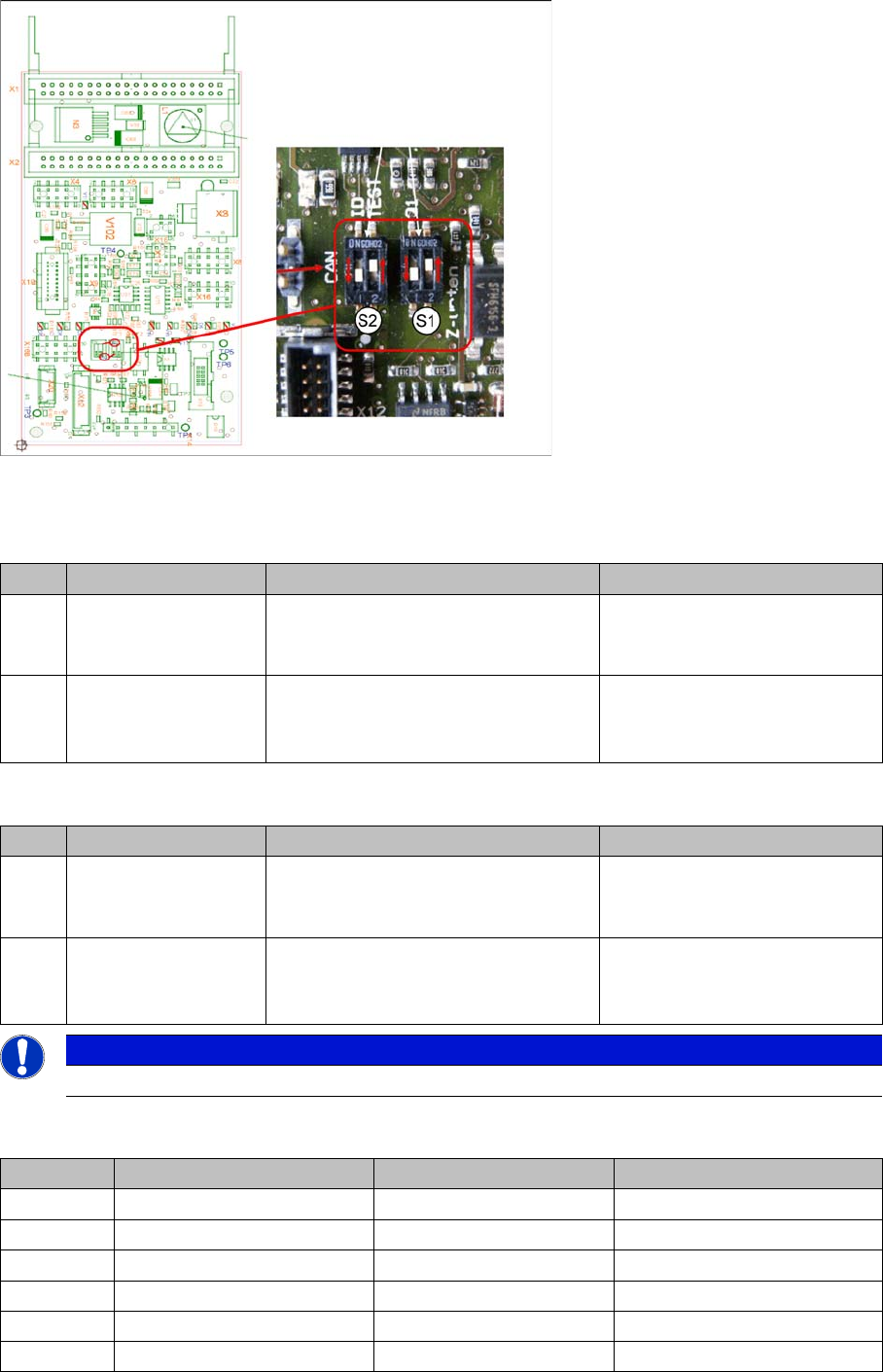
Switch setting S1, S2
Intermediate distributor - position of DIP switch
S1 (default setting: bold)
S2 (default setting: bold)
LEDs - meanings:
No. Function Switch setting = 0 (open) Switch setting = 1 (closed)
S1.1 Z down sensor:
switch on LED
LED is only switched on during
operation
LED always on (test mode e.g.
for detection of nozzle
suspension with oscillo.)
S1.2 Z-down sensor:
activating LED in
clocked mode
LED is activated in clocked mode
during
operation
LED is always switched on
during operation
No. Function Switch setting = 0 (open) Switch setting = 1 (closed)
S2.1 CAN test Normal operation: 1-wire head CAN
bus only with motherboard - ready for
operation
Test mode: operation without
motherboard possible
S2.2 CAN ID switchover -
pressure control valve
CAN ID active for pressure control
valve
0x6B0
CAN ID for pressure control
valve 0x6B8 (test mode)
NOTICE
The default switch setting is always printed in bold.
No. Function On Off
D3 +5 V Present Not present
D4 Z down Triggered Not triggered
D5 Z down reset Reset Not reset
D6 +15 V Present Not present
D7 +24 V_IN
D8 -15 V Present Not present
C&P20A
Setting the Nozzle Changer for C&P20A Settings
Student Guide SIPLACE X-Serie and X4I SW70x (AL2) 256
Test points:
Test connector X14:
Setting t he Nozzle Change r for C&P 20A
7.5.2 Setting the Nozzle Changer for C&P20A
V2 Z return valve Activated (down/bottom) Not activated (up/top)
V11 Enable pressure control
valve
Error - pressure control
valve
Pressure control valve OK
V14 +24 V Present Not present
V15 +24 V_DP Switched on Switched off
V16/17 Voltage GND
No. Function
TP1 GND
TP3 Voltage pressure signal - pressure control valve - internal
TP4 Output voltage I/U converter Z down
TP5 Z down
TP6 Z up/Z down reset
Pin Signal
1 CAN_RX
2 GND
3 +5 V
4 +15 V
5 -15 V
6 X2_11
7 24 V_DP
8 Z up/Z down reset
No. Function On Off
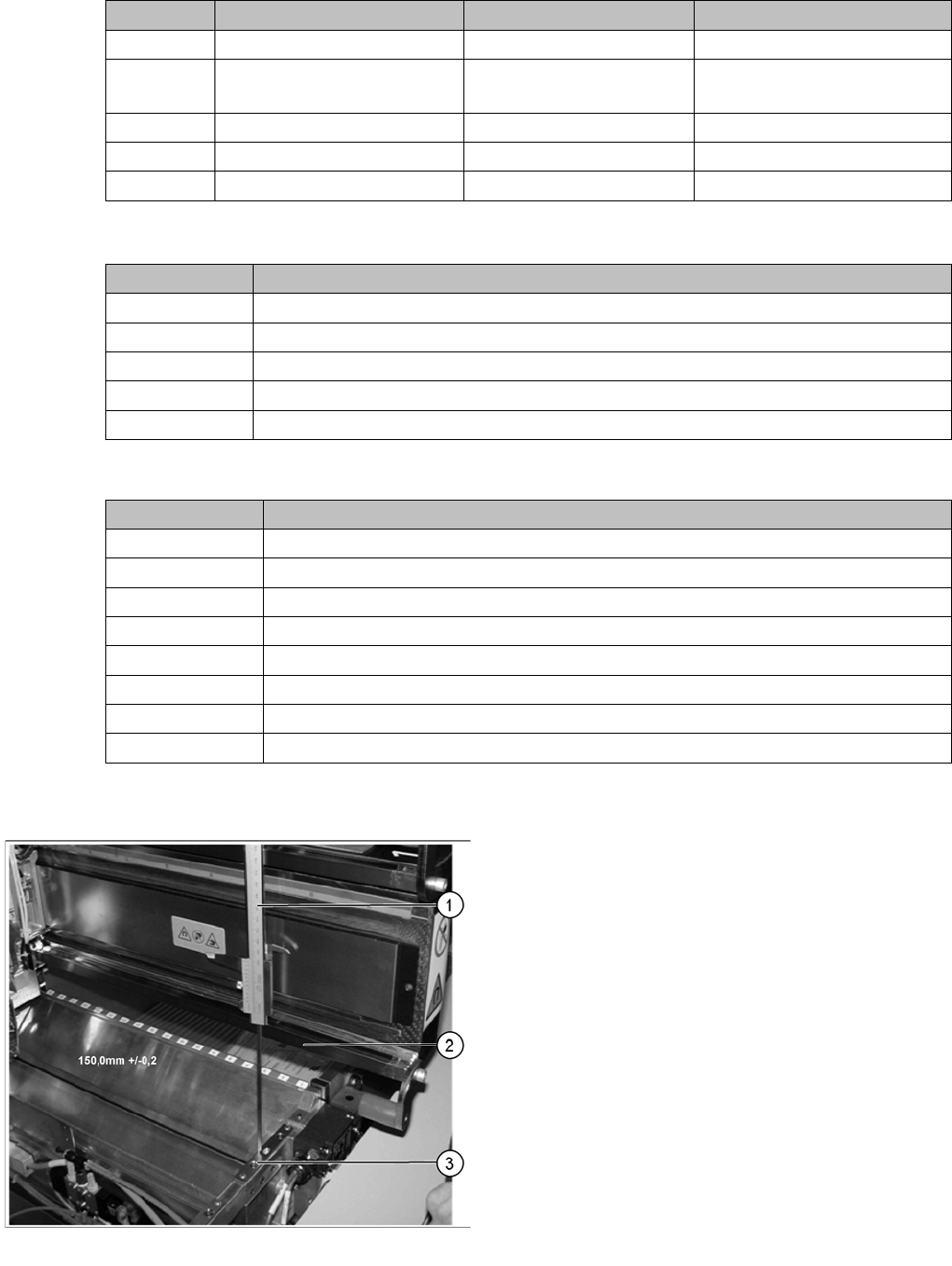
Setting the nozzle changer for C&P20A
Legend
1. Measuring scale
2. Top edge of the X axis lower linear guide
3. Fitting surface for nozzle changer
In order to guarantee the safety gap between the head
(component sensor) and nozzle changer, the contact
surface of the nozzle changer on the docking unit is set to
a distance of 150.0 mm +/-0.2 mm to the X axis linear
guidance, with a measuring scale. The height of the fitting
surface on the docking unit is adjusted with the help of
shim rings. The nozzle changer can then be fitted.