00194614-08 Trainingsdoku. SG X-Serie_X4i SW70x (AL2)_EN.pdf - 第485页
MTC2 MTC2 Calibration and Settings Adjustments feed axes 485 Student Guide SIPLACE X-Serie and X4I SW70x (AL2) Light barriers on the feed axes Legend Tools and Equipment Tools and Equipment ▪ Adjustment gauge, cra sh lig…
MTC2
Adjustments feed axes MTC2 Calibration and Settings
Student Guide SIPLACE X-Serie and X4I SW70x (AL2) 484
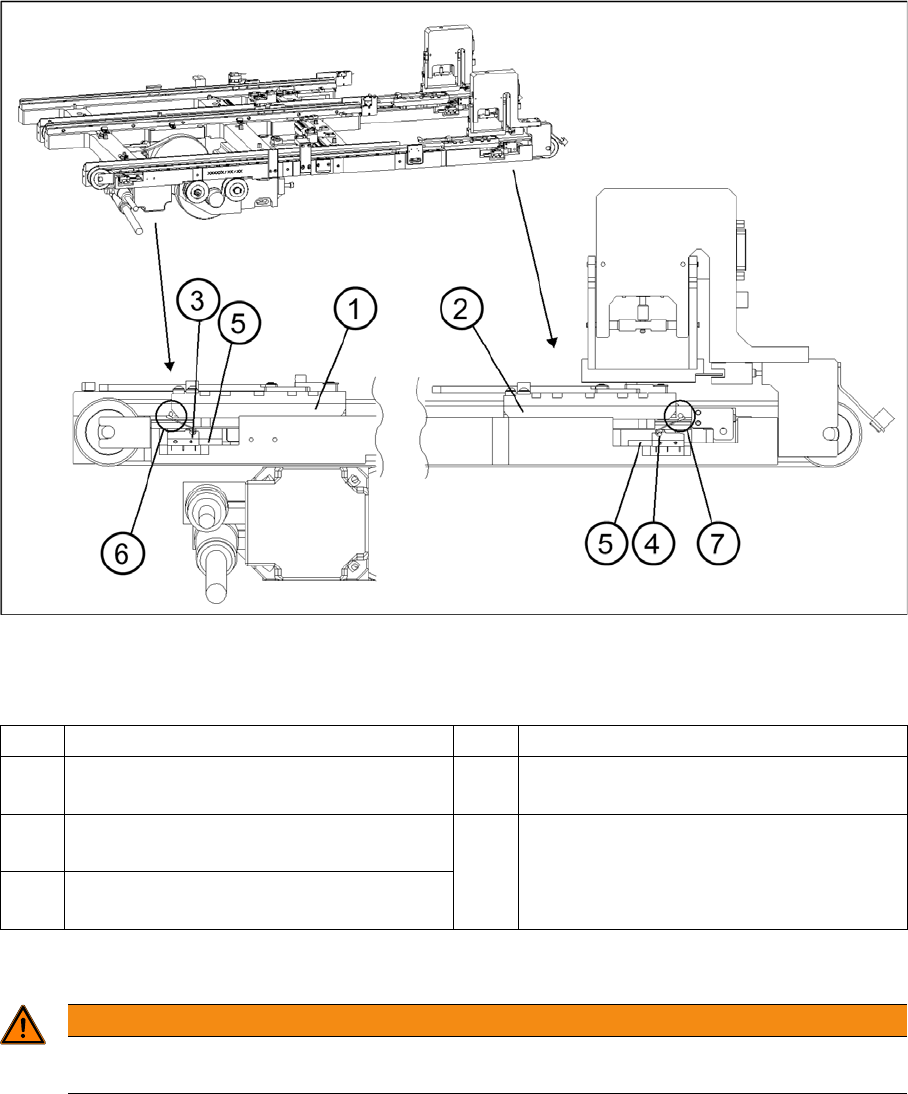
► Set the minimum position of the limit switch above its limit switch holder until there is a distance of
approximately 1 mm between the driver in the zero position and the contact roller of the limit switch
(approximately 10 mm on tower 2).
► Check the feed axis end positions --> „Check and calibrate the travel range end positions".
Setting the maximum and minimum positions of the limit switches (shown here for tower 1)
Legend
Light barriers
13.3.4.3 Light barriers
1 Driver at the transfer position 5 Limit switch holder
2 Driver at the zero position 6 Contact area driver/limit switch at
maximum position
3 Limit switch maximum position with contact
roller
7 Contact area driver/limit switch at minimum
position
4 Limit switch minimum position with contact
roller
WARNING
You may only check and calibrate the light barriers of the feed axis with the correct zero
positions, transfer positions and removal positions of the lifting and feed axes.
MTC2
MTC2 Calibration and Settings Adjustments feed axes
485 Student Guide SIPLACE X-Serie and X4I SW70x (AL2)
Light barriers on the feed axes
Legend
Tools and Equipment
Tools and Equipment
▪ Adjustment gauge, crash light barriers (03021679-01)
▪ 1 set of Allen keys
Preparat ions
Preparations
► Move the feed axis into the zero position --> „Check the zero point“.
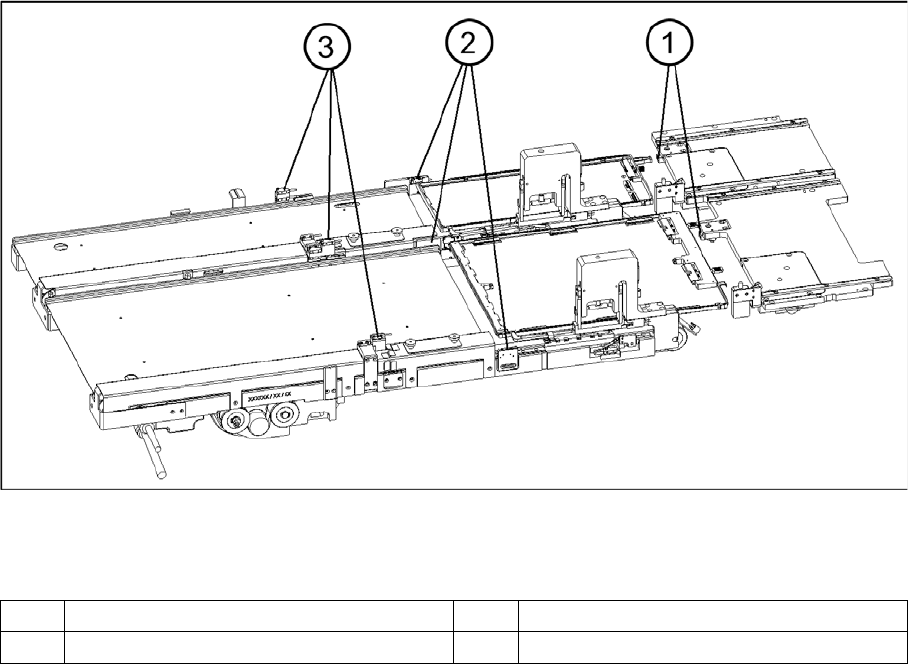
1 Handle sensor 3 Crash light barriers
2 WTC safety query
MTC2
Adjustments feed axes MTC2 Calibration and Settings
Student Guide SIPLACE X-Serie and X4I SW70x (AL2) 486
Checkin g and se tting the handle sensors
Checking and setting the handle sensors
Checking and setting the WTC safety query
Checking and setting the WTC safety query
Checking and setting the handle sensors
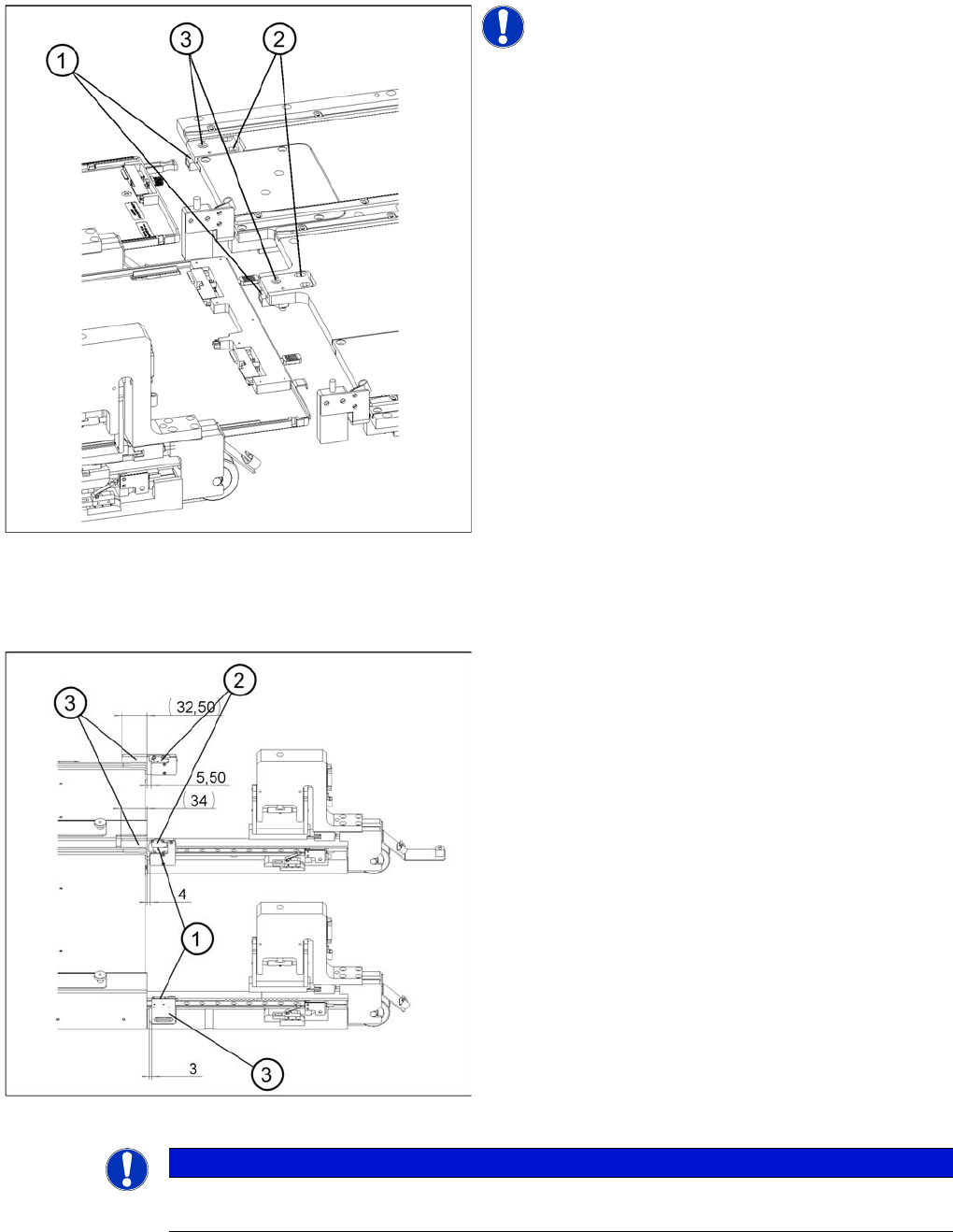
NOTICE! The handle sensors each comprise a
reflecting light barrier which can detect the handle of the
WTC or the side of the handle of the WTC XL. An LED
indicates the switching status of the sensor.
Legend
1. Reflecting light barriers of the handle sensors
2. Mounting plates with clamping screws
3. LEDs
► Unscrew the clamping screws of the mounting plate.
► Move the mounting plate in the direction of the WTC
until the reflecting light barrier responds (the LED will
change its status). Fix the plate in place there.
► Ensure that the status of the LED remains the same
when you move the locked WTC. If necessary, move
the mounting plate a little further in the direction of the
WTC.
► Firmly tighten the clamping screws.
Checking and setting the WTC safety queries
Legend
1. Light barrier for the WTC safety query for tower 1
2. Light barrier for the WTC safety query for tower 2
3. Light barrier holder with clamping screws
NOTICE
The WTC safety queries each comprise a light barrier which is interrupted by the front edge of
the WTC or the WTC XL. Two LEDs indicate the switching status of the sensor.